# CRYPTOCURRENCY
This menu aims to explore crypto world. You will have access to discovery menu where you can find most popular coins,
yield farms, top defi tokens or nfts. In overview menu you can find overall crypto statistics, latest news, info about
exchanges, stable coins, defi and many others. If you will load given coin from source like coinpaprika, coingecko or
binance you will have access to due-diligence menu where you can find more coin related information. You can also go
to technical analysis menu, or plot a chart for your coin. The usage of the following commands along with an example
will be explained below.
Note that we have added the ability to look at technical analysis in the ta menu. Data loaded from CoinGecko has no
candle data, so indicators that rely on anything other than close will fail with an error.
* [load](#load)
* load coin
* [chart](#chart)
* load coin
* [find](#find)
* load coin
* [clear](#clear)
* load coin
* [finbrain](#finbrain)
* crypto sentiment from 15+ major news headlines for more then 100 coins
[Discovery standalone menu](/gamestonk_terminal/cryptocurrency/discovery/)
[Overview standalone menu](/gamestonk_terminal/cryptocurrency/overview/)
[Due diligence standalone menu](/gamestonk_terminal/cryptocurrency/due_diligence/)
[Technical analysis standalone menu](/gamestonk_terminal/cryptocurrency/technical_analysis/)
[Report generation standalone menu](/gamestonk_terminal/cryptocurrency/report/)
## load
```text
usage: load [-c --coin] [--source]
```
Load a given coin. You can specify source of the data. Available sources are CoinGecko(cg), CoinPaprika(cp),
Binance(bin). Based on source which you will use to load a coin different commands will be available in due diligence
menu. By loading a coin you will have access to a lot of statistics on that coin like price data, available markets,
exchanges where coin is listed and also open access to technical analysis menu.
* -c/--coin: The coin you wish to load. Every data source has different style of coin ids and names.
In CoinGecko and CoinPaprika you can either use symbol or id of the coin, but in Binance only symbol (coin ticker) is
available.
* --source: Source of the data which you want to use to load coin. Available sources are:
`cp(CoinPaprika), cg(CoinGecko), bin(Binance)`. Default: `cg`
To load a coin from CoinGecko use: `load -c bitcoin --source cg`. In other case if you want to load coin from
CoinPaprika `load -c btc-bitcoin --source cp` (using id) or using symbol `load -c BTC --source cp`. To load coin from
Binance: `load -c BTC --source bin`.
If you not sure about coin symbol or coin id. You can go to discovery menu and try to list all coins with commands:
`cg_coins`, `cp_coins`, `bin_coins` or you can try to use in current menu `find` commands (only available for
CoinGecko and CoinPaprika)
## disc
```text
usage: disc
```
Go to discovery menu. You can find there trending coins, top gainers, losers, coins with highest sentiment and many others.
## ov
```text
usage: ov
```
Go to overview menu. You can find there different crypto statistics, list of exchanges, best stablecoins, defi metrics
and others.
## dd
```text
usage: dd
```
Go to due-diligence menu for loaded coin. Depends on source of the data for loaded coin different statistics will be available.
## chart
Display chart for loaded coin. Depends from which source you loaded the coin different parameters for chart will be available:
### Chart: CoinGecko and CoinPaprika
```bash
usage: chart [-d --days] [--vs]
```
You can specify currency vs which you want to show chart and also number of days to get data for.
Maximum range for chart is 1 year (365 days). If you use bigger range it will be automatically converted to 365 limit.
By default currency: usd and days: 30. E.g. if you loaded in previous step Bitcoin and you want to see it's price vs
USD in last 90 days range use `chart --vs USD --days 90`
* -d/--days: The number of days to look. Maximum 365 days. Default: 30
* --vs: The currency to look against. Default: `USD`
### Chart: Binance
```bash
usage: chart [-d --days] [--vs] [-i --interval] [-l --limit]
```
* --vs: The currency to look against. Default: `USDT`
* -i/--interval. Interval for candles. One of [1day,3day,1hour,2hour,4hour,6hour,8hour,12hour,1week,1min,3min,5min,15min,30min,1month].
Defaults to 1day.
* -l/--limit. Number of candles to get. Defaults to 100
## ta
Open Technical Analysis menu for loaded coin
### TA: CoinGecko and CoinPaprika
```bash
usage: ta [-d --days] [--vs]
```
You can specify currency vs which you want to show chart and also number of days to get data for.
Maximum range for chart is 1 year (365 days). If you use bigger range it will be automatically converted to 365 limit.
By default currency: usd and days: 30. E.g. if you loaded in previous step Bitcoin and you want to see it's price vs
USD in last 90 days range use `chart --vs USD --days 90`
* -d/--days: The number of days to look. Maximum 365 days. Default: 30
* --vs: The currency to look against. Default: `USD`
### TA: Binance
```bash
usage: ta [-d --days] [--vs] [-i --interval] [-l --limit]
```
* --vs: The currency to look against. Default: `USDT`
* -i/--interval. Interval for candles. One of [1day,3day,1hour,2hour,4hour,6hour,8hour,12hour,1week,1min,3min,5min,15min,30min,1month].
Defaults to 1day.
* -l/--limit. Number of candles to get. Defaults to 100
## clear
```text
usage: clear
```
Just remove previously loaded coin.
## find
```text
usage: find [-c --coin] [-t --top] [-k --key] [--source]
```
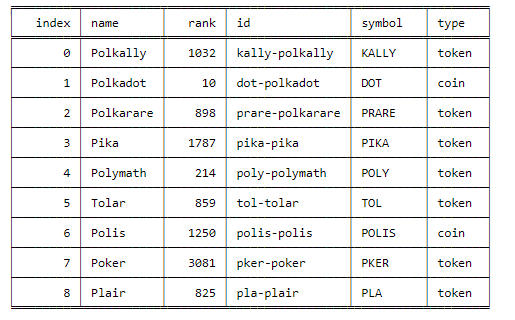
Find similar coin by coin name,symbol or id. If you don't remember exact name or id of the Coin at Coinpaprika, you can
use this command to display coins with similar name, symbol or id to your search query.
Example of usage: coin name is something like `polka`. So you can try: `find -c polka -k name -t 25`
It will search for coin that has similar name to polka and display top 25 matches.
If you want to search coins in CoinPaprika source then use `--source cp` flag.
* -c, --coin: Stands for coin - you provide here your search query
* --source: Source which you want to search in. Available sources: `cg`, `cp`. Default `cg`
* -k, --key: It's a searching key. You can search by symbol, id or name of coin
* -t, --top: It displays top N number of records.
## finbrain
```bash
usage: finbrain [-c --coin]
```
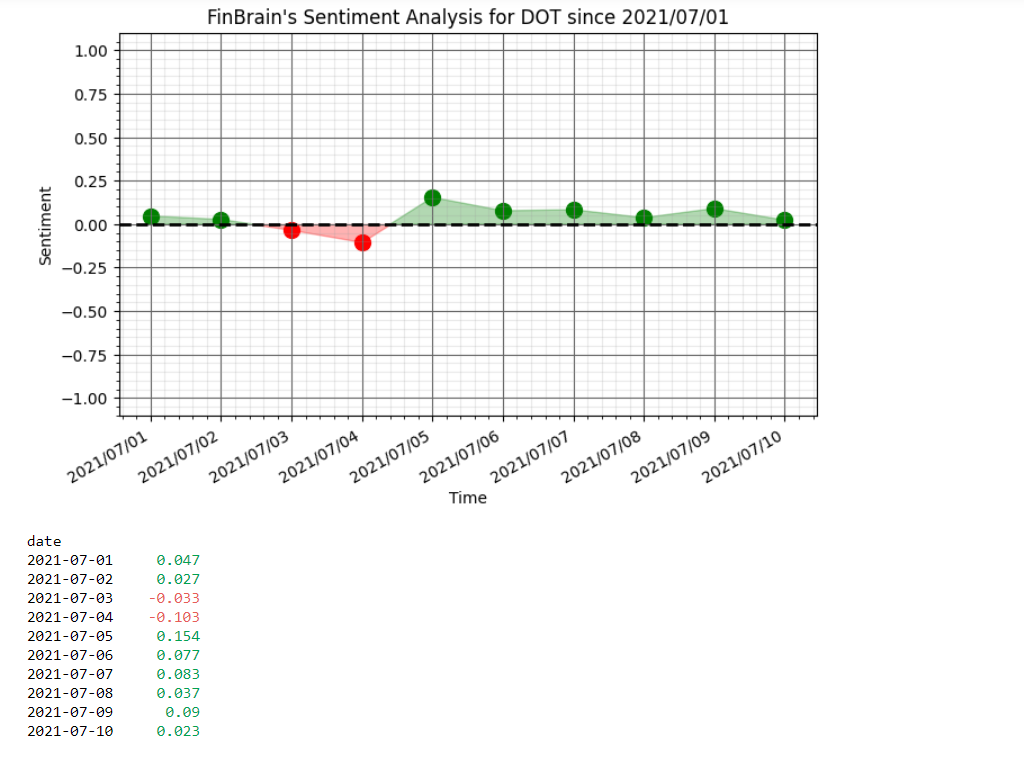
FinBrain collects the news headlines from 15+ major financial news sources on a daily basis and analyzes them to
generate sentiment scores for more than 4500 US stocks. FinBrain Technologies develops deep learning algorithms for
financial analysis and prediction, which currently serves traders from more than 150 countries all around the world.
[Source: See ]
Currently all sentiment is gathered for `COIN-USD` pairs. Please use upper case symbols of coins.
* -c/--coin - Symbol of the Coin for which you want to analyse sentiment. Currently available coins are:
```text
AAVE, ADA, ADX, AE, ANT, ARDR, ARK, ATOM, BAT, BCCOIN, BCH, BCN, BLOCK, BNB, BNT, BTC, BTCD, BTG, BTM, BTS, CVC, DASH,
DCN, DCR, DGB, DGD, DNT, DOGE, DOT, EDG, EOS, ETH, ETP, FAIR, FCT, FUN, GAME, GAS, GBYTE, GNO, GNT, HSR, ICX, IOC, KIN,
KMD, KNC, LINK, LKK, LRC, LSK, LTC, MAID, MCAP, MCO, MGO, MKR, MLN, MONA, MTL, NAV, NEBL, NEO, NLC2, NXS, NXT, OMG, PAY,
PIVX, PPT, QASH, QRL, QTUM, REP, RLC, SALT, SC, SMART, SNGLS, STEEM, STORJ, SUB, SYS, TAAS, TRX, UBQ, UNI, USDT, VEN,
VERI, VTC, WAVES, WINGS, WTC, XCP, XLM, XMR, XRP, XTZ, XVG, YFI, ZEC, ZEN, ZRX
```