 099ca7cd1d
* Added pycoingecko_helpers.py and pycoingecko_model.py, added some methods that scrapes the data from coingecko and some helper methods that handles mostly dataframe operations.

* More methods added for CoinGecko

* Started adding views, and adding them into controller.

* Add stablecoins, yield_farms, recently_added views

* Add more views for Coingecko, + add them to Controller

* remove retry from dependencies, and gecko model

* Add more views for coingecko, seperate coin menu from overview menu, fix imports

* Add some description for coin methods

* Add TA into seperate coin gecko controller

* fix mock path in coingecko tests

* Now if ta is sperate mode, and load doesn't return data frame, change test in the way that ta with Coin object returns data frame

* add seperate ta controller for crypto

* update readme

* small fix in REDME

* Add screenshots for coingecko menu

* fix ta menu for gecko

* Update Gecko Coin menu readme, add screenshots

* Update README with screenshots pt2

* Finish updating readme with screenshots

* remove not needed print statement from gecko view

* Typo

* fix ta crypto controller

* refactor some of views, remove url, add additional argparser params, remove columns which in most cases doesn't bring any value to end user

* Add additional parameters like sortby, descend, top, links for most of coingecko methods. Improve description of commands

* Split cmc, and binance into seperate menus

* add readme for cmc and binance

* Update REDME

* Update README pt2

* Fix news issue with sorting by rank, fix issue with period time parameter for top gainers and top losers view (changed from 1d - 24h)

* Add check for binance menu. If coin is not loaded, do not fail with candles and books commands. Remove new line in candle view. Update print help in crypto menu
TECHNICAL ANALYSIS
This menu aims to perform a technical analysis on a pre-loaded ticker chart, and the usage of the following commands along with an example will be exploited below.
- view
- view historical data and trendlines [Finviz]
- summary
- technical summary report [FinBrain API]
- recom
- recommendation based on Technical Indicators [Tradingview API]
- pr
- pattern recognition [Finnhub]
- cci
- commodity channel index
- macd
- moving average convergence/divergence
- rsi
- relative strength index
- stoch
- stochastic oscillator
- bbands
- bollinger bands
S/O to https://github.com/twopirllc/pandas-ta Owing to this library, it is fairly easy to add other technical indicators. So, let us know if there's any other that you would like.
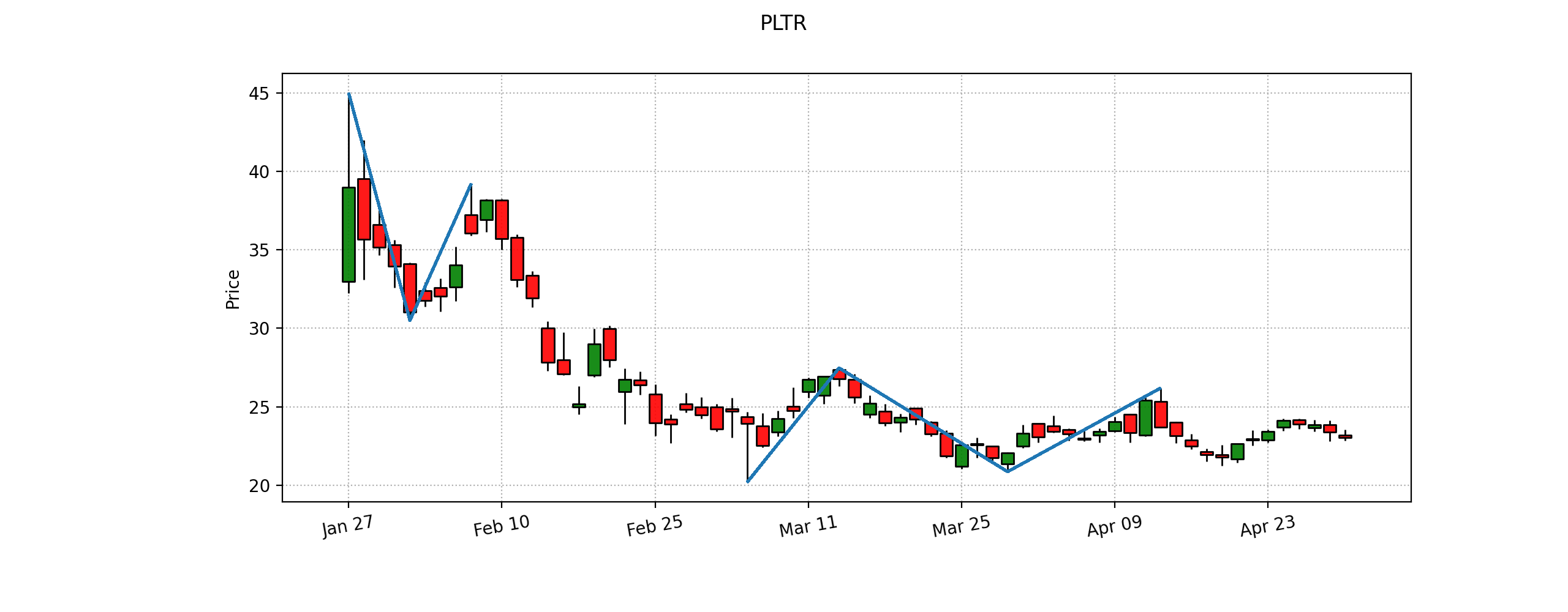
view
usage: view
View historical price with trendlines. [Source: Finviz]

summary
usage: summary
Technical summary report provided by FinBrain's API. FinBrain Technologies develops deep learning algorithms for financial analysis and prediction, which currently serves traders from more than 150 countries all around the world. [Source: https://finbrain.tech]

recom
usage: recom [-s {crypto,forex,cfd}] [-e EXCHANGE] [-i {1M,1W,1d,4h,1h,15m,5m,1m}]
Print tradingview recommendation based on technical indicators. [Source: https://pypi.org/project/tradingview-ta/]
- -s : screener. Default america.
- -e : exchange, e.g. NASDAQ, NYSE. Default uses Alpha Vantage to get this information from ticker
- -i : interval. Default is showing all of different intervals.

pr
usage: pr [-r {1,5,15,30,60,D,W,M}]
Display pattern recognition signals on the data. [Source: https://finnhub.io]
- -r : Plot resolution to look for pattern signals. Default 'D'.

OVERLAP
ema
usage: ema [-l N_LENGTH] [-o N_OFFSET]

sma
usage: sma [-l L_LENGTH] [-o N_OFFSET]

vwap
usage: vwap [-o N_OFFSET]

MOMENTUM
cci
usage: cci [-l N_LENGTH] [-s N_SCALAR] [-o N_OFFSET]

macd
usage: macd [-f N_FAST] [-s N_SLOW] [--signal N_SIGNAL] [-o N_OFFSET]

rsi
usage: rsi [-l N_LENGTH] [-s N_SCALAR] [-d N_DRIFT] [-o N_OFFSET]

stoch
usage: stoch [-k N_FASTKPERIOD] [-d N_SLOWDPERIOD] [--slowkperiod N_SLOWKPERIOD] [-o N_OFFSET]

TREND
adx
usage: adx [-l N_LENGTH] [-s N_SCALAR] [-d N_DRIFT] [-o N_OFFSET]

aroon
usage: aroon [-l N_LENGTH] [-s N_SCALAR] [-o N_OFFSET]

VOLATILITY
bbands
usage: bbands [-h] [-l N_LENGTH] [-s N_STD] [-m S_MAMODE] [-o N_OFFSET]

VOLUME
ad
usage: ad [-o N_OFFSET] [--open]

obv
usage: obv [-o N_OFFSET]
