7f05e2e7ae
* Added init files fixed pylint

* Updated coverage settings

* Fixing pylint issues

* Refactored residual_api imports

* Fixing pylint

* Fixing pylint

* Update fx_view.py

* Fixed black

* Removing ignore

Co-authored-by: Colin Delahunty <colindelahunty@Colins-Air.attlocal.net>
TECHNICAL ANALYSIS
This menu aims to perform a technical analysis on a pre-loaded ticker chart, and the usage of the following commands along with an example will be exploited below.
- view
- view historical data and trendlines [Finviz]
- summary
- technical summary report [FinBrain API]
- recom
- recommendation based on Technical Indicators [Tradingview API]
- pr
- pattern recognition [Finnhub]
- cci
- commodity channel index
- macd
- moving average convergence/divergence
- rsi
- relative strength index
- stoch
- stochastic oscillator
- bbands
- bollinger bands
- fib
- Shows fibonocci levels
S/O to https://github.com/twopirllc/pandas-ta Owing to this library, it is fairly easy to add other technical indicators. So, let us know if there's any other that you would like.
view
usage: view
View historical price with trendlines. [Source: Finviz]

summary
usage: summary
Technical summary report provided by FinBrain's API. FinBrain Technologies develops deep learning algorithms for financial analysis and prediction, which currently serves traders from more than 150 countries all around the world. [Source: https://finbrain.tech]

recom
usage: recom [-s {crypto,forex,cfd}] [-e EXCHANGE] [-i {1M,1W,1d,4h,1h,15m,5m,1m}]
Print tradingview recommendation based on technical indicators. [Source: https://pypi.org/project/tradingview-ta/]
- -s : screener. Default america.
- -e : exchange, e.g. NASDAQ, NYSE. Default uses Alpha Vantage to get this information from ticker
- -i : interval. Default is showing all of different intervals.

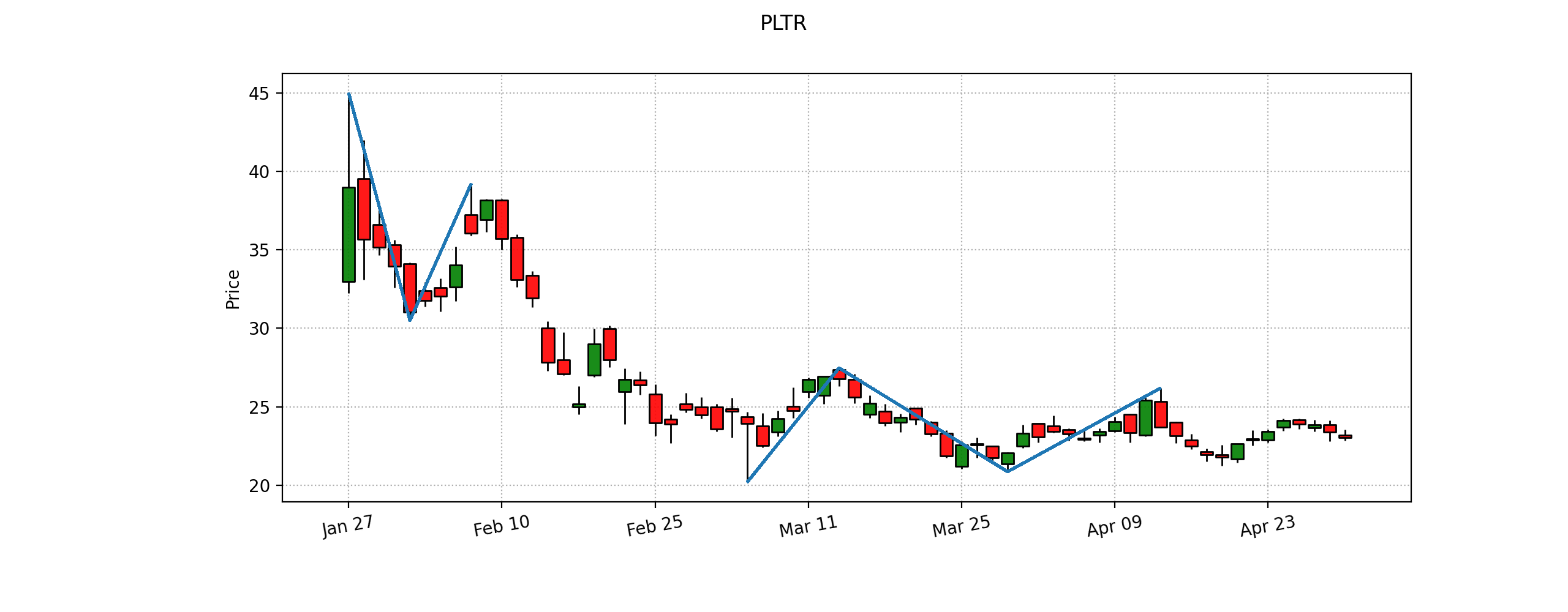
pr
usage: pr [-r {1,5,15,30,60,D,W,M}]
Display pattern recognition signals on the data. [Source: https://finnhub.io]
- -r : Plot resolution to look for pattern signals. Default 'D'.

OVERLAP
ema
usage: ema [-l N_LENGTH] [-o N_OFFSET]

sma
usage: sma [-l L_LENGTH] [-o N_OFFSET]

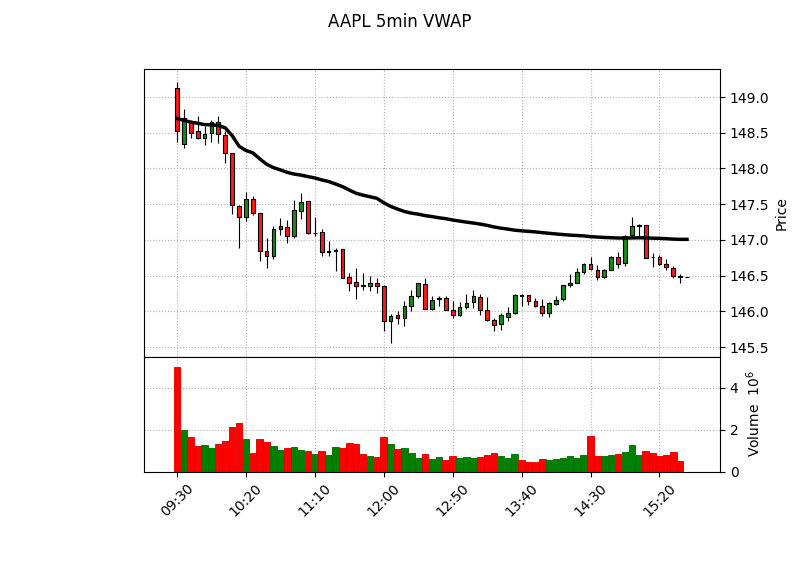
vwap
VWAP is available for intraday data. This plots the most recent day only.
usage: vwap [-o N_OFFSET]
MOMENTUM
cci
usage: cci [-l N_LENGTH] [-s N_SCALAR] [-o N_OFFSET]

macd
usage: macd [-f N_FAST] [-s N_SLOW] [--signal N_SIGNAL] [-o N_OFFSET]

rsi
usage: rsi [-l N_LENGTH] [-s N_SCALAR] [-d N_DRIFT] [-o N_OFFSET]

stoch
usage: stoch [-k N_FASTKPERIOD] [-d N_SLOWDPERIOD] [--slowkperiod N_SLOWKPERIOD] [-o N_OFFSET]

TREND
adx
usage: adx [-l N_LENGTH] [-s N_SCALAR] [-d N_DRIFT] [-o N_OFFSET]

aroon
usage: aroon [-l N_LENGTH] [-s N_SCALAR] [-o N_OFFSET]

VOLATILITY
bbands
usage: bbands [-h] [-l N_LENGTH] [-s N_STD] [-m S_MAMODE] [-o N_OFFSET]

VOLUME
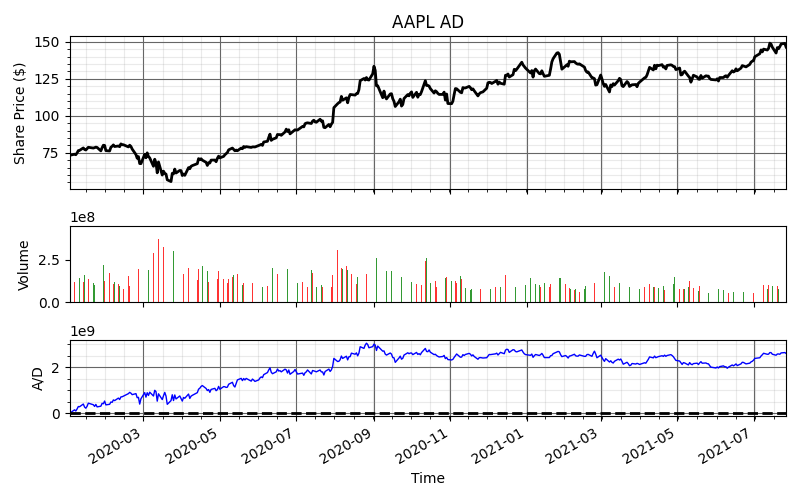
ad
usage: ad [-o N_OFFSET] [--open]
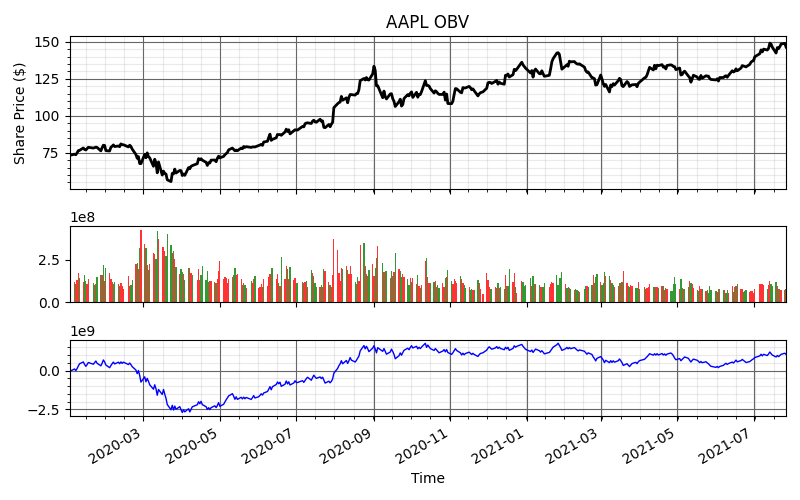
obv
usage: obv [-o N_OFFSET]
CUSTOM
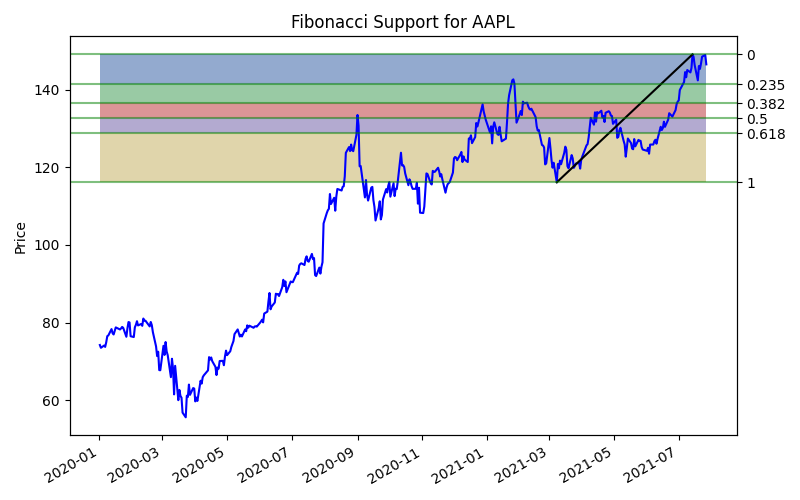
fib
Shows fibonocci levels
usage: fib [-p PERIOD] [--start] [--end]
- -p/--period: Number of days to lookback for retracement. Default = 120.
- --start: Allows for custom selection of min point.
- --end : Allows for custom selection of max point.
The fibonocci retracement works by looking at a minimum and maximum point. Between these values, there is typically support/resistance at 23.5 %, 38.2%, 50% and 61.8%. Those values follow the golden ratio from the fibonocci sequence.
The --start and --end flags allow the user to select dates for the min and max points as your retracement levels. Both flags are required if using.