
DUE DILIGENCE
This menu aims to help in due-diligence of a pre-loaded coin, and the usage of the following commands along with an example will be exploited below. Based on chosen source of data [CoinPaprika, Binance, Coingecko] different commands will be available in menu.
- info
- show coin base information
- market
- show market data
- ath
- show all time high related metrics
- atl
- show all time low related metrics
- score
- show different scores related to loaded coin
- web
- show websites related to loaded coin
- social
- show social media urls for loaded coin
- bc
- show block-chain explorers urls for loaded coins
- dev
- show developers data for loaded coins
- basic
- show coin basic information
- ps
- show coin price, supply, market cap related metrics.
- mkt
- show all markets for loaded coin
- ex
- show all exchanges where loaded coin is listed
- twitter
- show up to 50 last tweets for loaded coin
- events
- show events related to loaded coin
chart
usage: chart [--vs] [-d --days] # binance additional parameters [-i --interval] [-l --limit]
Plot a chart for loaded coin. Depends of source of data different parameters will be available.
For coin loaded with CoinGecko or CoinPaprika, available parameters are: [--vs][-d --days],
for coin loaded with Binance, you can also specify [-i --interval] [-l --limit]
CoinGecko
info
usage: info
Shows basic information about loaded coin like: id, name, symbol, asset_platform, description, contract_address, market_cap_rank, public_interest_score, total_supply, max_supply, price_change_percentage_24h, price_change_percentage_7d, price_change_percentage_30d, current_price_btc, current_price_eth, current_price_usd.
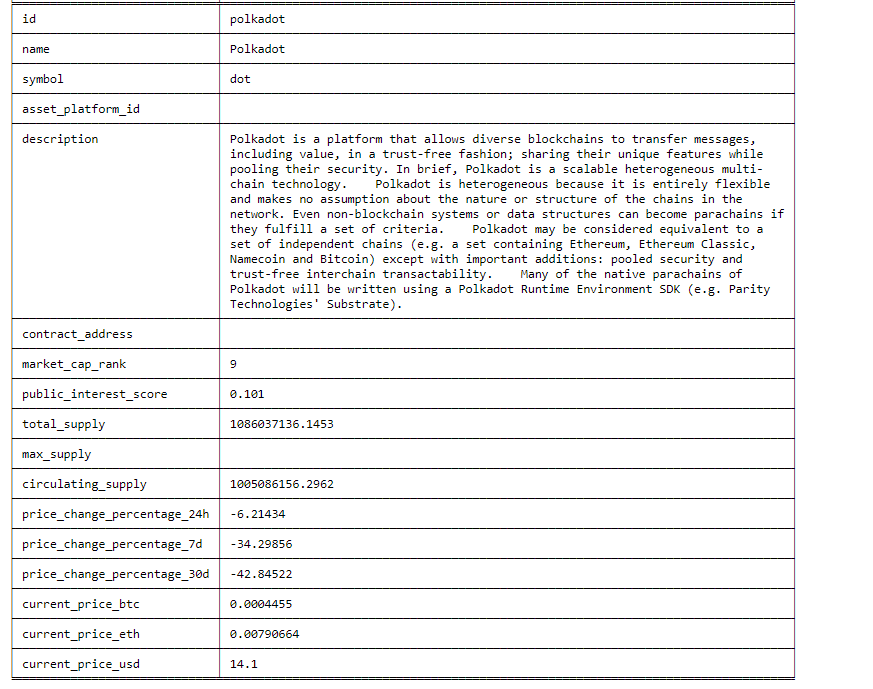
market
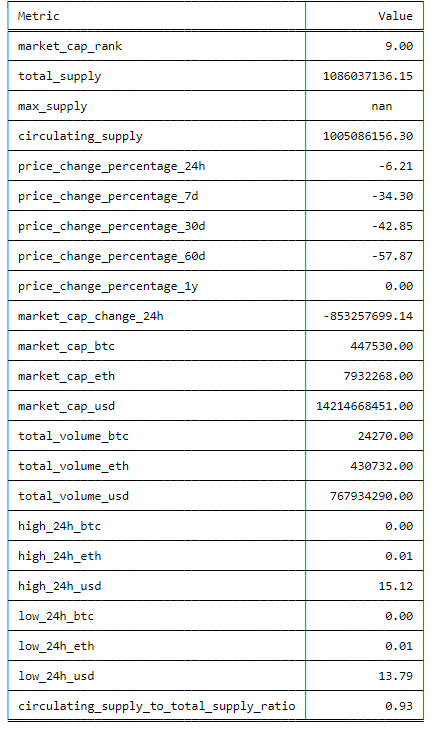
usage: market
Market data for loaded coin. There you find metrics like: market_cap_rank, total_supply, max_supply, circulating_supply, price_change_percentage_24h, price_change_percentage_7d, price_change_percentage_30d, price_change_percentage_60d, price_change_percentage_1y, market_cap_change_24h, market_cap_btc, market_cap_eth, market_cap_usd, total_volume_btc, total_volume_eth, total_volume_usd, high_24h_btc, high_24h_eth, high_24h_usd, low_24h_btc, low_24h_eth, low_24h_usd.
ath
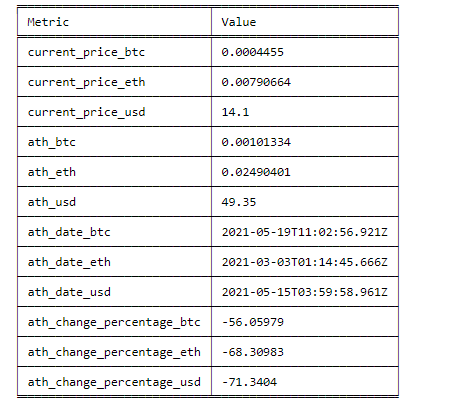
usage: ath
All time high data for loaded coin. You can find there most important metrics regarding ath of coin price like: current_price_btc, current_price_eth, current_price_usd, ath_btc, ath_eth, ath_usd, ath_date_btc, ath_date_eth, ath_date_usd, ath_change_percentage_btc, ath_change_percentage_btc, ath_change_percentage_eth, ath_change_percentage_usd.
atl
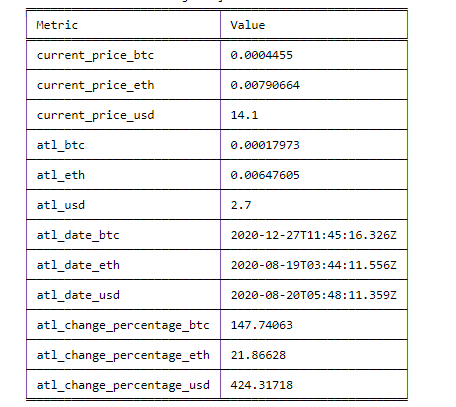
usage: atl
All time low data for loaded coin. You can find there most important metrics regarding atl of coin price like: current_price_btc, current_price_eth, current_price_usd, atl_btc, atl_eth, atl_usd, atl_date_btc, atl_date_eth, atl_date_usd, atl_change_percentage_btc, atl_change_percentage_btc, atl_change_percentage_eth, atl_change_percentage_usd.
score
usage: score
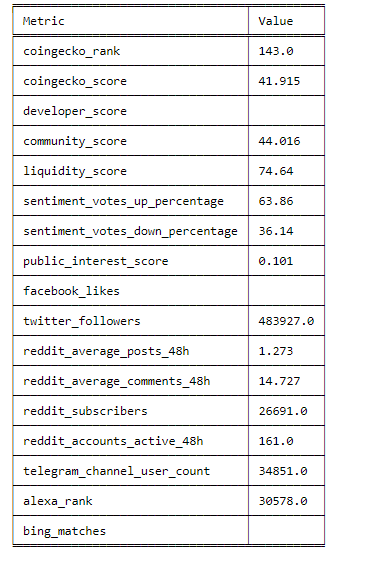
In this view you can find different kind of scores for loaded coin. Those scores represents different rankings, sentiment metrics, some user stats and other, like: coingecko_rank, coingecko_score, developer_score, community_score, liquidity_score, sentiment_votes_up_percentage, sentiment_votes_down_percentage, public_interest_score, facebook_likes, twitter_followers, reddit_average_posts_48h, reddit_average_comments_48h, reddit_subscribers, reddit_accounts_active_48h, telegram_channel_user_count, alexa_rank, bing_matches.
dev
usage: dev
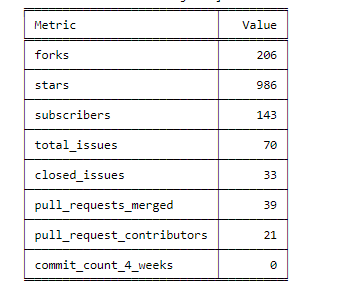
Developers data for loaded coin. If the development data is available you can see how the code development of given coin is going on. There are some statistics that shows number of stars, forks, subscribers, pull requests, commits, merges, contributors on github.
web
usage: web
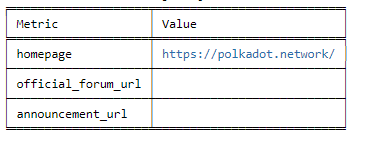
Websites found for given Coin. You can find there urls to homepage, forum, announcement site and others.
social
usage: social
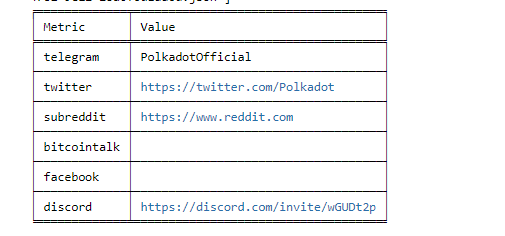
Display social media corresponding to loaded coin. You can find there name of telegram channel, urls to twitter, reddit, bitcointalk, facebook and discord.
bc
usage: bc
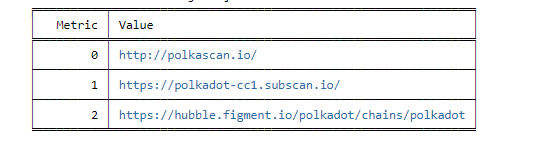
Blockchain explorers URLs for loaded coin. Those are sites like etherescan.io or polkascan.io in which you can see all blockchain data e.g. all txs, all tokens, all contracts...
CoinPaprika
basic
usage: basic
Shows basic information about loaded coin like: name, symbol, rank, type, description, platform, proof_type, contract, tags, parent.
ps
usage: ps [--vs]
Price, supply related data for loaded coin. There you find metrics like: name, symbol, rank, supply, volume, ath, market cap, price change related metrics
- --vs: The currency to look against. Available options are:
BTC,ETH,USD,EUR,PLN,KRW,GBP,CAD,JPY,RUB,TRY,NZD,AUD,CHF,UAH,HKD,SGD,NGN,PHP,MXN,BRL,THB,CLP,CNY,CZK,DKK,HUF,IDR,ILS,INR,MYR,NOK,PKR,SEK,TWD,ZAR,VND,BOB,COP,PEN,ARS,ISK. Default: USD
mkt
usage: mkt [--vs] [-t --top] [-s --sort] [--descend] [-u --urls]
Get all markets found for given coin.
- --vs: The currency to look against. Available options are:
BTC,ETH,USD,EUR,PLN,KRW,GBP,CAD,JPY,RUB,TRY,NZD,AUD,CHF,UAH,HKD,SGD,NGN,PHP,MXN,BRL,THB,CLP,CNY,CZK,DKK,HUF,IDR,ILS,INR,MYR,NOK,PKR,SEK,TWD,ZAR,VND,BOB,COP,PEN,ARS,ISK. Default: USD - -t/--top - number of markets to display. To display top 10 markets:
mkt --top 10 --sort trust_score - -s/--sort - sort by given column. You can chose on from
pct_volume_share, exchange, pair, trust_score, volume,price. - --descend - flag to sort in descending order (lowest first)
- -u/--urls - flag to show urls. Using this flag will add additional column with urls e.g.
mkt --links
ex
usage: ex [-t --top] [-s --sort] [--descend]
Get all exchanges found for given coin.
- -t/--top: Number of exchanges to display. To display top 10 exchanges:
ex --top 10 --sort fiats - -s/--sort: Sort by given column. You can chose on from
id, name, adjusted_volume_24h_share, fiats. - --descend: Flag to sort in descending order (lowest first)
usage: twitter [-t --top] [-s --sort] [--descend]
Show last tweets for given coin.
- -t/--top: Number of tweets to display. To display top 10 tweets:
twitter --top 10 --sort date - -s/--sort: Sort by given column. You can chose on from
date, user_name, status, retweet_count, like_count. - --descend: Flag to sort in descending order (lowest first)
events
usage: events [-t --top] [-s --sort] [--descend] [-u --urls]
Show information about most important coins events.
- -t/--top: Number of events to display. To display top 10 events:
events --top 10 --sort date - -s/--sort: Sort by given column. You can chose on from
date, date_to, name, description, is_conference. - --descend: Flag to sort in descending order (lowest first)
- -u/--urls: Flag to show urls. Using this flag will add additional column with urls e.g.
events --links. If you will use this flag url column will be displayed.
Binance
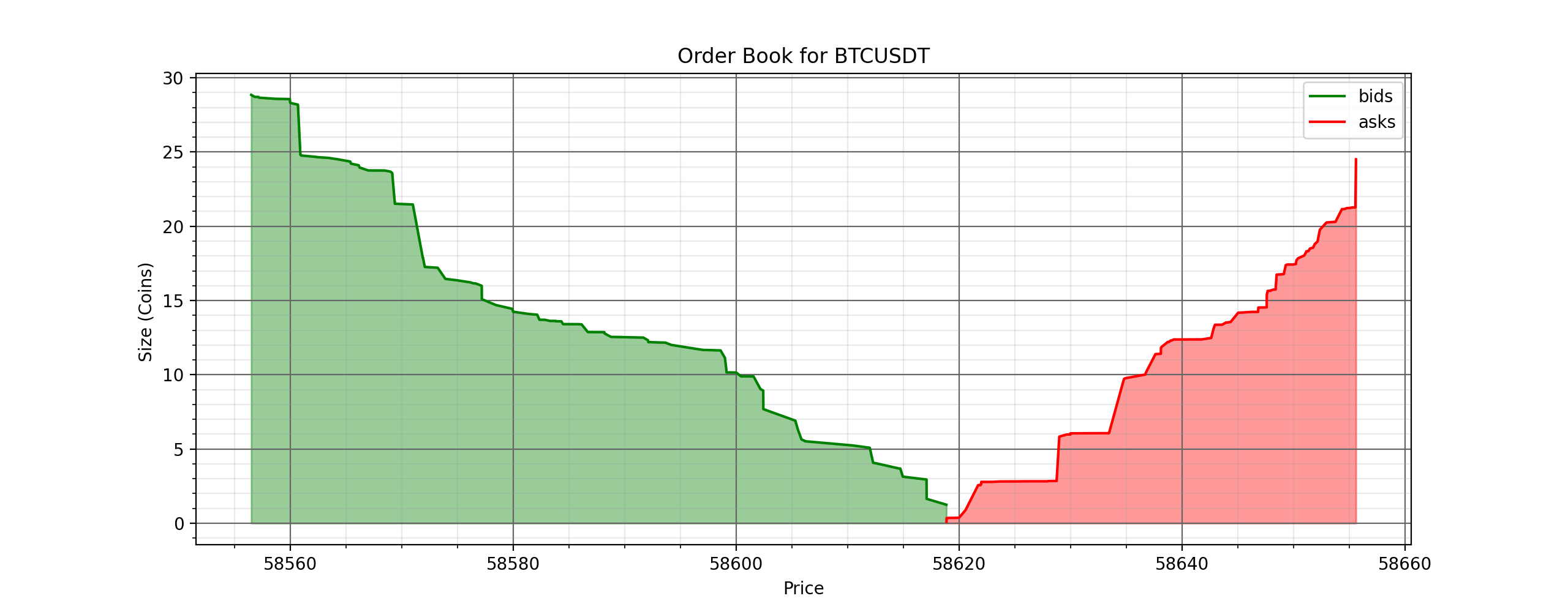
book
usage: book -l/--limit
Gets and shows the order book for the given coin/currency. Shows the cumulative amount of orders.
- -l/--limit Number of orders to get on each side. One of [5,10,20,50,100,500,1000,5000]. Defaults to 100.
balance
usage: balance
Shows the current holding balance in your account.