
PORTFOLIO
This page shows the available brokers for loading in data. If yours is not listed, please submit a new issue and we will look at adding it.
Current brokers:
- Robinhood
- Alpaca
- Ally
Once this screen is accessed, the first command to be run is
login [brokers]
The brokers should just be your brokers from the list shown on the first menu. To login to Robinhood, the command is
login rh
To login to both robinhood and alpaca:
login rh alp
After logging in, the help menu will display which brokers you logged into.
Your login information should be stored as environment variables in config file, but check each individual section for specifics.
- allyhold
- Look at Ally Invest Holdings
- hold
- View holdings across all brokers
ROBINHOOD
Robinhood has Two Factor Authentication, so you will likely be prompted to enter a code that is texted/emailed to you.
###NOTE THAT LOGGING IN WILL SAVE A TOKEN TO os.path.expanduser("~")/.tokens WHICH CAN BE USED TO LOGIN EVEN IF USER CREDENTIALS ARE INCORRECT.
In order to login, the config file requires two variables:
- "GT_RH_USERNAME"
- "GT_RH_PASSWORD"
rhhold
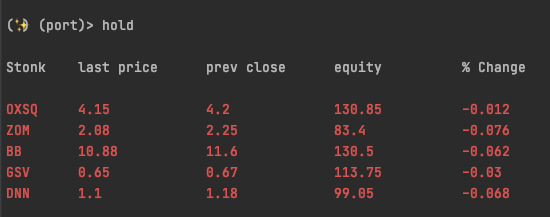
Displays current holdings to the console:
usage: rhhold
There are no additional flags. This just prints all current stonks, their last price, previous close, your equity and the % change from previous close.
Example:
rhhist
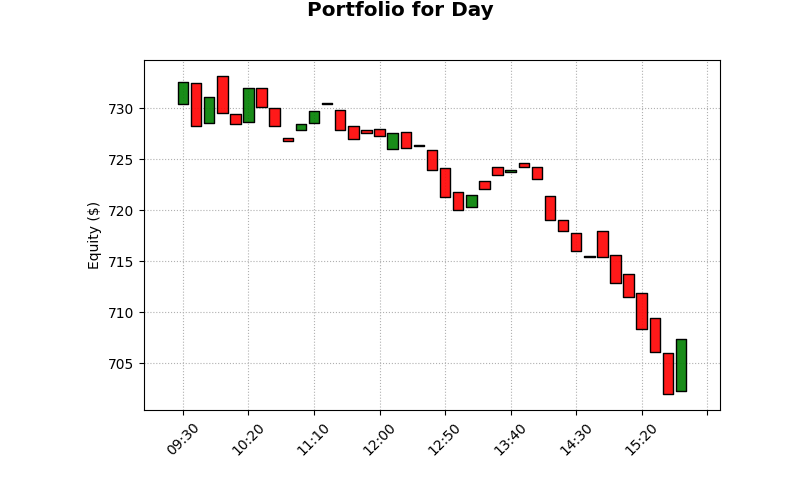
Display your RH portfolio based on provided interval and span. Based on the API data availablility, plotted as a candlestick chart.
usage: rhhist [-s --span] [-i --interval]
- -s/--span : How long to look back. Defaults to the day. Options:
- [day, week, month, 3month, year, 5year, all]
- -i/--interval: Data resolution. Defaults to 10minute intervals. Options:
- [5minute, 10minute, hour, day, week]
Example Default Output:
ALPACA
Alpaca has a nicely maintained python API that is used here. To login, the best approach is to just save the following environment variables:
- "APCA_API_BASE_URL"
- "APCA_API_KEY_ID"
- "APCA_API_SECRET_KEY"
If these are defined, then the login command does not explicitly need to be run, but the login command verifies all those keys are defined.
Note that alpaca does support paper trading, so if your base_url is "https://paper-api.alpaca.markets", then this will be importing your paper trading account.
alphold
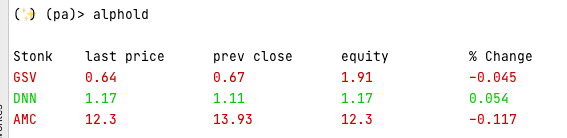
Displays current holdings to the console. Same as rhhold
usage: alphold
There are no additional flags. This just prints all current stonks, their last price, previous close, your equity and the % change from previous close.
Example Output:
alphist
Plots historical portfolio. The output plot in this case will not be a candle, as the api provides your equity at a gven time, unlike the robin_stocks, which gives high/low at a given time.
usage: alphist [-p --period] [-t --timeframe]
- -p/--period The duration of the data in <number> + <unit>, such as 1D, where can be D for day, W for week, M for month and A for year. Defaults to 1M
- -t/--timeframe The resolution of time window. 1Min, 5Min, 15Min, 1H, or 1D. If omitted, 1Min for less than 7 days period, 15Min for less than 30 days, or otherwise 1D.
ALLY
In order to access your Ally Invest account through the API, you must first acquire a key from your Ally Invest Account.
Once you have this, you want to load in the following environment variables (similar to alpaca, the api will access these directly from the environment)
- ALLY_CONSUMER_KEY
- ALLY_CONSUMER_SECRET
- ALLY_OAUTH_TOKEN
- ALLY_OAUTH_SECRET
- ALLY_ACCOUNT_NBR
- This is obtained from your actual account - not through the api application.
As of writing this, the ally API does not provide historical portfolio data, so only a holdings option is provided.
allyhold
Show all Ally Invest holdings:
usage : allyhold
No additional flags.
Merge
When logged into 1 or more brokers - this option is available. Currently, this allows for viewing holding across all platforms. The PnL is shown for all time (Market Value and your Cost Basis)
hold
Show holdings across all brokers that are logged in.
usage: hold
Currently no additional flags. If not all brokers are represented, double check that they are logged in.