
SCREENER
This menu aims to filter stocks based on pre-specified preset filters, and the usage of the following commands along with an example will be exploited below.
- view
- view available presets
- set
- set one of the available presets
- historical
- view historical price [Yahoo Finance]
- overview
- overview data (e.g. Sector, Industry, Market Cap, Volume) [Finviz]
- valuation
- valuation data (e.g. P/E, PEG, P/S, P/B, EPS this Y) [Finviz]
- financial
- financial data (e.g. Dividend, ROA, ROE, ROI, Earnings) [Finviz]
- ownership
- ownership data (e.g. Float, Insider Own, Short Ratio) [Finviz]
- performance
- performance data (e.g. Perf Week, Perf YTD, Volatility M) [Finviz]
- technical
- technical data (e.g. Beta, SMA50, 52W Low, RSI, Change) [Finviz]
- contains Oversold (-s) signal example
- signals
- view filter signals (e.g. -s top_gainers) [Finviz]
- > po
- portfolio optimization for last screened tickers
view
view
View available presets under presets folder.

set
usage: set [-p {template,sexy_year,...}]
Set preset from under presets folder.
- -p : Filter presets
historical
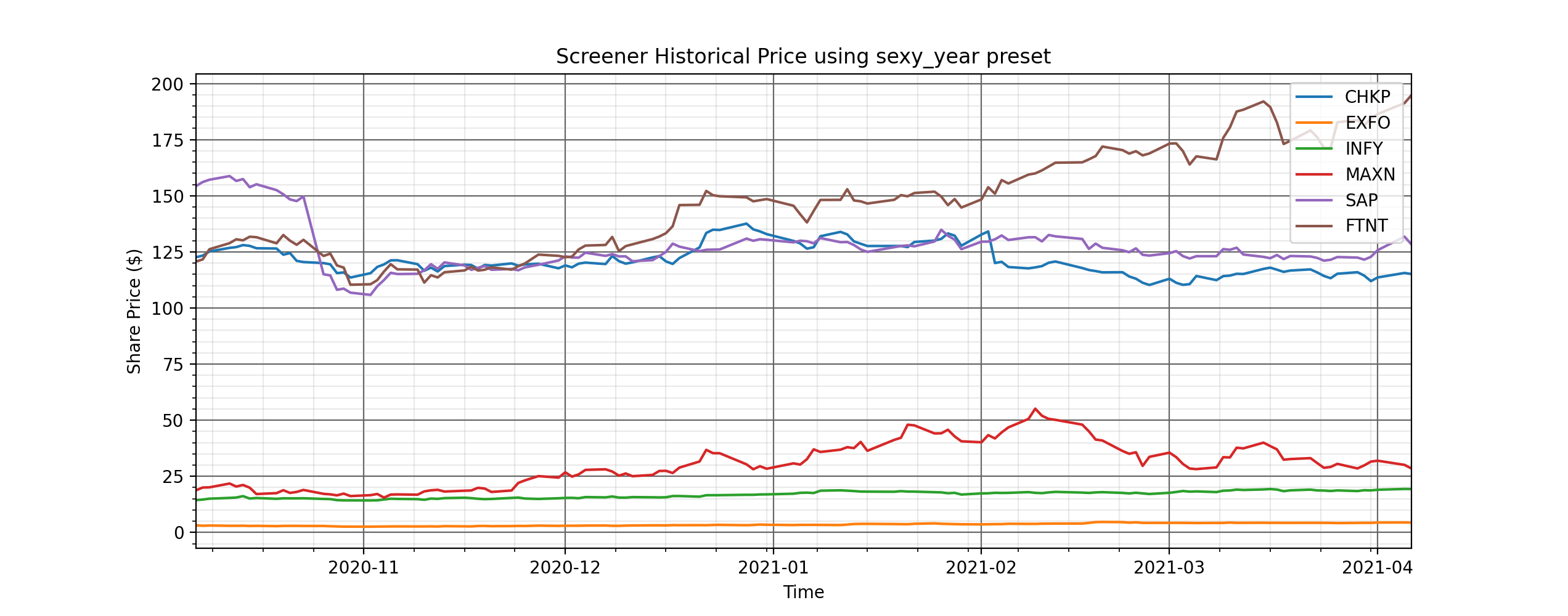
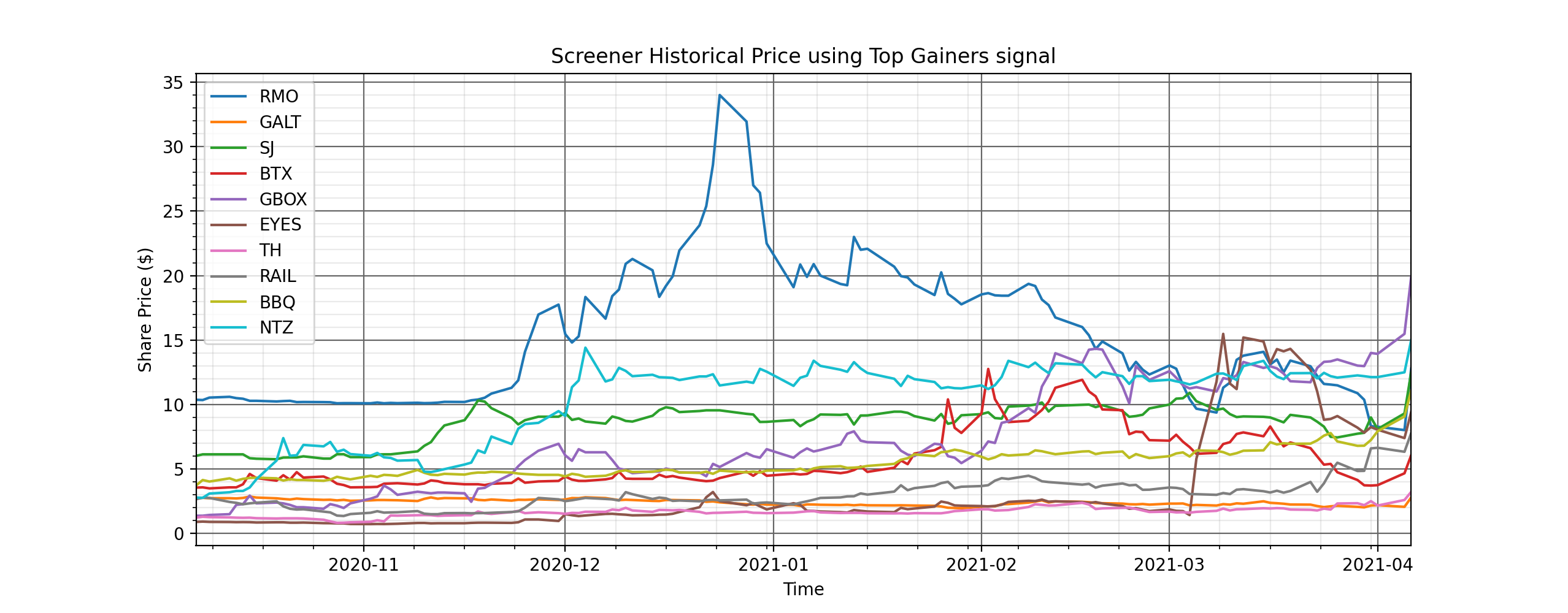
usage: historical [-t {o,h,l,c,a}] [-s {top_gainers,top_losers,...}] [--start START]
View historical price of stocks. [Source: Yahoo Finance]
- -t : Type of candle: Default 'a' for adjusted close.
- -s : Signal type. Default: None. When specified (see list available in signals), the preset is disregarded.
- --start : Start time with format "%Y-%m-%d". Default 6 months earlier.
overview
usage: overview [-p {template,sexy_year,...}] [-s {top_gainers,top_losers,...}] [-l LIMIT] [-a]
Prints screener data of the companies that meet the pre-set filtering. Some of the fields shown are: Sector, Industry, Market Cap, Volume. Note that when the signal parameter (-s) is specified, the preset is disregarded. [Source: Finviz]
- -p : Filter presets. Default: one pre-loaded in screener menu.
- -s : Signal type. Default: None. When specified (see list available in signals), the preset is disregarded.
- -l : Limit of stocks to output. Default: 200.
- -a : Set order of stocks shown to Ascended. Default: Descended.

valuation
usage: valuation [-p {template,sexy_year,...}] [-s {top_gainers,top_losers,...}] [-l LIMIT] [-a]
Prints screener data of the companies that meet the pre-set filtering. Some of the fields shown are: P/E, PEG, P/S, P/B, EPS this Y. Note that when the signal parameter (-s) is specified, the preset is disregarded. [Source: Finviz]
- -p : Filter presets. Default: one pre-loaded in screener menu.
- -s : Signal type. Default: None. When specified (see list available in signals), the preset is disregarded.
- -l : Limit of stocks to output. Default: 200.
- -a : Set order of stocks shown to Ascended. Default: Descended.

financial
usage: financial [-p {template,sexy_year,...}] [-s {top_gainers,top_losers,...}] [-l LIMIT] [-a]
Prints screener data of the companies that meet the pre-set filtering. Some of the fields shown are: Dividend, ROA, ROE, ROI, Earnings. Note that when the signal parameter (-s) is specified, the preset is disregarded. [Source: Finviz]
- -p : Filter presets. Default: one pre-loaded in screener menu.
- -s : Signal type. Default: None. When specified (see list available in signals), the preset is disregarded.
- -l : Limit of stocks to output. Default: 200.
- -a : Set order of stocks shown to Ascended. Default: Descended.

ownership
usage: ownership [-p {template,sexy_year,...}] [-s {top_gainers,top_losers,...}] [-l LIMIT] [-a]
Prints screener data of the companies that meet the pre-set filtering. Some of the fields shown are: Float, Insider Own, Short Ratio. Note that when the signal parameter (-s) is specified, the preset is disregarded. [Source: Finviz]
- -p : Filter presets. Default: one pre-loaded in screener menu.
- -s : Signal type. Default: None. When specified (see list available in signals), the preset is disregarded.
- -l : Limit of stocks to output. Default: 200.
- -a : Set order of stocks shown to Ascended. Default: Descended.

performance
usage: performance [-p {template,sexy_year,...}] [-s {top_gainers,top_losers,...}] [-l LIMIT] [-a]
Prints screener data of the companies that meet the pre-set filtering. Some of the fields shown are: Perf Week, Perf YTD, Volatility M. Note that when the signal parameter (-s) is specified, the preset is disregarded. [Source: Finviz]
- -p : Filter presets. Default: one pre-loaded in screener menu.
- -s : Signal type. Default: None. When specified (see list available in signals), the preset is disregarded.
- -l : Limit of stocks to output. Default: 200.
- -a : Set order of stocks shown to Ascended. Default: Descended.

technical
usage: technical [-p {template,sexy_year,...}] [-s {top_gainers,top_losers,...}] [-l LIMIT] [-a]
Prints screener data of the companies that meet the pre-set filtering. Some of the fields shown are: Beta, SMA50, 52W Low, RSI, Change. Note that when the signal parameter (-s) is specified, the preset is disregarded. [Source: Finviz]
- -p : Filter presets. Default: one pre-loaded in screener menu.
- -s : Signal type. Default: None. When specified (see list available in signals), the preset is disregarded.
- -l : Limit of stocks to output. Default: 200.
- -a : Set order of stocks shown to Ascended. Default: Descended.

signal oversold
Example:
technical -s oversold

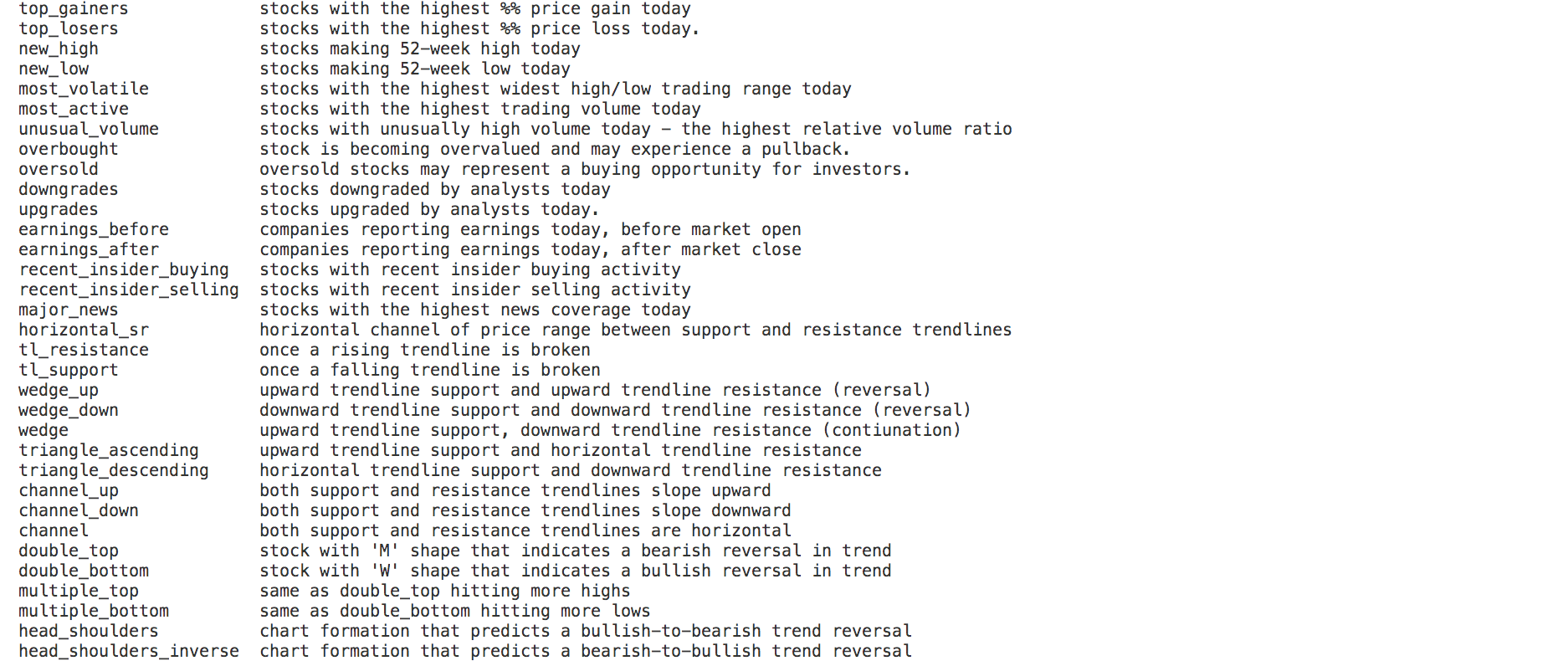
signals
usage: signals
Prints list of available signals. [Source: Finviz]
po
Goes to the portfolio menu with list of passed stocks. In order to pass the stocks, just type the tickers of interest, no commas.
usage: po ticker1 ticker2 ...
example: po aapl msft tsla gme