mirror of
https://github.com/block/buzz.git
synced 2026-10-29 13:31:44 +00:00
codex/fix-agent-auth-error
5 Commits
| Author | SHA1 | Message | Date | |
|---|---|---|---|---|
 klopez4212
|
bbcbd7ce13 |
Preview Tabler icons in the mobile app (#8109)
## Summary Preview buzz-app's Tabler icon style in the mobile app, replacing app-drawn Lucide glyphs across channels, messages, activity, search, and settings. A shared `BuzzIcons` mapping uses the bundled Tabler 3.46.0 outline font, matching buzz-app's version, with its MIT license and source documented. Native UIKit controls retain SF Symbols. The former 300/500 navigation glyphs use Tabler's standard outline; existing selection colors and labels remain. ### Related issue No matching Tabler mobile migration issue or PR found. Related native iOS controls: #8055. ### Testing - Pre-push mobile analysis, formatting, file-size checks, and the full mobile test suite passed. - 194 focused widget tests passed, including channels, home, search, settings, and message content. - Light and dark community-settings renders inspected. - Signed iPhone Release build succeeded; installed and launched as Buzz Tabler on a physical iPhone. - Full `just ci` attempted; stopped during Rust clippy compilation because the Mac ran low on disk space. Full repository validation is not claimed. Signed-off-by: kenny lopez <klopez4212@gmail.com> |
||
|
klopez4212
|
33f54de2dd |
feat(mobile): organize community and profile settings (#8056)
## Summary Move Invite, Appearance, and Remove community into a **Community settings** section in the community-avatar sheet, above the existing switcher. Keep the sheet untitled and use circle-minus for removal. Personal Settings groups **Set status** and **Copy public key (npub)** above an untitled card containing **Display name**, **Profile description**, and **Edit photo**. Remove the leading icons from status, public key, and Send identity to desktop; keep the latter in its own untitled card. Remove the avatar status badge and top Edit action, and rename the Theme page to **Appearance**. Opening the presence chip triggers selection haptics; copying plays native iOS success feedback and confirms with “Public key (npub) copied.” ### Testing - Mobile formatting, analysis, and file-size checks passed. - 111 affected widget tests passed; all 48 settings tests passed again after the final labels and icon changes. - Final release build installed and launched on a physical iPhone in the separate Buzz Community preview, retaining its existing test account. - Full repository `just ci` was blocked by local disk exhaustion during Rust compilation. The full mobile suite passed (2,609 passed, four skipped), plus three push-unconfigured tests. The presence and copy feedback passed focused widget tests and analysis, including native iOS success-channel coverage. ### Snapshots Light and dark Flutter widget renders with fixture data. Images are GitHub attachments, not committed to the repository. The personal-settings snapshots precede the final “(npub)” label clarification. | Surface | Light | Dark | | --- | --- | --- | | Community sheet | <img src="https://github.com/user-attachments/assets/d52a192e-bd40-4263-ac2d-05d589c7ebf2" width="280" alt="Community sheet, light"> | <img src="https://github.com/user-attachments/assets/8756ebe9-b6d4-4920-8fb7-1cb7ee8ef778" width="280" alt="Community sheet, dark"> | | Personal settings | <img src="https://github.com/user-attachments/assets/962b98bd-e4cf-4cd1-8948-69b349390ceb" width="280" alt="Personal settings, light"> | <img src="https://github.com/user-attachments/assets/223bb0a8-e10e-43b1-83ea-e0955af4627a" width="280" alt="Personal settings, dark"> | | Appearance | <img src="https://github.com/user-attachments/assets/334ba797-55cb-47ce-b677-0befafb7659b" width="280" alt="Appearance, light"> | <img src="https://github.com/user-attachments/assets/79b62503-d476-4dbc-8c75-8cee0ee37e98" width="280" alt="Appearance, dark"> | --------- Signed-off-by: kenny lopez <klopez4212@gmail.com> |
||
|
Logan Johnson
|
82656ffea0 |
fix(mobile): standardize public-key identity display on npub (#7493)
🤖 ## Summary In the mobile app, anyone who hasn't set a display name shows up as a raw 64-character hex key (e.g. `3a5d4f9c…`) — unreadable, and unrecognizable as the same identity across screens. Profile and Settings also let you copy that raw hex. Nostr public keys have a standard readable form — `npub1…`, the same encoding other Nostr apps and our desktop app already display. This PR makes every mobile identity surface render npub instead: - **Unnamed people everywhere** — message and thread authors, reactions, typing indicators, member lists, channel details, DM headers and tiles, inbox, search, forum cards, Pulse notes and reply context, mention suggestions, and invite rows — now show a compact npub label: first 8 + last 4 characters of the full npub joined by an ellipsis (`npub1abcd…wxyz`), the same truncation desktop uses. Previously these showed truncated raw hex. - **DM fallback avatars and blank names** — 1:1 DM tiles and headers key their fallback avatar to the same non-self counterpart the label names, including self-first participant order; a self-DM keeps its hex-key-derived initial. Blank or whitespace-only display names fall back to the compact npub instead of rendering empty, while nonblank authored names render verbatim (padding included). - **Profile sheet → "Copy public key"** now copies the full canonical npub — never raw hex. When the identity string isn't a valid public key, the copy tile is disabled, so a malformed key never reaches the clipboard. - **Settings → Identity (pubkey)** displays and copies the full npub; an invalid identity reads "Identity unavailable" with copy disabled. - **Invalid identities never leak truncated raw hex** into the UI anywhere — they render a neutral "Unknown identity" label. - **Unchanged on purpose:** display names and verified handles (NIP-05 — the `name@domain` badge) still render as before. Unnamed avatars keep distinct per-key initials, derived from the underlying hex key rather than the npub — otherwise every unnamed key would render the same "N" initial. Event IDs are not public keys, so they keep their hex truncation (in Pulse's "Replying to", the parent author shows npub while an event-id fallback still shows hex). The nevent share link, private keys, and internal hex storage are untouched. Inputs that accept a key (invite/member entry) accept both hex and npub and keep working in hex internally. ### Related issue N/A. Searched open issues/PRs for npub identity display on mobile — closest related: none found. Desktop's parallel npub standardization lives in the stacked desktop PRs (#7488 foundation, #7489 controls, #7495 display surfaces); this is the independent mobile slice (based directly on `main`, not on those branches). ### Testing At exact head `5a620e420a1fd57d9d8011ac26434eed32fcf765` (base: `main` `44316ff72`; 40 files, +1,345/−154): - Full mobile suite: 2,098 tests passing (`cd mobile && flutter test`); `flutter analyze` clean; `dart format --set-exit-if-changed .` clean — the same checks CI runs. - Widget/unit coverage at production seams: compact labels and hex-keyed avatar initials for DM headers/tiles, member rows, mention suggestions, and Pulse reply context; DM fallback avatars keyed to the labeled counterpart (self-first order and self-DMs); blank/whitespace display-name npub fallback with nonblank authored labels verbatim, including the Activity inbox sender and profile-sheet heading (each with its own empty/whitespace production-seam regression); full-npub copy and disabled-copy semantics in profile and settings; invalid-key suppression; and hex↔npub input round-trips. Verified via unit and widget tests — no device/simulator validation is claimed. ### Task provenance Buzz channel: `1f0e4a3d-7e01-4efe-bb16-843b357f85c9` Task: buzz://message?channel=1f0e4a3d-7e01-4efe-bb16-843b357f85c9&id=86b34eb4bd84a1472419e9af22636c011c0fe273e3c196f967d7a36996e149b6 --------- Signed-off-by: Logan Johnson <loganj@squareup.com> Co-authored-by: Larry <627498bd4bd1f281a16431e3c6cce3b5c25b6692798c78672298aefbf2f8f8b5@buzz.block.builderlab.xyz> |
||
|
klopez4212
|
a0298539f7 |
Add mobile profile editing (#6583)
## Summary - add mobile editing for display name, profile description, and profile photo - support image positioning, emoji backgrounds, and animated avatar capture with native iOS controls - refine settings navigation, profile motion, and the connection identity row ## Testing - `just mobile-check` - `just mobile-test` (1,685 tests) --------- Signed-off-by: kenny lopez <klopez4212@gmail.com> Signed-off-by: Kenny Lopez <klopez4212@gmail.com> Co-authored-by: Carl <3c4caeafb646d23867f1c4832e68211d77e2561946171625f75c3ce1a3f2670f@buzz.block.builderlab.xyz> |
||
|
Taylor Ho
|
d8281b9c93 |
feat(mobile): require device authentication for identity export (#5116)
**Category:** new-feature **User Impact:** Mobile users must confirm with Face ID, biometrics, or their device passcode before sending their Buzz identity to Desktop. **Problem:** A signed-in phone could send its full identity, including the `nsec`, to a desktop without fresh local verification. **Solution:** Require OS device authentication before opening the identity-recovery scanner, retain that authorization only for the active pairing session and short pairing window, and require fresh authentication again if it expires before the identity payload is sent. Normal app opening, identity import, and community removal remain unchanged. ## Screencasts | Enable Face ID | Use Face ID | | --- | --- | | 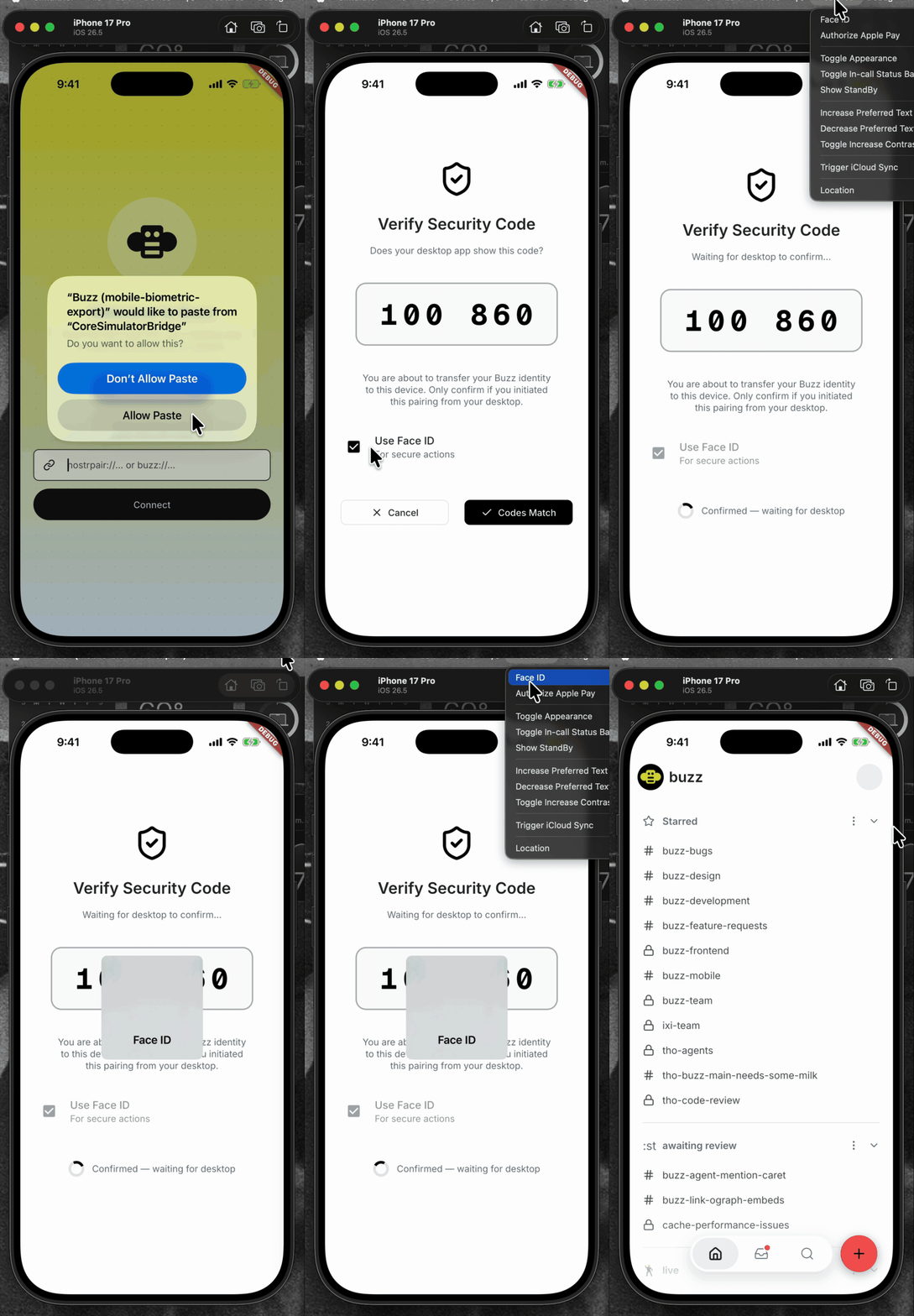 | 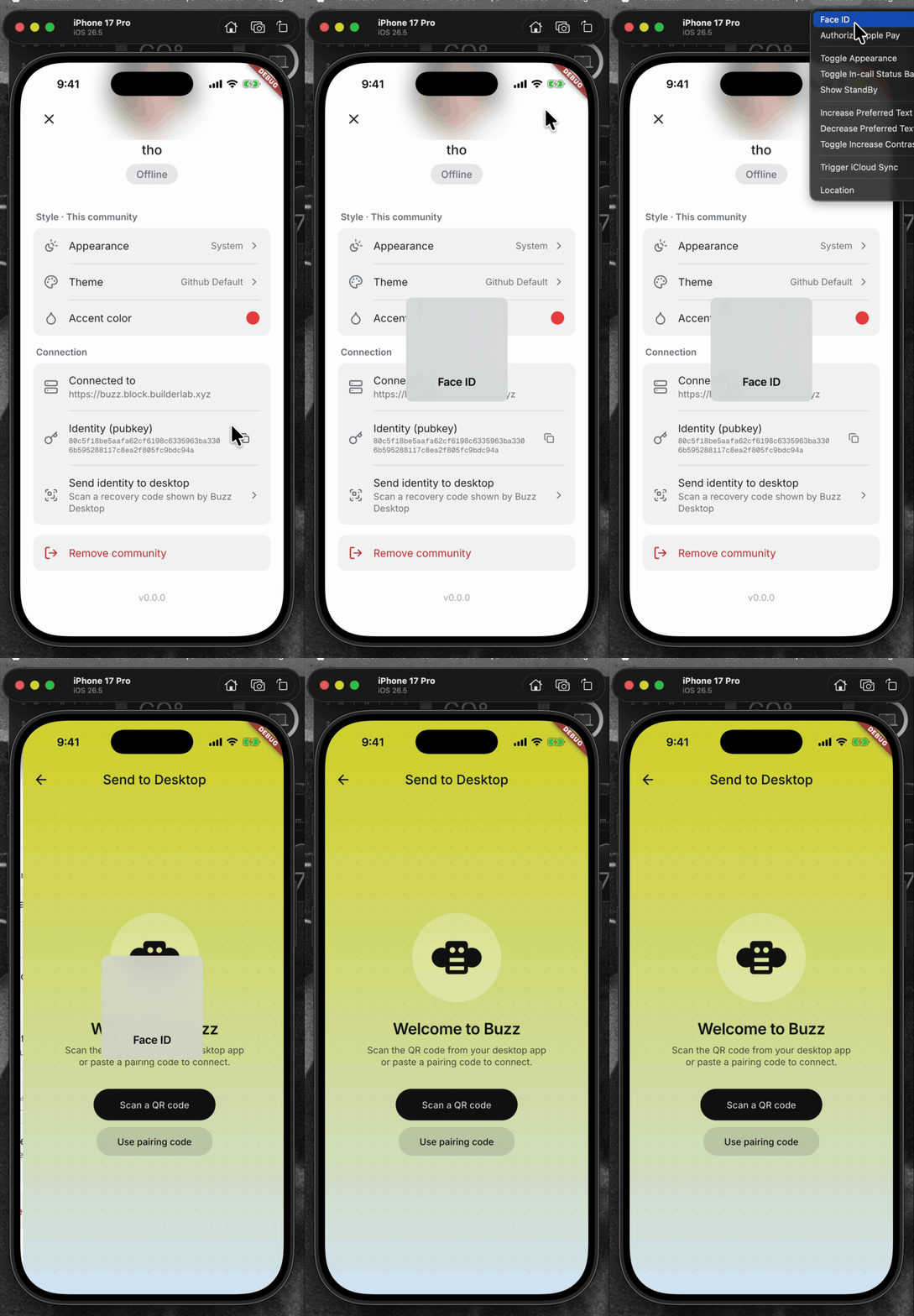 | <details> <summary>File changes</summary> **Android and iOS integration** - `mobile/android/app/build.gradle.kts` declares the AppCompat dependency required by the biometric activity theme. - `mobile/android/app/src/main/kotlin/xyz/block/buzz/mobile/MainActivity.kt` uses the activity type required by the system authentication prompt. - `mobile/android/app/src/main/res/values/styles.xml` and `mobile/android/app/src/main/res/values-night/styles.xml` use the compatible launch theme. - `mobile/ios/Podfile.lock` records the native local-authentication dependency. - `mobile/ios/Runner/Info.plist` explains why Buzz requests Face ID access. **Identity policy and pairing flow** - `mobile/lib/shared/security/sensitive_action_authorizer.dart` wraps OS authentication and maps platform errors to stable app-level outcomes. - `mobile/lib/shared/community/community.dart` and `mobile/lib/shared/community/community_storage.dart` persist the sensitive-action policy. - `mobile/lib/features/invites/invite_join_provider.dart` assigns the explicit policy for invite-created communities. - `mobile/lib/features/pairing/pairing_provider.dart` gates export, binds grants to the active community/session, reauthenticates expired grants, and clears grants on every terminal path. - `mobile/lib/features/pairing/pairing_page.dart` lets users choose biometric protection while importing an identity. - `mobile/lib/features/settings/settings_page.dart` wires pairing into settings. - `mobile/lib/features/settings/settings_page/connection_section.dart` authenticates before opening export recovery and bounds the foreground-resume wait. - `mobile/pubspec.yaml` and `mobile/pubspec.lock` add and lock `local_auth`. **Coverage** - `mobile/test/shared/security/sensitive_action_authorizer_test.dart` covers native result mapping, unsupported devices, and single-flight behavior. - `mobile/test/shared/community/community_test.dart` and `mobile/test/shared/community/community_storage_test.dart` cover policy defaults and persistence. - `mobile/test/features/invites/invite_join_provider_test.dart` covers the invite policy. - `mobile/test/features/pairing/pairing_page_test.dart` covers import protection controls. - `mobile/test/features/pairing/pairing_provider_test.dart` covers export/import authorization, stale/reset/concurrent guards, malformed payload cleanup, and no-export failure paths. - `mobile/test/features/settings/connection_section_test.dart` covers the tap gate, lifecycle resume, and timeout behavior. </details> ## Reproduction steps 1. Pair an identity into the mobile app. 2. Open Settings and choose “Send identity to desktop.” 3. Verify Face ID, biometrics, or the device passcode is required before the recovery scanner opens. 4. Cancel device authentication and verify the scanner does not open and no identity transfer begins. 5. Authenticate, scan a Desktop recovery code, confirm the SAS, and verify the identity transfer completes. ## Validation At `be5620f5f10aa6cc16e86a4f01f102f3d9aeef9b`: - `cd mobile && ../bin/flutter analyze` — no issues - `cd mobile && ../bin/flutter test` — 1,368 tests passed - `cd mobile/android && JAVA_HOME=$(/usr/libexec/java_home -v 21) ./gradlew app:assembleDebug` — debug APK assembled successfully --------- Signed-off-by: Taylor Ho <taylorkmho@gmail.com> |

