mirror of
https://github.com/block/buzz.git
synced 2026-11-25 10:42:26 +00:00
0e7fd48d41db0ea00f4baa60d36d4fdfce31df40
134 Commits
| Author | SHA1 | Message | Date | |
|---|---|---|---|---|
 Tom Brow |
8a3912f151 |
fix(mobile): fence notification replies by the clock and settle ones whose community is gone (#9668)
Follow-up to #9439 (iOS notification reply), which merged before these non-blocking review points landed. - **Publish fence checks the clock.** `mayPublish` now compares `DateTime.now()` with the publish deadline as well as the timer flag, before and after writing the publishing mark. After a suspension, a pending lookup can finish before the overdue timer callback runs; without the clock check the reply could publish past its deadline, after iOS already showed "Reply not sent". - **A recovered reply whose community is gone settles.** If the community was removed, or the user signed out, before the relaunch, `_keepDraft` used to throw, so the reply stayed in the native journal (with its text in `UserDefaults`) and was retried on every launch. It now keeps no draft and the reply is settled as not sent. - **Doc fix:** `SendMessage`'s `mayPublish` is asked after signing and after the optimistic local message is shown; the doc now says so. - **Test fix:** the resume test asserts the EVENT frame reached the original socket before `onAppResumed`, so the injected OK can't pass it on its own. ### Regressions None expected. The clock check can only refuse a publish the timer would also refuse moments later. A recovered reply for a missing community now drops its text instead of keeping it forever in a journal no launch can drain; there is no community left to show it in. ### Validation - [notification_reply_test.dart](https://github.com/block/buzz/blob/notification-reply-fence-followup/mobile/test/features/channels/notification_reply_test.dart): the recovered reply for a missing community now expects to be settled. - [relay_reconnect_resume_test.dart](https://github.com/block/buzz/blob/notification-reply-fence-followup/mobile/test/shared/relay/relay_reconnect_resume_test.dart): asserts the EVENT frame before resume. --------- Signed-off-by: Tom Brow <tomb@block.xyz> Co-authored-by: studio <dc2fc481343672df31a689840c09299972e704dac592e0da6f18486646a7ee3e@buzz.block.builderlab.xyz> Co-authored-by: studio <dc2fc481343672df31a689840c09299972e704dac592e0da6f18486646a7ee3e@localhost> |
||
|
Tom Brow
|
bc0b552894 |
fix(mobile): report failed reaction publishes instead of throwing (#9813)
Tapping a reaction while the relay is disconnected threw an uncaught `RelayNotConnectedError` (a `StateError`) from `RelaySessionNotifier.publish`, reported by Sentry from 1.5.0 builds. Every reaction call site fires `addReaction` or `removeReaction` without awaiting it, so any publish failure escaped as an unhandled error and the pill just didn't change. Now each of those call sites (pill taps, the `+` picker, the long-press quick-reaction row and grouped system rows) hands its publish to `reportReactionFailure`, which shows an error notice. It's a toast drawn above any Flutter route or sheet, including the Android reaction details sheet. While the native iOS reaction details sheet is open, that sheet shows the notice itself as an alert, since UIKit covers Flutter's overlay: - "Couldn’t add reaction. No connection." (or "remove") when the relay isn't connected; - "Reaction not confirmed. Connection lost." or "… The relay didn't respond." (or "Removal not confirmed. …") when the acknowledgement was lost or late, since the relay may have accepted it; - nothing for the relay's `duplicate:` reply to a reaction you already have (a double tap, or re-picking it from the picker), which is a success; - "Couldn’t add reaction. Try again." for anything else. Errors that aren't relay outcomes (for example the signer failing) still escape afterwards with their stack, so the uncaught-error handler reports them as before. | Before (offline tap) | After (offline tap) | | --- | --- | | <img alt="before" src="https://github.com/user-attachments/assets/7745ec5b-8f54-41a2-ba3d-b8dd599f127c" width="300"> | <img alt="after" src="https://github.com/user-attachments/assets/066fba0b-9580-4250-966e-cd0b99831ecc" width="300"> | ### Regressions - Successful reactions behave exactly as before: the UI still doesn't await the publish, and the notice only appears on failure. - Removing a reaction from a grouped system row publishes every deletion at once as before, and shows at most one notice if any fail. - Unexpected local errors reach diagnostics just as they did on main. - No new state or retries: a failed reaction isn't queued. It's reported instead of thrown. ### Validation - Added tests in [`reaction_row_test.dart`](https://github.com/block/buzz/blob/fix-reaction-publish-stateerror/mobile/test/features/channels/reaction_row_test.dart): offline add and remove, a lost ack, a duplicate and an unexpected signer failure, each with the notice it should show (or none), and whether the error escapes; plus a failed toggle from the reaction details sheet on Android and iOS. - Simulator run (iPhone 17 Pro, signed in to a Builderlab community, in a QA chat): add and remove online through the long-press quick-reaction row, the `+` picker and the reaction details sheet. The before and after captures come from builds that force reaction publishes to fail as if offline (the simulator can't drop its own network). The after build shows the toast once the quick-reaction sheet has closed. - A failed removal from the reaction details sheet shows its notice above the sheet, which stays open. Widget tests cover the Flutter sheet and the native-sheet `notice` call; a simulator run with a build that forces removals to fail showed the native alert on the iOS sheet: After: failed removal in the native reaction details sheet https://github.com/user-attachments/assets/b8d808f0-e86b-411f-82c0-c3d19a51b231 --------- Signed-off-by: Tom Brow <tomb@block.xyz> Co-authored-by: studio <dc2fc481343672df31a689840c09299972e704dac592e0da6f18486646a7ee3e@buzz.block.builderlab.xyz> |
||
|
Tom Brow
|
0636d21479 |
feat(mobile): report push gateway replies the app cannot read (#9806)
Reports push gateway replies the app cannot read, the last explicit
error report from [the diagnostic reporting
spec](https://github.com/block/buzz/blob/main/docs/mobile-diagnostic-reporting.md)
still missing.
The gateway is called from native code (`BuzzDevPushEnrollmentDriver`),
and Dart used to see every native failure as one code. Native now fails
with its own `gateway_response_invalid` code when a reply does not match
the gateway's protocol (bad JSON, a 2xx status other than the one the
gateway sends for that call, or a challenge, installation or delegation
reply with missing or invalid fields), carrying no text from the reply.
Dart reports that as a push gateway response error and rethrows as
before.
- **Not reported:** status mismatches (including 4xx and 5xx), timeouts
and offline failures, which the spec counts as routine; local-state
failures such as an App Attest key mismatch; and a plausible challenge
that has already expired by the device's clock, since a phone whose
clock runs fast would otherwise report on every retry. An expiry no real
challenge could have (zero, negative or a relative TTL) is still
reported. Local enrollment logs keep the fixed name of the failing
route.
- **Attribution:** the report goes through the signing member, so an
enrollment that finishes after a community switch names no one else.
## Validation
- `push_bridge_test.dart`: an unreadable reply is reported once and
enrollment still fails; routine native codes report nothing.
- `BuzzDevPushEnrollmentDriverTests`: bad JSON and an unexpected 2xx
fail as an unreadable reply; a 503 stays a status mismatch; a plausible
but expired challenge is not an unreadable reply, while an expiry of 0,
-1 or 300 is.
- `notification_toggle_test.dart`: an unreadable reply during the
notification journey files one report while the member matches and none
after it changes.
Full-app run on an iPhone 17 Pro simulator at
|
||
|
klopez4212
|
9c0bcd6239 |
Align Duo chat headers, inset Home selections, and fix received photo-stack swipes (#9795)
- In unfolded Duo portrait, place the live chat avatar and name together beside Back. Align the Messages and Activity headers with the status controls and keep the filters full width. - Center the stacked avatar and chat title over the sticky date with the Duo rail on either side. - Give Home selections rounder corners and a shared 12-point outer gutter for channels, DMs, and Solo chats. Preserve icon and label alignment. - Mirror drag distance and flick velocity for received photo stacks so a rightward swipe advances the stack. The combined release preview was installed and checked on a physical Duo. Widget tests cover the portrait header geometry, filter width, and return to landscape. ### Portrait layout references Cropped headers from the earlier Duo preview used as the design reference.   ### Simulator snapshots The fixtures use sample content and a 76-point right rail inset.   --------- Signed-off-by: Terp <5856f6900e8e0a4e0ea1f4f8d2ee33e4753d2119bc122f94ecafc660b46c0511@buzz.block.builderlab.xyz> Signed-off-by: Tom Brow <tomb@block.xyz> Co-authored-by: Terp <5856f6900e8e0a4e0ea1f4f8d2ee33e4753d2119bc122f94ecafc660b46c0511@buzz.block.builderlab.xyz> Co-authored-by: Tom Brow <tomb@block.xyz> Co-authored-by: studio <dc2fc481343672df31a689840c09299972e704dac592e0da6f18486646a7ee3e@buzz> |
||
|
klopez4212
|
14e5ea7cc4 |
Mobile: refine section filters and ordering in Messages (#9796)
## Summary Give Messages sections a common options sheet for sorting, filtering and ordering. Active sections let people choose a time window. Channel and DM sections can reveal filtered rows in place with **Show more** and collapse them with **Show fewer**. Reordering saves a device-local order for the current account and community. Failed activity lookups keep affected channels visible. The recovery toast offers Retry and dismisses when activity loads. On iOS the sheet dims the Messages header along with the list. ### Related work #9707 explores a count-based disclosure. This change uses the section’s unread or activity filter. ### iOS snapshots | Section options with an active filter | Reorder sections | | --- | --- | |  |  | ### Rename a section Tap the emoji beside the name to open the picker. Set saves both fields, including an emoji-only change.  ### Activity recovery and section order Unfiled Solo chats support local **Show more** and **Show fewer**, including offline. Failed activity lookups retry automatically up to three times with jittered backoff while Messages is visible and connected. **Retry** stays available after that budget is exhausted. The notice dismisses on recovery. Reorder supports drag handles and keyboard arrow keys. Saving preserves the position of an empty Starred section and checks for a newer order. Each signing identity has its own saved order per relay. ### Testing Exercised filtering, reorder and dismissal in the iOS simulator. The preview was also tested on iPhone Air. At `6135e314f3`, Flutter analysis and the full pre-push mobile checks passed (5,613 tests passed, 71 skipped). Widget regressions cover offline Solo disclosure, retry exhaustion, route visibility, keyboard reorder, large text, and editor cancellation. --------- Signed-off-by: kenny lopez <klopez4212@gmail.com> Co-authored-by: Terp <5856f6900e8e0a4e0ea1f4f8d2ee33e4753d2119bc122f94ecafc660b46c0511@buzz.block.builderlab.xyz> |
||
|
klopez4212
|
d647c9fd98 |
Refine iOS composer and transcribe recordings into drafts (#9574)
Refine the iOS composer with 40-point glass controls, native attachment menus, persistent emoji access, and selected-text formatting. The mic now transcribes recordings on device into an editable, unsent draft; Dictation has no five-minute recording cap or timer label, and its waveform fills the space between the controls. Voice note remains available in attachments with its five-minute cap. Unsupported devices fail before recording, and audio is retained until the draft is durably saved. Stopped dictation remains recoverable across editor teardown; failed retention and cleanup can be retried. Recovered transcripts are inserted only once across navigation or restart, preserving live exact mention bindings. Preserve selection handles over glass with animated avatars. Reduce the conversation fade to 100 points above the keyboard and transition continuously to 180 as the keyboard closes, without a first-frame jump when opening; Home is unchanged. Validation: 5,117 mobile tests and 27 crypto tests pass; analysis passes. Prior native suite on iPhone 16/iOS 26.5: 119 pass, one pre-existing expected failure, zero unexpected failures. Physical Air preview approved; simulator selection/dragging and attachment flows exercised. Fixed the native navigation test's timing race and a community-cache cleanup test that checked a parent directory before its asynchronous removal completed. Repository-wide `just ci` previously stopped in unchanged `buzz-test-client` load-generator tests; new-head hosted checks are pending. Snapshots: production composer in an iPhone Air simulator fixture with fictional conversation text; Photos snapshot retained from the attachment preview. | Composer | Attachments | Photos | | --- | --- | --- | |  |  |  | --------- Signed-off-by: Terp <5856f6900e8e0a4e0ea1f4f8d2ee33e4753d2119bc122f94ecafc660b46c0511@buzz.block.builderlab.xyz> Signed-off-by: Tom Brow <tomb@squareup.com> Signed-off-by: Princess Donut <b238ea756dee4d98afa5883fc7f1de61eeabe65bf700e3a5a5a80db5e42e2c2b@buzz.block.builderlab.xyz> Signed-off-by: Tom Brow <tomb@block.xyz> Co-authored-by: Terp <5856f6900e8e0a4e0ea1f4f8d2ee33e4753d2119bc122f94ecafc660b46c0511@buzz.block.builderlab.xyz> Co-authored-by: Tom Brow <tomb@block.xyz> Co-authored-by: Tom Brow <tomb@squareup.com> Co-authored-by: studio <dc2fc481343672df31a689840c09299972e704dac592e0da6f18486646a7ee3e@buzz.block.builderlab.xyz> Co-authored-by: Princess Donut <b238ea756dee4d98afa5883fc7f1de61eeabe65bf700e3a5a5a80db5e42e2c2b@buzz.block.builderlab.xyz> |
||
|
Tom Brow
|
a303d7d5b5 |
fix(mobile): send Siri Bestie messages without confirmations (#9779)
Saying "Message my Bestie" to Siri (or running it from the Action button or Shortcuts) now sends the dictated message straight away. Siri no longer asks "Send … to <Bestie>?" before sending or shows a "Sent." dialog afterward. The Bestie's display name was looked up only to word that confirmation, so that lookup is gone too: the Flutter side no longer preloads the Bestie's profile or returns its name, and the bridge's `confirm` callback is removed. ### Regressions - A misheard message, or a Bestie changed on another device that this one hasn't synced yet, now sends without a chance to cancel. We accept that: the point of the shortcut is a hands-free send, and the message still appears in the Bestie DM, where it can be deleted. - This includes runs while the phone is locked and Shortcuts automations that supply the message: both send immediately, by design. - The community-switch guard stays: a Bestie looked up in one account or community still can't be sent to from another. - Nothing outside the Siri intent changes. ### Validation - The app code at this head (the last commit only touches a test) is built into a Buzz Dev development build installed on an iPhone 16e. The Siri flow itself has not yet been run on that build. - Updated [quick_send_test.dart](https://github.com/block/buzz/blob/tomb/siri-no-confirm/mobile/test/features/channels/quick_send_test.dart) for the `bestie` reply without a name. - No before/after captures: the change is in Siri's own UI, which can't be driven or recorded in the simulator. --------- Signed-off-by: Tom Brow <tomb@block.xyz> Co-authored-by: studio <dc2fc481343672df31a689840c09299972e704dac592e0da6f18486646a7ee3e@buzz> |
||
|
John Matthew Tennant
|
b7fb268e8b |
fix(mobile): keep active iOS Huddles connected while locked (#9682)
## Summary Locking an iPhone paused Buzz and ended the current Huddle. An admitted iOS Huddle now keeps its audio session and media connection through app pause and resume. Detaching the app or switching communities still ends local audio, and the main relay retains its normal pause policy. ### Related issue None found. The disconnect was reported while using the installed Buzz iPhone app. ### Testing - A Flutter regression joins a Huddle, pauses the app, lets the main relay’s background grace period expire, and resumes. The baseline left the Huddle. With the fix, the local session remains active and detach still stops media. The test uses fake media and transport. - The iOS simulator package and development-signed iPhone package both declare the background audio mode. An iPhone 15 Pro running the development build at `18db4d969494` stayed connected when locked. Two-way lock-screen audio and headset switching remain unverified. In a test Huddle, exchange distinct phrases in both directions with the phone unlocked, while it stays locked, and after unlock. Confirm that participation continues without rejoining and that Leave stops audio. - Before readiness, verify what peers see when the backgrounded app exits after its main relay disconnects, and what the iPhone shows on unlock after a prolonged media interruption. #### Screenshots Flutter Huddle card rendered with test data. 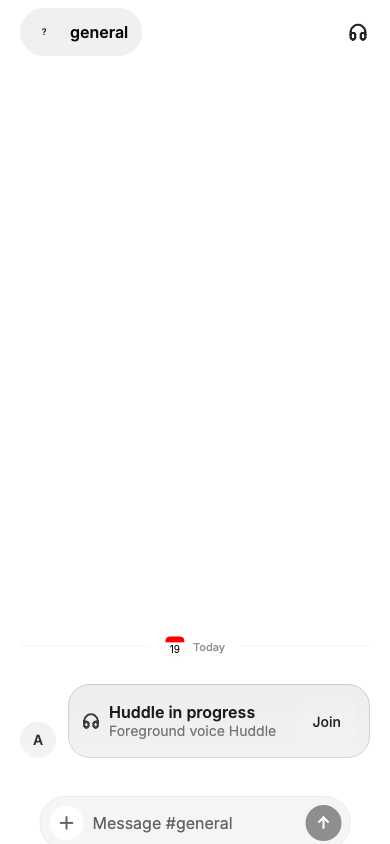 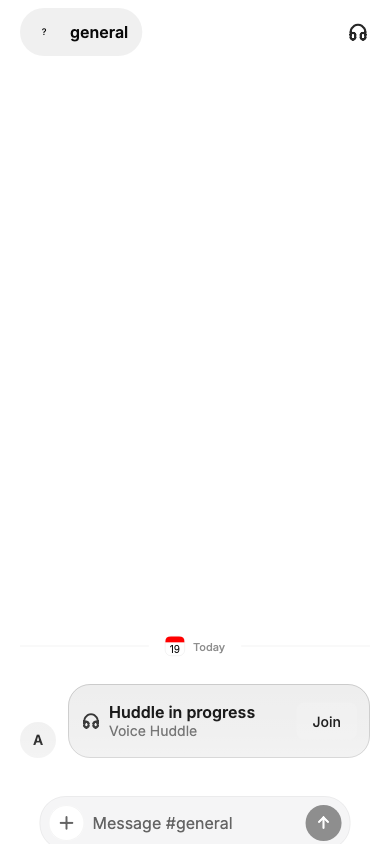 --------- Signed-off-by: John Tennant <jtennant@squareup.com> Signed-off-by: Tom Brow <tomb@block.xyz> Co-authored-by: Oliver <e78152627ea32fbacb070e5047afcfb8e409fa3343d9e618227baacca5b5e607@buzz.block.builderlab.xyz> Co-authored-by: Tom Brow <tomb@block.xyz> |
||
|
klopez4212
|
42b89f9b5f |
fix(mobile): align Huddle cards and preserve conversation navigation (#9713)
Hide generated private Huddle rooms from mobile channel lists, including cached rooms and older rooms with creator-matched creation receipts. Ended Huddle cards keep **View** available while membership is unknown. Known non-members see disabled **Ended**. Unknown membership is checked with the relay before opening history, and explicit access denials clear cached transcript rows. Opening history never joins audio. Known members can reopen loaded history offline. Already-authorized history stays mounted through a disconnect or transient revalidation failure while the route remains open; reconnects recheck access, and explicit denial clears it. Rooms without sufficient evidence remain visible. Match desktop card colours, borders, 20-point corners, elapsed duration, participant avatars and ended-call icon. Active cards retain headphones and mobile tap targets. Replace the minimized Huddle's full-app UIKit background with Flutter clipping: the native background caused the two-pane iOS conversation to appear blank even though its messages were loaded and scrollable. The owner reproduced the failure and confirmed the Flutter surface restores the timeline on iPhone Duo. Lifecycle updates share one live subscription and merge into history. Start/end discovery has its own query budget and survives a failed participant-history read; avatar rosters use revision and admission metadata for same-second reconnects. Explicit denials propagate without trying a fallback transport. Creation receipts coalesce overlapping list refreshes and reconcile after the list loads, retain verified classifications in scoped snapshots, and stop sending batches after a community switch. Removed the unused native backdrop and bottom-corner options. Validation on `7f1a278dbe`: 5,133 Flutter tests plus 27 companion tests passed (71 skipped), analyzer and file-size checks passed, and the iOS release build passed. The updated Buzz Huddles preview is installed on iPhone Duo. The phone locked before launch, so the exact-revision native journey is still pending. Regressions cover cached-history denial, live-only lifecycle events across recovery, busy-call discovery, same-second rejoining, slow and overlapping receipt lookups, cached classifications, community switching, and HTTP denial with a transient WS failure configured. Both transport-denial and overlapping-refresh regressions were verified failing before the fixes. Tom’s follow-up from #9719 adds held-revalidation, known-member offline reopen and partial-roster failure coverage. The original blank-screen fix was verified by the owner on iPhone Duo; this review revision still needs their on-device minimized-Huddle/two-pane and VoiceOver checks. The surface retains Flutter's existing 24-point shape instead of iOS-adaptive concentric corners. ### Snapshots Synthetic widget previews; no private conversation data. | Active | Ended | Dark mode | | --- | --- | --- | |  |  |  |  --------- Signed-off-by: kenny lopez <klopez4212@gmail.com> Signed-off-by: Tom Brow <tomb@block.xyz> Co-authored-by: Terp <5856f6900e8e0a4e0ea1f4f8d2ee33e4753d2119bc122f94ecafc660b46c0511@buzz.block.builderlab.xyz> Co-authored-by: Tom Brow <tomb@block.xyz> Co-authored-by: studio <dc2fc481343672df31a689840c09299972e704dac592e0da6f18486646a7ee3e@localhost> |
||
|
klopez4212
|
bf1cd5500d |
fix(mobile): stabilize Duo chat switching and sheet layering (#9717)
## Summary Selecting a chat or channel in the expanded conversation layout now switches immediately, while opening a deeper thread keeps its navigation animation. The selected chat reuses the native iOS header and blur surface so switching conversations does not flash; each conversation still owns its own editor and timeline state. Search and Activity now slide as opaque sheets over stationary native controls, revealing them progressively on dismissal. Activity keeps its existing title styling with Close in the Duo rail; expanded Search gains top spacing. Compact navigation and the transparent toast composition path are preserved. ## Validation - Final head `bd92c40e86`: full mobile suite 5,132 passed, 71 skipped; 27 crypto tests passed. Required push checks passed. - Native iOS suite: 115 passed. Formatting and analysis clean. - Header-retention regression fails with the retention key removed and passes after restoration. - Recorded repeated native-header switches in a wide iPad simulator fixture, plus Search/Activity transition checks in the Duo simulator. - Owner verified both sheet motion and chat switching on the physical Duo. The final ordinary-iPad Activity guard is covered separately by tests. ## Snapshots Synthetic chat fixture using the actual conversation-pane routes and UIKit header on an iPad simulator. These illustrate two consecutive selections; they are not screenshots of the owner's chats or the Duo rail geometry. Recorded transition frames were also inspected for continuous blur. | Design selected | Mobile selected | | --- | --- | |  |  | --------- Signed-off-by: kenny lopez <klopez4212@gmail.com> Co-authored-by: Terp <5856f6900e8e0a4e0ea1f4f8d2ee33e4753d2119bc122f94ecafc660b46c0511@buzz.block.builderlab.xyz> |
||
|
klopez4212
|
5bd9d2c5d2 |
Transcribe Bestie hold recordings into text on device (#9645)
Hold Bestie to record with the waveform and slide-up cancel interaction from #8665, then release to send an on-device transcript as a normal text message. Stay on Home with a loader inside Bestie until delivery succeeds, then open chat. Failures expose Retry/Discard; saved recordings and signed messages remain recoverable without duplicate sends. Saved audio is excluded from OS backup. Existing composer voice notes are unchanged. Separate exploration from #8665. Transcription requires iOS 26 and a supported language. Android reports unavailable before capture because its generic recognizer cannot guarantee saved-file input. Validation: at `b5dc83bbf5`, 5,046 Flutter tests (71 skipped), 27 crypto tests, analysis and required push checks pass. Prior native changes at `30a397f83c`: Android build and 33 tests pass; iOS simulator compilation and backup-exclusion test pass, with one unchanged document-picker timeout passing on isolated rerun. Earlier iPhone preview was tested with saved profile preserved; these latest fixes have not been installed on the physical phone. --------- Signed-off-by: kenny lopez <klopez4212@gmail.com> Signed-off-by: Tom Brow <tomb@block.xyz> Co-authored-by: Terp <5856f6900e8e0a4e0ea1f4f8d2ee33e4753d2119bc122f94ecafc660b46c0511@buzz.block.builderlab.xyz> Co-authored-by: Tom Brow <tomb@block.xyz> Co-authored-by: studio <dc2fc481343672df31a689840c09299972e704dac592e0da6f18486646a7ee3e@buzz.block.builderlab.xyz> Co-authored-by: corey <2dafccf60ea6d431a568f6d67fc600160d92a51e415e09dc8b213b8e360663d5@buzz.block.builderlab.xyz> |
||
|
Tom Brow
|
bf9ce1432e |
feat(mobile): add diagnostic reporting module with crash capture (#9613)
Step one of [mobile diagnostic reporting](https://github.com/block/buzz/blob/main/docs/mobile-diagnostic-reporting.md), first piece: the reporting module, plus capture of crashes and uncaught errors. A build given a `BUZZ_SENTRY_DSN` now reports native crashes, Flutter framework errors and uncaught asynchronous Dart errors to that Sentry project, attributed to the signed-in member's public key. A build without one (every build made from this repository alone) uses a do-nothing reporter and never initializes the SDK, as [ADR 0007](https://github.com/block/buzz/blob/main/docs/adr/0007-diagnostic-reporting-follows-the-destination.md) requires. A destination the SDK cannot parse is treated as none, so a configuration mistake never stops the app from starting. ### What's in it - **One interface** in `mobile/lib/shared/diagnostics/`: report an error, count a networking event, leave a breadcrumb, and set the member. It has a Sentry-backed and a do-nothing implementation. Only this folder imports the SDK. The explicit error reports and the networking counts that use it come in the next PRs. - **Startup** wraps `runBuzzApp` and installs the SDK's crash and error handlers only when a usable destination is set: one with an HTTP(S) host, a public key and a project, which the native SDKs also require. On Android, the manifest removes the SDK's startup performance provider, which would otherwise run before that check. - **Member:** set from the active community's key, changed when the account switches, cleared on sign-out. Adding the Builderlab origin and account subject is left to a later PR. Every report also carries a random per-install identifier the app creates on first launch, as its own `install.id` tag, signed in or not, so a device's reports can be matched to its members. It lives in a file that device backups and transfers skip, so a phone restored from another gets its own: on Android in the app's files directory, excluded in both backup rule sets; on iOS in an Application Support folder that a small native call marks as excluded from backup (not the caches folder, which iOS can clear when storage runs low). Set on the SDK scope, it also reaches native crash and hang reports. With no member set (before sign-in or after sign-out), the SDK also fills the report's user with its own random per-install identifier, on Dart and native reports alike. - **One filter** runs on every Dart report, breadcrumb and count before it leaves the device: - It replaces every error's own text with fixed wording, since an error can quote its input, a server's response body or a URL. The error keeps its type, mechanism type and stack trace. - It drops what the SDK adds about the failing platform call (`mechanism.data`) and the failing widget (`flutter_error_details`), which can quote what is on screen. - It removes URL query strings and fragments, and keeps only tags and count attributes on the allowed list. - It drops every breadcrumb except networking events and the SDK's foreground/background entries. - **SDK options:** personal data, screenshots, view hierarchy, replay and tracing stay off. The SDK's session records stay on, for a crash-free rate. A session begins each time the app starts or returns after 30 seconds or more in the background; the SDK sends a record when it begins, an update each time an error is counted, and a last one when it ends, carrying the start time, error count, outcome, time from start to end, release, environment and the random per-install identifier. Native auto-breadcrumbs, Android's network-change breadcrumbs (VPN state, signal strength, bandwidth; turned off in the manifest, since the Flutter bridge leaves them on), Cocoa's network breadcrumbs (which keep each request's query and reach native crash reports) and print breadcrumbs are off. With print breadcrumbs on, the SDK would replace `debugPrint` in non-debug builds with one that prints nothing. - **Main-thread hangs:** iOS app hang tracking, Android ANR detection and iOS watchdog-termination tracking are set on explicitly, at the SDK's default thresholds. iOS reports the main thread blocked, fully or mostly, for 2 s or more while the app is active, including freezes it recovers from; a hang still going when the system kills the app is sent on the next launch as a fatal hang, and watchdog-termination tracking reports a foreground run that ended with nothing else to explain it. Android reports only system-declared ANRs: on Android 11 and later, the most recent one that ended the process (read on the next launch, when the system kept a thread dump); before 11, after 5 s once the system marks the app not responding. So recoverable freezes are reported on iOS, and on Android only before 11 once the system marks the app not responding. Dart runs on the main thread, so blocking Dart work shows up with the main thread's stack; Dart frames need the Dart debug symbols at the destination, as crashes do. The spec now has a bullet and a user story for this. - **What the filter does not cover:** native crashes and app hangs are captured and sent by the native SDKs, which never call the Dart filter. They carry stack traces and, for a native exception, its reason text. No app code puts content in a native exception today. The spec now says this. - **Reporting never blocks the app or reaches it with an error:** every call returns at once, and a failure inside reporting is dropped with a `debugPrint`. ### Regressions None for builds without a destination, which includes every build from this repository: they run the same startup with one extra synchronous check, and the SDK is never initialized. The SDK still adds to the app's binary size on both platforms. With a destination, the first frame waits for the SDK to start, native SDK included, and for the install ID to be read from (or, on first launch, written to) a small file. On a debug simulator build the first frame came about 0.3 s later (median of 6 cold launches: 768 ms with a destination, 431 ms without), measured before the install ID was added. Device builds will differ. Uncaught errors still reach Flutter's default handling, and the SDK sends in the background. ### Validation Added tests (`test/shared/diagnostics/diagnostic_reporting_test.dart`): - A table of inputs run through the production Sentry options callbacks: SDK HTTP and navigation breadcrumbs are dropped, network breadcrumbs keep only their four attributes, URLs lose their query string and fragment, unknown tags and count attributes are dropped, and the privacy and breadcrumb options stay off. - Errors sent through a real SDK hub, with the SDK's own platform-error processor and Flutter error integration, into an in-memory transport: for a parse failure, a bad argument, a server response and a platform failure, the serialized event keeps the type and stack but none of the error's text; a real framework build error leaves out the widget text. - A release-mode check that `debugPrint` keeps printing with reporting on. - A build with no destination, one the SDK cannot parse, one without a public key or one without an HTTP(S) host starts the do-nothing reporter and the SDK stays disabled. - Reporting calls whose SDK calls throw, either synchronously or asynchronously, never reach the caller. - Hang detection is on and its thresholds equal the SDK's defaults. - An installation keeps one install ID across launches, a new installation gets a new one, and the filter keeps the `install.id` tag. - Signing in, switching accounts and signing out change the member that later reports are attributed to. I checked that each guard is real by removing it: the print-breadcrumb setting, the destination check, the error-text replacement, the `mechanism.data` and `flutter_error_details` removal, the network-breadcrumb setting, the dropped-failure catch and the tag filter each made a test fail. End to end on an iPhone 17 Pro simulator, with a local server standing in as the destination and a throwaway probe (not committed) that made an HTTPS request with a secret in its query, then raised an uncaught Dart error and a framework error with secrets in their text, then crashed natively: - All four reports arrived (two Dart, one framework, one native crash on the next launch), and none of the secrets appeared in any envelope. - Dart reports carried only the foreground/background breadcrumb; the native crash carried none. - As a control, a build with Cocoa's network breadcrumbs switched back on put the request's secret query and fragment into the native crash report, so that setting is what keeps them out. - `debugPrint` lines still appeared in the device log. Hangs, on a fresh iPhone 17 Pro simulator with no debugger attached and the same local server: a throwaway probe busy-looped the main isolate for 5 s after the first frame. The SDK sent an `App Hang Fully Blocked` event ("App hanging between 5.7 and 6.5 seconds", mechanism `AppHang`) carrying the main thread's stack: Flutter engine frames around 12 frames of Dart code. This was a debug build, where Dart is compiled just in time, so those frames have no image to symbolicate against; in release builds they fall in the app's compiled Dart framework and need its debug symbols at the destination. Install ID, rechecked after moving it to its own file, on a fresh simulator with the same local server, launched twice with a probe that raised a Dart error and then crashed natively: both Dart errors and the native crash carried the same `install.id`, while the signed-out user was the SDK's own identifier. The ID file was in the backup-excluded `Library/Application Support/Diagnostics` folder, not in the app's preferences. The merged Android debug manifest has neither of the SDK's startup providers and has the network-change setting off. The NDK preload provider is still merged in, but it does nothing unless its own manifest flag is set, and it isn't. Full mobile suite passes. Dart errors are captured in the main Flutter engine only; the iOS sheets that start their own engine are out of scope for this PR (native crashes while they are open are still caught), as the spec now says. iOS simulator and Android debug builds with a destination set both build; on iOS the SDK resolves through Swift Package Manager. --------- Signed-off-by: Tom Brow <tomb@squareup.com> Signed-off-by: Tom Brow <tomb@block.xyz> Co-authored-by: studio <dc2fc481343672df31a689840c09299972e704dac592e0da6f18486646a7ee3e@localhost> |
||
|
Tom Brow
|
3689241672 |
feat(mobile): reply to a message from its iOS notification (#9439)
On iOS, a notification that shows a channel or DM message now offers
**Reply**. The user types a reply in the notification and sends it
without opening the app.
- The reply goes in a subthread under the notified message (its thread
root is the message's own root, or the message itself when top-level). A
Solo chat takes no thread replies, so there it goes at the chat's top
level.
- It always mentions the notified message's sender, so the person or
agent being answered is notified. Typed `@name` text stays plain, since
a notification has no mention autocomplete.
- It is sent by the app's own send path. iOS starts the Flutter engine
when it wakes the app in the background, and the reply reopens the relay
connection (closed after the background grace period), waiting a bounded
time for it before sending.
- A sent reply marks the conversation read **up to the notified
message** (newer messages stay unread) and clears that notification and
earlier ones from the same conversation.
- An unsent reply (offline, relay error, timeout, a channel the user
isn't in) keeps the typed text as a draft, after any draft already
there, and shows a "Reply not sent" notification that opens the
conversation.
For now only notifications from the community selected in the app offer
Reply: replying must not switch communities, and the app can only reach
the selected one. Forum posts and fallback notifications that show no
message offer none. The design and the options considered are in
`docs/adr/0004-notification-reply.md`.
### Before / after
Long-pressing a message notification (synthetic names and text). Before
has no reply field (captured by sending the notification without its new
reply category, which is how main presents it); after shows one with
Send.
| Before | After |
| --- | --- |
|
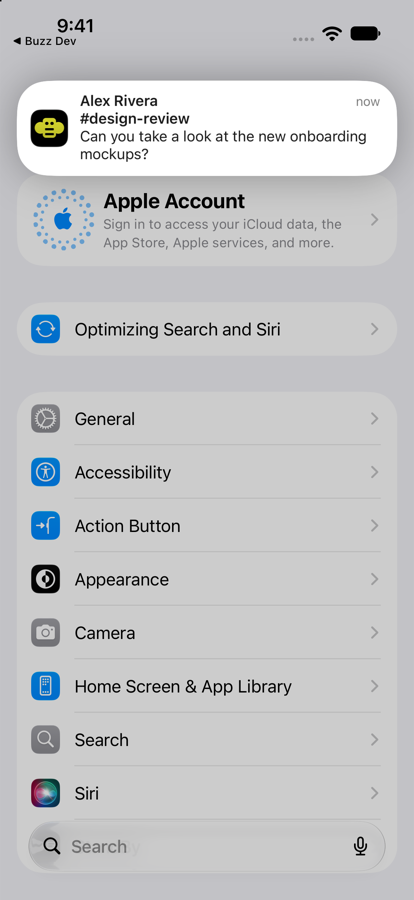
|
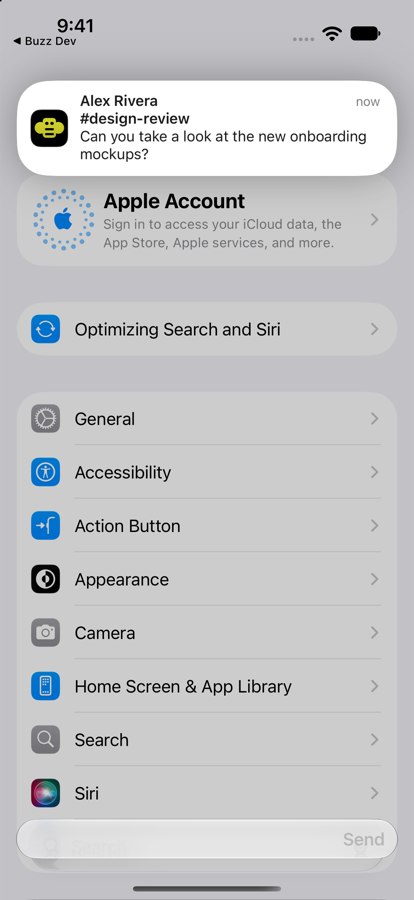
|
### Demo
With the app backgrounded past the relay grace period, replying from the
notification lands the reply in a subthread under the message:
https://github.com/user-attachments/assets/37df7e28-aa46-4521-938e-8af5faa77b83
### Regressions
Nothing existing changes unless the user taps Reply. Notifications gain
a category and a small reply context in `userInfo`; tapping a
notification still opens the conversation as before. The relay reconnect
only happens for a pending reply and then falls back to the normal
background disconnect, so idle background behavior and network use are
unchanged. Reply failures end in a draft and a "Reply not sent"
notification rather than touching other state.
### Validation
- End to end on an iOS 27 simulator against a real community: with the
app backgrounded past the relay grace period, replied from the
notification; the reply appeared in a subthread under the message,
mentioning its sender. The demo above was recorded before the review
fixes (session hold, community fence, origin-community drafts, composer
draft sync); the same run was repeated on the current head,
|
||
|
Tom Brow
|
a5b3dbc00d |
fix(mobile): stop reporting saved images as failed on iOS (#9599)
On iOS, **Save image** in the image viewer reported a failure for a save that worked. It asks only for permission to add photos. With that permission the image landed in Photos, but the app showed "Could not save image" and iOS then asked for full library access. After choosing **Keep Add Only**, every later save did the same: saved, and reported as failed. Now the save reports what actually happened, and add-only permission is all it needs, so iOS never asks for full access. | Before | After | | --- | --- | | <img src="https://github.com/user-attachments/assets/5926b595-6a2d-4382-83e5-89329c009159" alt="Before: full access prompt over a "Could not save image" message" width="300"> | <img src="https://github.com/user-attachments/assets/3b797c3e-43c4-4766-950b-8bef415ae2e0" alt="After: "Saved to Photos" message" width="300"> | Before: https://github.com/user-attachments/assets/e4f88b29-cabc-4c43-9967-d8481e434551 After: https://github.com/user-attachments/assets/ca3631a5-c988-4082-898a-426867788051 ### Cause `photo_manager`'s `saveImage` returns the saved asset, so its iOS code fetches the new asset back after writing it. PhotoKit does not let an add-only app fetch assets: the fetch makes iOS show the full-access prompt and comes back empty, and the plugin reports an error for a write that succeeded. The latest release (3.12.0) has the same code. On iOS the image is now written by a small native saver (`PhotoLibrarySaver`) that creates the asset and reports the result of that write, without reading the library. Android keeps using `photo_manager`, and the permission request is unchanged on both platforms. ### Regressions None expected. - The write is the same PhotoKit creation request the plugin made, with the same original filename, so saved images are unchanged. - Real failures still show "Could not save image": a denied permission, a failed download and a failed write all still surface. - Android and the rest of the app's photo library use (the composer's photo picker) are untouched. ### Validation - Added test: the image actions journey saves on iOS with a photo library that grants add-only access and rejects every read, and expects "Saved to Photos", one write with the downloaded bytes and filename, and an add-only permission request. A failed write then shows "Could not save image". It fails without the fix. - Full mobile suite and the iOS Runner unit tests pass. - Full-app run on an iOS 27 simulator, on a fresh install with no photo permission, comparing this branch with unmodified `main`: - `main`: first save adds the image, shows "Could not save image" and the full-access prompt; a second save after **Keep Add Only** adds another copy and shows the error again. - This branch: first and second saves each add one image and show "Saved to Photos", with no full-access prompt, and only add permission is granted afterwards. - This branch, other paths: **Don't Allow** shows "Could not save image" and saves nothing; saving with full access already granted works; **Share image** still opens the share sheet. - Not covered: a physical device, and Android (its code path is unchanged). --------- Signed-off-by: Tom Brow <tomb@squareup.com> Co-authored-by: judge <7615ec4b7ddf99f0bb48e913297f99f8f772d289a1c9ef54e1d906dd55a93ba8@buzz.block.builderlab.xyz> |
||
|
Tom Brow
|
ff652ed06c |
perf(mobile): cache and animate custom emoji in the iOS picker (#9479)
The iOS emoji picker's custom emoji downloaded again every time the
picker opened, and animated emoji showed only their first frame.
Now each custom emoji downloads once per install and plays its
animation:
- The native picker gets image bytes from Flutter through the same path
as the rest of the app's images: the in-memory custom emoji cache, then
the persistent media disk cache, then one download through the shared
media HTTP client. Relay media is cached as immutable.
- Swift decodes every frame (no Swift-side cache) and shows the image in
a `UIImageView`, since SwiftUI `Image` draws only the first frame of an
animated `UIImage`. With Reduce Motion on, it shows the first frame,
following the setting live.
- At most four picker downloads run at once, and an emoji scrolled off
screen before its turn never starts. Emoji already saved on disk skip
the queue, so reopening a large set stays instant.
- A picker load joins any download of the same image already in flight
elsewhere in the app. A saved copy that fails to decode is evicted and
downloaded again, and only bytes that decoded are kept in memory.
- Swift decodes at most four emoji at once, including ones from cached
bytes. An emoji whose cell scrolls away gives up its place and stops
decoding between frames, and a cell that leaves the screen keeps only
its first frame.
- Each animation frame keeps its own delay. UIKit spaces animated frames
evenly, so a frame repeats for its share of the loop, and a GIF that
holds its last frame for 3 s still does.
### Why it refetched
The native picker loaded images itself with `URLSession.shared` and an
`NSCache` keyed on the whole request. Every request carried a freshly
signed media auth header, so the key never matched and nothing was
cached on disk.
### Validation
Relay media downloads for the 48 custom emoji matching "nod" (local
relay, iPhone 17 Pro simulator):
| Step | main | this PR |
| --- | --- | --- |
| First open | 48 | 48 |
| Leave and re-enter the channel, reopen | 48 | 0 |
| Relaunch the app, reopen | 48 | 0 |
| Reinstall the app, reopen | not measured | 0 |
Before (main): every reopen downloads again, and animated emoji are
still.
https://github.com/user-attachments/assets/7a43dd6a-61e0-495d-abed-6c11f7d4f965
After (this PR): reopening shows cached emoji immediately, and animated
emoji play.
https://github.com/user-attachments/assets/bf45a5c0-77ef-4501-8843-6f42e15de389
Automated app run: signed in to a local relay, opened a channel,
long-pressed a message, opened the full picker, searched, closed, left
and re-entered the channel, reopened, relaunched and reopened. Repeated
on the final head (
|
||
|
klopez4212
|
921a05a379 |
fix(mobile): host Duo long-press menus in native sheets (#9536)
## Summary On unfolded Duo landscape, channel/DM actions and Solo details now open in a UIKit sheet above the app’s native controls, while retaining Buzz’s Flutter tiles, member rows, and grouped cards. Content drags take priority over sheet dragging; the native top bar still supports dismissal. The presentation-only engine starts only when an eligible sheet is presented, without account, camera, audio, or storage plugins. It is destroyed on dismissal; other iPhones pay no second-engine launch cost. The main app retains live permissions and actions, and the native sheet dismisses before opening follow-up screens. Cover-display and portrait postures retain the existing bottom sheet. Pending avatar requests are abandoned on dismissal, including after the display wait expires; the display timeout alone lets the download finish and cache. Confirmed lifecycle actions retire the invisible owner route before waiting for the relay. ### Related issue Follow-up to #8568. No duplicate sheet PR found. ### Testing - `just mobile-install mobile-check mobile-test`: clean analysis; 4,900 Flutter tests passed (71 skipped), plus gateway/package checks. - Mobile file-size and diff checks passed. - Earlier signed device preview built, installed, and launched; owner confirmed its scrolling. The later lazy-start and lifecycle fixes have not been rechecked on the device. - Unsigned iOS release build passed for `4ed94c6eb4` (Xcode 116.7s). - Journeys cover bridge permissions, copy/close callbacks, the content renderer, full profile-to-DM return, and reopening the list during a held archive. Avatar tests cover immediate cancellation, display timeout followed by cancellation, and timeout followed by completion and cache reuse; regression probes fail with the fixes disabled. UIKit drag handling still lacks automated interaction coverage. ### Snapshots Actual Flutter sheet contents at 540×580 points with sample data. These show the content layout; they do not show UIKit’s surrounding sheet or its animation. | Surface | Light | Dark | | --- | --- | --- | | Solo details |  |  | | Channel actions |  |  | --------- Signed-off-by: kenny lopez <klopez4212@gmail.com> Co-authored-by: Terp <5856f6900e8e0a4e0ea1f4f8d2ee33e4753d2119bc122f94ecafc660b46c0511@buzz.block.builderlab.xyz> |
||
|
Tom Brow
|
934a16f2ff |
feat(mobile): message the Bestie from Siri and Shortcuts (#9517)
Adds a **Message my Bestie** action for Siri and Shortcuts. Siri asks
what to say, confirms with the Bestie's name ("Send “…” to Astra?"), and
posts the message in your DM with the Bestie, without opening Buzz. The
Bestie's reply arrives as a normal notification, in the same DM the Home
star opens.

This is the iOS 16+ App Shortcut from [ADR
0005](https://github.com/block/buzz/blob/mobile-siri-bestie-dm/docs/adr/0005-quick-send-uses-the-system-send-message-action.md).
Follow-ups, not in this PR: the iOS 27 `messages.sendMessage` schema
intent, naming other recipients, a separate "Start a chat with my
Bestie" intent for a new Solo chat, and opening Buzz with a draft when a
send fails.

### How it works

- The App Intent runs without opening the app and hands the text to Dart
over a method channel. It waits up to 20 s for Home to say it is ready,
and runs one send at a time.
- A background launch already starts the Flutter engine and builds Home
([ADR
0004](https://github.com/block/buzz/blob/mobile-siri-bestie-dm/docs/adr/0004-background-work-runs-in-the-app-engine.md)
records the measurement). So a small `QuickSendHost`, which the app
hands Home as an invisible background widget, takes the send. Nothing is
reimplemented natively.
- Before confirming, Swift asks Dart for the saved Bestie's pubkey and
name; the send then goes to exactly that agent, so a choice this phone
hasn't synced yet is caught at the confirmation.
- The send reuses the Home star's lookup for the Bestie DM (opening it
with the relay's find-or-create DM command when it isn't loaded) and
posts with the same `SendMessage` the composer uses.
- If Buzz has been in the background past its 5 s grace period, the
relay session has closed its socket. The send reopens it, then lets the
normal background pause start over.
- A message the relay rate-limits is retried (up to 3 tries); the relay
turned it away, so a retry can't duplicate it. Any other failure isn't
retried, since the message might have landed.
- The confirmation is pinned to the community and account it was shown
in: if Buzz switches either before the message goes out, the send is
refused.
- If the send fails, or Buzz can't tell whether it landed (no answer
from the relay), the message is saved as the Bestie DM's composer draft,
after any draft already there, and Siri says so ("Buzz isn't sure that
sent. Check your Bestie DM before trying again." when the outcome is
unknown). A successful send leaves the draft alone. Limits: if the DM
can't be found or opened, there is nowhere to save it and Siri says the
message wasn't saved, and the app being killed mid-send isn't covered.
- Refusals (no Bestie, offline, empty or too long, switched community)
come back as a short message Siri reads.

### Regressions

- Nothing existing changes behavior: the host only answers this method
channel, and the action does nothing until someone runs it. Its bugs
stay inside the quick send path.
- The Home star's DM lookup moved into `cachedBestieConversation`
unchanged, so the star behaves as before.
- A composer that is open on screen now shows a draft another writer
saved for it (here, a failed quick send) instead of overwriting it with
the next keystroke. It listens without rebuilding, and its own saves are
ignored.
- A background wake pays the cost of starting the app's Dart code, which
iOS already does for this launch.

### Before / after

| Before: no Buzz actions in Shortcuts | After |
| --- | --- |
| <img width="300" alt="Shortcuts Library before"
src="https://github.com/user-attachments/assets/b0870e3d-2823-4c7d-be0e-a242a3fdafd7">
| <img width="300" alt="Shortcuts Library after, listing Buzz Dev under
Apps"
src="https://github.com/user-attachments/assets/8c092006-76b9-4313-a401-68189f5674cf">
|

| Asks what to say | Confirms (names the Bestie) | Sent |
| --- | --- | --- |
| <img width="250" alt="Prompt"
src="https://github.com/user-attachments/assets/a2eaf44a-5287-48b6-9c5a-2aaefc90c0a8">
| Shows "Send “…” to *Bestie's name*?" (capture omitted: it shows an
internal agent name) | <img width="250" alt="Sent"
src="https://github.com/user-attachments/assets/07fe66e3-4480-4d06-be52-623416e567b8">
|

The DM result and a demo video show internal names, so they're shared
internally rather than here.

### Testing

- Added test, `quick_send_test.dart` journey: Home reports ready; Siri's
Bestie lookup is refused with no Bestie, then returns the chosen
Bestie's pubkey and name; a send confirmed for another community is
refused; an empty send is refused without publishing; a send while Buzz
is backgrounded and its socket closed reconnects, opens the DM with the
Bestie, survives a rate-limited first try, posts the message in that DM
tagged to the Bestie, and hands the session back to its background
pause; a second send goes to the same DM and leaves the person's draft
there as it was; a send whose answer is lost is reported as unsure and
kept in that draft after the person's own text, with its mentions; a
socket that drops just before the message goes out keeps it too; leaving
Home reports unready. Removing the rate-limit retry, the community check
or the draft save fails it.
- Extended the composer's share-delivery journey: a draft saved by
another writer while the composer is open shows in the composer and
survives the next keystroke, and survives an ordinary send that was
pending when it arrived and then fails. Removing the composer's listener
or its revision bump fails it.
- iPhone 17 Pro simulator (iOS 27), Builderlab community with a Bestie,
automated with AXe:
- Cold: Buzz terminated, ran the action from Shortcuts, the confirmation
named the Bestie, "Sent.", and the message was in the Bestie DM with its
reply. No Solo chat was created.
- Warm: Buzz in the background for 10 s, ran it again, "Sent.", same DM.
- At-risk flows: sent a typed message from the DM composer, went back to
Home, and the Home star reopened the same DM.
- `just mobile-check mobile-test` passes.


buzz-review-completed

---------

Signed-off-by: Tom Brow <tomb@squareup.com>
Co-authored-by: Tom Brow <tomb@squareup.com>
|
||
|
Tom Brow
|
2b428f56b8 |
feat(mobile): share into Buzz from the iOS share sheet (#9433)
Lets people share screenshots, screen recordings, photos, URLs and text from any iOS app into Buzz. Today Buzz doesn't appear in the share sheet at all. - **Plain Buzz icon:** opens a new Solo chat with the items in its composer. - **Suggested conversation:** iOS offers channels and DMs the person recently sent top-level messages in. Choosing one opens that conversation with the items in its composer. When the conversation is already open, the share goes to that page's composer instead of opening a second one; if another page covers it, Buzz stays where it is and shows "Go back to that conversation to finish sharing", and the items join the draft when the person goes back. - The share extension has no UI and sends nothing. It copies the items into the app group and opens Buzz, which prefills the normal composer, so drafts, attachments, mentions and failed-send handling all stay the app's (see [the ADR](https://github.com/block/buzz/blob/mobile-share-extension-design/docs/adr/0003-share-hands-off-to-the-conversation.md)). - If the conversation already has a draft, Buzz asks whether to add the shared items to it or replace it. - A share to a conversation that's no longer available (a removed community or channel, or an unreadable share) shows "That conversation isn't available". A share while signed out shows "Sign in to share". Suggestions come from an outgoing `INSendMessageIntent` the app donates after a top-level send or a new Solo chat. The notification extension no longer donates incoming messages, so receiving a message never makes a conversation a suggestion; it still turns the push into a communication notification with the sender's avatar. Both use the same conversation identifier, now the plain community and channel IDs instead of a hash, because the extension needs to hand the identifier back to the app. | Before | After | | --- | --- | | <img alt="Share sheet without Buzz" src="https://github.com/user-attachments/assets/452fac1b-7e87-44c3-a442-099f78d0e07b" width="300"> | <img alt="Share sheet with Buzz" src="https://github.com/user-attachments/assets/54b9775d-29b4-49a5-8ab9-5fda8718a02f" width="300"> | | Buzz icon: new Solo chat | Suggested DM with a draft | After Add | | --- | --- | --- | | <img alt="New Solo chat with the shared photo" src="https://github.com/user-attachments/assets/c5da4d8b-1dd8-4e30-9e92-9dba515b3623" width="250"> | <img alt="Add to your draft prompt" src="https://github.com/user-attachments/assets/2f879f8a-3b9f-48e0-b963-2828e90dc9fe" width="250"> | <img alt="Draft with the shared link and photo added" src="https://github.com/user-attachments/assets/12832006-85c5-4447-98b5-62932552c931" width="250"> | https://github.com/user-attachments/assets/b9d380fa-e802-4ed7-89a8-592a03784c8f ### Regressions - Nothing changes for people who never use the share sheet, except that sending a top-level message or starting a Solo chat now makes one local `INInteraction.donate` call (skipped while the age restriction is on, which still purges every interaction). - Communication notifications look the same. Dropping the incoming donation removes work (and a deletion fence) from the notification extension's time budget. - The share hand-off reuses the existing deep link dispatcher. A share link is a new link type; notification and message links take the same paths as before. ### Validation - Added tests: - Dispatcher hand-off: a share to a suggested channel opens it with the shared text and files; shares to a removed community, an unlisted channel, an unknown manifest version or a missing manifest show the error and delete the pending share; share links accept only the extension's UUID ids. - Composer delivery: with an existing draft, Add appends the shared text on a new line and attaches the file, Replace clears the draft first, and the app group copy is deleted either way. - Notification presenter: specializes the notification from the intent, or falls back to the ordinary content when that throws (replaces the donation and deletion-fence tests). - Full mobile Flutter suite and BuzzPushKit Swift tests pass. - Automated app run on an iPhone 17 Pro simulator (iOS 27, dev relay test community), recorded above: sent a DM, shared a photo from Photos with the Buzz icon from a cold start (new Solo chat with the photo attached), then handed a link and photo to a DM that had a draft and chose Add. Also checked that a share's pending files are deleted after delivery. - Limitation: the iOS simulator never shows share-sheet conversation suggestions (it has no `coreduetd`), so the suggested-DM step in the video is staged by writing the same pending share and link the extension writes. Choosing a real suggestion still needs a check on a device. - Known gaps, all confined to sharing: suggestions have no avatar image yet; a suggestion for a conversation left after signing out shows "isn't available"; choosing Later in the unfinished-chat dialog keeps the share until the next new chat; and a pending share the app never receives (for example when Buzz doesn't open) stays in the app group. ### Before merge - [x] On a real iPhone, choose a suggested conversation in the share sheet and confirm the shared items open in that conversation's composer (the simulator can't show suggestions). Waived before merge: the managed test iPhone shows no share-sheet suggestions for any app, so this will be checked on a personal phone after landing. --------- Signed-off-by: Tom Brow <tomb@squareup.com> Co-authored-by: Tom Brow <tomb@squareup.com> |
||
|
Tom Brow
|
bf3bdd0eae |
fix(mobile): match browser GIF timing in the iOS reaction sheet (#9437)
The two follow-ups from the pre-review of [#9432 GIF frame timing](https://github.com/block/buzz/pull/9432), rebased onto main now that it has landed. **iOS reaction details sheet.** The sheet decodes custom emoji natively (`NativeMessageImageLoader.decode`) and timed each frame as `max(0.02, delay)`, so with [#9432 GIF frame timing](https://github.com/block/buzz/pull/9432) a GIF with 0 or 1 cs delays plays at 100 ms per frame in the timeline chip but 20 ms per frame in the sheet opened from it. The decoder now shows frames of 10 ms or less for 100 ms, as browsers and `MediaImageProvider` do, and keeps longer frames as written. The 20 ms floor goes with it: browsers keep 11 to 19 ms frames as written too. **Provider-level test.** The existing tests call `withBrowserFrameTiming` directly, so removing the provider's call to it left the suite green. A new test resolves a GIF through `MediaImageProvider` with a mock HTTP client and pumps the scheduler's app frames at explicit timestamps: the 10 ms first frame is still showing at 50 ms and is replaced at 100 ms. ### Regressions None expected. The sheet already summed the frame delays into one `UIImage.animatedImage` duration, so only the per-frame value changes, and only for frames of 10 ms or less, which ran at 20 ms before. Still images and longer frames decode as before. The Dart test drives frame callbacks with explicit timestamps rather than waiting on wall-clock time. ### Validation Added tests: `NativeMessageImageLoaderDecodeTests` in RunnerTests (a 0, 1, 2, 5 cs GIF decodes to a 0.27 s animation; a one-frame GIF stays still) and `withBrowserFrameTiming is applied to the frames MediaImageProvider plays` in `media_image_test.dart`, which fails when the provider's call is removed (the second frame shows at 50 ms). Full mobile suite: 4,780 tests passed. `flutter analyze`: no issues. RunnerTests `NativeMessageImageLoaderDecodeTests` and `NativeReactionDetailsTests`: all five pass on an iPhone 17 simulator (Xcode build-for-testing of the Debug simulator app). No full-app run: the change is one delay value in a decoder and is covered by the unit tests above. Signed-off-by: Tom Brow <tomb@squareup.com> Co-authored-by: Tom Brow <tomb@squareup.com> Co-authored-by: judge <7615ec4b7ddf99f0bb48e913297f99f8f772d289a1c9ef54e1d906dd55a93ba8@sprout-oss.stage.blox.sqprod.co> |
||
|
Tom Brow
|
60b7fb8178 |
fix(mobile): keep shortcut taps and the member picker from wedging (#9388)
Follow-up to review notes on [#9360 Home Screen shortcuts](https://github.com/block/buzz/pull/9360). These are fixes for rare races, with no visible change. - **The member picker can't wedge.** UIKit ignores a dismiss that arrives mid-transition (the sheet still animating in, or during an interactive swipe-down) and never runs its completion. The picker coordinator queues every later present behind that completion, so New DM and Add members then opened nothing for the rest of the session. Dismiss now waits for the transition to finish, then dismisses whatever is still presented. - **A shortcut tap reaches Dart once.** The native bridge both buffered a tap and sent it, so a tap during cold launch could arrive twice and run again after Home had already handled it. Now a tap is buffered only until Dart first takes the pending one, and after that it is sent directly. - **Signing out drops a waiting tap.** Removing Home clears a tap that is still waiting (for example on a Bestie that is still loading), so it can't run in the next account's Home. Not included: carrying the Bestie's pubkey in the shortcut item, so a stale "Message Alice" falls back to Agents rather than opening the current Bestie. It's optional, and it would change the bridge's payload shared with the lock screen widgets in [#9373 lock screen widgets](https://github.com/block/buzz/pull/9373). ### Validation - The Home shortcut journey gains a step: a tap waiting while the app is inactive is cleared when Home goes away. The step fails with the teardown guard removed. - Automated simulator run (iPhone 17 Pro, iOS 27, signed in to a Builderlab test community), driving the app icon's quick actions on the Home Screen: - New DM from a conversation opens the picker. New DM again, with the picker already open, replaces it. New chat over the picker closes it and opens a draft, and New DM after that opens the picker again (it doesn't get stuck). - Message (Bestie) opens the Bestie conversation. - Cold launch through New chat opens exactly one New chat screen. Back returns to Messages. buzz-review-completed Signed-off-by: Tom Brow <tomb@squareup.com> Co-authored-by: Tom Brow <tomb@squareup.com> Co-authored-by: Claude Opus 5.5 <noreply@anthropic.com> |
||
|
Tom Brow
|
4a101752fb |
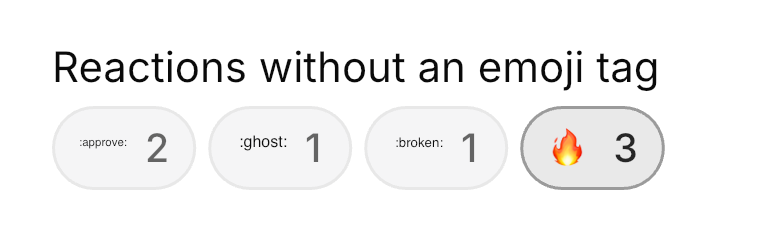
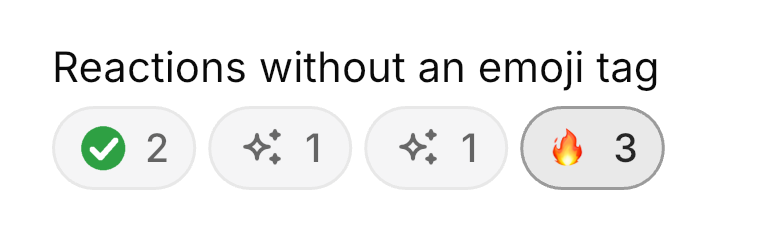
fix(mobile): never show emoji shortcodes in reaction pills (#9411)
## Context A reaction slot should never show an emoji shortcode as text. Today it does in two cases: - An agent's reaction is a kind 7 event with content `:shortcode:` and no NIP-30 `emoji` tag, so the pill printed `:approve:` in tiny text instead of the community emoji. - A custom emoji whose image fails to load fell back to the shortcode text. ## Behavior - A tagless `:shortcode:` reaction resolves against the community custom-emoji palette and renders that image. An `emoji` tag on the event still wins. - A shortcode with no palette entry, or whose image fails to load, shows a neutral placeholder glyph (the muted sparkles icon) instead of text. The shortcode survives only as the semantics label. - This applies to every reaction slot: the timeline pills, the combined reaction tray, the Flutter reaction detail sheet, and the native iOS reactions sheet (which is told which shortcodes have no image, so `NativeMessageGlyph` draws the placeholder). System-message rows reuse the same reaction row. - Unicode emoji are unchanged. The icon is the existing `BuzzIcons.sparkles`. Pareto note: the palette lookup is the shared `reactionEmojiUrl` helper, so there is no new resolver, and the pill only watches the palette when the reaction has no tag. ### Validation - `just mobile-check mobile-test`: format and analyze clean; full suite passes (4773 passed, 74 skipped). - New widget tests (journeys, in `reaction_row_test/shortcode_tests.dart`): a tagless known shortcode renders its image; an unknown shortcode and a failed image render the placeholder and never the text; unicode is unchanged; the native sheet payload marks image-less shortcodes. Reverting the fix makes both new journeys fail. - iOS: added a Swift unit test for the native glyph placeholder (`NativeMessageImageLoaderTests`); not run locally, the app run below exercises the same code. - Automated app run on a cloned iOS simulator with a fixture entry point (mocked media, synthetic palette): confirmed the pills before and after, and opened the reaction sheet from a long-press to confirm the placeholder renders there too. The clone was deleted afterwards. ## Before / after Captures use synthetic shortcodes and a synthetic palette. <img width="300" alt="reaction-pills-before" src="https://raw.githubusercontent.com/block/buzz/75b22a00d92df2db389ef90d35d476b285b60374/pr-9411--reaction-pills-before.png"> <img width="300" alt="reaction-pills-after" src="https://raw.githubusercontent.com/block/buzz/75b22a00d92df2db389ef90d35d476b285b60374/pr-9411--reaction-pills-after.png"> Reaction sheet after: <img width="300" alt="reaction-sheet-after" src="https://raw.githubusercontent.com/block/buzz/75b22a00d92df2db389ef90d35d476b285b60374/pr-9411--reaction-sheet-after.png"> 🤖 Generated with [Claude Code](https://claude.com/claude-code) Signed-off-by: Tom Brow <tomb@squareup.com> Co-authored-by: Tom Brow <tomb@squareup.com> Co-authored-by: Claude Opus 5.5 <noreply@anthropic.com> Co-authored-by: studio <dc2fc481343672df31a689840c09299972e704dac592e0da6f18486646a7ee3e@buzz.block.builderlab.xyz> |
||
|
klopez4212
|
cb69ad9e4f |
Adapt iPhone Duo layouts, rail navigation, and native sheets (#8568)
Duo keeps conversations and Settings details open across closed, book and flat postures. Book mode splits at the fold; flattening restores the sidebar. Native rail controls, full-width navigation backdrops and sheet-local safe areas keep content aligned. Ordinary iPhones remain single-pane in portrait and landscape; tablet and Duo split layouts remain enabled. Includes the recovered preview's matching pane widths, Buzz empty-pane mark, stable Settings chevrons, Bestie pane routing and Duo-only upward New menu attachment. Current main's Activity redesign, Search content fade and unread-navigation button are retained. Menu selection checks sit beside their labels. Shared mobile changes remain in scope: the native iOS status editor, Appearance preview layout, avatar crop preservation, onboarding footer layout, profile/invite sheet geometry and nested conversation navigation. This PR is not exclusively Duo-gated. Nested navigator observers preserve recording cancellation and navigation callbacks; crop resizing preserves the selected image region. iOS 27.1 APIs remain compile-time and runtime gated. Validation on the reconciled source: Flutter analysis, Activity/Home journeys, the full mobile test suite, file-size checks and Swift package tests. The iPhone single-pane fix was also exercised on an iPhone 18 Pro simulator before reconciliation. Fresh hosted CI and physical-device confirmation of the reconciled build are separate and remain pending. --------- Signed-off-by: kenny lopez <klopez4212@gmail.com> Signed-off-by: Tom Brow <tomb@squareup.com> Co-authored-by: Terp <5856f6900e8e0a4e0ea1f4f8d2ee33e4753d2119bc122f94ecafc660b46c0511@buzz.block.builderlab.xyz> Co-authored-by: Claude Opus 5.5 <noreply@anthropic.com> Co-authored-by: Tom Brow <tomb@block.xyz> Co-authored-by: Tom Brow <tomb@squareup.com> |
||
|
Tom Brow
|
27f0fe7527 |
feat(mobile): add iOS Home Screen shortcuts for New chat, New DM and the Bestie (#9360)
Long-pressing the Buzz icon on iOS now offers three quick actions: - **New chat** opens a new solo chat (the same draft as New › New chat). - **New DM** opens the New DM picker. - **Message <Bestie>** opens the DM with the current community's Bestie, using the agent's display name (for example "Message astra"). It's hidden when the community has no Bestie, and it updates when the Bestie, its name or the community changes. | Before | After | | --- | --- | | <img alt="before" src="https://github.com/user-attachments/assets/393c3fb6-fe64-4505-a7a4-12714d8bf1df" width="300"> | <img alt="after" src="https://github.com/user-attachments/assets/1c57df92-6fed-4fee-9ce8-e9ea0ec70294" width="300"> | ### How it works Home publishes the items through a small native bridge (`buzz/home_screen_shortcuts`), which sets `UIApplication.shortcutItems`. A tap goes through the scene delegate. The bridge keeps the latest one until Dart has handled it, the same pattern push-notification taps use, so cold launches work too. Home runs it only once the app is active and the destination is ready. When a tap arrives, Home pops back to the first route once, so a shortcut never opens beneath a Flutter sheet or a conversation that was already open. A screen that refuses to close (for example a New chat whose first message is still sending) stays, and the tap is dropped. The one exception is the native iOS New channel form, which isn't a Flutter route: a shortcut tapped with it open runs underneath it. If a screen is opened while a tap is still waiting for its destination, the tap is dropped. A New DM tap while the New DM picker is open replaces the picker. Opening the Bestie DM now goes through one shared function, so the Home launcher button and the shortcut run identical code. A second open while the DM is still being looked up does nothing. Signing out clears the items. The shortcut wiring lives in its own leaf widget, so Home doesn't rebuild for it. Behavior change for the existing Home Bestie launcher: if you open another screen while it's still looking up the DM, the DM no longer opens over that screen. Behavior change for the native member picker (New DM, and Add members in channels): a picker reopened while the previous one is still closing now opens once the dismissal finishes, instead of failing with "Cannot open the member picker". ### Validation - Added tests: a Home journey covers the published titles (including the Bestie's name), a cold tap that waits for the app to resume and for New chat to be available, a Bestie tap made with another route open, a New chat tap while a draft is open, a New DM tap replacing an open picker, a waiting tap dropped once another screen opens, no Home rebuilds on lifecycle changes, and clearing the items when Home goes away. A launcher test covers a slow Bestie lookup, and a New chat test covers a shortcut tapped while the first message is still sending. I also broke the code that runs the shortcut and confirmed the journey fails. - Full mobile suite and `flutter analyze` pass. CI doesn't compile Swift on drafts, so `NativeAddMembersSheet.swift` was compiled with a local `flutter build ios --simulator` build. - iPhone 17 Pro simulator (iOS 27), signed in to a Builderlab community: from a cold launch, New chat opened the new-chat draft. Then, with the app warm, New DM opened the picker and Message <Bestie> replaced it with the Bestie DM. The recording stays in Buzz because it shows real account data. buzz-review-completed 🤖 Generated with [Claude Code](https://claude.com/claude-code) --------- Signed-off-by: Tom Brow <tomb@squareup.com> Co-authored-by: Tom Brow <tomb@squareup.com> Co-authored-by: Claude Opus 5.5 <noreply@anthropic.com> |
||
|
klopez4212
|
96e56c5b33 |
Add participant avatars to mobile conversation headers (#9369)
## Summary Add participant portraits to mobile conversation headers, with up to four portraits in a compact cluster. DM and Solo headers show counterparts; channel headers use the member roster. Names stay on one line, and tapping either the portrait or title opens the existing settings. - iOS: float portraits above the glass title capsule; lift standalone animated artwork and tuck the title underneath. - Android: place the cluster inside a left-aligned title pill, 16 dp after Back, with smaller agent portraits and a 48 dp tap target. - Remove header presence/member-count subtitles. In confirmed two-member conversations (DM, Solo, or channel), hide redundant incoming author avatars and give text the freed 48 dp while retaining the previous total width. Apply this to thread replies and align their footers; messages with avatars and outgoing messages retain their production width caps. Keep sender attribution visible while DM metadata and current membership disagree. Forum loading, error, and post-list states reserve the full conversation header height. The floating title follows the app-selected appearance, including when it differs from iOS. Conversation headers remain name-only, including temporary conversations, as requested; retention accessibility text is preserved. ## Validation - Formatting/static analysis and full mobile suite: 4,695 passed, 71 skipped; auxiliary push and crypto suites passed. - Full native iOS suite passed, including title positioning/reset and settings activation. - Installed previews on physical iPhone Air and Pixel; Android avatar/title settings taps exercised. - Final diff reviewed for correctness, accessibility, scope, and public-source boundaries; no blocking findings. The width follow-up is covered by rendered conversation/thread tests. The width follow-up is installed and launched on iPhone Air; the Pixel preview remains on the preceding header build. The review fixes have not been installed on physical devices. ## Snapshots Current Pixel preview, cropped to the header to omit conversation history. These captures show a single agent and a four-portrait cluster. The current iOS preview is installed, but a fresh physical-device screenshot was blocked by device authentication; no outdated iOS capture is included. ### Android — single agent  ### Android — grouped agents  --------- Signed-off-by: kenny lopez <klopez4212@gmail.com> Co-authored-by: Terp <5856f6900e8e0a4e0ea1f4f8d2ee33e4753d2119bc122f94ecafc660b46c0511@buzz.block.builderlab.xyz> |
||
|
klopez4212
|
ef57fec4d2 |
Fix gallery video selection, thumbnails, and swipe dismissal (#9356)
## Summary Photos currently filters out videos, video messages without poster metadata stay grey until playback, and the native gallery rejects downward dismissal on video pages. - Include photos and videos in the native inline/popover pickers, system picker, and recent-media grid. Mixed selections retain their order and videos use the video upload path. Remove the redundant Video menu row on iOS and Android, whose Photos picker accepts both media types; reduce their menu height to four rows. Native pickers request the current asset representation to avoid compatibility transcoding and export up to three files concurrently, preserving order and cleaning up cancelled/failed batches. - Show local stills for queued videos. For older messages without posters, serialize thumbnail generation for the four rendered stack cards, bound/cancel downloads, remove temporary videos, and save stills in the existing account/community cache. Existing poster metadata is used directly. The native viewer uses the poster while loading instead of a play-button snapshot. - Allow downward dismissal on native video pages while preserving horizontal paging/scrubbing, zoomed-photo panning, and the accessible Close button. Fire selection-click haptics as a swipe begins rather than after the page settles, with no duplicate on completion or cancellation. Page-indicator changes retain immediate feedback. Replace visible video-loading text with the existing white arc-spinner treatment, implemented natively with reduced-motion and lifecycle handling. Completed swipes release the previous video player even after UIKit removes it from the active children. Legacy videos need one initial download (up to the existing 100 MB limit) to generate their cached preview. This does not start playback. ### Related issue Follow-up to merged #9259 and #9314. Searched open and closed gallery/video issues and PRs; no duplicate fix found. ### Testing - Full `just mobile-check` and `just mobile-test` passed at `12e6ed6ae3`: 4,688 Flutter tests (71 skipped), 4 unconfigured-push tests, and 27 crypto-package tests. File-size checks passed. Regressions cover mixed image/video upload routing, queued still previews, the rendered-card poster window, authenticated/cancelled downloads, caching/cleanup, and native poster loading. - Native gallery simulator regression fixture passed: photo/video dismissal guards, real MP4 decoding, paging, selected-only playback loading, and teardown. - Swift type-check of the native picker and its dependencies passed, with existing deprecation/capture warnings. - `just ci` passed its repository-wide lint/type checks. The unrelated Rust test rebuild was stopped after consuming about 13 GB to preserve remaining disk space; only that run's generated caches were removed. Release build at `fb09f9cb8` installed in place and launched on the physical iPhone Air as **Buzz Photo Stack**, with `BUZZ_NATIVE_PHOTO_ZOOM=true`. Existing app updated in place with the same bundle and Keychain identity; no uninstall or reset. Owner tested the physical-device preview and approved readiness for review. No before/after capture was produced. The simulator evidence above is an automated native fixture, not a full Buzz device journey. Native preparation follow-up: `scripts/test-mobile-picker-preparation.sh` passed on an iPhone Air simulator, covering bounded overlap, out-of-order completion, cancellation, and failure cleanup. The updated physical Air preview launched successfully with unchanged preferences metadata. Cloud-only assets may still require preparation. Loader/haptics follow-up native fixture passed: real video readiness hides the loader, error/retry and detach stop/restart it correctly, swipe start triggers one haptic before selection changes, and completion/cancellation/duplicate-start callbacks add none. Updated release installed and launched on the physical Air; owner approved the final preview for review. Review: focused code review and native regression checks completed; physical Air preview tested by the owner, who approved readiness. P2 follow-up: video presentation uses an already decoded poster or the source snapshot immediately, then forwards a pending poster asynchronously. Late poster updates are limited to the selected native page and do not restart playback. Added pending-provider presentation coverage and native late/stale-poster checks. This follow-up has not been installed on the physical preview yet. --------- Signed-off-by: kenny lopez <klopez4212@gmail.com> Co-authored-by: Terp <5856f6900e8e0a4e0ea1f4f8d2ee33e4753d2119bc122f94ecafc660b46c0511@buzz.block.builderlab.xyz> |
||
|
klopez4212
|
b40f22114b |
Add video stacks and native iOS zoom playback (#9316)
## Summary Videos previously rendered outside photo stacks and opened only the Flutter video viewer. Message bubbles now group trailing videos and photos in their original order, with poster thumbnails or a visible play placeholder. On iOS 18+, the native zoom gallery (enabled by default) opens both standalone videos and mixed stacks with AVKit playback controls, and closing restores the selected stack item. Flutter downloads only the selected video using fresh media authentication, streams it to a bounded temporary file, and cancels/deletes it when selection changes or the viewer closes. UIKit releases the old player before that file is removed. Failed downloads and playback expose Retry. Video URLs never enter the image decoder, and photo-only actions are hidden on video pages. The existing Flutter viewers remain the fallback. Native zoom defaults on; `--dart-define=BUZZ_NATIVE_PHOTO_ZOOM=false` remains an explicit build-time opt-out. Unsupported platforms/formats, unavailable native presentation, and bridge failures use the Flutter fallback. Native video pages use Close or accessibility escape to return with zoom; the photo-specific downward drag recognizer is disabled there to avoid competing with AVKit controls. ### Related issue Stacked on #9314 (PNG/HEIC photo formats); merge that first. No matching open video-stack/zoom PR found. ### Testing - Default-on follow-up: presentation tests also cover unavailable, null, and throwing bridge responses. - `just mobile-check mobile-test`: analysis clean, 4,601 mobile tests passed, plus push-configuration and secp256k1 package tests. - Full native-enabled mobile suite: 4,626 passed, 68 skipped; rerun passed at `dc752dccaa664cb56a19cbe517a266d1407a1100`. - Mixed-stack widget journey covers order, video opening, returning to selection, and the photo-only fallback gallery. - Native bridge tests cover video snapshot presentation, selected-only dispatch, stale sessions and keeping video URLs out of image decoding. - Real HTTP download journey covers authenticated requests, Retry, byte limits, cancellation and temporary-file cleanup. - Native simulator fixture decodes a real MP4 and verifies selected-only loading, player release on paging and teardown. Removing playback cleanup makes the regression fail; restoring it passes. - No physical-device installation or end-to-end zoom recording captured. ### Widget previews Actual Flutter renders with sample video URLs and no poster metadata; these show the stack layout, not device playback. | Received, light | Sent, dark | | --- | --- | |  |  | ### Human verification pending On a normal build on iOS 18+ (no extra flag required), open a message containing photos and videos, page between them, play a video, and close. Verify playback controls work, only the selected video plays, and closing returns to the selected stack item. --------- Signed-off-by: kenny lopez <klopez4212@gmail.com> Co-authored-by: Terp <5856f6900e8e0a4e0ea1f4f8d2ee33e4753d2119bc122f94ecafc660b46c0511@buzz.block.builderlab.xyz> |
||
|
klopez4212
|
e2dc54e22f |
Support PNG and HEIC photos in the native iOS zoom gallery (#9314)
## Summary The opt-in iOS zoom gallery rejected PNG and HEIC/HEIF photos, so photo stacks containing those files opened the Flutter fallback. Accept these formats by MIME type or file extension, including uppercase extensions and URLs with query strings. Preserve animated PNG playback by forwarding continuing decoded frames to the selected native page. Keep the existing five-photo load window, coalesce frames while the bridge is busy, skip offscreen frame encoding, and release listeners on eviction or dismissal. Native updates reject stale sessions, offscreen pages, malformed frames, and closed viewers. `BUZZ_NATIVE_PHOTO_ZOOM` remains opt-in. iOS below 18 and unsupported formats retain the existing gallery. ### Related issue Follow-up to #9259. No matching open issue or PR found; #7666 concerns desktop HEIC upload tiling, a separate path. ### Testing - `just mobile-install mobile-check mobile-test` passed. - Full mobile suite with `BUZZ_NATIVE_PHOTO_ZOOM=true`: 4,623 passed, 68 skipped. Standard configuration: 4,599 passed, 92 skipped; push configuration and secp256k1 package tests also passed. - Real PNG and HEIC decoding through the production presentation bridge; real two-frame APNG decoding with continuing-frame and listener-cleanup assertions. - `scripts/test-mobile-photo-zoom.sh` on an iOS 27 simulator exercises the production native controller, including frame updates, stale-page rejection, malformed input and teardown. No physical-device or end-to-end zoom recording captured. This extends accepted image formats and playback without changing the gallery layout. --------- Signed-off-by: kenny lopez <klopez4212@gmail.com> Co-authored-by: Terp <5856f6900e8e0a4e0ea1f4f8d2ee33e4753d2119bc122f94ecafc660b46c0511@buzz.block.builderlab.xyz> |
||
|
klopez4212
|
44b3c4823f |
Add swipeable photo stacks and native iOS gallery preview (#9259)
## Summary Replace bubble photo carousels with swipeable, overlapping photo stacks, with distinct sent/received layouts and a stationary photo count. Opening and closing the gallery preserves the selected photo. Photo frames follow the active theme. Add an opt-in iOS 18+ native zoom gallery (`BUZZ_NATIVE_PHOTO_ZOOM=true`) with paging, continuous dot scrubbing, preview-backed loading, Reply/More actions, and Liquid Glass controls on iOS 26+. The existing gallery remains the fallback. UIKit’s late corner settling and brief return-transition input lockout remain known preview limitations. ### Related issue None found. ### Testing Validation: full mobile pre-push checks/tests passed on `2b5bac3075`; light/dark sent/received widget renders verified. Earlier native simulator checks covered paging, scrubbing, downward close, and Reply. Snapshots below are actual Flutter widget renders with sample photos (not device screenshots). | Before: carousel | After: sent | After: received | | --- | --- | --- | |  |  |  | | Dark mode: sent | Dark mode: received | | --- | --- | |  |  | --------- Signed-off-by: kenny lopez <klopez4212@gmail.com> Co-authored-by: Terp <5856f6900e8e0a4e0ea1f4f8d2ee33e4753d2119bc122f94ecafc660b46c0511@buzz.block.builderlab.xyz> |
||
|
Tom Brow
|
5f59940544 |
fix(mobile): steady New DM picker rows and animate picks (#9249)
On iOS, the New DM (and Add Members) picker is a native UIKit sheet that Flutter drives by pushing the picker's whole state on every rebuild. Each push called `reloadData`, which rebuilt every visible row in a fresh, unreused cell showing the initials fallback, then fetched each avatar again over the platform channel. So whenever anything refreshed (several refreshes land right after foregrounding), every avatar blinked to its initial for a frame or two. Picks also jumped instantly from the results to the chosen section. Now the picker: - ignores a pushed state identical to the one it shows; - applies the rest as a diffable snapshot, so unchanged rows keep their cells and changed rows are redrawn in place, in reused cells; - keeps loaded avatars by avatar key for the life of the sheet, so a redrawn row shows its avatar at once; - animates a member's row moving between the chosen and result sections when it's picked or removed (no animation with Reduce Motion). Flutter's toggle handlers in both pickers now read the current selection rather than the one captured at build time. A fast second tap could otherwise add the same person twice, which the diffed table would reject. ### Validation - Native member picker test (`scripts/test-mobile-member-picker.sh`), extended: after an avatar loads, a changed row is redrawn with that avatar and requests nothing more. The avatar check fails on `main` and passes here; the existing identity and accessibility checks still pass with the diffable table. - Added a New DM test: two toggles before Flutter rebuilds never list a person twice. It fails without the toggle fix. - Full mobile Flutter suite and analyzer pass in CI on the current head, which includes `main`'s fix for the right-drag link tests. - Simulator runs of the app (iPhone 17 Pro, iOS 27, signed in to a test community): opened New DM, backgrounded and foregrounded the app, searched, picked from the list and from a search, and removed a pick. Without this change, every avatar flashed to its initial after a foreground. With it, no avatar flashed at any point, and picks and removals animate between sections. Recordings show real community members, so they're shared in Buzz rather than here. #### Full-app comparison, `main` vs this PR The same scripted New DM sequence on a clone of the same signed-in simulator (iPhone 17 Pro, iOS 27), first on `main` ( |
||
|
Tom Brow
|
52cb6818fa |
perf(mobile): keep remote images on disk and show small ones as thumbnails (#9158)
## Summary The mobile app now saves remote images on disk. After a relaunch, avatars, custom emoji, message attachments and agent artwork show immediately. The app does not download them again. Small images on a relay now load only the relay's thumbnail. The app never downloads the full-size upload to show a small image. ## Why Before this change, the app kept remote images only in memory. Each cold launch downloaded every image again. On a slow connection, attachments showed a "Loading image" placeholder for a long time. Also, when a relay had no thumbnail for an image, the app downloaded the full-size upload. That upload can be up to 20 MiB, for an avatar that is a few dozen points wide. ## What changes ### Images on disk - `MediaImageProvider` reads and writes a `MediaDiskCache`. Each account in each community has its own cache, at `<root>/communities/<community id>/media/<signer pubkey>`. The cache is built on `flutter_cache_manager`, with a JSON index. - On iOS, the root is the app group's `Library/Caches` (from a new `buzz/app_group` method channel). App extensions can then read the same cache. On other platforms, the root is the app cache directory. - Each cache holds a maximum of 250 MB. When it is full, the least recently used images go first. `MediaCacheIndex` measures each file when it writes it, because `flutter_cache_manager` limits only the number of files. Every disk read marks the file used, and every write schedules eviction, including a refresh that replaces bytes the package already holds in memory (by default the package does neither for those). - The cache does not save an image that is larger than 5 MiB. The app still shows that image from memory. Thus, one large image cannot push out all the others. - Relay media URLs contain a content hash, so their bytes never change. The cache keeps them until it evicts them. For other URLs, the cache shows the saved image, and then gets a new copy in the background after one week. A maximum of two of these refreshes run at the same time. The app decodes a refreshed image before it replaces the saved copy. - When you remove a community, the app deletes its cache. When a community gets a new signing key, the app deletes the media of the old account. At launch, the app also deletes caches of communities and accounts that are no longer present. - Startup does not wait for the cache. The cache directory resolves in the background. Image reads wait for it for a maximum of 3 seconds. ### Thumbnails for small images - A small relay image loads the relay's WebP thumbnail. If the relay has no WebP thumbnail, the image loads the JPEG thumbnail. If the relay has neither, the widget shows its placeholder (initials for an avatar, an empty tile for artwork). - Native avatars drawn by UIKit (the navigation bar, the community icon on the create button, and the New DM and Add Members pickers) use the same choice, through a new `smallMediaImageProviders`. They try the same thumbnails, fall back the same way, and show initials when neither thumbnail exists. Before, they downloaded the full-size upload and only decoded it small. - Larger layouts and the full-screen viewer load the full-size upload, as before. ### Agent artwork - Preset agent artwork (the tray, flight, video placeholder, avatar hero and the avatar editor's blurred backdrop) now loads through `MediaImage`, so it uses the disk cache too. - The create-agent and empty-bestie pages warm the same `MediaImageProvider` that their widgets read, through a new `mediaImageProviderFor(ref, url)`. - No code in `mobile/lib` uses `Image.network` or `NetworkImage` now. ## Demo A cold relaunch (the app is stopped, then started) into a synthetic "QA demo" Solo chat that holds a few generated images. Shown at half speed. Before: the attachment shows a "Loading image" placeholder while it downloads. https://github.com/user-attachments/assets/107f43a3-63d0-40c3-bd80-4ea9d7897a97 After: the attachment shows with the chat, from disk. https://github.com/user-attachments/assets/d3985bb2-838c-4efa-93cb-44cef51f677d ## Tests - `test/shared/relay/media_disk_cache_test.dart` follows one journey through the real provider and a real cache in a temporary directory. The first launch downloads and saves. An offline relaunch shows the full-size image, its thumbnail and an external image from disk, and the oversized image goes back to the network. Eight days later, only the external image refreshes. Removing the community deletes its directory. - A second test checks the order of eviction when the cache is full, that a file read from disk is evicted after files that were not, and that replacing a file's bytes after eviction last ran evicts again when the cache goes over budget. - `community_provider_test` checks that launch deletes orphan media directories, that a new signing key deletes only the old account's media, and that removing a community deletes its media. - `avatar_image_test` checks that a missing WebP thumbnail falls back to the JPEG thumbnail, and that an avatar with no thumbnail shows its initials. - `native_avatar_image_test` checks the same for native avatars: a WebP 404 paints the JPEG thumbnail, the full-size upload is never requested, a relay with no thumbnail paints initials and is not asked again, and any other failure stops at the initials. - `flutter analyze` and the full mobile test suite pass. - Automated app runs on an iPhone 17 Pro simulator (iOS 27): the channel list, a DM, Home, the Agents grid and an agent details sheet show their images. After a relaunch, the images came from disk and the app wrote no new files. In the "QA demo" chat, a new image from the app showed immediately. - Automated run of the native-thumbnail fix on an iPhone 17 Pro simulator (iOS 27): the native New DM picker shows photo avatars, and the cache gained only relay `.thumb.webp` entries for them, no full-size uploads. After a cold relaunch, the picker showed the same avatars within about 1.5 seconds, and the cache directory gained no files. The avatar editor backdrop was not exercised in the app. The test community has no remote agents, and the backdrop tests cover only emoji and picked-image selections. ## Before merge - [x] Automated simulator run of this head: avatars and agent artwork show their thumbnails, and a cold relaunch shows images from disk. 🤖 Generated with [Claude Code](https://claude.com/claude-code) --------- Signed-off-by: Tom Brow <tomb@squareup.com> Co-authored-by: Tom Brow <tomb@squareup.com> Co-authored-by: Claude Opus 5.5 <noreply@anthropic.com> Co-authored-by: studio <dc2fc481343672df31a689840c09299972e704dac592e0da6f18486646a7ee3e@localhost> |
||
|
Tom Brow
|
ac2c5831f3 |
fix(mobile): show already-loaded custom emoji in the iOS reactions sheet (#9150)
On iOS, the reactions sheet (long-press a reaction pill) could show a custom emoji as truncated `:shortcode:` text, for example `:eye…`, even though the same emoji rendered as an image on the message pill a moment before. The sheet is a native UIKit view that downloaded each custom emoji again with its own `URLSession` request and showed the shortcode label until that download finished, and for good when it failed. A shortcode is illegible in a chip that size. Now: - Flutter keeps the encoded bytes of custom emoji it has downloaded (a bounded LRU: 512 KiB per emoji, 8 MiB total, rebuilt when the media auth scope changes so accounts never share bytes) and hands them to the sheet, which decodes them without a fetch. Emoji the timeline never loaded still download natively as before. - A custom emoji in the sheet never shows its shortcode: it stays blank while loading and shows the sparkles icon, matching the native emoji picker, if the image cannot load. Reaction pills in Flutter get the same sparkles fallback. Inline emoji in message text keep the shortcode fallback, where it reads as text. Avatars in the sheet keep their initial. ### Before / after Reactions sheet header and chips right after opening, on a message with two custom-emoji reactions (synthetic test channel, captured from a 30 fps screen recording). | Before (main) | After (this branch) | | --- | --- | | <img width="300" alt="Before: custom emoji chips show truncated :qa-... shortcodes" src="https://github.com/user-attachments/assets/593e555b-9c82-4eec-9049-3d909f987c76"> | <img width="300" alt="After: custom emoji chips show images" src="https://github.com/user-attachments/assets/a6739997-b39f-4062-9e5c-d22a8a38b368"> | ### Validation - Added tests: the native sheet's payload carries the bytes the pill already downloaded; the combined reaction tray shows sparkles, not the shortcode, when a custom emoji fails to load (the existing alignment test previously asserted the shortcode). - Full mobile suite and `just mobile-check` pass; the iOS simulator build compiles. - Automated simulator run (iPhone 17 Pro, iOS 27, main vs this branch, signed in to a test community): channel list, opening a channel, the message action sheet, the emoji picker, and the reactions sheet on a message carrying two custom emoji I added plus a thumbs-up. On main the sheet's custom-emoji chips show truncated `:qa-...` shortcodes for a few frames before the images arrive; on this branch they render as images from the first frame (see Before / after). Limitations: the emoji images load fine over the network in this setup, so the failed-download sparkles fallback was covered by tests only, not seen in the app; a long press on the combined reaction tray opened the message menu in the simulator, a tap opened the sheet. 🤖 Generated with [Claude Code](https://claude.com/claude-code) Signed-off-by: Tom Brow <tomb@squareup.com> Co-authored-by: Tom Brow <tomb@squareup.com> Co-authored-by: studio <dc2fc481343672df31a689840c09299972e704dac592e0da6f18486646a7ee3e@buzz.block.builderlab.xyz> Co-authored-by: Claude Opus 5.5 <noreply@anthropic.com> |
||
|
Tom Brow
|
1a0dae77bf |
fix(mobile): shimmer loading photos in the iOS carousel (#9167)
On iOS, a message with several photos renders them in a native UIKit carousel. While a thumbnail downloads, each cell showed the words "Loading image". Single images and the Flutter carousel already show a shimmering skeleton, so the native carousel stood out. Native carousel cells now show the same shimmer as Flutter's `SkeletonShimmer`: a fill in the theme's primary color at 10% opacity, with a lighter band sweeping across every two seconds. Flutter passes the primary color to the native view along with the brightness. With Reduce Motion on, the fill stays still. Once the thumbnail arrives the shimmer hides. If the thumbnail fails, the cell shows its existing "Image unavailable" message on the plain surface. ### Demo A synthetic private chat with a four-photo message, reopened on a cold launch. To make the loading state easy to see, both builds were patched locally to delay thumbnail delivery by 4 seconds (the patch is not part of this PR). Before (main): each cell shows the words "Loading image" until the thumbnail arrives. https://github.com/user-attachments/assets/3724873d-4f33-4db7-af16-634dce3371ac After (this PR): each cell shimmers in the theme's primary color until the thumbnail arrives. https://github.com/user-attachments/assets/20f65789-de3f-4e13-892f-3b2d9a0461cc ### Validation - `just mobile-check` and the full `just mobile-test` suite pass. - Automated simulator run (iPhone 17 Pro, debug build): posted four photos to a synthetic private chat from the app's photo picker, relaunched, and opened the chat on both main and this branch. Before shows "Loading image"; after shows the shimmer, which gives way to the photo when it arrives. Limitations: light mode only, and the 4 second thumbnail delay was a local patch to make the state observable. Dark mode, Reduce Motion and the failed-thumbnail state were not exercised. 🤖 Generated with [Claude Code](https://claude.com/claude-code) --------- Signed-off-by: Tom Brow <tomb@squareup.com> Co-authored-by: Tom Brow <tomb@squareup.com> Co-authored-by: Claude Opus 5.5 <noreply@anthropic.com> |
||
|
Tom Brow
|
794ee64183 |
fix(ios): mint hosted NIP-FI assertions in the notification extension (#9228)
Share the hosted Builderlab session with the iOS notification extension so it can mint hosted NIP-FI assertions. The extension queries a hosted relay without an assertion first and mints only after a NIP-FI challenge, for a key the account is already bound to. Credential headers never follow redirects, and flag-off builds clear a previously shared session. Signed-off-by: Tom Brow <tomb@squareup.com> Co-Authored-By: Claude Opus 5.5 <noreply@anthropic.com> |
||
|
Tom Brow
|
597a8d1970 |
feat(mobile): rename Activity and add header filters (#9213)
The UI-only part of #9186 by @klopez4212, split out so it can land without the Activity sync changes. - The Inbox page becomes Activity, with header controls instead of menus: a type menu (All, Threads, Mentions, DMs, Reminders, Drafts), a sender menu (Anyone, People, Agents) and an Unread toggle. All of them filter the feed the app already loads. - Activity and Search get a top edge fade. Bulk mark-as-read and the "New" divider are gone. - DM thread replies group with their DM row, so the DMs filter includes them. Left out, for a separate sync PR: the Activity history cache, subscriptions to every joined channel, the refresh coalescer, thread-follow evidence, Reactions and Solo rows, and the read-state changes. The Activity provider and read-state writes are unchanged from main. One fix on top: the iOS filter labels pass an unscaled font size, since the native button already applies Dynamic Type. Before, large text was scaled twice. ### Validation - Kenny's added tests for the header controls (`tabs_journey`) and `TopEdgeFade`, adjusted for the removed Reactions option. Added tests for the DM filter, marking a DM row with replies under two thread roots read, and sender filtering per event. - Full mobile suite: see the latest CI run. Locally, 11 push and notification-toggle tests fail identically on an unchanged checkout. - Automated simulator run (iPhone 17 Pro, iOS 27) of a build combining this PR with its sibling split: Home rows measure 44 pt, the bell opens Activity and shows its dot after a row is marked unread, type/sender/Unread filters each narrow the feed, a row opens its conversation, Search results scroll under the fade, and filter labels fit at the largest text size. Screenshots are in Buzz rather than here because they show internal test data. Android was covered only by widget tests. ### Before merge - [x] Automated simulator run of Activity filters, row taps, read and unread, and Search, with screenshots. 🤖 Generated with [Claude Code](https://claude.com/claude-code) --------- Signed-off-by: Tom Brow <tomb@squareup.com> Co-authored-by: Tom Brow <tomb@squareup.com> Co-authored-by: kenny lopez <klopez4212@gmail.com> Co-authored-by: studio <dc2fc481343672df31a689840c09299972e704dac592e0da6f18486646a7ee3e@buzz.block.builderlab.xyz> Co-authored-by: Claude Opus 5.5 <noreply@anthropic.com> |
||
|
Tom Brow
|
beec055300 |
feat(mobile): move Activity to a Home bell and align Home spacing (#9212)
The UI-only part of #9193 by @klopez4212, split out so it can land without the Activity sync changes. - Activity moves from a row in the Home list to a bell button in the Home header, with an unread dot driven by the existing Activity feed and read state. - Home filter capsules match native iOS and Android widths, with a subtle outline on Android when the header collapses. - Home section spacing is tighter. Left out: the reconnect rewrite in #9193's last commit (live events applied in place, no rebuild on reconnect, fatal fallback reads). The Activity provider is unchanged from main. Channel and Solo rows keep their bottom padding so they stay at the 44 pt minimum tap height. ### Validation - Kenny's added tests: `inbox_unread_provider_test` (unread dot) and the Home page bell and filter width tests. - Full mobile suite: all pass except 11 push and notification-toggle tests that fail identically on an unchanged checkout in this environment. - Automated simulator run (iPhone 17 Pro, iOS 27) of a build combining this PR with its sibling split: Home rows measure 44 pt, the bell opens Activity and shows its dot after a row is marked unread, type/sender/Unread filters each narrow the feed, a row opens its conversation, Search results scroll under the fade, and filter labels fit at the largest text size. Screenshots are in Buzz rather than here because they show internal test data. Android was covered only by widget tests. ### Before merge - [x] Automated simulator run of Home, the bell, Activity and channel navigation, with screenshots. 🤖 Generated with [Claude Code](https://claude.com/claude-code) Signed-off-by: Tom Brow <tomb@squareup.com> Co-authored-by: Tom Brow <tomb@squareup.com> Co-authored-by: kenny lopez <klopez4212@gmail.com> Co-authored-by: studio <dc2fc481343672df31a689840c09299972e704dac592e0da6f18486646a7ee3e@buzz.block.builderlab.xyz> Co-authored-by: Claude Opus 5.5 <noreply@anthropic.com> |
||
|
Diem Nguyen
|
133c883b8c |
fix(mobile): confirm before starting a Huddle from the header (#9155)
Tapping the headphones button in a channel header used to start a Huddle straight away, which turned on the microphone and posted "Huddle started" to the channel. The button is easy to hit by accident. Now, when no Huddle is running there, the button asks "Start a Huddle?" first, with Cancel and Start Huddle. - `showConfirmation` in `shared/widgets/confirmation_dialog.dart` adds a non-destructive mode to the shared confirm helper. `showDestructiveConfirmation` now calls it with `destructive: true`, so existing callers behave the same. On iOS the native UIKit alert reads a new `destructive` argument and uses `.default` style instead of `.destructive` when it's false. On other platforms the confirm button keeps the default `FilledButton` style instead of the error color. - `_huddleNavigationAction` asks before calling `start`. That covers both the Material header button and the iOS native navigation action. Opening or joining a Huddle that's already running stays one tap, and so do the explicit "Start new" buttons inside the Huddle sheets. Companion to block/buzz-app#2687, which adds the same confirmation on desktop. buzz-app#2660 also moves the desktop button away from the members button, but there's no equivalent move on mobile: the headphones is the only action in the header. ### Screenshots Rendered by a scratch widget test from the real `ChannelDetailPage` (Android/Material path, Inter loaded) at 390×844. The scratch test has been removed. On iOS, the same confirmation shows as a native UIKit alert, which isn't captured here because this machine has no iOS Simulator. Before: tapping the headphones goes straight into a call. <img src="https://github.com/user-attachments/assets/adced280-2abd-44ad-a079-1c83749892a0" width="300" alt="Before"> After, light and dark, cropped to the new dialog: | Light | Dark | | --- | --- | |  |  | ### Validation - The existing journey "community transition cancels and awaits an in-flight Huddle start" now taps the button and checks that the dialog appears, that Cancel closes it without publishing anything, and that tapping again and choosing Start Huddle starts the call. With the confirm removed, this test fails. - `channel_member_profile_actions_test` checks that destructive confirmations still send `destructive: true` to the iOS bridge. - Full `flutter test`: 4,508 passed. `flutter analyze` and `dart format` are clean. - Not yet checked: the iOS native alert on a device or simulator, and a human trying it. 🤖 Generated with [Claude Code](https://claude.com/claude-code) Signed-off-by: Diem Nguyen <diem@squareup.com> Co-authored-by: Fizz <6be7be23ec5bba868f3e1db5ec86013d76bd1a293dce5b435a192158fec13641@buzz.block.builderlab.xyz> Co-authored-by: Claude Opus 5.5 <noreply@anthropic.com> |
||
|
Matt Toohey
|
2bd4917825 |
fix(mobile): answer push snapshot bridge calls at user-initiated QoS; report hop latency on callback timeout (#8916)
## Summary `BuzzPushSnapshotEnrichmentTests` (iOS RunnerTests) timed out on two unrelated PR branches on 2026-11-01 and passed on re-run both times. The timings point to a starved test host, not a missed callback. This PR makes one production change and two test changes, in two files: - **`mobile/ios/Runner/PushSnapshotBridge.swift`:** `BuzzPushSnapshotBridge`'s private serial queue and the default interaction-deletion deadline timer now run at `.userInitiated` instead of `.utility`. Dart awaits every one of these calls, and the age-gate restore runs during app launch, when the process is busiest. User-initiated is the class for work a caller is waiting on. - **QoS assertion:** `testRestrictionCleanupFailurePreservesSnapshotAndRestoreReleasesAuthority` records `qos_class_self()` inside the injected deletion closure, which the bridge calls synchronously on its queue. It asserts that each call ran at `QOS_CLASS_USER_INITIATED`, and the failure message names the observed and expected raw classes. - **`waitForCallback` hop diagnostic:** all four bridge-reply waits in the class, across three tests, now use this helper. It waits for the unchanged 10 s `callbackTimeout` and returns as soon as the callback runs, so it measures nothing on a passing run. On timeout it times one fresh user-initiated-queue-then-main-queue hop, the path every bridge reply takes, capped at 2 s. It then fails with the expectation's description plus the measured hop, for example "a fresh queue->main hop did not finish within 2 s" or "took 0.4 ms". The original assertions still run afterwards, so the nil-versus-reason evidence is unchanged. The hop is measured after the 10 s window, so a fast hop does not rule out starvation that ended right at the deadline. No timeout changed. ### Related issue None found. #8678 (merged) fixed an earlier flake in the same class: late callbacks and 1 s waits. It introduced the 10 s `callbackTimeout` this PR keeps. ### Failing runs Both runs were in "Mobile Swift (Native)", step "Test native controls and Runner unit tests", attempt 1. Both passed on attempt 2. - [Run 41327410782, job 124910378184](https://github.com/block/buzz/actions/runs/41327410782/job/124910378184), on `mobile-avatar-thumb-followup` (#8896): `testRestrictionCleanupFailurePreservesSnapshotAndRestoreReleasesAuthority` timed out its 10 s "allowed without restoring snapshot" wait (19.3 s total). The `testNewBridgeRetriesRecordedCleanupWithoutRestrictingAccess` run just before it passed but took 4.3 s. - [Run 41325606910, job 124905175903](https://github.com/block/buzz/actions/runs/41325606910/job/124905175903), on `mobile-http2` (#8897): `testNewBridgeRetriesRecordedCleanupWithoutRestrictingAccess` timed out its "retry failure stays allowed" wait, getting nil instead of `interaction_cleanup_retry_failed`. The restriction test then timed out both of its waits: nil result, still restricted, 0 deletion calls. ### Diagnosis Every reply from `BuzzPushSnapshotBridge` goes through a private serial queue, previously created at `.utility` QoS, and then `DispatchQueue.main`. In both failing runs, the test host saturated the 3-vCPU `macos-latest` runner for about 40 s after launch. The test host is the full Flutter app, loaded as `TEST_HOST`. - `BrowserAuthBridgeTests.testAllowsOnlyBuilderlabLoginPages`, a synchronous main-thread URL-parsing test, took 2.65 s instead of 0.013 s. - `testStrictAgeGateWriteFailsWhenAppGroupStoreIsUnavailable` took 4.9 s. That test has since been deleted from `main`. - A trivial hop took 1.3 s, then more than 10 s, during that window. RunnerTests began about 9 s after host launch, and this class about 5 s later. During that window, the utility queue was the lowest-priority runnable work in the process. It got no CPU for 10–20 s, while main-thread work kept moving slowly. In both passing re-runs, every test in this class took under 0.3 s. The test logic doesn't explain a callback that never arrives: - The deletion mocks are synchronous. - The deadline scheduler is a no-op. - Each test uses its own temp directory and bridge. - No state is shared between tests. That rules out both a state leak and an expectation-ordering race. This diagnosis is inferred from CI timings. The starvation did not reproduce on a 16-core local host (see Testing). ### Tried and dropped - **A class `setUp` settle barrier ( |
||
|
Tom Brow
|
6b8a72e835 |
fix(mobile): send hosted relay auth with iOS custom emoji downloads (#9056)
On iOS, custom emoji in the native emoji picker often render as the sparkle fallback icon instead of the image. The native picker downloads custom emoji with `URLSession` and asks Flutter for request headers over the `mediaHeaders` channel call. That call returned only the media read `Authorization` header. Hosted relays also require the `Nostr-Federated-Identity` assertion, which the Flutter image path gets from `HostedRelayHttpClient`, so relay-hosted emoji get a 401 and the picker falls back to sparkles. Emoji hosted elsewhere still load, which is why only some are missing. The `mediaHeaders` bridge now also includes the hosted relay assertion via a new `HostedRelayAuth.headersForUrl`, scoped to the relay's own origin like `HostedRelayHttpClient`. The native loader refuses redirects for requests that carry the assertion, matching the Dart client, so the token can't be forwarded to another host. The iOS reactions sheet had the same gap: it passes avatar and custom emoji URLs to native views with only the `Authorization` header. A new `nativeMediaHeadersProvider` combines both headers for any native media consumer, and the reactions sheet uses it. ### Validation - Added tests: the native picker's `mediaHeaders` call returns the relay assertion for relay media and no headers for an external emoji URL; `headersForUrl` returns the assertion only for the relay origin (not another host, subdomain or port). The reactions sheet passes the combined headers for avatars and custom emoji, and `nativeMediaHeadersProvider` merges both headers only for relay URLs. - Focused existing validation: the emoji picker and organization relay auth suites pass, and `flutter analyze` is clean. In the full mobile suite, the only failures are 10 in `notification_toggle_test`, `push_bootstrap_test` and `push_bridge_test`, and they fail the same way on `main`. - Automated full-app simulator run (iPhone 17 Pro, iOS 27, debug build of this branch with hosted auth enabled, signed in to two hosted communities through a cloned simulator keychain, driven with AXe). Covered: launch signed in, channel and DM lists, opening a channel and a DM, the native emoji picker (its Custom section shows the emoji as an image, not the sparkle fallback), sending a custom emoji message and seeing it render, reacting with the custom emoji (shown in the quick-reaction row and as a reaction pill), opening a thread, switching communities, avatars and community icons, background and resume, and a cold relaunch. Result: no crashes or regressions seen. Screenshots are omitted because they show real account and community names. - Limitations: this run does not reproduce the original bug. The hosted community's custom emoji also loaded in a temporary build with the relay assertion removed from the `mediaHeaders` bridge, so its emoji URL evidently doesn't need the assertion, and the run doesn't prove the fix. The reactions detail sheet could not be reached because simulated long presses on the pill opened the message menu, and inline image attachments were not exercised. A device build against a community whose emoji are relay-hosted is still needed to confirm the fix. 🤖 Generated with [Claude Code](https://claude.com/claude-code) --------- Signed-off-by: Tom Brow <tomb@squareup.com> Co-authored-by: Tom Brow <tomb@squareup.com> Co-authored-by: Claude Opus 5.5 <noreply@anthropic.com> Co-authored-by: studio <dc2fc481343672df31a689840c09299972e704dac592e0da6f18486646a7ee3e@buzz.block.builderlab.xyz> |
||
|
Tom Brow
|
e558f15faa |
Mobile: one New chat screen (#9079)
Mobile had two New chat screens. [#8884](https://github.com/block/buzz/pull/8884) made the Flutter draft page (first send creates and names the chat) the New chat screen, but kept the older create form (a native iOS sheet, with a Flutter bottom sheet on Android) for one case: resuming a creation that an older build had saved with a chat name and no first message. Nothing creates that state anymore, so the old form only appeared for users with an interrupted creation from before that change. This removes the old form. Every New chat, including that resume case, now opens the draft page: - **New chat**: unchanged. - **Resuming an interrupted creation**: after the existing Resume / Discard setup / Later prompt, the draft page shows the saved chat with its agent and workspace locked and a Retry button, the same choices the old sheet offered when it locked its fields. A creation saved with a first message resumes exactly as before. One saved without a message finishes without one, because a saved creation can't change after its first relay write. The iOS editor's chat-only code (`presentChat`, `updateChatAssistants`, the agent list, and its avatar loader) goes too. The same editor still handles profile fields, channel details and workspace names. The native test and CI step that covered only the removed chat form are removed. ### Screenshots Resuming an interrupted creation saved without a first message: | Before: old native sheet (removed) | After: draft page (kept) | | --- | --- | | <img src="https://raw.githubusercontent.com/block/buzz/5d0a502e92fc3dfeffbe4fa95d63ba8f73d1e612/pr-9079--01-before-resume-native-sheet.png" width="300"> | <img src="https://raw.githubusercontent.com/block/buzz/5d0a502e92fc3dfeffbe4fa95d63ba8f73d1e612/pr-9079--02-after-resume-draft-page.png" width="300"> | A brand new chat already opened the draft page and is unchanged: <img src="https://raw.githubusercontent.com/block/buzz/5d0a502e92fc3dfeffbe4fa95d63ba8f73d1e612/pr-9079--03-new-chat-draft-page.png" width="300"> ### Validation - Changed tests: `me_page_test` checks that Resume and Discard setup both open the draft page and that no native sheet is requested. `solo_creation_tags_test` checks that recovering an interrupted named creation through the draft page's Retry continues with member setup, keeps the saved name and agent, and adds no first message. - Full mobile Flutter suite (4,431 passed) and `flutter analyze` (clean). iOS debug simulator build succeeds. - Automated simulator run (iPhone 17 Pro, iOS 27, signed-in account): New chat opened the draft page, the agent picker selected an agent, and the first send created the chat, which then appeared under Solo. New workspace still opened the native editor, enabled Create once named, and showed the Discard changes prompt on cancel. The recording isn't attached here because it shows internal account content. - Resuming an interrupted pre-[#8884](https://github.com/block/buzz/pull/8884) creation can't be produced by the current build. For the screenshots above, a capture-only, uncommitted patch to a `main` build seeded one; the branch build installed over it resumed it on the draft page. The widget tests cover finishing it. - `solo_creation_tags_test` also covers a conflicting pending Solo organization edit during that Retry: the draft offers the Conflicting Solo changes dialog, keeps the saved creation, and the next Retry finishes it. 🤖 Generated with [Claude Code](https://claude.com/claude-code) buzz-review-completed --------- Signed-off-by: Tom Brow <tomb@squareup.com> Co-authored-by: Tom Brow <tomb@squareup.com> Co-authored-by: studio <dc2fc481343672df31a689840c09299972e704dac592e0da6f18486646a7ee3e@buzz.block.builderlab.xyz> Co-authored-by: Claude Opus 5.5 <noreply@anthropic.com> |
||
|
Tom Brow
|
ec21753e1b |
Make mobile New DM and Add members pick recipients like mention autocomplete (#9065)
The mobile New DM picker listed the first 50 relay profiles alphabetically, mostly identities the viewer doesn't know. It ran its own debounced directory search with no cache, and its rows disappeared on every keystroke until the search returned. Mention autocomplete in the composer already solves the same problem well, so New DM and Add members now use its implementation. Add members was reusing the same New DM directory search. ### What changes - **Same candidates and order as mention autocomplete.** The chooser's candidate building, ranking, row stability, 200 ms debounced search and search cache now back both surfaces. New DM is treated like a stream with no members yet: the viewer's own agents and agents shared with them appear up front, people are found by name, and agents that couldn't answer the viewer are left out. Typing a name shows the same people in the same order as `@name` in a stream. - **Results stay on screen while a search runs.** A query searched before shows its people immediately, and a longer query starts from the shorter query's results. A failed search keeps its rows and adds a retry row below them. - **Presentation matches the mention rows.** Rows show the name, and agents show "agent · managed by …". Npub lines are gone. - **Sheet chrome.** The title is "New DM", like the menu item that opens it. Both pickers keep their grouped cards but drop the "People and agents" and "Selected" section titles and the empty header bands above them (selected recipients stay in their own card at the top with checkmarks on iOS, as chips on Android). The native iOS picker now focuses search once it appears, which iOS used to ignore. In New DM a pick clears the query, as an inserted mention ends its query. - **Add members keeps what is specific to it.** Existing members and members just added are never offered, names are still compared with the channel roster so a same-name candidate is told apart, the query stays after a pick so several matches can be added in a row, and agents that don't answer the viewer can still be added, since a channel can hold them. While the WebSocket reconnects, the relay agent directory and its owners keep their last read in the community instead of going empty, so shared agents already found stay eligible in both New DM and the composer chooser. The debug-only offline preview directory and the old directory listing and search providers are removed, since no picker reads them any more. ### Validation Added tests: the New DM widget journey now drives the real mention search through a fake relay session. It covers the empty-query state, the debounce, rows kept while a longer query searches, cached results shown again at once, selection, chips and submit. The layout journey covers the 50-row cap, and the native-bridge journey covers title, rows without key detail lines, the selection limit and failure handling. The full `mobile/test/features/channels` suite passes. Automated app run (iPhone 17 Pro simulator, iOS 27, debug build, Remote Agents Pilot community): opened New DM from the menu, confirmed the keyboard comes up with only the viewer's own agents listed, searched for people and an agent, selected both and confirmed the query cleared after each pick. Also exercised the composer mention chooser (same results and order for the same query) and the shared Add members sheet (plain style, autofocus, search, query kept after a pick). Captures show real community members, so they're shared internally rather than here. The DM was not actually created, to avoid a stray conversation; submit is covered by the widget tests. 🤖 Generated with [Claude Code](https://claude.com/claude-code) --------- Signed-off-by: Tom Brow <tomb@squareup.com> Co-authored-by: Tom Brow <tomb@squareup.com> Co-authored-by: Claude Opus 5.5 <noreply@anthropic.com> |
||
|
Tom Brow
|
7157a55f5f |
fix(mobile): keep the iOS 27 header blur in long chats (#8971)
On iOS 27, the frosted header in a long conversation could flicker between blurred and sharp, most visibly right after returning to the app. ### Cause The native header mirrors Flutter's scroll depth into a hidden 10,000 pt `UIScrollView` so UIKit can draw its scroll-edge effect. For a reversed chat that depth is the loaded history above the viewport (`extentAfter`), which can exceed the mirror's range in a long channel. Past the end of that content, UIKit finds nothing under the bar and drops the blur and top fade. While the timeline reconnects and catches up, the lazy list's depth estimate moves back and forth across that point, so the header flips between blurred and sharp. ### Fix Cap the depth sent to the mirror at 1,000 pt. Only the first few hundred points change the header (scroll-under material alpha and large-title collapse), so pages behave the same below the cap. ### Validation - Reproduced in an iOS 27 simulator (iPhone 17 Pro) with a debug-only patch that cycled the reported depth through 0, 9,500, 10,500 and 20,000 pt. Without the fix, the header dropped its blur and top fade at the deep values, matching the device recording. With the fix, the blur stayed steady across the same cycle. - Backgrounded and resumed a channel in the simulator with the fixed build. The header stayed blurred through the reconnect and catch-up. - Not yet checked on a physical iOS 27 device; the report came from a device recording. Captures stay in Buzz because they show internal conversations. 🤖 Generated with [Claude Code](https://claude.com/claude-code) Signed-off-by: Tom Brow <tomb@squareup.com> Co-authored-by: Tom Brow <tomb@squareup.com> |
||
|
Tom Brow
|
bf13f7c83b |
fix(ios): mint NIP-FI assertions in the notification extension (#8982)
Organization relays that enforce NIP-FI (federated identity) require a `Nostr-Federated-Identity` assertion on `/query`. The iOS notification service extension signed its `/query` with NIP-98 only, so the relay answered `401` and every push from an enforcing organization relay showed the generic "You have a new message." body. The app already mints these assertions in Dart from its organization account session, but that session lives in the app's own keychain, and assertions last minutes, so a cached one is useless by the time a push arrives. This change lets the extension mint its own: - **App:** whenever the organization `BuilderlabAccountClient` adopts or clears its session, the app writes or deletes a device-only keychain item in the group it already shares with the extension. The item holds the organization origin, the session credential and the organization's exact relay hosts (from `BUZZ_ORGANIZATION_RELAYS`). Builds without an organization never write it. - **Extension:** for a community whose relay host is one of those exact hosts, `BuzzRelayAssertionIssuer` requests an assertion from the organization issuer (`/api/goose/v1/buzz/identity/assertions`, session credential plus NIP-98 with the community's account key, the same request the app makes), checks it was issued for that key, and caches it in-process until 30 seconds before expiry. Both `/query` paths (message lookup and sender/channel enrichment) send it. Other relays get no header and never see the session. - Signing out awaits removal of the shared copy and fails if removal fails; each restore that finds no session retries the removal. - If issuance fails or the user is signed out, the extension sends the query without the header and the relay refuses it, which keeps today's generic fallback. Not covered here: relay-hosted avatars on enforcing relays still load without the assertion (the notification text and title are unaffected), hosted Builderlab communities, and Android. ### Validation Added tests: - `testOrganizationRelayQueriesCarryMintedAssertion`: against a stub relay that answers `401` without the assertion, two organization pushes resolve with message body and sender name from a single issuance, a non-organization relay gets neither the header nor the session, and after sign-out the notification falls back. Removing the header from the query path makes this test fail. - `testOrganizationAssertionIssuanceFailuresSendNoHeader`: refused, wrong-key, expired and header-injection responses produce no header. Subdomains and other ports of the organization relay host are never sent the session. - `builderlab_account_test.dart`: the shared copy follows exchange, restore and clear; a failed removal fails sign-out, and the next restore retries it. Focused existing validation: the full BuzzPushKit suite, the hosted Dart tests, `flutter analyze`, and an iOS device build of the app and extension. Not yet validated: a live push from the Block relay on a device. ## Before merge Live device push test: waived by Tom (2026-11-03). 🤖 Generated with [Claude Code](https://claude.com/claude-code) --------- Signed-off-by: Tom Brow <tomb@squareup.com> Co-authored-by: Tom Brow <tomb@squareup.com> Co-authored-by: Claude Opus 5.5 <noreply@anthropic.com> |
||
|
klopez4212
|
a66cb5f7ab |
Modernize mobile channel and DM creation sheets (#8942)
Modernizes New Channel and New DM with full-height forms and X/Create or X/checkmark actions. iOS uses UIKit sheets throughout; Android uses the Flutter fallback. Channel menus default to Ongoing/Public, and native menu previews lift only the trailing value while labels stay fixed. Channel names disable automatic capitalization, autocorrect, and spellcheck; both platforms use descriptive placeholders. Preserves recipient search and limits, creation error retries, and navigation after native dismissal. Validation: 4,154 mobile tests passed (38 skipped), auxiliary suites and static checks passed; iOS device/simulator and Android builds passed. Exercised menus, dismissal, DM search and selection in the simulator and Android form behavior on Pixel; iPhone UI tested and approved by the author. | iOS native form (Simulator) | Android Flutter form (Pixel) | | --- | --- | |  |  | Native menu with the left label fixed:  --------- Signed-off-by: kenny lopez <klopez4212@gmail.com> Co-authored-by: Terp <5856f6900e8e0a4e0ea1f4f8d2ee33e4753d2119bc122f94ecafc660b46c0511@buzz.block.builderlab.xyz> |
||
|
John Matthew Tennant
|
6684f7e2f0 |
fix(mobile): make the Join button readable in dark mode (#8969)
## Summary After scanning or pasting a community invite in dark mode, the native Join button can display white text on a white background. This fix passes the theme’s foreground color to native confirmation and applies it alongside the button’s background color. ### Related issue Related invite handoff: https://github.com/block/buzz/pull/8601. ### Testing A widget regression checks the foreground and background colors sent to native confirmation. The isolated PR build shows readable black Join text on the white native button in dark mode. ### Screenshots Before (consent-only build `3d566de`): 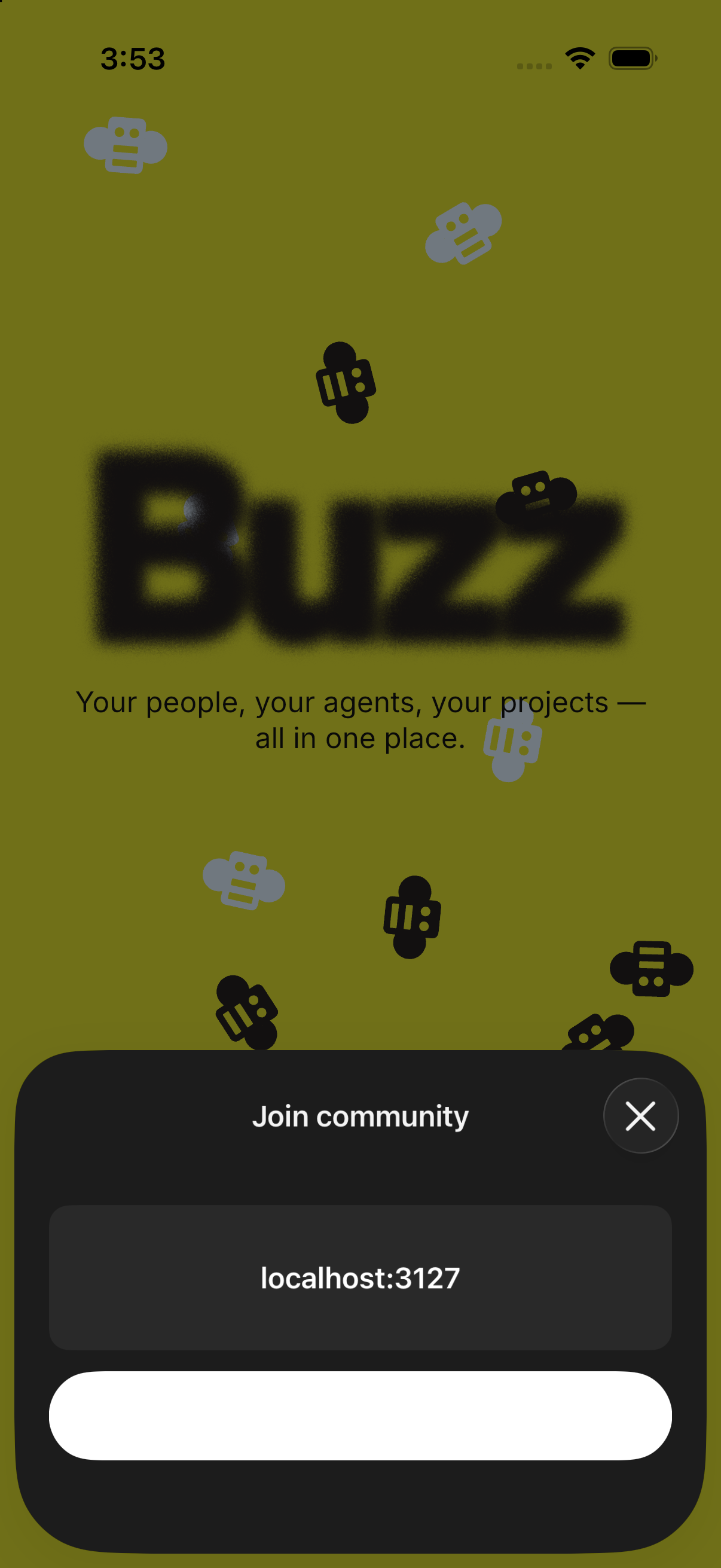 After (this PR): 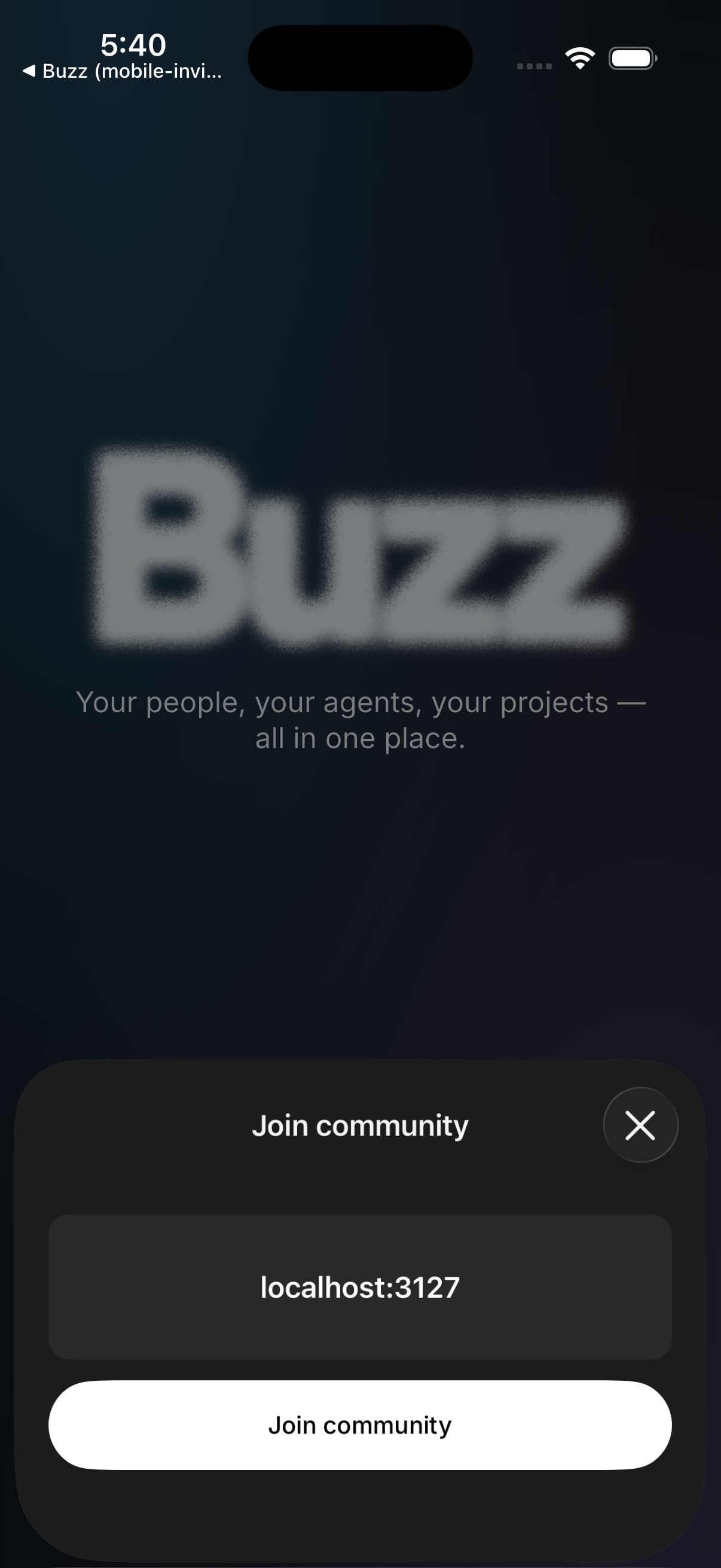 Signed-off-by: John Tennant <jtennant@block.xyz> Signed-off-by: John Tennant <jtennant@squareup.com> Co-authored-by: Zack <04f47b290b155b3b8b782b11501cdb15f1e21e82dfceefd01ff0ed405459d927@buzz.block.builderlab.xyz> Co-authored-by: Aaron <f425b86c3b780d43f8d9cf1802429d04dd985bf92eac44fca9468b5ad3887c5e@buzz.block.builderlab.xyz> |
||
|
John Matthew Tennant
|
1c143a40b7 |
fix(mobile): show the Join prompt when an invite launches Buzz (#8970)
## Summary Opening an invite while Buzz is closed can leave the Join prompt invisible and block later attempts. Native confirmation can attach to a temporary system dialog that then closes, leaving the join result pending. This fix uses Flutter confirmation when the native presenter is occupied. If UIKit rejects presentation, it clears the pending session so the user can try again. ### Related issue Related invite handoff: https://github.com/block/buzz/pull/8601. ### Testing The native regression fails before the fix and passes afterward. It covers rejected presentation, a second attempt, and an existing temporary dialog. The isolated PR build passed a fresh-user journey from Safari consent through launching Buzz, visible confirmation, Join, starter channels and seeded history. ### Screenshots Visible Join prompt after Safari opens Buzz, from this PR build:  ### Remaining work Finish Dart validation and review before readiness. Signed-off-by: John Tennant <jtennant@block.xyz> Co-authored-by: Zack <04f47b290b155b3b8b782b11501cdb15f1e21e82dfceefd01ff0ed405459d927@buzz.block.builderlab.xyz> |
||
|
John Matthew Tennant
|
0ec74838a5 |
fix(mobile): open consent for scanned and pasted invites (#8952)
## Summary Scanning or pasting a valid community invite can show “approval has expired” before the user has reviewed the community’s requirements. This fix opens browser consent, preserves the joining identity, and resumes joining when approval returns. If the browser cannot open, Review requirements remains available to retry. ### Related issue Related invite handoff: https://github.com/block/buzz/pull/8601. ### Testing Provider and widget regressions cover missing or expired approval, browser-launch failure and retry, identity preservation, and native dismissal without reporting a successful join. The isolated PR build passed actual clipboard entry and Allow Paste, browser consent, return to Join, membership, starter channels and seeded history. Camera scanning remains untested. ### Screenshots Browser requirements opened from the native Join prompt:  Joining resumes after approval:  Joined with starter-channel history:  Signed-off-by: John Tennant <jtennant@block.xyz> Co-authored-by: Zack <04f47b290b155b3b8b782b11501cdb15f1e21e82dfceefd01ff0ed405459d927@buzz.block.builderlab.xyz> |
||
|
klopez4212
|
b4509dee8b |
feat(mobile): add Buzzies and refresh agent avatar picker (#8921)
## Summary Adds Buzzies and refreshes the agent avatar picker with larger previews, rounded option strips, and clearer category choices. Also moves Agents above Appearance in the home menu and adds a custom agent icon. ### Related issue None found. ### Testing Analysis, 4,138 app tests, package tests, and 121 configured-auth tests pass. Earlier visual build exercised on Pixel and iOS simulator, with iPhone review; snapshots below show that build. | Android · Pixel | iOS · simulator preview | | --- | --- | |  |  | --------- Signed-off-by: kenny lopez <klopez4212@gmail.com> Co-authored-by: Terp <5856f6900e8e0a4e0ea1f4f8d2ee33e4753d2119bc122f94ecafc660b46c0511@buzz.block.builderlab.xyz> |
||
|
Tom Brow
|
f6f6d9a673 |
chore(mobile): delete dead code with no remaining UI path (#8880)
## Summary Deletes mobile code that no longer has a user-reachable path and has no counterpart in buzz-app, so it is unlikely to come back for parity. Net: 104 files, about 5,500 lines removed. No intended behavior change. - **iOS native message menu and action surface:** `NativeMessageMenu.swift` and `NativeMessageActionSurface.swift`, the `message`/`supportsMessage` coordinator branches, and the Dart selection hook. Dart stopped creating this view in [#8280](https://github.com/block/buzz/pull/8280). The native reactions sheet in the same coordinator is kept. - **Old home quick-actions launcher and `ComposeMorphIcon`:** only instantiated in tests since the nav-bar creation actions replaced them. - **Retired local theme stack:** `ThemeNotifier`, `AccentNotifier`, `SchemeNotifier`, `adaptive_theme.dart`, `AccentPickerPage`, the appearance-mode sheet and their helpers. These predate per-community theme sync. The legacy prefs migration in `community_theme_preference.dart` is kept. - **Unused widgets:** `ProfileAvatar` and `MaskedAvatarBadge`. - **Push permission-status plumbing:** the iOS `notificationAuthorizationStatus`/`openNotificationSettings` handlers, plus the uncalled strict age-gate snapshot registration and its Swift `syncAgeGatePushSnapshot` path. - **Orphaned files** with no importer: `profile_text_edit_sheet`, `editor_option_button`, `retained_page_transition`, `tappable_flapping_bee`, `agent_model_info`, `community_bot_profiles`, `sheet_divider`, `success_haptic`. - **Uncalled helpers:** the `pickAndUpload*`/camera helpers in `media_upload.dart`, unused `NostrFilters` builders, `mediaGetHeadersFor*`, and about 20 other uncalled functions, providers and styles. - **Removed-UI leftovers:** the never-wired invite directory providers, `AuthNotifier.signOut` and `removeActiveCommunityForSignOut` (the Sign out row is gone), `renameCommunity`, `HomePage.profilePageBuilder`/`SettingsPage.embedded`, and the create-forum branches of the create-channel sheet. Forum viewing is unchanged. Tests that only covered deleted code are removed. Tests of surviving code that used deleted helpers as drivers were repointed to the surviving API. An audit of `mobile/android` found no dead Kotlin, resources, manifest entries or Gradle dependencies, so Android code is unchanged. ## Validation - `flutter analyze`: no issues. - After rebasing onto main ([ |
||
|
klopez4212
|
93b8b8febc |
Standardize mobile navigation edges (#8895)
Standardizes mobile navigation headers: Android uses Home’s shared Flutter blur; iOS uses native soft edges, with graduated material retained during large-title collapse and the iOS 26 fallback preserved. Preserves Home’s upward title motion with a soft boundary and keeps the avatar crop title visible. Validation: 4,112 Flutter tests and 111 native tests passed after merging main. Rendered partial-scroll regression verified on the iOS 27 simulator; removing either review fix fails its regression assertion. The earlier preview was installed on a physical iPhone with the existing profile. --------- Signed-off-by: kenny lopez <klopez4212@gmail.com> Co-authored-by: Terp <5856f6900e8e0a4e0ea1f4f8d2ee33e4753d2119bc122f94ecafc660b46c0511@buzz.block.builderlab.xyz> |
||
|
klopez4212
|
634f48a8bd |
Mobile: open Solo chats with Bestie and workspace controls (#8884)
Mobile New chat now opens directly with the synced Bestie selected. The first send creates and names the chat; leaving an empty draft creates nothing. New and existing Solo chats can select or clear a workspace from the header popover, with a checkmark for the active choice and a No Workspace option. Workspace and agent controls have separate iOS glass surfaces, Bestie stays at the far right, and Back uses a chevron. The agent sheet fits its list, with scrolling for long lists. Workspace creation stays in the Home New menu. The New menu groups Solo above Team. Android expands across the full control row; iOS keeps its native menu while Search and Bestie merge into New through Liquid Glass, with synchronized icon motion and the residual glass fading away. Empty workspaces use a compact, muted message. Validation: 4,055 mobile tests passed (34 skipped), static analysis passed, and native menu checks passed. Earlier physical-device previews and the iPhone New-menu animation were visually approved before this consolidation. This PR consolidates the controls previously developed in #8891 into the existing draft/first-send implementation. The New menu animations, attachment handling, and durable retries remain in this PR. The combined controls have widget interaction coverage; the combined build has not yet had a new physical-device walkthrough. Current combined controls below are Android Flutter widget renders with fixture data, not device screenshots. Images are GitHub attachments only. | New conversation | Workspace popover | Compact agent sheet | | --- | --- | --- | |  |  |  | Empty workspace widget preview (unchanged):  --------- Signed-off-by: kenny lopez <klopez4212@gmail.com> Co-authored-by: Terp <5856f6900e8e0a4e0ea1f4f8d2ee33e4753d2119bc122f94ecafc660b46c0511@buzz.block.builderlab.xyz> |