mirror of
https://github.com/block/buzz.git
synced 2026-11-25 18:52:52 +00:00
0e7fd48d41db0ea00f4baa60d36d4fdfce31df40
2 Commits
| Author | SHA1 | Message | Date | |
|---|---|---|---|---|
 Tom Brow |
3689241672 |
feat(mobile): reply to a message from its iOS notification (#9439)
On iOS, a notification that shows a channel or DM message now offers
**Reply**. The user types a reply in the notification and sends it
without opening the app.
- The reply goes in a subthread under the notified message (its thread
root is the message's own root, or the message itself when top-level). A
Solo chat takes no thread replies, so there it goes at the chat's top
level.
- It always mentions the notified message's sender, so the person or
agent being answered is notified. Typed `@name` text stays plain, since
a notification has no mention autocomplete.
- It is sent by the app's own send path. iOS starts the Flutter engine
when it wakes the app in the background, and the reply reopens the relay
connection (closed after the background grace period), waiting a bounded
time for it before sending.
- A sent reply marks the conversation read **up to the notified
message** (newer messages stay unread) and clears that notification and
earlier ones from the same conversation.
- An unsent reply (offline, relay error, timeout, a channel the user
isn't in) keeps the typed text as a draft, after any draft already
there, and shows a "Reply not sent" notification that opens the
conversation.
For now only notifications from the community selected in the app offer
Reply: replying must not switch communities, and the app can only reach
the selected one. Forum posts and fallback notifications that show no
message offer none. The design and the options considered are in
`docs/adr/0004-notification-reply.md`.
### Before / after
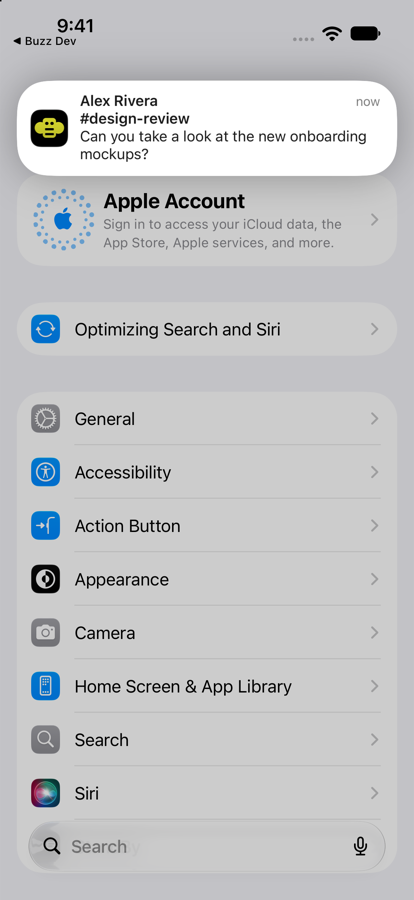
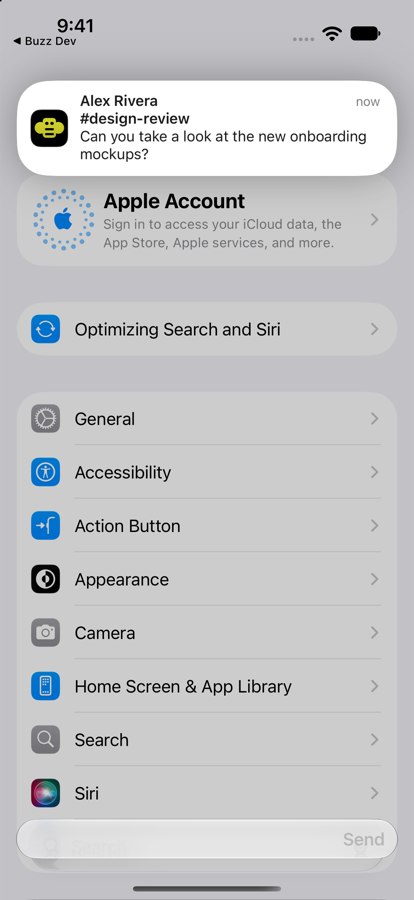
Long-pressing a message notification (synthetic names and text). Before
has no reply field (captured by sending the notification without its new
reply category, which is how main presents it); after shows one with
Send.
| Before | After |
| --- | --- |
|
|
|
### Demo
With the app backgrounded past the relay grace period, replying from the
notification lands the reply in a subthread under the message:
https://github.com/user-attachments/assets/37df7e28-aa46-4521-938e-8af5faa77b83
### Regressions
Nothing existing changes unless the user taps Reply. Notifications gain
a category and a small reply context in `userInfo`; tapping a
notification still opens the conversation as before. The relay reconnect
only happens for a pending reply and then falls back to the normal
background disconnect, so idle background behavior and network use are
unchanged. Reply failures end in a draft and a "Reply not sent"
notification rather than touching other state.
### Validation
- End to end on an iOS 27 simulator against a real community: with the
app backgrounded past the relay grace period, replied from the
notification; the reply appeared in a subthread under the message,
mentioning its sender. The demo above was recorded before the review
fixes (session hold, community fence, origin-community drafts, composer
draft sync); the same run was repeated on the current head,
|
||
|
Taylor Ho
|
05150c1188 |
feat(mobile): sync themes per community (#3767)
**Category:** new-feature **User Impact:** Mobile now keeps each community’s appearance in sync with desktop, including theme, accent, and system-mode preference. **Problem:** Appearance choices were device-local, so the same account could look different between desktop and mobile. Live sync could also stop after the relay closed a subscription. **Solution:** Store each community’s encrypted appearance preference on its relay using the shared desktop wire contract, restore it from a local identity-scoped cache, and apply replacement events live. Closed subscriptions now recover with guarded backoff and fetch the latest preference so no update is lost during the gap. <details> <summary>File changes</summary> **mobile/lib/app.dart** Connects community appearance state to the authenticated app lifecycle. **mobile/lib/features/settings/accent_picker_page.dart** Aligns mobile accent choices and selection behavior with the shared catalog. **mobile/lib/features/settings/settings_page/appearance_section.dart** Clarifies the active appearance and hides accent controls when the Buzz theme owns its neutral accent. **mobile/lib/features/settings/theme_picker_page.dart** Persists catalog theme choices through the community-scoped provider. **mobile/lib/shared/theme/accent_colors.dart** Matches desktop’s accent catalog and wire values. **mobile/lib/shared/theme/buzz_theme.dart** Keeps Buzz visually neutral without discarding the user’s stored accent for other themes. **mobile/lib/shared/theme/community_theme_preference.dart** Defines and validates the versioned desktop-compatible appearance payload. **mobile/lib/shared/theme/community_theme_provider.dart** Coordinates cache-first appearance loading with account and community changes. **mobile/lib/shared/theme/community_theme_sync.dart** Adds encrypted NIP-78 relay persistence, live replacement handling, deterministic ordering, safe seeding, and resilient subscription recovery. **mobile/lib/shared/theme/theme.dart** Exports the community appearance modules. **mobile/test/features/settings/theme_picker_page_test.dart** Covers the updated settings behavior. **mobile/test/shared/crypto/nip44_interop_test.dart** Proves Dart decrypts a desktop-produced nostr-rs NIP-44 v2 preference. **mobile/test/shared/theme/buzz_theme_test.dart** Covers Buzz’s neutral rendering and stored-accent restoration. **mobile/test/shared/theme/community_theme_preference_test.dart** Covers wire parsing, validation, migration, and future-version handling. **mobile/test/shared/theme/community_theme_sync_test.dart** Covers cache/relay lifecycle, replacement ordering, switching races, absence-only seeding, and closed-subscription recovery. </details> ## Reproduction steps 1. Sign into desktop and mobile with the same account and join the same community relay. 2. On desktop, choose a distinctive non-Buzz theme and accent; mobile should update without a local toggle. 3. Restart mobile and confirm it restores the same appearance. 4. Change the mobile theme and accent and confirm desktop follows. 5. Leave mobile idle or backgrounded through a relay reconnect, then change desktop again; mobile should resubscribe and catch up automatically. 6. Switch communities and confirm each community restores only its own appearance. --------- Signed-off-by: Taylor Ho <taylorkmho@gmail.com> Co-authored-by: npub1223z34hd7vtwc6qj4s7flsxkj644nlre2nthu7lrrmkumhu3xddsrx9r6w <52a228d6edf316ec6812ac3c9fc0d696ab59fc7954d77e7be31eedcddf91335b@buzz.block.builderlab.xyz> |

