mirror of
https://github.com/block/buzz.git
synced 2026-11-24 18:21:59 +00:00
21802f019e19e2836f35da660e090511b6ccf32b
7 Commits
| Author | SHA1 | Message | Date | |
|---|---|---|---|---|
 klopez4212 |
120cbae8e5 |
fix(mobile): restore inline typing groups and keep working thread links (#8865)
Restores mobile’s shared inline typing bubble and animated avatar cluster after #8765 replaced them with composer activity. Humans and agents share the group, including the existing overflow badge and reduced-motion behavior; fresh replies regain the bubble-to-message handoff. Keeps the working-agent reply link from #8754, including its current DM support: a root message can show working agents and open its thread before the first reply. Thread timelines now use the same inline typing group after their last message, so reverting the redesign does not bring back the old full-width typing bar. Archived and non-member conversations retain their existing no-typing-indicator behavior. This intentionally follows the requested mobile presentation rather than buzz-app’s composer activity layout. VISION_MOBILE.md allows platform-specific presentation. The composer’s “Working now” list is removed with the redesign; the root-message thread links remain. Validation: - At `5df48ad4b`: `just mobile-install`, `just mobile-check` and `just mobile-test` passed (4,036 Flutter tests passed, 30 skipped; unconfigured-push checks and 27 crypto tests also passed). Repository file-size checks passed. - Required pre-push hooks passed, including a second full mobile check/test run and the repository file-size gate. Hosted CI is pending. - Extended the existing thread journey through opening an empty working thread, mixed human/agent typing after a reply, clearing typing, and Back. Existing coverage exercises avatar grouping, overflow, reduced motion, reply handoff, and followed/detached thread scrolling. - Agent self-review completed; no additional blockers found after correcting inventory-only agent avatar shapes and waiting for timeline layout before following new thread typing. - Simulator component preview uses synthetic identities in a local, uncommitted entrypoint. It is not evidence of a live relay exchange. Human verification pending (draft): 1. In a channel or DM, have an agent work on a threaded reply. Confirm the root’s working-agent reply link opens that thread before a reply arrives. 2. Have multiple people/agents type. Confirm one inline avatar group and dot bubble, including inside the opened thread, with no wide composer bar. 3. Receive a fresh reply in the main conversation/Solo and check the typing-to-message handoff. In a long thread, check typing while following the latest message and while scrolled up, then navigate Back. Component preview on iPhone 18 Pro (iOS 27.0 simulator). These are production widgets in an uncommitted preview shell with synthetic identities; surrounding screen chrome is not a full-app screenshot.   --------- Signed-off-by: kenny lopez <klopez4212@gmail.com> Co-authored-by: Terp <5856f6900e8e0a4e0ea1f4f8d2ee33e4753d2119bc122f94ecafc660b46c0511@buzz.block.builderlab.xyz> |
||
|
Logan Johnson
|
aa5f3e7bde |
feat(mobile): show conversation activity by the composer, as buzz-app does (#8765)
## Summary Stacked on #8754. This brings the rest of buzz-app's conversation activity to mobile. buzz-app shows who is active in a conversation in one place, just above the composer (`src/features/messages/TypingIndicator.tsx`). Mobile had its own design: a typing bubble at the end of the timeline that turned into the agent's reply (the "handoff"). This change replaces that design with buzz-app's indicator in channels, DMs, Me and threads. What the indicator shows, as in buzz-app: - **On the right: your agents working here.** Up to four agent avatars, then "+N". "Your agents" are your agent inventory (kind 30177), as in #8754. Tapping the avatars opens the "Working now" list. - **On the left: everyone else typing here.** Typing dots and buzz-app's text: "Alice is typing", "Alice, Bob are typing", "Alice, Bob and 1 others are typing". - **"Working now" list.** Each row shows the agent, "Working" and, in a channel view, where it works: "Channel conversation", or "Thread · <first 60 characters of the root>", with "+N more" after two places. - If the agent works in exactly one thread, the row opens that thread. A thread whose root is not loaded opens by its ID, as buzz-app's link does. A button at the end of the row opens the agent's activity. - Otherwise (in a thread view, in Me, in the channel only, or in several threads), the row opens the agent's activity. As in buzz-app, work in the channel does not count as a thread: an agent in the channel and one thread opens that thread. - "Activity" is mobile's existing `AgentActivitySheet`. - The list closes when the last agent stops. - **Scope** (`current-activity.ts`: "Channel views include threads; thread views do not"): | View | Your agents | Everyone else | |---|---|---| | Channel or DM | Here and in any thread | Here only | | Thread | This thread only | This thread only | | Me | Anywhere | Anywhere | - **Me** works like buzz-app's Solo chat: with one agent working, tapping the avatars opens its activity directly. - **Spoken status:** buzz-app's live status, for example "Jerry, Morty, Summer are working. Alice is typing". The button says "Activity: Morty working" or "Activity: 3 agents working". Changes you will notice compared with #8754 and main: - The typing bubble at the end of the timeline and the bubble-to-reply handoff are removed. #8754's channel typing row goes with them. The root message's reply row from #8754 stays. - In DMs, other people's agents typing in a thread no longer show at the DM level. Only your agents do, as in buzz-app. This reverses part of #8731. - With no composer, there is no indicator. This applies when you are not a member or the channel is archived, as in buzz-app (`ChannelsPage`, and `ThreadPanel`'s `composerRoot`). Before, mobile showed typing in those threads. Less than buzz-app, not in this PR: - Status is always "Working". buzz-app also uses lifecycle evidence (local agent state, kind 24200) and tool labels. Mobile uses typing only, as in #8754. - No hover preview and no keyboard path (Down arrow) into the list. - The indicator sits in the composer dock, so it moves the timeline up a little. In buzz-app it floats over the history. Code: - `conversation_activity_state.dart` holds the scope rules, read from typing and the inventory. - `conversation_activity.dart` is the indicator. `working_now_sheet.dart` is the list. - `channel_detail_page/composer_activity.dart` puts it in the channel composer dock and opens threads. The thread page puts it above its composer. - Removed: `inline_agent_typing.dart`, `agent_reply_handoff.dart`, `agent_typing_bubble.dart`, `typing_avatar_cluster.dart`, `typing_motion_preview.dart`, `channel_typing_indicator.dart`, and their tests. ### Related issue N/A. Reported in Buzz #buzz-bugs (on iOS you cannot tell whether an agent is down or typing). Searched issues and PRs for duplicates: none found. ### Testing Android emulator, local relay, debug build of `8362d46af`. **Channel and thread.** Demo User mentions Morty. Morty, Summer and Jerry (in Demo User's agent inventory) type in the mention's thread. Rick (not in the inventory) types in the thread and in the channel itself. In the video: 1. The channel shows three agent avatars on the right and "Rick is typing" on the left. Rick's thread typing does not show. 2. Tapping the avatars opens "Working now". Each row reads "Working" and "Thread · …". Tapping Morty's row opens the thread. 3. In the thread, the same three agents show, with "Rick is typing" (his thread typing). Rows there open activity: tapping Morty's opens his activity sheet. 4. Back in the channel, Summer, Jerry and Rick stop. Only Morty's avatar is left. Then Morty replies and the indicator goes away. No typing bubble shows at any point. https://github.com/user-attachments/assets/b300e16e-8bec-4489-9ee4-a68c5c2dc30d **DM.** A DM with Morty (in the inventory) and Rick (not). Demo User posts. Both type in its thread, and only Morty's avatar shows. Then Rick also types in the DM itself, and "Rick is typing" shows. Morty replies, and his avatar goes away. https://github.com/user-attachments/assets/3614be5f-3a69-4a1a-9290-d1fad16a5445 The UI tree confirmed each state, for example "Summer, Jerry, Morty are working. Rick is typing", "Activity: 3 agents working", "Morty is working" (agents only), and "Morty is working. Rick is typing" (DM). - Widget tests in `channel_detail_page_test.dart` (Typing indicator group): - Scope table: Me, channel and DM, for a person and for your agent. While the inventory loads, an agent never shows as a person. - The journey from #8754, extended: the composer status and button, the list's places, opening the thread, thread-view rows opening activity, and the list closing when work stops. - Six agents in several places: four avatars and "+2", "+1 more", scrolling to the last row, opening a thread that is not loaded, and opening activity. - Me opens a lone agent's activity directly. People typing: 1, 2 and 3. - Each new check was made to fail on purpose by removing the code it guards. - `just mobile-check` and the full `just mobile-test` passed on `3480ad238` (3983 passed, 28 skipped). - Typing names use the full foreground, so they stay readable in dark themes (review feedback). A test checks the color. - Auto and Cerveau reviewed it adversarially against buzz-app origin/main. Their findings are fixed: the list did not scroll, unloaded threads did not open, the Me behaviour, the non-member indicator, and a double-tap pop. Their last pass on `2c45f3ec0` found nothing. The device run then showed that, with only agents working, the spoken status had no size and Android dropped it. `8362d46af` fixes this, and their review of that fix found nothing. - Not yet tested on iOS or by a human. 🤖 Generated with [Claude Code](https://claude.com/claude-code) --------- Signed-off-by: Logan Johnson <loganj@squareup.com> Co-authored-by: Larry <627498bd4bd1f281a16431e3c6cce3b5c25b6692798c78672298aefbf2f8f8b5@buzz.block.builderlab.xyz> Co-authored-by: Claude Opus 5.5 <noreply@anthropic.com> |
||
|
Logan Johnson
|
851250524e |
feat(mobile): show your agents working in a thread on its root message (#8754)
## Summary When you mention one of your agents in an ordinary channel on mobile, nothing in the channel showed that the agent was working until its reply landed. The agent answers in the mention's thread, so its typing (kind 20002) is thread-scoped, and the channel timeline hides thread typing. The header working dot that used to cover this was removed in #8052, #8075 and #8082. This change brings buzz-app's behaviour to mobile. In buzz-app, the thread summary under a message shows the viewer's own agents while they type in that thread (`MessageRow.tsx` `useThreadAgents`, described in `docs/agents.md`). Mobile now does the same. The root message's reply row shows the working agents' avatars and the typing dots, and the row appears even under a mention that has no replies yet. It then reads "View thread". Tapping it opens the thread. When the reply arrives and the typing ends, the dots go away and the row reads "1 reply". The details follow buzz-app: - Only your agents count. buzz-app's "your agents" (`agentChoices.identities`) are your agent inventory, which is the kind 30177 records you author with archived agents included, plus your local agents. It does not read the NIP-OA owner tag. Mobile uses the same inventory. An agent that only names you as owner in its profile does not count. People and other agents typing in a thread stay inside the thread view. - Working agents leave the participant stack for their own group: up to two agent-shaped avatars side by side, then "+N", then the dots. - The curved reply branch shows only when the message has replies. - buzz-app's channel indicator by the composer also includes your agents working in any thread ("Channel views include threads" in `current-activity.ts`). Mobile's channel-level surface is the typing row at the end of the timeline. In ordinary channels, that row now also shows your agents that are typing in a thread, with the agent avatar shape. It goes away when the agent's reply arrives. - The spoken labels use buzz-app's strings: "View thread: Morty is working", "View thread: 3 agents are working" and "View thread: 1 reply. Morty working". - Me and DMs already show thread typing inline, so they are unchanged. Code changes: - `TypingDots` is extracted from `AgentTypingBubble`, so the reply row and the bubble share one animation. It respects reduce motion. - `ReplySummaryLink` accepts a nullable summary and a list of working agents with their names. `SmallAvatar` gains an `agent` flag for the working group, and `InlineAgentTyping` a `knownAgents` set so the channel typing row gives inventory agents the agent shape. - `meAgentInventoryProvider` holds the inventory keys. It is read only while a thread in the channel has typing. Each read, failed ones included, is reused for 30 seconds, then read again if still watched, or dropped. So the inventory refreshes every 30 seconds while it is watched, and a short gap between an agent's messages does not query again. - The page selects a "pubkey root" key from channel typing, so typing expiry refreshes do not rebuild it. Less than buzz-app, not in this PR: - buzz-app prefers lifecycle evidence (local agent state and kind 24200 observer turns) and falls back to typing. Mobile uses typing only. So when an agent stops without replying, mobile keeps its dots until the typing expires (8 seconds). A second buzz-app device without that evidence behaves the same way. I found no 24200 publisher in buzz-app itself. buzz-app publishes typing (kind 20002) for the agents it runs. - The channel typing row reads "Morty is typing" where buzz-app's indicator says "working". It has no popover that names the thread and no tap action. It sits after the newest message, so it scrolls away with the timeline, while buzz-app's indicator stays by the composer. ### Related issue N/A. Reported in Buzz #buzz-bugs. Searched issues and PRs for duplicates: none found. ### Testing Android emulator, local relay, build of `3caa17a20`. Demo User mentions Morty. Morty, Summer, Jerry and Rick send thread typing: - Morty is a channel bot in Demo User's agent inventory. - Summer and Jerry are in the inventory but are ordinary members, so only the inventory gives them the agent shape. - Rick names Demo User as owner in his profile but is not in the inventory. In the video: 1. The root message shows Morty and Summer, "+1", the dots and "View thread", with no reply branch. The channel typing row reads "Morty and 2 others" with three agent avatars. Rick does not show. 2. Tapping "View thread" opens the thread before the first reply. Back to the channel. 3. Summer and Jerry stop. Their typing expires, and only Morty is left on both rows. 4. Morty replies. The typing row goes away, the reply branch shows, and the root row reads "1 reply". The UI tree confirmed "View thread: 3 agents are working", "Morty and 2 others are typing", "View thread: Morty is working", "Morty is typing" and "View thread: 1 reply". https://github.com/user-attachments/assets/2237e565-aa48-405a-84ca-39ab9a06b7a6 - The widget test "an agent working in a thread shows on its root message" (`channel_detail_page_test.dart`, Typing indicator group) covers these cases: - A person, and an agent outside the inventory that names you as owner, show no row and no channel typing row. - Inventory agents also show in the channel typing row ("Morty and 2 others are typing", checked in the semantics tree), with the agent shape. That row goes away when the reply arrives. - Three inventory agents show two avatars with the agent shape, "+1", "View thread", no branch, and "View thread: 3 agents are working". - The row opens the thread before the first reply. - After the reply, Morty shows once, the branch shows, and the label is "View thread: 1 reply. Morty working". - With Summer still typing, Morty removed from the inventory stops counting after the 30-second refresh. - Each check was made to fail on purpose by removing the code it guards. - `just mobile-check` and the full `just mobile-test` passed on `3caa17a20` (3996 passed, 28 skipped). - Auto and Cerveau reviewed it adversarially against buzz-app origin/main. Their findings are fixed, and their last pass found nothing. - Not yet tested on iOS or by a human. 🤖 Generated with [Claude Code](https://claude.com/claude-code) --------- Signed-off-by: Logan Johnson <loganj@squareup.com> Co-authored-by: Larry <627498bd4bd1f281a16431e3c6cce3b5c25b6692798c78672298aefbf2f8f8b5@buzz.block.builderlab.xyz> Co-authored-by: Claude Opus 5.5 <noreply@anthropic.com> |
||
|
klopez4212
|
8260b6ef4c |
feat(mobile): group typing avatars into one animated indicator (#8543)
## Summary Replace stacked mobile typing rows with one animated avatar cluster and one typing bubble. People and agents share diagonal, triangle, and four-corner layouts, with a circular +N badge for overflow and reduced-motion support. Includes an opt-in local demo (`BUZZ_TYPING_PREVIEW=true`) with mixed human/agent avatars and count controls; it never publishes typing events. ### Related issue Follow-up to #8505. No duplicate found in the typing-avatar PR search. ### Testing - 3,736 mobile tests plus four unconfigured-push tests passed; analysis and file-size checks passed. - Installed and iterated on a physical iPhone with the existing profile/community preserved; owner reviewed the motion and badge sizing. Signed-off-by: kenny lopez <klopez4212@gmail.com> Co-authored-by: Terp <5856f6900e8e0a4e0ea1f4f8d2ee33e4753d2119bc122f94ecafc660b46c0511@buzz.block.builderlab.xyz> |
||
|
klopez4212
|
0768397092 |
feat(mobile): show inline human typing and outgoing avatars (#8505)
## Summary People typing in a mobile channel now appear beside their avatar in an inline three-dot bubble, using the existing agent typing animation instead of the separate composer status strip. Human avatars stay round; agent identities retain their agent shape. Reduced Motion keeps the dots still, and thread-scoped typing remains inside its thread. Restore the viewer’s avatar on the right of their own messages in channel and Me timelines. Grouped messages show the avatar on the final bubble, with reactions and reply footers aligned to the bubble. ### Related issue No duplicate found. Related: #3668 tracks observer-backed agent working status; this PR changes presentation only and does not add observer lifecycle behavior. ### Testing - `just mobile-install`; final pre-push `just mobile-check && just mobile-test` passed (3,728 tests passed, 16 skipped; 4 unconfigured-push tests passed). Repository file-size gate and commit formatting passed. - Regression checks fail against the original channel typing and outgoing-avatar implementation. - Pixel 10 / Honeycomb Studios: the recording build exercised inline human/agent typing, avatar shapes, own-message avatars, and message arrival. That build predates this fresh-main PR; the PR additionally uses the shared agent identity lookup. - Before/after widget-rendered previews use generic sample messages. No recording identity, app-package override, or demo scripts are included. ### Before / after Rendered from the production channel widgets using generic sample messages; Reduce Motion enabled for the stills. | Before | After | | --- | --- | | 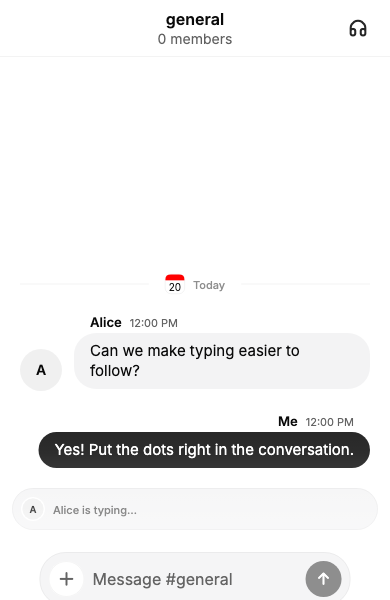 | 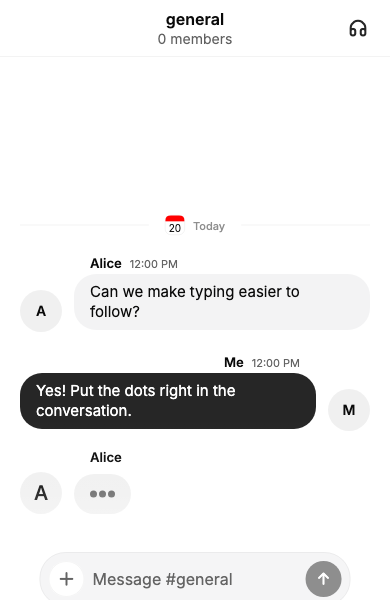 | ### Manual check Open a channel and have another person type: their round avatar and animated dots should appear at the bottom of the conversation and disappear when the message arrives. Send two consecutive messages: your avatar should appear once beside the final bubble. Repeat with Reduce Motion and larger text. Draft pending human testing of this PR snapshot. Do not merge based on the earlier recording alone. --------- Signed-off-by: kenny lopez <klopez4212@gmail.com> Co-authored-by: Terp <5856f6900e8e0a4e0ea1f4f8d2ee33e4753d2119bc122f94ecafc660b46c0511@buzz.block.builderlab.xyz> |
||
|
klopez4212
|
c8ea4fb4eb |
feat(mobile): polish Home navigation and Solo workspace (#8393)
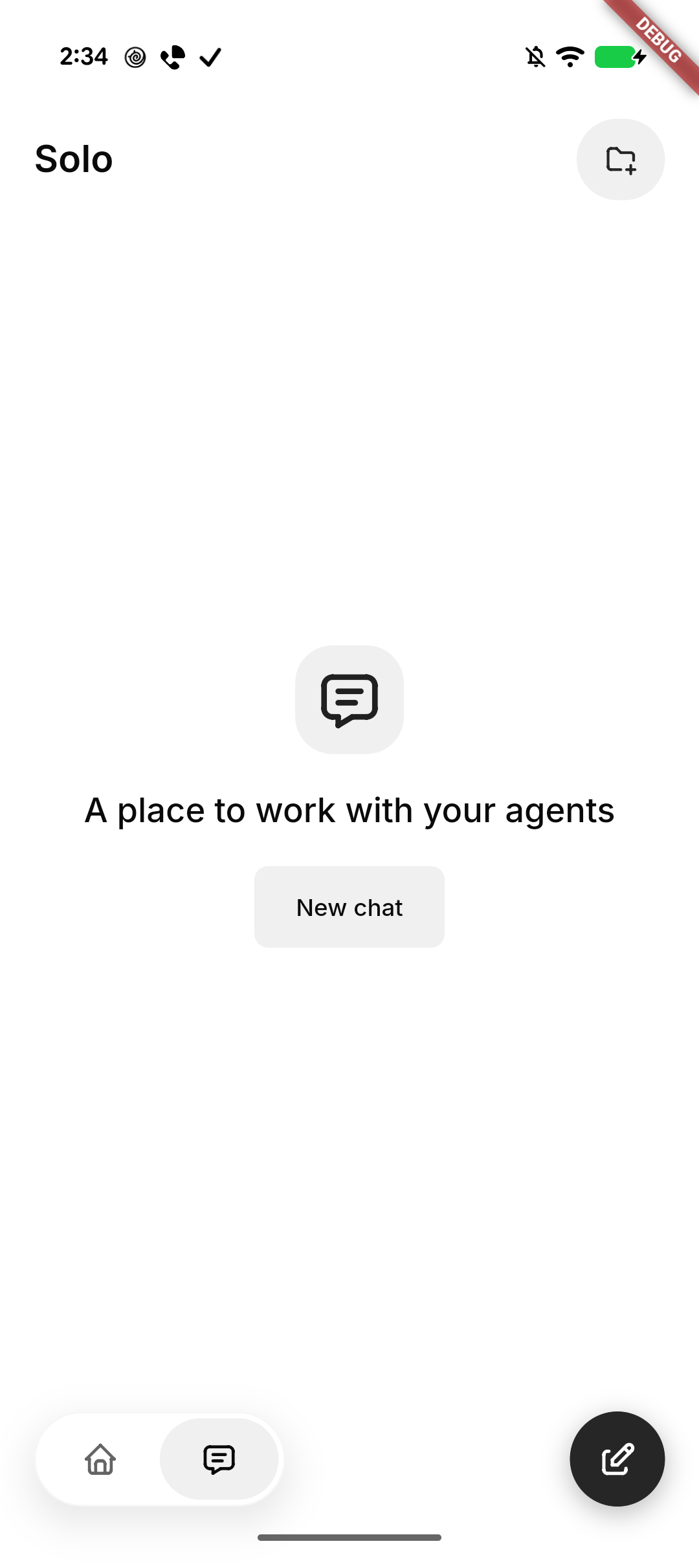
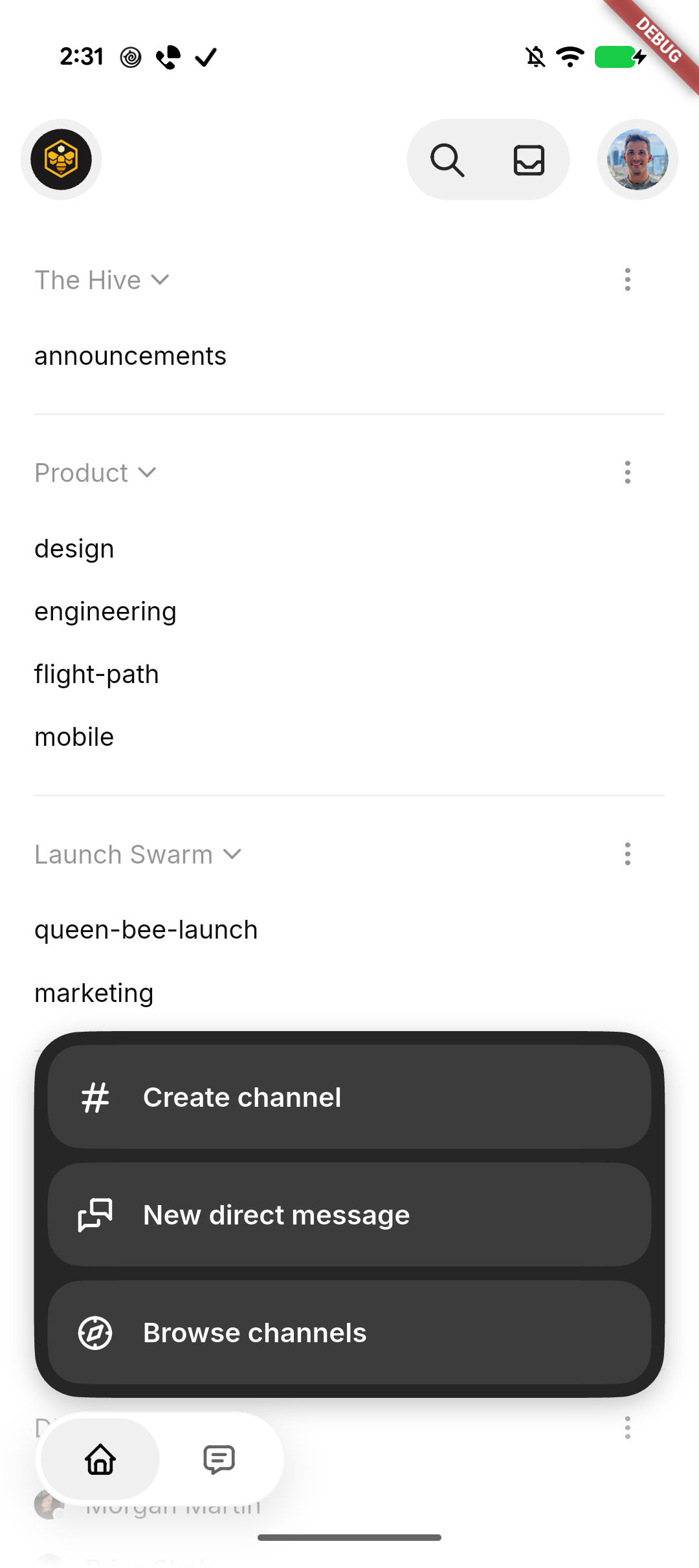
## Summary Polish mobile Home and Solo: group Search/Inbox beside a separate profile avatar, move Inbox and Settings to bottom-up pages with Close controls, and place tabs opposite the plus/compose action. Morph plus to compose clockwise when entering Solo and reverse counterclockwise when returning Home, with a directional quarter-turn of the icon inside a level button and a subtle scale pulse, respecting reduced motion. Align Search’s Close control with Inbox, simplify its placeholder, and initialize selected filter contrast correctly. Collapse the plus menu when leaving Home. Center Solo’s native-glass New chat empty state and keep it stationary behind the keyboard. Standardize Tabler icons and neutral backgrounds, retain SF Back/Close on iOS, use native Liquid Glass headers, tab container, and actions (solid grey selected tab, slightly darker on iOS) on iOS and black actions on Android, and smooth the expanded menu corners. Repair native header safe-area/return layout and compose movement after cancellation. ### Related issue None found for this UI refinement; follows #8337. ### Testing - Formatting, analysis, full mobile suite: 3,487 passed, 4 skipped; 3 push-configuration tests passed. File-size checks passed. - Base UI built and installed on Pixel and iPhone in place. Pixel navigation/New chat cancellation checked. Subsequent glass and rotation refinements are previewed on iPhone; motion feel awaits human confirmation. - Draft pending human confirmation of the final Settings entrance/return behavior on iPhone. ### Pixel snapshots | Solo | Expanded actions | | --- | --- | | <img src="https://raw.githubusercontent.com/block/buzz/16dc0f8af971e63d788fee20974997fab925dec9/docs/screenshots/mobile-home-solo/pixel-solo.png" width="280" alt="Solo empty state with New chat" /> | <img src="https://raw.githubusercontent.com/block/buzz/16dc0f8af971e63d788fee20974997fab925dec9/docs/screenshots/mobile-home-solo/pixel-actions.png" width="280" alt="Expanded channel actions with smooth corners" /> | --------- Signed-off-by: kenny lopez <klopez4212@gmail.com> Co-authored-by: Terp <5856f6900e8e0a4e0ea1f4f8d2ee33e4753d2119bc122f94ecafc660b46c0511@buzz.block.builderlab.xyz> |
||
|
klopez4212
|
b1d60f98e2 |
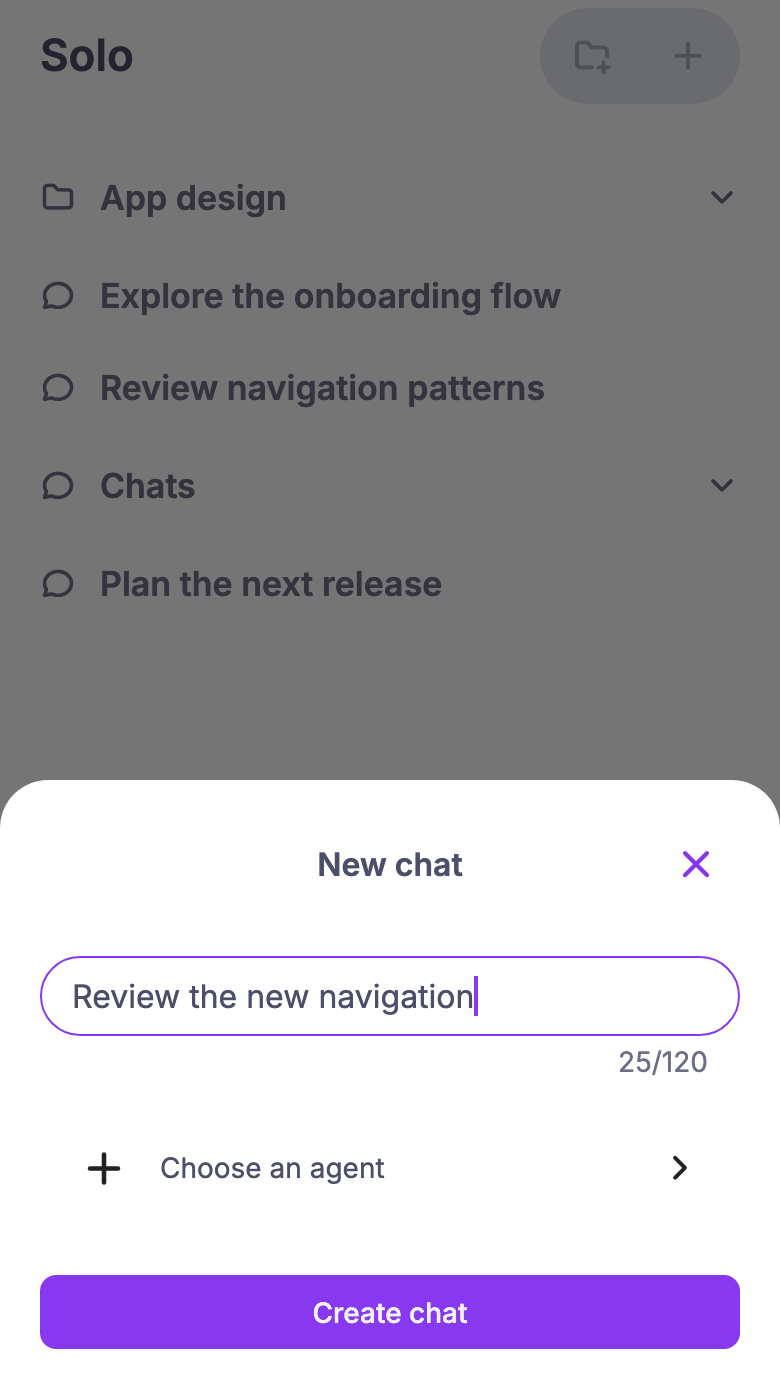
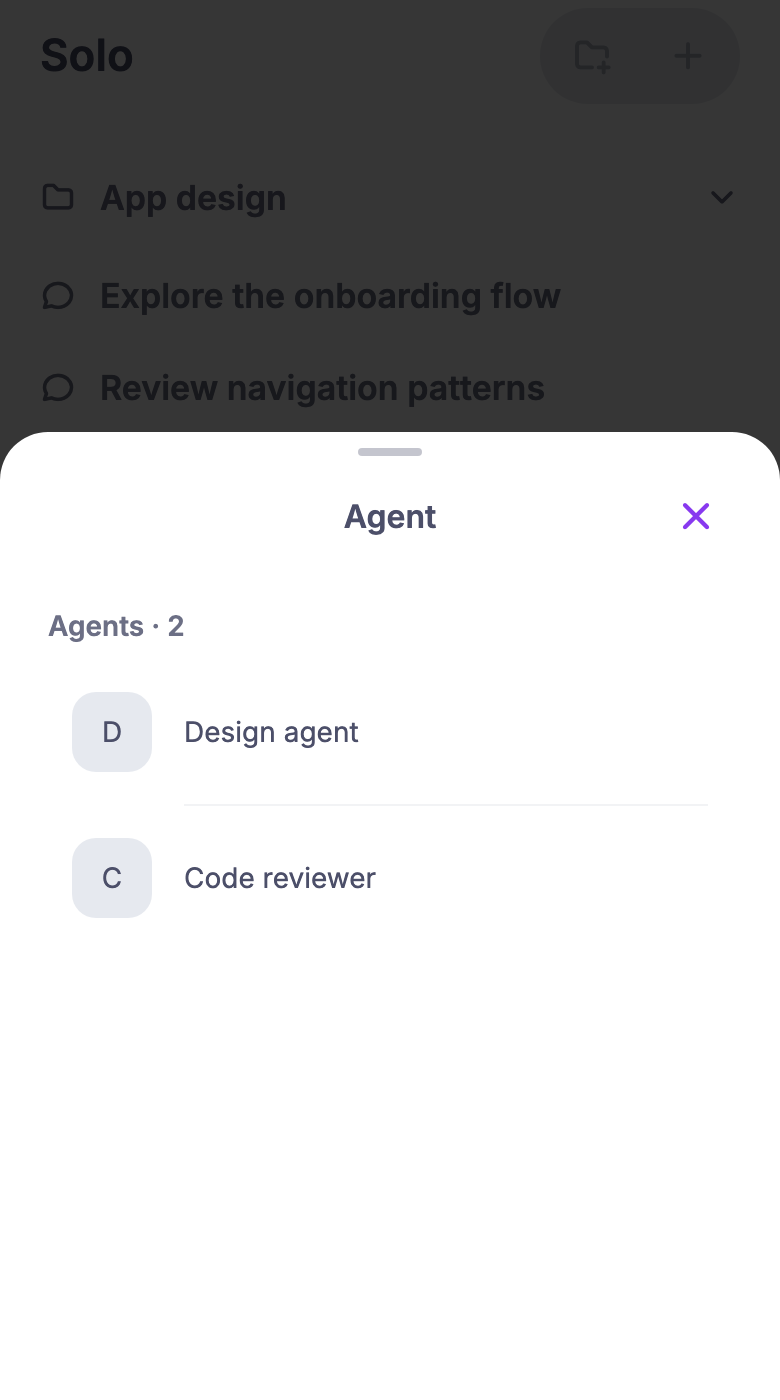
Bring synced Solo chats and projects to mobile (#8337)
## Summary Bring desktop Solo chats and project organization to mobile, with synced collapsible sections, shared unread highlights and tab badges, agent selection, shared search, native iOS creation sheets, and inline typing bubbles that transition into replies. Resolve Solo placement for every chat entry route, retain encrypted organization snapshots for offline reading, and let users resume or discard unfinished chat and project setup without deleting existing messages. ### Related issue Related: #6565; expandable agent transcripts remain separate work. ### Testing - Fresh Solo read state seeds each active chat from its captured initial last-message timestamp before exposing row/section/tab unread state. Baselines survive intervening channel updates and reset across identity/community boundaries while surviving read-state readiness changes. Regressions cover multiple chats, events before read-state readiness and during/after seeding, and identity changes; removing either the seed or the display gate fails them. - Chat completion reconciles a retained Solo-save journal even when placement is already confirmed. False/throwing cleanup regressions ensure the outer intent remains until reconciliation and only one placement is published. Typing terminal-close loops remain bounded; the retry budget resets after an uninterrupted eight-second health interval or transport reconnect. - Typing retry budgets reset after sustained recovery; invalid Solo updates retain cached rows with a retry warning that survives failed refreshes. Project names use the editors’ 120-grapheme limit, including emoji and combining characters. Regression coverage exercises repeated recovery, invalid live/refresh heads, and character-limit boundaries. - Rebased onto current main, preserving the newer Search controls, Huddle timeline filtering, and message-media layout. - Failed project journal writes reload storage before claiming recovery and reopen the entered name for retry. Typing subscription rejections are caught; terminal closures clear stale indicators and retry with a bounded backoff, canceled on disposal. Regression tests cover both false/throwing storage writes and initial/late subscription rejection. - Explicit ordinary destinations skip optional Solo lookup waits. Generic destinations perform one bounded lookup in the destination (search no longer duplicates it); an unavailable classification falls back to ordinary sending per the product owner's explicit choice. Positively identified Solo destinations use Solo providers. - Terminal Solo subscription closure preserves cached rows and exposes live-update Retry. Page coverage verifies warning visibility, usable rows during recovery, and a subsequent terminal close. Removing the warning or the immediate ordinary-route guard fails its regression. - Generic channel entries share an ordinary default when Solo classification is unavailable, per the requested product behavior. Known Solo placement takes precedence; callers can explicitly require unresolved placement to remain blocked. Bounded initial lookup preserves known Solo deep-link routing. - Dirty newest snapshots and offline-save warnings survive transport reconnects; Retry persists that same event even if the relay returns an older head. Community changes replace the service, and agent-directory reconnect refresh remains intact. - Pending-save discard reloads failed removals. Repeated reconnect testing confirms typing subscriptions are released on provider rebuild and disposal; removing the existing cleanup fails the regression. - Ordinary Home/create routes explicitly preserve private-channel sending during Solo failures; identified Solo sends use the Solo sender and explicit unresolved routes remain fail-closed. Solo unread replies beyond the initial 200-event page are loaded through the oldest-unread boundary. - Chat/project/agent cleanup reloads failed removals, retains same-process recovery, and protects replaced records. False/throw regressions verify retries do not duplicate creation or membership. Route, unread, and cleanup guard-removal mutations each fail their regression. - Ordinary channels, DMs, and forums remain sendable when optional Solo sync fails; explicit unresolved placement stays blocked. Controlled cache races retain the newest verified snapshot, keep usable chats visible, and retry offline persistence without stale writes. Both protection-removal regressions fail as expected. - Confirmed journal cleanup checks false/throwing removal and exact-record identity. Interrupted agent choices are visible immediately, identify the saved agent, and cover Resume/Later/Discard with accessible name/key-fallback controls. - Notification deep links preserve the contiguous history cursor; same-second messages infer the newest agent consistently. Failed offline-cache writes surface Retry, with false/throwing storage failures and offline restart covered. - Composite history cursors cover 350 same-second events plus older history; removing the ID cursor makes the regression fail. Agent changes now journal before granting access, with restart/failure and Resume/Later/Discard widget coverage. Signed malformed profiles remain isolated. - Native iOS avatar tests passed on the simulator: visible-row loading, three-request concurrency, streamed byte limits, response validation, downsampling/pixel limits, cancellation, and visible avatar updates. - Solo and Home share observed-event/read-marker logic. Widget coverage verifies unread rows, collapsed-section indicators, the tab badge before first Solo visit, message/thread reads, forced unread, and filtering archived/nonmember/unplaced chats. - Chat intent is saved before ownership and organization preflight; tests cover interrupted ownership lookup and a disconnect while the native creation form is open. - Mobile analysis, formatting, file-size checks, and full mobile tests passed at `1d4c41354`. - Project creation persists its encrypted name/UUID before connectivity checks or relay reads. Restart tests cover Resume/Later/Discard, scope isolation, stale-intent rejection, and lost acknowledgements. Removing the pre-network save makes all four production-flow regressions fail. - Regression coverage includes notification/Activity routing, inline replies, unknown-placement send protection, restart recovery/discard, and encrypted offline cache isolation/refresh. - Earlier feature build exercised on a physical iPhone with existing account/community data; review follow-ups have not been reinstalled on the device. UIKit agent-row accessibility checks passed on an iOS simulator. - Earlier cross-platform `just ci` stopped on the existing `buzz-acp` test `signals_cancel_startup_turn_and_pending_stdin_without_hanging` (process exit-code assertion); no Rust production changes are included in this PR. ### Remaining review limitation Agent discovery is bounded to 10 pages / 1,000 profiles with automatic retries disabled. Owner-scoped discovery remains open because the current relay ignores `#auth` filters; supporting that query requires a relay change. ### Snapshots Sample data, shared Flutter/Android surface. Native iOS uses platform sheets and controls. | Solo: projects and chats | New chat | Choose an agent | | --- | --- | --- | | <img src="https://raw.githubusercontent.com/block/buzz/d9b29aa079a3b9a88e8ed89b70df8d6af06fa41b/pr-8337--01-solo.png" width="240" alt="Solo with collapsible projects and chats" /> | <img src="https://raw.githubusercontent.com/block/buzz/d9b29aa079a3b9a88e8ed89b70df8d6af06fa41b/pr-8337--02-new-chat.png" width="240" alt="New chat form" /> | <img src="https://raw.githubusercontent.com/block/buzz/d9b29aa079a3b9a88e8ed89b70df8d6af06fa41b/pr-8337--03-agent-picker.png" width="240" alt="Agent selection list" /> | --------- Signed-off-by: kenny lopez <klopez4212@gmail.com> Signed-off-by: Logan Johnson <loganj@squareup.com> Co-authored-by: Terp <5856f6900e8e0a4e0ea1f4f8d2ee33e4753d2119bc122f94ecafc660b46c0511@buzz.block.builderlab.xyz> Co-authored-by: Logan Johnson <loganj@squareup.com> Co-authored-by: Larry <627498bd4bd1f281a16431e3c6cce3b5c25b6692798c78672298aefbf2f8f8b5@buzz.block.builderlab.xyz> |