## Summary

- Organize mobile Messages into configurable flat sections. See All
keeps the list and its search position when opening a conversation, and
supports side-by-side browsing on an unfolded Duo.
- Use the same 16-point Messages gutter in booklet and open Duo layouts.
The regular iPhone uses 20 points. Align navigation actions and use
native inline titles on See All.
- Update mobile typography and spacing across chat rows, message
bubbles, drafts, and the composer. Render code proportionally to the
17-point message body.

## Device review

Compare the leading edges of the section headings and channel icons in
Messages on the open Duo and in booklet mode. Open See All and check
that its rows follow the same column.

---------

Signed-off-by: Terp <5856f6900e8e0a4e0ea1f4f8d2ee33e4753d2119bc122f94ecafc660b46c0511@buzz.block.builderlab.xyz>
Signed-off-by: kenny lopez <klopez4212@gmail.com>
Co-authored-by: Terp <5856f6900e8e0a4e0ea1f4f8d2ee33e4753d2119bc122f94ecafc660b46c0511@buzz.block.builderlab.xyz>
## Summary

Match the desktop New menu on mobile. New chat, New channel, and New DM
appear above a divider, with New workspace and its folder icon below.
Remove the Solo and Team headings and keep the action order fixed in
UIKit.

On iOS, fade the search icon and avatar as they move toward New. Restore
them when the menu closes and respect Reduce Motion.

## Testing

- Full Flutter suite passed (5,987 passed, 71 skipped). The Home widget
test covers the menu order, divider, and opacity during opening and
dismissal.
- The focused UIKit simulator check passed for workspace grouping and
selection. The broader native harness stops at an unrelated dismissal
assertion that also fails on the base commit.
- Built, installed, and launched the updated preview on a physical
iPhone Duo.

Related work: #9840.

---------

Signed-off-by: kenny lopez <klopez4212@gmail.com>
Co-authored-by: Terp <5856f6900e8e0a4e0ea1f4f8d2ee33e4753d2119bc122f94ecafc660b46c0511@buzz.block.builderlab.xyz>
Hide generated private Huddle rooms from mobile channel lists, including
cached rooms and older rooms with creator-matched creation receipts.
Ended Huddle cards keep **View** available while membership is unknown.
Known non-members see disabled **Ended**. Unknown membership is checked
with the relay before opening history, and explicit access denials clear
cached transcript rows. Opening history never joins audio. Known members
can reopen loaded history offline. Already-authorized history stays
mounted through a disconnect or transient revalidation failure while the
route remains open; reconnects recheck access, and explicit denial
clears it. Rooms without sufficient evidence remain visible.
Match desktop card colours, borders, 20-point corners, elapsed duration,
participant avatars and ended-call icon. Active cards retain headphones
and mobile tap targets. Replace the minimized Huddle's full-app UIKit
background with Flutter clipping: the native background caused the
two-pane iOS conversation to appear blank even though its messages were
loaded and scrollable. The owner reproduced the failure and confirmed
the Flutter surface restores the timeline on iPhone Duo.
Lifecycle updates share one live subscription and merge into history.
Start/end discovery has its own query budget and survives a failed
participant-history read; avatar rosters use revision and admission
metadata for same-second reconnects. Explicit denials propagate without
trying a fallback transport. Creation receipts coalesce overlapping list
refreshes and reconcile after the list loads, retain verified
classifications in scoped snapshots, and stop sending batches after a
community switch. Removed the unused native backdrop and bottom-corner
options.
Validation on `7f1a278dbe`: 5,133 Flutter tests plus 27 companion tests
passed (71 skipped), analyzer and file-size checks passed, and the iOS
release build passed. The updated Buzz Huddles preview is installed on
iPhone Duo. The phone locked before launch, so the exact-revision native
journey is still pending. Regressions cover cached-history denial,
live-only lifecycle events across recovery, busy-call discovery,
same-second rejoining, slow and overlapping receipt lookups, cached
classifications, community switching, and HTTP denial with a transient
WS failure configured. Both transport-denial and overlapping-refresh
regressions were verified failing before the fixes. Tom’s follow-up from
#9719 adds held-revalidation, known-member offline reopen and
partial-roster failure coverage. The original blank-screen fix was
verified by the owner on iPhone Duo; this review revision still needs
their on-device minimized-Huddle/two-pane and VoiceOver checks. The
surface retains Flutter's existing 24-point shape instead of
iOS-adaptive concentric corners.
### Snapshots
Synthetic widget previews; no private conversation data.
| Active | Ended | Dark mode |
| --- | --- | --- |
| 
| 
| 
|

---------
Signed-off-by: kenny lopez <klopez4212@gmail.com>
Signed-off-by: Tom Brow <tomb@block.xyz>
Co-authored-by: Terp <5856f6900e8e0a4e0ea1f4f8d2ee33e4753d2119bc122f94ecafc660b46c0511@buzz.block.builderlab.xyz>
Co-authored-by: Tom Brow <tomb@block.xyz>
Co-authored-by: studio <dc2fc481343672df31a689840c09299972e704dac592e0da6f18486646a7ee3e@localhost>
Mobile New chat now opens directly with the synced Bestie selected. The
first send creates and names the chat; leaving an empty draft creates
nothing. New and existing Solo chats can select or clear a workspace
from the header popover, with a checkmark for the active choice and a No
Workspace option. Workspace and agent controls have separate iOS glass
surfaces, Bestie stays at the far right, and Back uses a chevron. The
agent sheet fits its list, with scrolling for long lists. Workspace
creation stays in the Home New menu.
The New menu groups Solo above Team. Android expands across the full
control row; iOS keeps its native menu while Search and Bestie merge
into New through Liquid Glass, with synchronized icon motion and the
residual glass fading away. Empty workspaces use a compact, muted
message.
Validation: 4,055 mobile tests passed (34 skipped), static analysis
passed, and native menu checks passed. Earlier physical-device previews
and the iPhone New-menu animation were visually approved before this
consolidation.
This PR consolidates the controls previously developed in #8891 into the
existing draft/first-send implementation. The New menu animations,
attachment handling, and durable retries remain in this PR. The combined
controls have widget interaction coverage; the combined build has not
yet had a new physical-device walkthrough.
Current combined controls below are Android Flutter widget renders with
fixture data, not device screenshots. Images are GitHub attachments
only.
| New conversation | Workspace popover | Compact agent sheet |
| --- | --- | --- |
| 
| 
| 
|
Empty workspace widget preview (unchanged):

---------
Signed-off-by: kenny lopez <klopez4212@gmail.com>
Co-authored-by: Terp <5856f6900e8e0a4e0ea1f4f8d2ee33e4753d2119bc122f94ecafc660b46c0511@buzz.block.builderlab.xyz>
Originally stacked on #8375, now merged. Rebased onto main.

Polishes the onboarding landing page, community-link entry, and recovery
sheets. Profile setup uses a consistent sheet with a larger avatar,
inline display name, and draft photo/emoji/animated editing; iOS uses
native controls and coordinated avatar/sheet transitions.

Validation: mobile analysis, full tests, and normal pre-push checks
passed after rebase. Prior iOS build and device walkthrough passed;
native validation was not repeated after this rebase. Snapshots omitted
as requested.

---------

Signed-off-by: kenny lopez <klopez4212@gmail.com>
Signed-off-by: Tom Brow <tomb@block.xyz>
Co-authored-by: Terp <5856f6900e8e0a4e0ea1f4f8d2ee33e4753d2119bc122f94ecafc660b46c0511@buzz.block.builderlab.xyz>
Co-authored-by: Tom Brow <tomb@block.xyz>
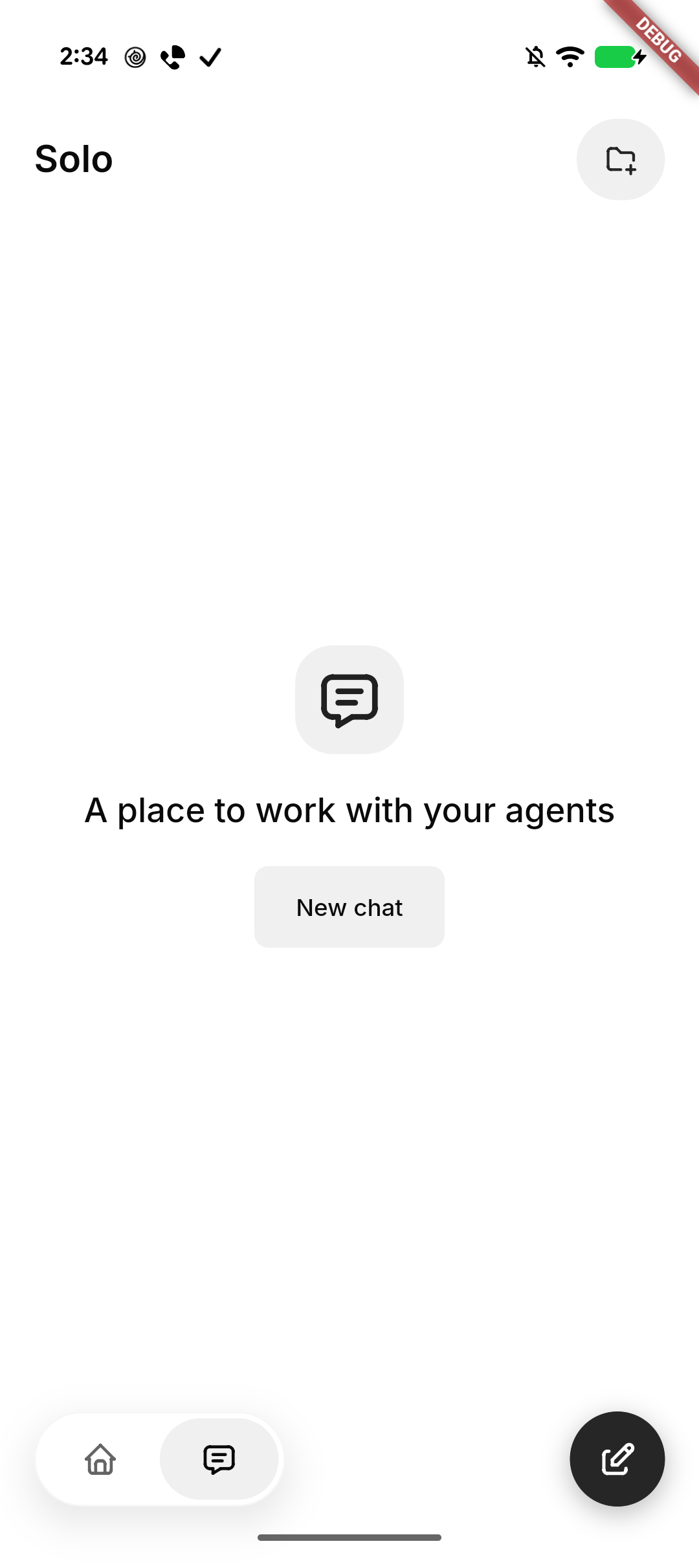
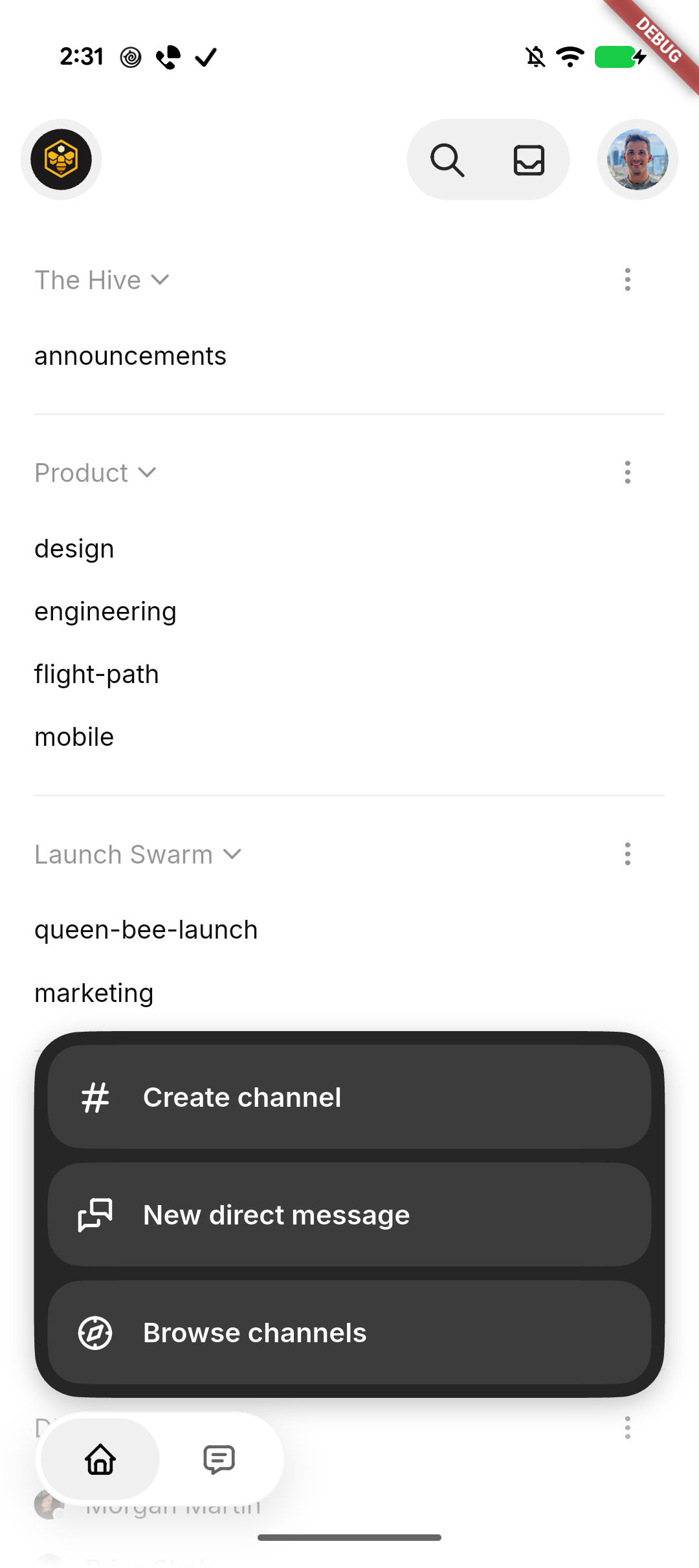
## Summary
Polish mobile Home and Solo: group Search/Inbox beside a separate
profile avatar, move Inbox and Settings to bottom-up pages with Close
controls, and place tabs opposite the plus/compose action. Morph plus to
compose clockwise when entering Solo and reverse counterclockwise when
returning Home, with a directional quarter-turn of the icon inside a
level button and a subtle scale pulse, respecting reduced motion. Align
Search’s Close control with Inbox, simplify its placeholder, and
initialize selected filter contrast correctly. Collapse the plus menu
when leaving Home. Center Solo’s native-glass New chat empty state and
keep it stationary behind the keyboard.

Standardize Tabler icons and neutral backgrounds, retain SF Back/Close
on iOS, use native Liquid Glass headers, tab container, and actions
(solid grey selected tab, slightly darker on iOS) on iOS and black
actions on Android, and smooth the expanded menu corners. Repair native
header safe-area/return layout and compose movement after cancellation.

### Related issue
None found for this UI refinement; follows #8337.

### Testing
- Formatting, analysis, full mobile suite: 3,487 passed, 4 skipped; 3
push-configuration tests passed. File-size checks passed.
- Base UI built and installed on Pixel and iPhone in place. Pixel
navigation/New chat cancellation checked. Subsequent glass and rotation
refinements are previewed on iPhone; motion feel awaits human
confirmation.
- Draft pending human confirmation of the final Settings entrance/return
behavior on iPhone.

### Pixel snapshots
| Solo | Expanded actions |
| --- | --- |
| <img
src="https://raw.githubusercontent.com/block/buzz/16dc0f8af971e63d788fee20974997fab925dec9/docs/screenshots/mobile-home-solo/pixel-solo.png"
width="280" alt="Solo empty state with New chat" /> | <img
src="https://raw.githubusercontent.com/block/buzz/16dc0f8af971e63d788fee20974997fab925dec9/docs/screenshots/mobile-home-solo/pixel-actions.png"
width="280" alt="Expanded channel actions with smooth corners" /> |

---------

Signed-off-by: kenny lopez <klopez4212@gmail.com>
Co-authored-by: Terp <5856f6900e8e0a4e0ea1f4f8d2ee33e4753d2119bc122f94ecafc660b46c0511@buzz.block.builderlab.xyz>
## Summary

Preview buzz-app's Tabler icon style in the mobile app, replacing
app-drawn Lucide glyphs across channels, messages, activity, search, and
settings. A shared `BuzzIcons` mapping uses the bundled Tabler 3.46.0
outline font, matching buzz-app's version, with its MIT license and
source documented.

Native UIKit controls retain SF Symbols. The former 300/500 navigation
glyphs use Tabler's standard outline; existing selection colors and
labels remain.

### Related issue

No matching Tabler mobile migration issue or PR found. Related native
iOS controls: #8055.

### Testing

- Pre-push mobile analysis, formatting, file-size checks, and the full
mobile test suite passed.
- 194 focused widget tests passed, including channels, home, search,
settings, and message content.
- Light and dark community-settings renders inspected.
- Signed iPhone Release build succeeded; installed and launched as Buzz
Tabler on a physical iPhone.
- Full `just ci` attempted; stopped during Rust clippy compilation
because the Mac ran low on disk space. Full repository validation is not
claimed.

Signed-off-by: kenny lopez <klopez4212@gmail.com>