mirror of
https://github.com/block/buzz.git
synced 2026-11-24 10:12:19 +00:00
b7fb268e8bcdd012b5237db6e72be201b848ef86
9 Commits
| Author | SHA1 | Message | Date | |
|---|---|---|---|---|
 Tom Brow |
bf9ce1432e |
feat(mobile): add diagnostic reporting module with crash capture (#9613)
Step one of [mobile diagnostic reporting](https://github.com/block/buzz/blob/main/docs/mobile-diagnostic-reporting.md), first piece: the reporting module, plus capture of crashes and uncaught errors. A build given a `BUZZ_SENTRY_DSN` now reports native crashes, Flutter framework errors and uncaught asynchronous Dart errors to that Sentry project, attributed to the signed-in member's public key. A build without one (every build made from this repository alone) uses a do-nothing reporter and never initializes the SDK, as [ADR 0007](https://github.com/block/buzz/blob/main/docs/adr/0007-diagnostic-reporting-follows-the-destination.md) requires. A destination the SDK cannot parse is treated as none, so a configuration mistake never stops the app from starting. ### What's in it - **One interface** in `mobile/lib/shared/diagnostics/`: report an error, count a networking event, leave a breadcrumb, and set the member. It has a Sentry-backed and a do-nothing implementation. Only this folder imports the SDK. The explicit error reports and the networking counts that use it come in the next PRs. - **Startup** wraps `runBuzzApp` and installs the SDK's crash and error handlers only when a usable destination is set: one with an HTTP(S) host, a public key and a project, which the native SDKs also require. On Android, the manifest removes the SDK's startup performance provider, which would otherwise run before that check. - **Member:** set from the active community's key, changed when the account switches, cleared on sign-out. Adding the Builderlab origin and account subject is left to a later PR. Every report also carries a random per-install identifier the app creates on first launch, as its own `install.id` tag, signed in or not, so a device's reports can be matched to its members. It lives in a file that device backups and transfers skip, so a phone restored from another gets its own: on Android in the app's files directory, excluded in both backup rule sets; on iOS in an Application Support folder that a small native call marks as excluded from backup (not the caches folder, which iOS can clear when storage runs low). Set on the SDK scope, it also reaches native crash and hang reports. With no member set (before sign-in or after sign-out), the SDK also fills the report's user with its own random per-install identifier, on Dart and native reports alike. - **One filter** runs on every Dart report, breadcrumb and count before it leaves the device: - It replaces every error's own text with fixed wording, since an error can quote its input, a server's response body or a URL. The error keeps its type, mechanism type and stack trace. - It drops what the SDK adds about the failing platform call (`mechanism.data`) and the failing widget (`flutter_error_details`), which can quote what is on screen. - It removes URL query strings and fragments, and keeps only tags and count attributes on the allowed list. - It drops every breadcrumb except networking events and the SDK's foreground/background entries. - **SDK options:** personal data, screenshots, view hierarchy, replay and tracing stay off. The SDK's session records stay on, for a crash-free rate. A session begins each time the app starts or returns after 30 seconds or more in the background; the SDK sends a record when it begins, an update each time an error is counted, and a last one when it ends, carrying the start time, error count, outcome, time from start to end, release, environment and the random per-install identifier. Native auto-breadcrumbs, Android's network-change breadcrumbs (VPN state, signal strength, bandwidth; turned off in the manifest, since the Flutter bridge leaves them on), Cocoa's network breadcrumbs (which keep each request's query and reach native crash reports) and print breadcrumbs are off. With print breadcrumbs on, the SDK would replace `debugPrint` in non-debug builds with one that prints nothing. - **Main-thread hangs:** iOS app hang tracking, Android ANR detection and iOS watchdog-termination tracking are set on explicitly, at the SDK's default thresholds. iOS reports the main thread blocked, fully or mostly, for 2 s or more while the app is active, including freezes it recovers from; a hang still going when the system kills the app is sent on the next launch as a fatal hang, and watchdog-termination tracking reports a foreground run that ended with nothing else to explain it. Android reports only system-declared ANRs: on Android 11 and later, the most recent one that ended the process (read on the next launch, when the system kept a thread dump); before 11, after 5 s once the system marks the app not responding. So recoverable freezes are reported on iOS, and on Android only before 11 once the system marks the app not responding. Dart runs on the main thread, so blocking Dart work shows up with the main thread's stack; Dart frames need the Dart debug symbols at the destination, as crashes do. The spec now has a bullet and a user story for this. - **What the filter does not cover:** native crashes and app hangs are captured and sent by the native SDKs, which never call the Dart filter. They carry stack traces and, for a native exception, its reason text. No app code puts content in a native exception today. The spec now says this. - **Reporting never blocks the app or reaches it with an error:** every call returns at once, and a failure inside reporting is dropped with a `debugPrint`. ### Regressions None for builds without a destination, which includes every build from this repository: they run the same startup with one extra synchronous check, and the SDK is never initialized. The SDK still adds to the app's binary size on both platforms. With a destination, the first frame waits for the SDK to start, native SDK included, and for the install ID to be read from (or, on first launch, written to) a small file. On a debug simulator build the first frame came about 0.3 s later (median of 6 cold launches: 768 ms with a destination, 431 ms without), measured before the install ID was added. Device builds will differ. Uncaught errors still reach Flutter's default handling, and the SDK sends in the background. ### Validation Added tests (`test/shared/diagnostics/diagnostic_reporting_test.dart`): - A table of inputs run through the production Sentry options callbacks: SDK HTTP and navigation breadcrumbs are dropped, network breadcrumbs keep only their four attributes, URLs lose their query string and fragment, unknown tags and count attributes are dropped, and the privacy and breadcrumb options stay off. - Errors sent through a real SDK hub, with the SDK's own platform-error processor and Flutter error integration, into an in-memory transport: for a parse failure, a bad argument, a server response and a platform failure, the serialized event keeps the type and stack but none of the error's text; a real framework build error leaves out the widget text. - A release-mode check that `debugPrint` keeps printing with reporting on. - A build with no destination, one the SDK cannot parse, one without a public key or one without an HTTP(S) host starts the do-nothing reporter and the SDK stays disabled. - Reporting calls whose SDK calls throw, either synchronously or asynchronously, never reach the caller. - Hang detection is on and its thresholds equal the SDK's defaults. - An installation keeps one install ID across launches, a new installation gets a new one, and the filter keeps the `install.id` tag. - Signing in, switching accounts and signing out change the member that later reports are attributed to. I checked that each guard is real by removing it: the print-breadcrumb setting, the destination check, the error-text replacement, the `mechanism.data` and `flutter_error_details` removal, the network-breadcrumb setting, the dropped-failure catch and the tag filter each made a test fail. End to end on an iPhone 17 Pro simulator, with a local server standing in as the destination and a throwaway probe (not committed) that made an HTTPS request with a secret in its query, then raised an uncaught Dart error and a framework error with secrets in their text, then crashed natively: - All four reports arrived (two Dart, one framework, one native crash on the next launch), and none of the secrets appeared in any envelope. - Dart reports carried only the foreground/background breadcrumb; the native crash carried none. - As a control, a build with Cocoa's network breadcrumbs switched back on put the request's secret query and fragment into the native crash report, so that setting is what keeps them out. - `debugPrint` lines still appeared in the device log. Hangs, on a fresh iPhone 17 Pro simulator with no debugger attached and the same local server: a throwaway probe busy-looped the main isolate for 5 s after the first frame. The SDK sent an `App Hang Fully Blocked` event ("App hanging between 5.7 and 6.5 seconds", mechanism `AppHang`) carrying the main thread's stack: Flutter engine frames around 12 frames of Dart code. This was a debug build, where Dart is compiled just in time, so those frames have no image to symbolicate against; in release builds they fall in the app's compiled Dart framework and need its debug symbols at the destination. Install ID, rechecked after moving it to its own file, on a fresh simulator with the same local server, launched twice with a probe that raised a Dart error and then crashed natively: both Dart errors and the native crash carried the same `install.id`, while the signed-out user was the SDK's own identifier. The ID file was in the backup-excluded `Library/Application Support/Diagnostics` folder, not in the app's preferences. The merged Android debug manifest has neither of the SDK's startup providers and has the network-change setting off. The NDK preload provider is still merged in, but it does nothing unless its own manifest flag is set, and it isn't. Full mobile suite passes. Dart errors are captured in the main Flutter engine only; the iOS sheets that start their own engine are out of scope for this PR (native crashes while they are open are still caught), as the spec now says. iOS simulator and Android debug builds with a destination set both build; on iOS the SDK resolves through Swift Package Manager. --------- Signed-off-by: Tom Brow <tomb@squareup.com> Signed-off-by: Tom Brow <tomb@block.xyz> Co-authored-by: studio <dc2fc481343672df31a689840c09299972e704dac592e0da6f18486646a7ee3e@localhost> |
||
|
Tom Brow
|
3689241672 |
feat(mobile): reply to a message from its iOS notification (#9439)
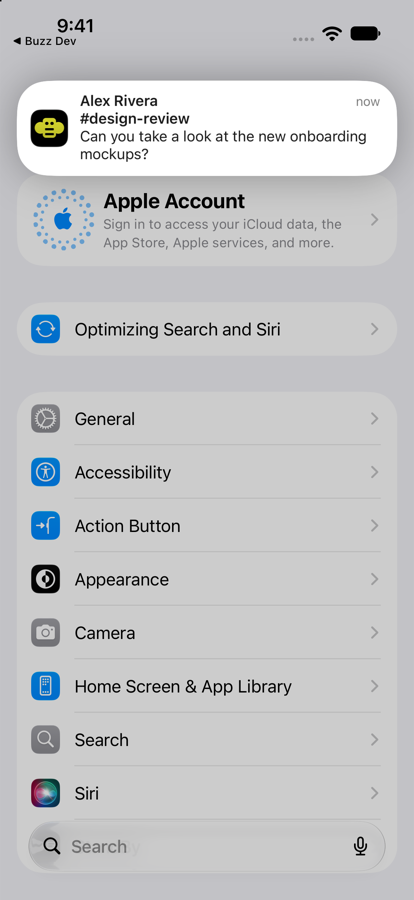
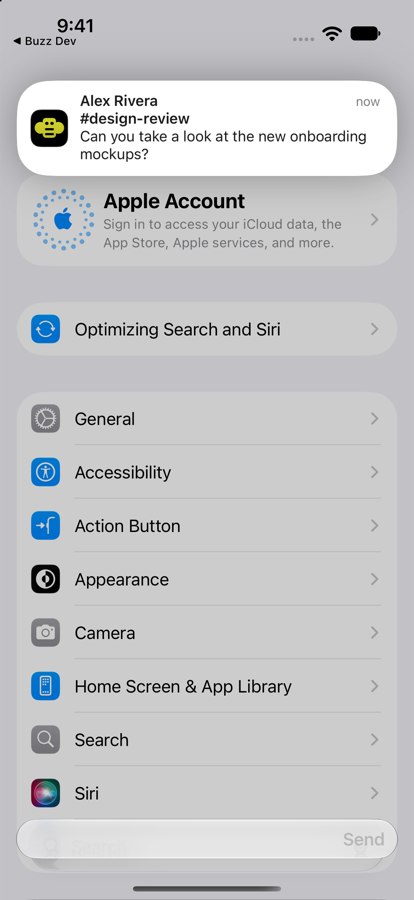
On iOS, a notification that shows a channel or DM message now offers
**Reply**. The user types a reply in the notification and sends it
without opening the app.
- The reply goes in a subthread under the notified message (its thread
root is the message's own root, or the message itself when top-level). A
Solo chat takes no thread replies, so there it goes at the chat's top
level.
- It always mentions the notified message's sender, so the person or
agent being answered is notified. Typed `@name` text stays plain, since
a notification has no mention autocomplete.
- It is sent by the app's own send path. iOS starts the Flutter engine
when it wakes the app in the background, and the reply reopens the relay
connection (closed after the background grace period), waiting a bounded
time for it before sending.
- A sent reply marks the conversation read **up to the notified
message** (newer messages stay unread) and clears that notification and
earlier ones from the same conversation.
- An unsent reply (offline, relay error, timeout, a channel the user
isn't in) keeps the typed text as a draft, after any draft already
there, and shows a "Reply not sent" notification that opens the
conversation.
For now only notifications from the community selected in the app offer
Reply: replying must not switch communities, and the app can only reach
the selected one. Forum posts and fallback notifications that show no
message offer none. The design and the options considered are in
`docs/adr/0004-notification-reply.md`.
### Before / after
Long-pressing a message notification (synthetic names and text). Before
has no reply field (captured by sending the notification without its new
reply category, which is how main presents it); after shows one with
Send.
| Before | After |
| --- | --- |
|
|
|
### Demo
With the app backgrounded past the relay grace period, replying from the
notification lands the reply in a subthread under the message:
https://github.com/user-attachments/assets/37df7e28-aa46-4521-938e-8af5faa77b83
### Regressions
Nothing existing changes unless the user taps Reply. Notifications gain
a category and a small reply context in `userInfo`; tapping a
notification still opens the conversation as before. The relay reconnect
only happens for a pending reply and then falls back to the normal
background disconnect, so idle background behavior and network use are
unchanged. Reply failures end in a draft and a "Reply not sent"
notification rather than touching other state.
### Validation
- End to end on an iOS 27 simulator against a real community: with the
app backgrounded past the relay grace period, replied from the
notification; the reply appeared in a subthread under the message,
mentioning its sender. The demo above was recorded before the review
fixes (session hold, community fence, origin-community drafts, composer
draft sync); the same run was repeated on the current head,
|
||
|
Tom Brow
|
026b203c64 |
docs: define mobile diagnostic reporting (#9600)
## Summary Records the vocabulary, the two hard-to-reverse decisions and the spec for diagnostic reporting in the mobile app, before any code is written. Nothing here changes behavior. - `CONTEXT.md`: two new terms. **Diagnostic reporting** is sending crash, error and performance data from a mobile installation to a reporting destination. A **reporting destination** is where a build sends it, chosen at build time by whoever distributes the build. - [ADR 0007](https://github.com/block/buzz/blob/tomb/mobile-diagnostic-reporting-docs/docs/adr/0007-diagnostic-reporting-follows-the-destination.md): a build reports if, and only if, it was given a reporting destination, whatever kind of build it is. It also lists what a report may and may never carry. - [ADR 0008](https://github.com/block/buzz/blob/tomb/mobile-diagnostic-reporting-docs/docs/adr/0008-sentry-for-mobile-diagnostic-reporting.md): the app reports through the Sentry Flutter SDK, with the comparison against Datadog and Bugsnag. - [`docs/mobile-diagnostic-reporting.md`](https://github.com/block/buzz/blob/tomb/mobile-diagnostic-reporting-docs/docs/mobile-diagnostic-reporting.md): the spec for step one. It covers crashes, uncaught errors, error reports for unexpected protocol and decoding failures, and networking measurements by backend and endpoint, all through one reporting module. It sits beside the existing mobile push suppression spec. The term avoids "telemetry" because the repository already uses that word for agent session streams and relay rollout signals. ### Related issue N/A. The Swift Package Manager move that ADR 0008 depends on is #9597. ### Regressions Documentation only. No code, configuration or build changes. ### Validation Checked that every link in the four files resolves within the branch, and that the new glossary anchors match the links that point to them. --------- Signed-off-by: Tom Brow <tomb@squareup.com> Co-authored-by: Tom Brow <tomb@squareup.com> Co-authored-by: judge <7615ec4b7ddf99f0bb48e913297f99f8f772d289a1c9ef54e1d906dd55a93ba8@buzz.block.builderlab.xyz> |
||
|
Tom Brow
|
0c409e7a6a |
docs: design Android push notifications (#9555)
Design docs for Android push notifications, matching what iOS has today: DM and mention notifications with real message text, grouped per conversation, and tapping one opens it. - **[ADR 0004](docs/adr/0004-push-gateway-hides-device-platform.md):** one push gateway per app distribution serves both platforms, and the relay can't tell an Android installation from an iOS one. - **[ADR 0005](docs/adr/0005-android-push-enrollment-attestation.md):** Android enrollment requires hardware Key Attestation on a locked bootloader, verified offline. Later installation calls are signed with the attested key. - **[ADR 0006](docs/adr/0006-android-notifications-run-app-dart-code.md):** Android builds notifications with the app's own Dart code in a background engine, instead of a native port of the iOS extension. - **[PLANS/ANDROID_PUSH.md](PLANS/ANDROID_PUSH.md):** the spec, plus the tickets it splits into. - **CONTEXT.md:** defines *wake signal* and *push gateway*. The privacy model stays the same: pushes carry a fixed wake signal and nothing about any event. ### Validation A throwaway [prototype](https://github.com/block/buzz/tree/prototype/android-push-headless-dart) checked ADR 0006 against FCM's ~10 s handler budget. It started a headless Dart engine from a killed app, signed in to a local relay and updated a placeholder notification with the real text. | Device | Wake to real text (median, 12 cold runs) | Memory (PSS) | |---|---|---| | Pixel 9a | 0.51 s (worst 0.54 s) | ~45 MB | | Emulator, CPU slowed ~8x | 0.80 s (worst 1.05 s) | ~57 MB | The relay ran on the same machine, so real network latency is still unmeasured. With an unresponsive relay, the placeholder notification stayed and the native watchdog ended the handler. This PR changes documentation only, so no app run applies. ### Regressions None. This PR adds documentation only and changes no behavior. The design keeps iOS push working through the rollout, and the relay learns no more about devices than it does today. --------- Signed-off-by: Tom Brow <tomb@squareup.com> Co-authored-by: Tom Brow <tomb@squareup.com> |
||
|
Tom Brow
|
934a16f2ff |
feat(mobile): message the Bestie from Siri and Shortcuts (#9517)
Adds a **Message my Bestie** action for Siri and Shortcuts. Siri asks
what to say, confirms with the Bestie's name ("Send “…” to Astra?"), and
posts the message in your DM with the Bestie, without opening Buzz. The
Bestie's reply arrives as a normal notification, in the same DM the Home
star opens.

This is the iOS 16+ App Shortcut from [ADR
0005](https://github.com/block/buzz/blob/mobile-siri-bestie-dm/docs/adr/0005-quick-send-uses-the-system-send-message-action.md).
Follow-ups, not in this PR: the iOS 27 `messages.sendMessage` schema
intent, naming other recipients, a separate "Start a chat with my
Bestie" intent for a new Solo chat, and opening Buzz with a draft when a
send fails.

### How it works

- The App Intent runs without opening the app and hands the text to Dart
over a method channel. It waits up to 20 s for Home to say it is ready,
and runs one send at a time.
- A background launch already starts the Flutter engine and builds Home
([ADR
0004](https://github.com/block/buzz/blob/mobile-siri-bestie-dm/docs/adr/0004-background-work-runs-in-the-app-engine.md)
records the measurement). So a small `QuickSendHost`, which the app
hands Home as an invisible background widget, takes the send. Nothing is
reimplemented natively.
- Before confirming, Swift asks Dart for the saved Bestie's pubkey and
name; the send then goes to exactly that agent, so a choice this phone
hasn't synced yet is caught at the confirmation.
- The send reuses the Home star's lookup for the Bestie DM (opening it
with the relay's find-or-create DM command when it isn't loaded) and
posts with the same `SendMessage` the composer uses.
- If Buzz has been in the background past its 5 s grace period, the
relay session has closed its socket. The send reopens it, then lets the
normal background pause start over.
- A message the relay rate-limits is retried (up to 3 tries); the relay
turned it away, so a retry can't duplicate it. Any other failure isn't
retried, since the message might have landed.
- The confirmation is pinned to the community and account it was shown
in: if Buzz switches either before the message goes out, the send is
refused.
- If the send fails, or Buzz can't tell whether it landed (no answer
from the relay), the message is saved as the Bestie DM's composer draft,
after any draft already there, and Siri says so ("Buzz isn't sure that
sent. Check your Bestie DM before trying again." when the outcome is
unknown). A successful send leaves the draft alone. Limits: if the DM
can't be found or opened, there is nowhere to save it and Siri says the
message wasn't saved, and the app being killed mid-send isn't covered.
- Refusals (no Bestie, offline, empty or too long, switched community)
come back as a short message Siri reads.

### Regressions

- Nothing existing changes behavior: the host only answers this method
channel, and the action does nothing until someone runs it. Its bugs
stay inside the quick send path.
- The Home star's DM lookup moved into `cachedBestieConversation`
unchanged, so the star behaves as before.
- A composer that is open on screen now shows a draft another writer
saved for it (here, a failed quick send) instead of overwriting it with
the next keystroke. It listens without rebuilding, and its own saves are
ignored.
- A background wake pays the cost of starting the app's Dart code, which
iOS already does for this launch.

### Before / after

| Before: no Buzz actions in Shortcuts | After |
| --- | --- |
| <img width="300" alt="Shortcuts Library before"
src="https://github.com/user-attachments/assets/b0870e3d-2823-4c7d-be0e-a242a3fdafd7">
| <img width="300" alt="Shortcuts Library after, listing Buzz Dev under
Apps"
src="https://github.com/user-attachments/assets/8c092006-76b9-4313-a401-68189f5674cf">
|

| Asks what to say | Confirms (names the Bestie) | Sent |
| --- | --- | --- |
| <img width="250" alt="Prompt"
src="https://github.com/user-attachments/assets/a2eaf44a-5287-48b6-9c5a-2aaefc90c0a8">
| Shows "Send “…” to *Bestie's name*?" (capture omitted: it shows an
internal agent name) | <img width="250" alt="Sent"
src="https://github.com/user-attachments/assets/07fe66e3-4480-4d06-be52-623416e567b8">
|

The DM result and a demo video show internal names, so they're shared
internally rather than here.

### Testing

- Added test, `quick_send_test.dart` journey: Home reports ready; Siri's
Bestie lookup is refused with no Bestie, then returns the chosen
Bestie's pubkey and name; a send confirmed for another community is
refused; an empty send is refused without publishing; a send while Buzz
is backgrounded and its socket closed reconnects, opens the DM with the
Bestie, survives a rate-limited first try, posts the message in that DM
tagged to the Bestie, and hands the session back to its background
pause; a second send goes to the same DM and leaves the person's draft
there as it was; a send whose answer is lost is reported as unsure and
kept in that draft after the person's own text, with its mentions; a
socket that drops just before the message goes out keeps it too; leaving
Home reports unready. Removing the rate-limit retry, the community check
or the draft save fails it.
- Extended the composer's share-delivery journey: a draft saved by
another writer while the composer is open shows in the composer and
survives the next keystroke, and survives an ordinary send that was
pending when it arrived and then fails. Removing the composer's listener
or its revision bump fails it.
- iPhone 17 Pro simulator (iOS 27), Builderlab community with a Bestie,
automated with AXe:
- Cold: Buzz terminated, ran the action from Shortcuts, the confirmation
named the Bestie, "Sent.", and the message was in the Bestie DM with its
reply. No Solo chat was created.
- Warm: Buzz in the background for 10 s, ran it again, "Sent.", same DM.
- At-risk flows: sent a typed message from the DM composer, went back to
Home, and the Home star reopened the same DM.
- `just mobile-check mobile-test` passes.


buzz-review-completed

---------

Signed-off-by: Tom Brow <tomb@squareup.com>
Co-authored-by: Tom Brow <tomb@squareup.com>
|
||
|
Tom Brow
|
2b428f56b8 |
feat(mobile): share into Buzz from the iOS share sheet (#9433)
Lets people share screenshots, screen recordings, photos, URLs and text from any iOS app into Buzz. Today Buzz doesn't appear in the share sheet at all. - **Plain Buzz icon:** opens a new Solo chat with the items in its composer. - **Suggested conversation:** iOS offers channels and DMs the person recently sent top-level messages in. Choosing one opens that conversation with the items in its composer. When the conversation is already open, the share goes to that page's composer instead of opening a second one; if another page covers it, Buzz stays where it is and shows "Go back to that conversation to finish sharing", and the items join the draft when the person goes back. - The share extension has no UI and sends nothing. It copies the items into the app group and opens Buzz, which prefills the normal composer, so drafts, attachments, mentions and failed-send handling all stay the app's (see [the ADR](https://github.com/block/buzz/blob/mobile-share-extension-design/docs/adr/0003-share-hands-off-to-the-conversation.md)). - If the conversation already has a draft, Buzz asks whether to add the shared items to it or replace it. - A share to a conversation that's no longer available (a removed community or channel, or an unreadable share) shows "That conversation isn't available". A share while signed out shows "Sign in to share". Suggestions come from an outgoing `INSendMessageIntent` the app donates after a top-level send or a new Solo chat. The notification extension no longer donates incoming messages, so receiving a message never makes a conversation a suggestion; it still turns the push into a communication notification with the sender's avatar. Both use the same conversation identifier, now the plain community and channel IDs instead of a hash, because the extension needs to hand the identifier back to the app. | Before | After | | --- | --- | | <img alt="Share sheet without Buzz" src="https://github.com/user-attachments/assets/452fac1b-7e87-44c3-a442-099f78d0e07b" width="300"> | <img alt="Share sheet with Buzz" src="https://github.com/user-attachments/assets/54b9775d-29b4-49a5-8ab9-5fda8718a02f" width="300"> | | Buzz icon: new Solo chat | Suggested DM with a draft | After Add | | --- | --- | --- | | <img alt="New Solo chat with the shared photo" src="https://github.com/user-attachments/assets/c5da4d8b-1dd8-4e30-9e92-9dba515b3623" width="250"> | <img alt="Add to your draft prompt" src="https://github.com/user-attachments/assets/2f879f8a-3b9f-48e0-b963-2828e90dc9fe" width="250"> | <img alt="Draft with the shared link and photo added" src="https://github.com/user-attachments/assets/12832006-85c5-4447-98b5-62932552c931" width="250"> | https://github.com/user-attachments/assets/b9d380fa-e802-4ed7-89a8-592a03784c8f ### Regressions - Nothing changes for people who never use the share sheet, except that sending a top-level message or starting a Solo chat now makes one local `INInteraction.donate` call (skipped while the age restriction is on, which still purges every interaction). - Communication notifications look the same. Dropping the incoming donation removes work (and a deletion fence) from the notification extension's time budget. - The share hand-off reuses the existing deep link dispatcher. A share link is a new link type; notification and message links take the same paths as before. ### Validation - Added tests: - Dispatcher hand-off: a share to a suggested channel opens it with the shared text and files; shares to a removed community, an unlisted channel, an unknown manifest version or a missing manifest show the error and delete the pending share; share links accept only the extension's UUID ids. - Composer delivery: with an existing draft, Add appends the shared text on a new line and attaches the file, Replace clears the draft first, and the app group copy is deleted either way. - Notification presenter: specializes the notification from the intent, or falls back to the ordinary content when that throws (replaces the donation and deletion-fence tests). - Full mobile Flutter suite and BuzzPushKit Swift tests pass. - Automated app run on an iPhone 17 Pro simulator (iOS 27, dev relay test community), recorded above: sent a DM, shared a photo from Photos with the Buzz icon from a cold start (new Solo chat with the photo attached), then handed a link and photo to a DM that had a draft and chose Add. Also checked that a share's pending files are deleted after delivery. - Limitation: the iOS simulator never shows share-sheet conversation suggestions (it has no `coreduetd`), so the suggested-DM step in the video is staged by writing the same pending share and link the extension writes. Choosing a real suggestion still needs a check on a device. - Known gaps, all confined to sharing: suggestions have no avatar image yet; a suggestion for a conversation left after signing out shows "isn't available"; choosing Later in the unfinished-chat dialog keeps the share until the next new chat; and a pending share the app never receives (for example when Buzz doesn't open) stays in the app group. ### Before merge - [x] On a real iPhone, choose a suggested conversation in the share sheet and confirm the shared items open in that conversation's composer (the simulator can't show suggestions). Waived before merge: the managed test iPhone shows no share-sheet suggestions for any app, so this will be checked on a personal phone after landing. --------- Signed-off-by: Tom Brow <tomb@squareup.com> Co-authored-by: Tom Brow <tomb@squareup.com> |
||
|
Tom Brow
|
defc2d5ea3 |
fix(mobile/ios): close notification code blocks only at line-ending fences (#9349)
Follow-up to [#9346 notification message text](https://github.com/block/buzz/pull/9346), from [Kyle's review](https://github.com/block/buzz/pull/9346#discussion_r4539634396). A fenced code block that contains three backticks, such as a `"```"` string literal, closed at those backticks. The rest of its code then got the prose rules, so `"**literal**"` lost its asterisks in the notification. A fenced block now closes only at a fence at least as long as its opening fence that ends its line, as in CommonMark and the in-app preview. Along the way, fences the old regex handled loosely are now consistent with the app: a block fenced with four or more backticks keeps its code (and can hold a three-backtick fence), and a block's opening line is dropped as its language even when it contains a backtick. A one-line fenced span (`` ```just ci``` ``) and an unclosed fence running to the end of the text, on one line or several, are unchanged. **What gets better, what doesn't get worse:** code inside a fenced block now shows exactly as written. The change is one regex in the notification body function, and every existing shared case still passes. ### Validation - Added tests: six shared cases in `test-fixtures/notification-body.json`: backticks inside a block don't close it, a closing fence at the end of the last code line closes the block, a four-backtick block keeps its code, a four-backtick block can hold a three-backtick fence, an unclosed one-line fence runs to the end, and an opening line with a backtick is dropped. All 112 BuzzPushKit XCTest cases and the Swift Testing suite pass. - No visible change outside notification text for fenced code, so there are no new screenshots. Human testing is waived; the shared-case run covers the changed behavior. 🤖 Generated with [Claude Code](https://claude.com/claude-code) --------- Signed-off-by: Tom Brow <tomb@squareup.com> Co-authored-by: Tom Brow <tomb@squareup.com> Co-authored-by: Claude Opus 5.5 <noreply@anthropic.com> |
||
|
Tom Brow
|
95dd9d67dd |
feat(mobile/ios): show the message's own text in notifications (#9346)
Expanding a Buzz notification today shows the same stub as the banner: one line of at most 180 characters, with code replaced by `[code]` and links by `[link]`. A long message can only be read by opening the app. The notification body is now the message's own text. It keeps line breaks, the text of code and bare URLs, and drops the Markdown syntax around them (`[text](url)` shows `text`). It is capped at 256 UTF-16 units, which is the most iOS shows even when a notification is expanded. iOS cuts longer bodies mid-word with no ellipsis, so the cap stops at 255 units and adds "…" without splitting a character. A link label, image alt text or bold run may contain code, and a code fence with no closing fence runs to the end of the message. The body is built from at most the first 4096 UTF-16 units of the message, so very long or hostile Markdown stays fast (under 300 ms for a 256 KB message in an optimized build); when that cut drops text, the body also ends with "…". | Before (expanded) | After (expanded) | | --- | --- | | <img width="300" alt="Before" src="https://github.com/user-attachments/assets/7201791f-9556-446a-86d2-a50f024cf9dc"> | <img width="300" alt="After" src="https://github.com/user-attachments/assets/3fa52db8-ebcf-470f-9175-47fe5ef4ed12"> | [ADR 0002](docs/adr/0002-notification-message-text.md) records the rules so other mobile platforms follow them, and the cases in `test-fixtures/notification-body.json` are the contract. The iOS tests run every case, and Android's notification code can run the same file when it lands. **What gets better, what doesn't get worse:** only the body text of message notifications changes. The title, subtitle, grouping, avatars, navigation and dedupe are untouched, and the change lives in one pure function. A notification can now show code and URLs from the message, as the message itself does, and the user's lock-screen preview setting still applies. ### Validation - Added tests: `testPreviewBodyMatchesSharedNotificationBodyCases` runs the 30 shared cases (links, mentions, images, fenced and inline code, code inside link labels and bold runs, Markdown inside code, unclosed and cut fences, whitespace, the cap at 256 and 257 units, emoji and ZWJ sequences at the cap, the 4096-unit input cut). The full BuzzPushKit suite passes: 112 XCTest and 70 Swift Testing tests. - iOS limit measured on an iPhone 17 Pro simulator (iOS 27) with a local notification: the expanded body and its accessibility label both stopped at exactly 256 UTF-16 units (256 ASCII characters, 128 emoji), cut mid-word with no ellipsis. A 40-line body showed about 31 lines. - The screenshots show this function's before and after output for the same message, posted as a local notification. The simulator doesn't run the Notification Service Extension for `simctl push`, so the full push path (relay fetch through to display) was not exercised. An iPad was not measured. - Human testing is waived; the automated run above covered display of the changed body only, since nothing else in the app changes. 🤖 Generated with [Claude Code](https://claude.com/claude-code) --------- Signed-off-by: Tom Brow <tomb@squareup.com> Co-authored-by: Tom Brow <tomb@squareup.com> Co-authored-by: Claude Opus 5.5 <noreply@anthropic.com> |
||
|
Tom Brow
|
12f3d51001 |
feat(mobile): one Builderlab per build, internal and public distributions (#9224)
The mobile app can now be built as a public build or an internal build, set explicitly with `BUZZ_DISTRIBUTION=internal|public`. Each build trusts exactly one Builderlab (`BUZZ_BUILDERLAB_URL`), and sends that Builderlab's relay assertions only to the relays in `BUZZ_BUILDERLAB_RELAYS`. The three settings are set together or not at all; with none set, the app is a Nostr-only development build. The decision is recorded in `docs/adr/0001-internal-and-public-mobile-builds.md`, and the terms are defined in `CONTEXT.md`. Before this change, one build supported a public Builderlab and an organization Builderlab at the same time, with two sessions. An organization's members could reach public communities from the organization's app. ### Behavior - **Public build:** QR pairing, email sign-in and multiple communities are unchanged. It has no knowledge of any organization. An organization's relay already rejects clients that can't present its Builderlab's assertion, and the public build relies on that. - **Internal build:** the first screen has a single **Sign in** button that goes straight to the organization's single sign-on and then joins the organization's community. There is no QR pairing, community link or community creation, and the community switcher is hidden. Only the exact relay hosts listed in `BUZZ_BUILDERLAB_RELAYS` are reachable. - **Identity (internal):** a member whose account has no Nostr identity yet gets a new key on first sign-in; the first relay assertion binds it, and the app backs it up to the organization automatically. A member whose account is already bound uses that key from this device, or restores it from the organization's backup. If neither is possible, Sign in says it couldn't restore the identity and saves nothing. - **Sign-out (internal):** a destructive **Sign out** row at the bottom of Settings, the build's only way out. It removes the community, closes Settings and returns to Sign in. The Builderlab session is cleared from storage immediately and can never be reused to sign back in. The relay push-stop keeps the retired credential in memory only, for up to 10 minutes, and uses it only to get an assertion for a key that is already bound. It is a best-effort request. - **Upgrade to an internal build:** a saved public Builderlab session is cleared. Communities on other relays are hidden, not deleted, and their keys stay on the device. - `BUZZ_HOSTED_RELAY_AUTH` is unchanged here. ### Screenshots (internal build) | Sign in | Community menu | Settings | | --- | --- | --- | |  |  |  | Gateway-side push revocation, which needs no Builderlab session, is planned as a separate PR. ### Validation Added tests: - An internal-build journey: one Sign in creates and binds a key, and a retry after a cancelled join reuses it. The app uploads that key's backup itself. Sign out from Settings closes it and returns to the landing, which ends the session, and Sign in then restores the same identity from the backup. Communities on other relays stay stored but hidden. - Internal Sign in for a bound account: the key on this device, a key restored from backup, and no backup (clear error, nothing saved). Each guard was shown to fail when removed. - Organization relay assertions: assertions go only to exact listed hosts, not subdomains. After sign-out, only a push stop for a bound key gets an assertion, and nothing can sign back in. Proven to fail without the fix. - Builderlab build setting parsing. CI runs the internal and public journeys in their own lanes with those settings. The full suite passes in the default configuration. The full suite isn't meant to run under the internal configuration, because most fixtures use relays that an internal build hides. Automated full-app run on an iPhone 17 Pro simulator at the current head: - Public build, upgraded in place over a signed-in install: home loads, a channel opens and a message sends. - Internal build: a fresh install shows only Sign in. With a saved organization community, the community menu has no Switch community, and Settings → Sign out → confirm returns to Sign in. Real single sign-on can't run in the simulator. 🤖 Generated with [Claude Code](https://claude.com/claude-code) --------- Signed-off-by: Tom Brow <tomb@squareup.com> Co-authored-by: Tom Brow <tomb@squareup.com> Co-authored-by: studio <dc2fc481343672df31a689840c09299972e704dac592e0da6f18486646a7ee3e@buzz.block.builderlab.xyz> Co-authored-by: Claude Opus 5.5 <noreply@anthropic.com> Co-authored-by: studio <dc2fc481343672df31a689840c09299972e704dac592e0da6f18486646a7ee3e@localhost> |

