### What changed?

After a new mobile invite claim succeeds, Buzz now best-effort ensures
membership in the same public starter channels as desktop:

- `#general`
- `#welcome-everyone`

Missing starters use desktop's deterministic per-relay IDs and exact
public channel configuration, so concurrent mobile and desktop setup
converges safely. Setup failures do not invalidate or retry an already
successful invite claim, and failure for one starter does not block the
other.

The success sheet offers **Continue to #welcome-everyone** when that
channel is available. Mobile does not create the private `Welcome`
channel because it cannot provision the desktop Welcome agents that make
that channel useful.

This PR is stacked on #6145 because it deliberately reuses that PR's
open-channel directory and join behavior. Once #6145 merges, this PR can
be retargeted to `main` without changing its BUZZ-12 diff.

Fixes
[BUZZ-12](https://linear.app/squareup/issue/BUZZ-12/bug-community-appears-empty-after-using-invite-link-on-mobile).

### How is it tested?

- Desktop/mobile deterministic starter-ID parity coverage.
- Existing-channel join and missing-channel creation coverage.
- Duplicate-create convergence and per-channel failure isolation
coverage.
- Invite success remains successful when starter setup fails.
- Widget coverage for continuing directly into `#welcome-everyone`.
- Focused invite/deep-link tests: 23 passed.
- `just mobile-check`: passed.
- `just mobile-test`: 1,483 passed.
- Pre-push repository checks: passed.

---------

Signed-off-by: Tom Brow <tomb@block.xyz>
Co-authored-by: Codex <noreply@openai.com>
**Category:** new-feature
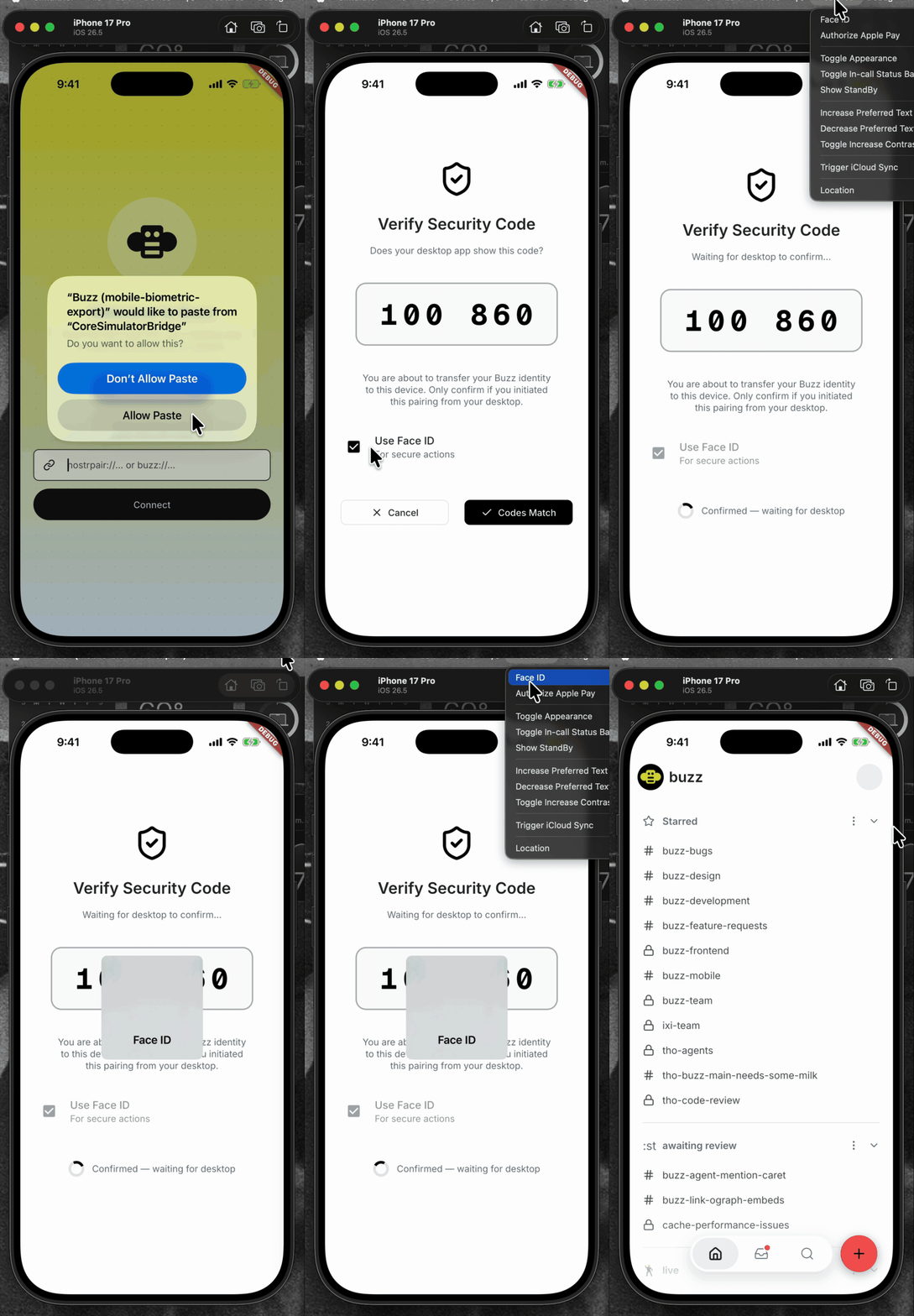
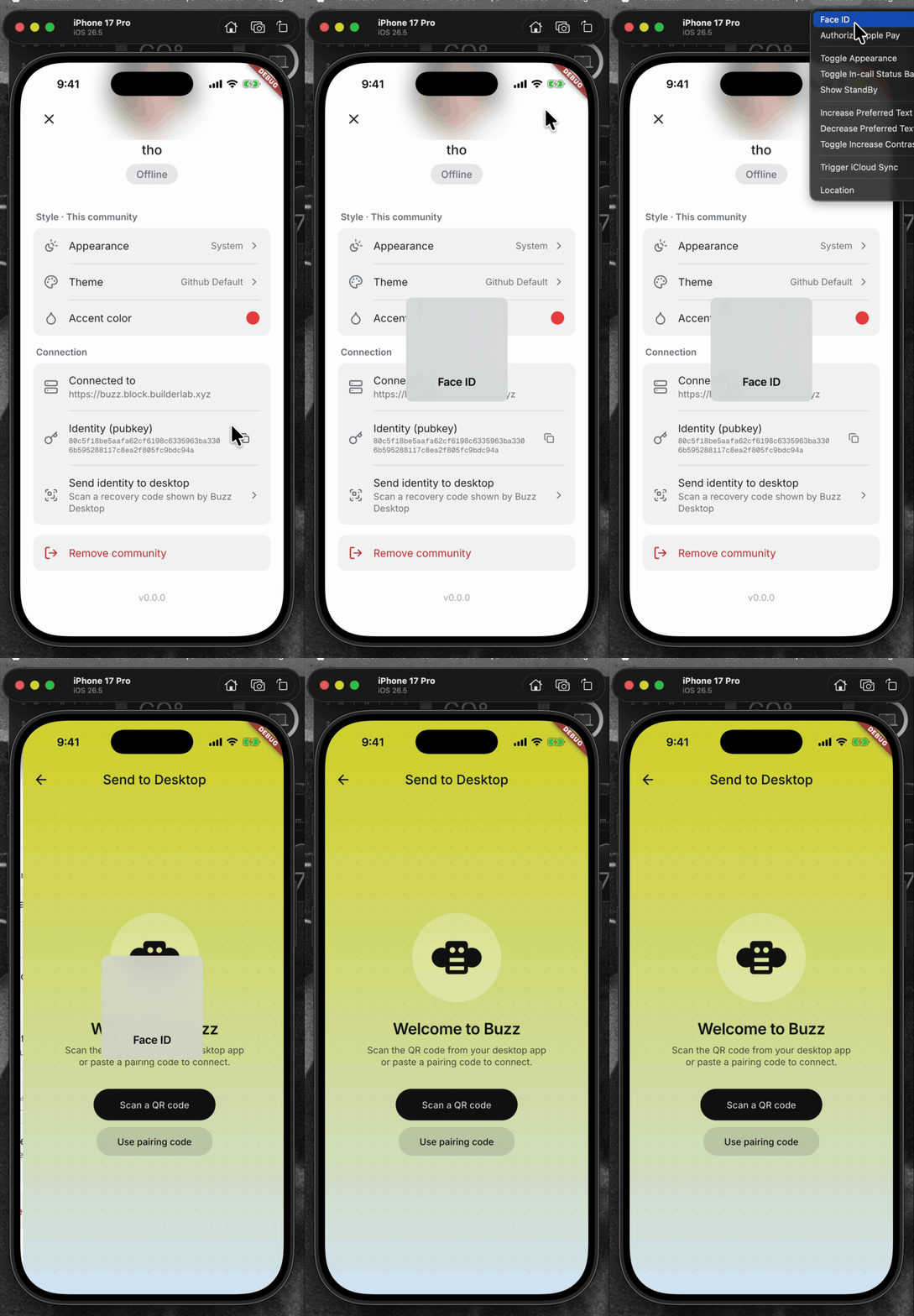
**User Impact:** Mobile users must confirm with Face ID, biometrics, or
their device passcode before sending their Buzz identity to Desktop.
**Problem:** A signed-in phone could send its full identity, including
the `nsec`, to a desktop without fresh local verification.
**Solution:** Require OS device authentication before opening the
identity-recovery scanner, retain that authorization only for the active
pairing session and short pairing window, and require fresh
authentication again if it expires before the identity payload is sent.
Normal app opening, identity import, and community removal remain
unchanged.
## Screencasts
| Enable Face ID | Use Face ID |
| --- | --- |
| 
| 
|
<details>
<summary>File changes</summary>
**Android and iOS integration**
- `mobile/android/app/build.gradle.kts` declares the AppCompat
dependency required by the biometric activity theme.
-
`mobile/android/app/src/main/kotlin/xyz/block/buzz/mobile/MainActivity.kt`
uses the activity type required by the system authentication prompt.
- `mobile/android/app/src/main/res/values/styles.xml` and
`mobile/android/app/src/main/res/values-night/styles.xml` use the
compatible launch theme.
- `mobile/ios/Podfile.lock` records the native local-authentication
dependency.
- `mobile/ios/Runner/Info.plist` explains why Buzz requests Face ID
access.
**Identity policy and pairing flow**
- `mobile/lib/shared/security/sensitive_action_authorizer.dart` wraps OS
authentication and maps platform errors to stable app-level outcomes.
- `mobile/lib/shared/community/community.dart` and
`mobile/lib/shared/community/community_storage.dart` persist the
sensitive-action policy.
- `mobile/lib/features/invites/invite_join_provider.dart` assigns the
explicit policy for invite-created communities.
- `mobile/lib/features/pairing/pairing_provider.dart` gates export,
binds grants to the active community/session, reauthenticates expired
grants, and clears grants on every terminal path.
- `mobile/lib/features/pairing/pairing_page.dart` lets users choose
biometric protection while importing an identity.
- `mobile/lib/features/settings/settings_page.dart` wires pairing into
settings.
- `mobile/lib/features/settings/settings_page/connection_section.dart`
authenticates before opening export recovery and bounds the
foreground-resume wait.
- `mobile/pubspec.yaml` and `mobile/pubspec.lock` add and lock
`local_auth`.
**Coverage**
- `mobile/test/shared/security/sensitive_action_authorizer_test.dart`
covers native result mapping, unsupported devices, and single-flight
behavior.
- `mobile/test/shared/community/community_test.dart` and
`mobile/test/shared/community/community_storage_test.dart` cover policy
defaults and persistence.
- `mobile/test/features/invites/invite_join_provider_test.dart` covers
the invite policy.
- `mobile/test/features/pairing/pairing_page_test.dart` covers import
protection controls.
- `mobile/test/features/pairing/pairing_provider_test.dart` covers
export/import authorization, stale/reset/concurrent guards, malformed
payload cleanup, and no-export failure paths.
- `mobile/test/features/settings/connection_section_test.dart` covers
the tap gate, lifecycle resume, and timeout behavior.
</details>
## Reproduction steps
1. Pair an identity into the mobile app.
2. Open Settings and choose “Send identity to desktop.”
3. Verify Face ID, biometrics, or the device passcode is required before
the recovery scanner opens.
4. Cancel device authentication and verify the scanner does not open and
no identity transfer begins.
5. Authenticate, scan a Desktop recovery code, confirm the SAS, and
verify the identity transfer completes.
## Validation
At `be5620f5f10aa6cc16e86a4f01f102f3d9aeef9b`:
- `cd mobile && ../bin/flutter analyze` — no issues
- `cd mobile && ../bin/flutter test` — 1,368 tests passed
- `cd mobile/android && JAVA_HOME=$(/usr/libexec/java_home -v 21)
./gradlew app:assembleDebug` — debug APK assembled successfully
---------
Signed-off-by: Taylor Ho <taylorkmho@gmail.com>


