mirror of
https://github.com/block/buzz.git
synced 2026-10-27 20:41:57 +00:00
 c8ea4fb4eb
## Summary
Polish mobile Home and Solo: group Search/Inbox beside a separate
profile avatar, move Inbox and Settings to bottom-up pages with Close
controls, and place tabs opposite the plus/compose action. Morph plus to
compose clockwise when entering Solo and reverse counterclockwise when
returning Home, with a directional quarter-turn of the icon inside a
level button and a subtle scale pulse, respecting reduced motion. Align
Search’s Close control with Inbox, simplify its placeholder, and
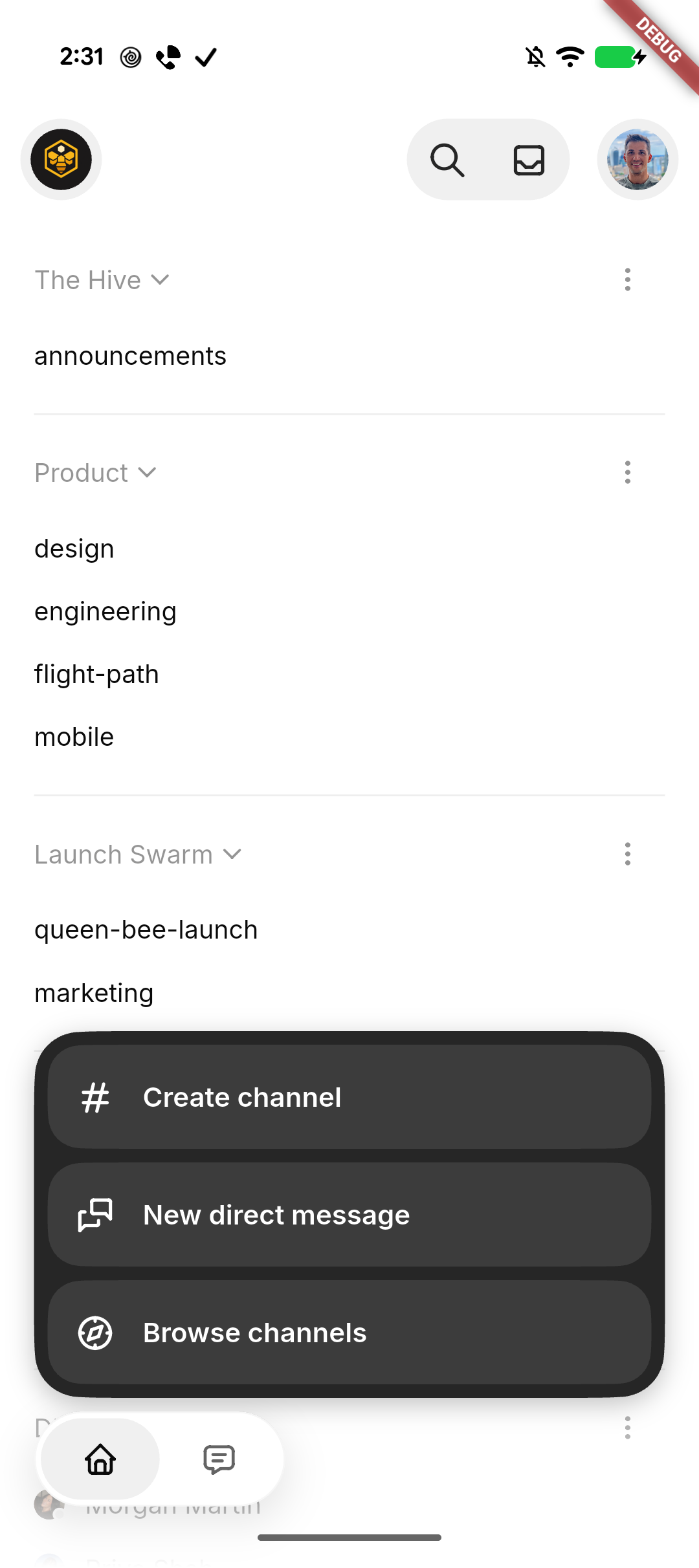
initialize selected filter contrast correctly. Collapse the plus menu
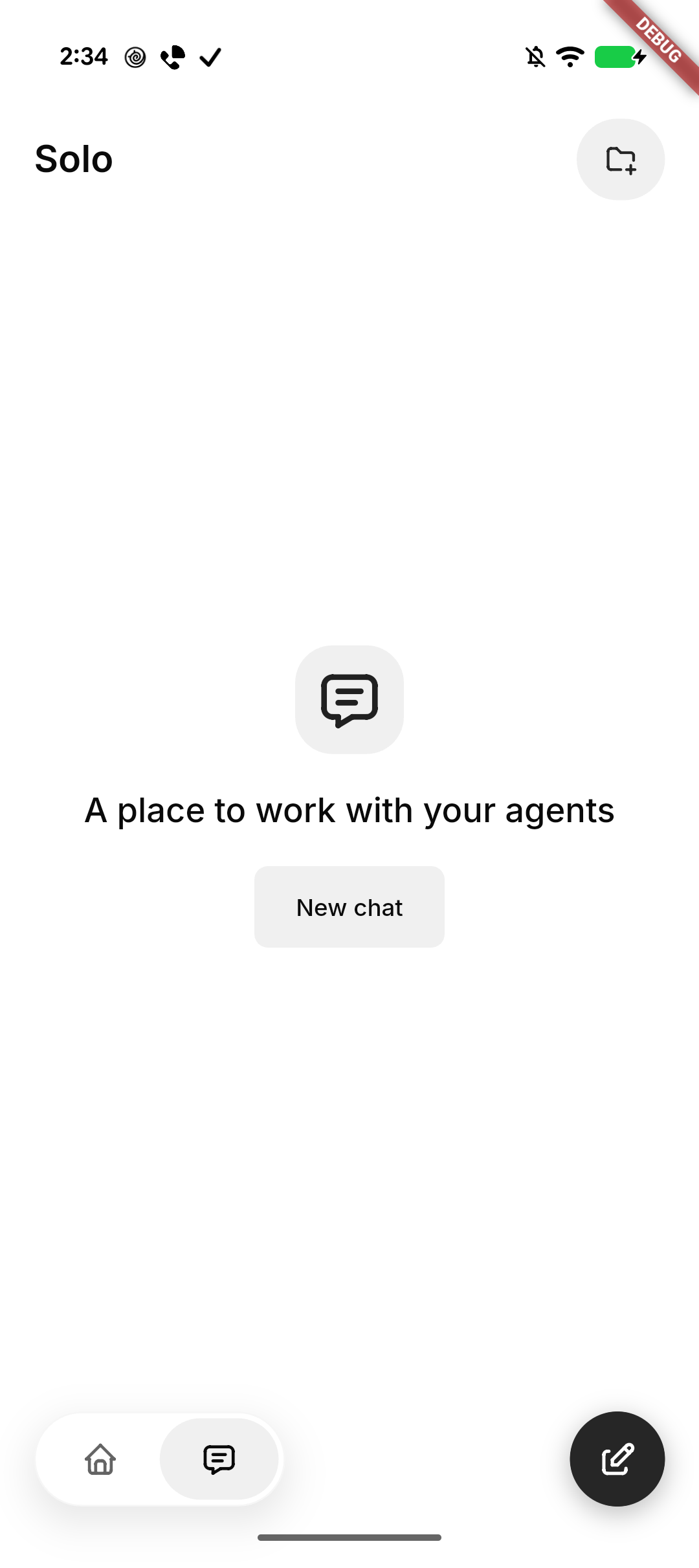
when leaving Home. Center Solo’s native-glass New chat empty state and
keep it stationary behind the keyboard.

Standardize Tabler icons and neutral backgrounds, retain SF Back/Close
on iOS, use native Liquid Glass headers, tab container, and actions
(solid grey selected tab, slightly darker on iOS) on iOS and black
actions on Android, and smooth the expanded menu corners. Repair native
header safe-area/return layout and compose movement after cancellation.

### Related issue
None found for this UI refinement; follows #8337.

### Testing
- Formatting, analysis, full mobile suite: 3,487 passed, 4 skipped; 3
push-configuration tests passed. File-size checks passed.
- Base UI built and installed on Pixel and iPhone in place. Pixel
navigation/New chat cancellation checked. Subsequent glass and rotation
refinements are previewed on iPhone; motion feel awaits human
confirmation.
- Draft pending human confirmation of the final Settings entrance/return
behavior on iPhone.

### Pixel snapshots
| Solo | Expanded actions |
| --- | --- |
| <img
src="https://raw.githubusercontent.com/block/buzz/16dc0f8af971e63d788fee20974997fab925dec9/docs/screenshots/mobile-home-solo/pixel-solo.png"
width="280" alt="Solo empty state with New chat" /> | <img
src="https://raw.githubusercontent.com/block/buzz/16dc0f8af971e63d788fee20974997fab925dec9/docs/screenshots/mobile-home-solo/pixel-actions.png"
width="280" alt="Expanded channel actions with smooth corners" /> |

---------

Signed-off-by: kenny lopez <klopez4212@gmail.com>
Co-authored-by: Terp <5856f6900e8e0a4e0ea1f4f8d2ee33e4753d2119bc122f94ecafc660b46c0511@buzz.block.builderlab.xyz>
143 lines
4.3 KiB
Swift
143 lines
4.3 KiB
Swift
import Flutter
|
|
import UIKit
|
|
|
|
@available(iOS 26.0, *)
|
|
extension NativeAttachmentPopoverViewController {
|
|
func makeMenuView() -> UIView {
|
|
let container = UIView()
|
|
container.translatesAutoresizingMaskIntoConstraints = false
|
|
|
|
let scrollView = UIScrollView()
|
|
scrollView.alwaysBounceVertical = false
|
|
scrollView.translatesAutoresizingMaskIntoConstraints = false
|
|
container.addSubview(scrollView)
|
|
|
|
let stack = UIStackView()
|
|
stack.axis = .vertical
|
|
stack.distribution = .fillEqually
|
|
stack.spacing = NativeAttachmentMenuLayout.itemSpacing
|
|
stack.translatesAutoresizingMaskIntoConstraints = false
|
|
scrollView.addSubview(stack)
|
|
let stackHeightConstraint = stack.heightAnchor.constraint(
|
|
equalToConstant: NativeAttachmentMenuLayout.itemsHeight(
|
|
compatibleWith: traitCollection
|
|
)
|
|
)
|
|
menuStackHeightConstraint = stackHeightConstraint
|
|
NSLayoutConstraint.activate([
|
|
scrollView.leadingAnchor.constraint(equalTo: container.leadingAnchor),
|
|
scrollView.trailingAnchor.constraint(equalTo: container.trailingAnchor),
|
|
scrollView.topAnchor.constraint(equalTo: container.topAnchor),
|
|
scrollView.bottomAnchor.constraint(equalTo: container.bottomAnchor),
|
|
stack.leadingAnchor.constraint(
|
|
equalTo: scrollView.frameLayoutGuide.leadingAnchor,
|
|
constant: NativeAttachmentMenuLayout.contentPadding
|
|
),
|
|
stack.trailingAnchor.constraint(
|
|
equalTo: scrollView.frameLayoutGuide.trailingAnchor,
|
|
constant: -NativeAttachmentMenuLayout.contentPadding
|
|
),
|
|
stack.topAnchor.constraint(
|
|
equalTo: scrollView.contentLayoutGuide.topAnchor,
|
|
constant: NativeAttachmentMenuLayout.contentPadding
|
|
),
|
|
stack.bottomAnchor.constraint(
|
|
equalTo: scrollView.contentLayoutGuide.bottomAnchor,
|
|
constant: -NativeAttachmentMenuLayout.contentPadding
|
|
),
|
|
stackHeightConstraint,
|
|
])
|
|
|
|
stack.addArrangedSubview(
|
|
makeNativeAttachmentMenuButton(
|
|
title: "Camera",
|
|
symbol: "camera",
|
|
action: { [weak self] in self?.showCamera() }
|
|
)
|
|
)
|
|
stack.addArrangedSubview(
|
|
makeNativeAttachmentMenuButton(
|
|
title: "Photos",
|
|
symbol: "photo.on.rectangle.angled",
|
|
action: { [weak self] in self?.showPhotos() }
|
|
)
|
|
)
|
|
stack.addArrangedSubview(
|
|
makeNativeAttachmentMenuButton(
|
|
title: "Video",
|
|
symbol: "video",
|
|
action: { [weak self] in
|
|
self?.finish(method: "pickVideo")
|
|
}
|
|
)
|
|
)
|
|
stack.addArrangedSubview(
|
|
makeNativeAttachmentMenuButton(
|
|
title: "Voice note",
|
|
symbol: "mic",
|
|
action: { [weak self] in
|
|
self?.finish(
|
|
method: "recordVoiceNote",
|
|
notifyBeforeDismissal: true
|
|
)
|
|
}
|
|
)
|
|
)
|
|
stack.addArrangedSubview(
|
|
makeNativeAttachmentMenuButton(
|
|
title: "Files",
|
|
symbol: "doc",
|
|
action: { [weak self] in
|
|
self?.finish(method: "pickFiles")
|
|
}
|
|
)
|
|
)
|
|
return container
|
|
}
|
|
|
|
func makeGlassControl(
|
|
title: String?,
|
|
symbol: String?,
|
|
accessibilityLabel: String,
|
|
prominent: Bool = false,
|
|
action: @escaping () -> Void
|
|
) -> UIButton {
|
|
var configuration =
|
|
prominent
|
|
? UIButton.Configuration.prominentGlass()
|
|
: UIButton.Configuration.glass()
|
|
configuration.title = title
|
|
if prominent {
|
|
configuration.baseBackgroundColor = .black
|
|
}
|
|
if let symbol {
|
|
configuration.image = NativeTabler.image(symbol)
|
|
}
|
|
configuration.imagePadding = 8
|
|
configuration.baseForegroundColor = .white
|
|
configuration.titleTextAttributesTransformer =
|
|
UIConfigurationTextAttributesTransformer { attributes in
|
|
var interAttributes = attributes
|
|
interAttributes.font = NativeAttachmentMenuTypography.font(
|
|
forTextStyle: .body
|
|
)
|
|
return interAttributes
|
|
}
|
|
configuration.contentInsets = NSDirectionalEdgeInsets(
|
|
top: 11,
|
|
leading: 15,
|
|
bottom: 11,
|
|
trailing: 15
|
|
)
|
|
let button = UIButton(
|
|
configuration: configuration,
|
|
primaryAction: UIAction { _ in
|
|
UISelectionFeedbackGenerator().selectionChanged()
|
|
action()
|
|
}
|
|
)
|
|
button.accessibilityLabel = accessibilityLabel
|
|
return button
|
|
}
|
|
}
|