mirror of
https://github.com/block/buzz.git
synced 2026-11-06 17:31:19 +00:00
 daeb463f37
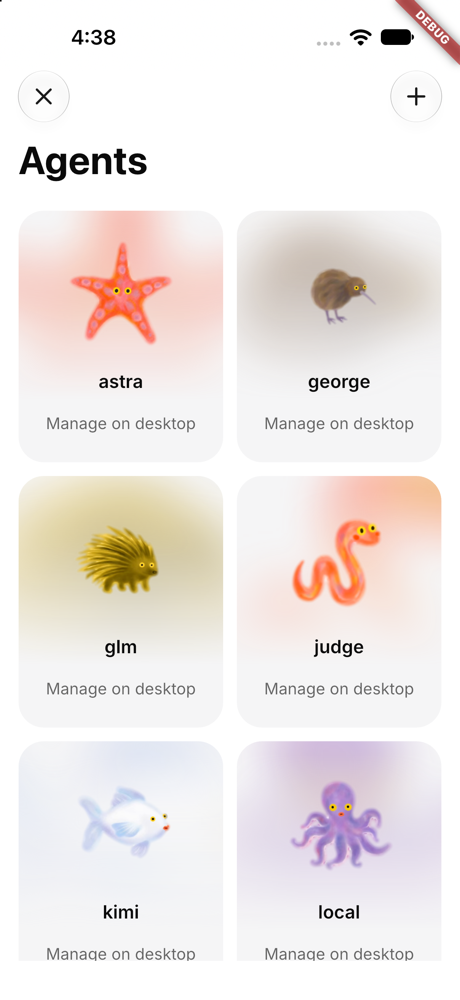
Without a Builderlab session, mobile can't tell which agents run on
Builderbot, so the Agents page labeled every agent "Manage on desktop",
including remote ones.

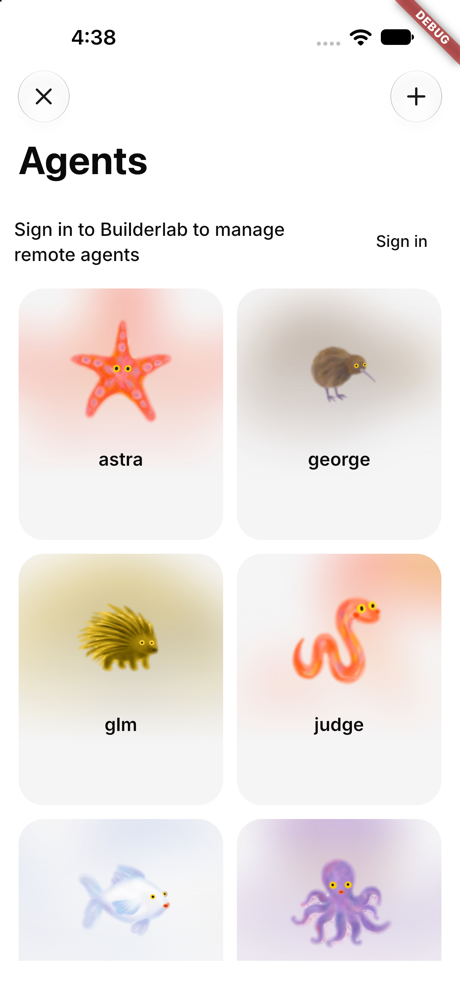
Now, when the community supports remote agents and there's no Builderlab
session:
- The Agents page shows "Sign in to Builderlab to manage remote agents"
with a **Sign in** button (the same reconnect flow as Add).
- Agent cards and the navigation subtitle drop the "Manage on desktop"
label.
- An agent's profile says to sign in to see whether it runs on
Builderbot or desktop.

### Before / after

iOS simulator, signed in to the remote-agent-pilot community with no
Builderlab session.

| Before (main) | After (this PR) |
| --- | --- |
| <img
src="https://raw.githubusercontent.com/block/buzz/9be9cebedc8f5ff172e97a3df2cbf505a90e41c4/pr-8907--before-agents.png"
width="300"> | <img
src="https://raw.githubusercontent.com/block/buzz/9be9cebedc8f5ff172e97a3df2cbf505a90e41c4/pr-8907--after-agents.png"
width="300"> |

### Validation

- New widget test `agents_signed_out_prompt_test.dart` (runs with
`BUZZ_AUTH_DOMAINS`, added to the CI list).
- `just mobile-check` and the mobile test suite pass.
- Checked the signed-out Agents page in the iOS simulator.

buzz-review-completed (manual testing waived by Tom)

🤖 Generated with [Claude Code](https://claude.com/claude-code)

---------

Signed-off-by: Tom Brow <tomb@squareup.com>
Co-authored-by: Tom Brow <tomb@squareup.com>
Co-authored-by: Claude Opus 5.5 <noreply@anthropic.com>
81 lines
2.8 KiB
Dart
81 lines
2.8 KiB
Dart
import 'package:flutter/material.dart';
|
||
import 'package:flutter_hooks/flutter_hooks.dart';
|
||
import 'package:hooks_riverpod/hooks_riverpod.dart';
|
||
|
||
import '../../shared/agents/remote_agents.dart';
|
||
import '../../shared/community/community_provider.dart';
|
||
import '../../shared/theme/theme.dart';
|
||
import '../../shared/widgets/app_list_card.dart';
|
||
import 'agent_instructions.dart';
|
||
|
||
/// The agent's instructions and management information in shared Settings cards.
|
||
class AgentIdentitySections extends HookConsumerWidget {
|
||
const AgentIdentitySections({
|
||
required this.pubkey,
|
||
required this.controller,
|
||
super.key,
|
||
});
|
||
|
||
final String pubkey;
|
||
final RemoteAgentController controller;
|
||
|
||
@override
|
||
Widget build(BuildContext context, WidgetRef ref) {
|
||
useListenable(controller);
|
||
useListenable(controller.account.subjectChanges);
|
||
final community = ref.watch(activeCommunityProvider).asData?.value;
|
||
final unknown = agentLocationUnknown(community, controller);
|
||
final remote = controller.agents.any(
|
||
(agent) => agent['agent_pubkey'] == pubkey,
|
||
);
|
||
// Remote instructions come from the registry row, listed for the active
|
||
// community's owner only (as the agents page decides).
|
||
final owner = community?.pubkey;
|
||
final row = owner != null && controller.owner == owner
|
||
? controller.agents
|
||
.where((agent) => agent['agent_pubkey'] == pubkey)
|
||
.firstOrNull
|
||
: null;
|
||
return Column(
|
||
crossAxisAlignment: CrossAxisAlignment.stretch,
|
||
children: [
|
||
AppListCard(
|
||
label: 'Instructions',
|
||
horizontalPadding: 0,
|
||
children: [
|
||
Padding(
|
||
padding: const EdgeInsets.all(Grid.xs),
|
||
child: SizedBox(
|
||
width: double.infinity,
|
||
child: AgentInstructions(pubkey: pubkey, registryRow: row),
|
||
),
|
||
),
|
||
],
|
||
),
|
||
AppListCard(
|
||
label: 'Management',
|
||
horizontalPadding: 0,
|
||
children: [
|
||
Padding(
|
||
padding: const EdgeInsets.all(Grid.xs),
|
||
child: SizedBox(
|
||
width: double.infinity,
|
||
child: Text(
|
||
unknown && !remote && controller.busy
|
||
? 'Checking whether this agent runs on Builderbot…'
|
||
: unknown && !remote
|
||
? 'Sign in to Builderlab to see whether this agent runs on Builderbot or your desktop.'
|
||
: remote
|
||
? 'This agent runs on Builderbot. Your desktop doesn’t need to be online for it to work.'
|
||
: 'This agent is managed on your desktop. Keep Buzz open and your desktop online for it to work.',
|
||
style: context.textTheme.bodyMedium,
|
||
),
|
||
),
|
||
),
|
||
],
|
||
),
|
||
],
|
||
);
|
||
}
|
||
}
|