mirror of
https://github.com/OpenBB-finance/OpenBB.git
synced 2026-10-27 12:40:35 +00:00
 c045b04853
* Add separate view for finbrain for crypto curreny sentiment analysis

* Move json with symbols to separate directory, little refactoring, update readme

* Add screenshot of finbrain for PolkaDot

* Add model for cryptopanic - news aggregator for crypto

* Add view for cryptopanic

* controller for overview

* Add docs for news cryptopanic cmd

* update readme with Coinpanic api key

* add news to hugo main.yml, change export method
535 lines
23 KiB
Markdown
Vendored
535 lines
23 KiB
Markdown
Vendored
<!-- PROJECT SHIELDS -->
|
||
<!--
|
||
*** I'm using markdown "reference style" links for readability.
|
||
*** Reference links are enclosed in brackets [ ] instead of parentheses ( ).
|
||
*** See the bottom of this document for the declaration of the reference variables
|
||
*** for contributors-url, forks-url, etc. This is an optional, concise syntax you may use.
|
||
*** https://www.markdownguide.org/basic-syntax/#reference-style-links
|
||
-->
|
||
[![Stargazers][stars-shield]][stars-url]
|
||
[![Forks][forks-shield]][forks-url]
|
||
[![Contributors][contributors-shield]][contributors-url]
|
||
[![MIT License][license-shield]][license-url]
|
||
|
||
[![Issues][issues-shield]][issues-url]
|
||
[![Bugs Open][bugs-open-shield]][bugs-open-url]
|
||
[![Bugs Closed][bugs-closed-shield]][bugs-closed-url]
|
||
|
||
[](https://github.com/GamestonkTerminal/GamestonkTerminal/actions)
|
||
[](https://github.com/GamestonkTerminal/GamestonkTerminal/releases)
|
||
[](https://github.com/psf/black)
|
||
[](https://www.tickgit.com/browse?repo=github.com/GamestonkTerminal/GamestonkTerminal&branch=main)
|
||
|
||

|
||
[](https://twitter.com/gamestonkt)
|
||
|
||
<!-- PROJECT LOGO -->
|
||
<br />
|
||
<p align="center">
|
||
<a href="https://github.com/GamestonkTerminal/GamestonkTerminal">
|
||
<img src="images/gst_logo_lockup_rGreen_with_letters.png" alt="Logo" width="800" height="276">
|
||
</a>
|
||
|
||
<h3 align="center">Gamestonk Terminal 🚀</h3>
|
||
|
||
<p align="center">
|
||
The next best thing after Bloomberg Terminal. #weliketheterminal
|
||
<br />
|
||
<a href="https://github.com/GamestonkTerminal/GamestonkTerminal/blob/master/ROADMAP.md"><strong>≪ ROADMAP</strong></a>
|
||
  ·  
|
||
<a href="https://github.com/GamestonkTerminal/GamestonkTerminal/tree/master/gamestonk_terminal/README.md">
|
||
<strong>FEATURES »</strong></a>
|
||
<br />
|
||
<br />
|
||
<a href="https://github.com/GamestonkTerminal/GamestonkTerminal/issues/new?assignees=&labels=bug&template=bug_report.md&title=%5BBug%5D">
|
||
Report Bug</a>
|
||
·
|
||
<a href="https://github.com/GamestonkTerminal/GamestonkTerminal/issues/new?assignees=&labels=enhancement&template=enhancement.md&title=%5BIMPROVE%5D">
|
||
Suggest Improvement</a>
|
||
·
|
||
<a href="https://github.com/GamestonkTerminal/GamestonkTerminal/issues/new?assignees=&labels=new+feature&template=feature_request.md&title=%5BFR%5D">
|
||
Request Feature</a>
|
||
</p>
|
||
</p>
|
||
|
||
<!-- TABLE OF CONTENTS -->
|
||
<details open="open">
|
||
<summary><h2 style="display: inline-block">Table of Contents</h2></summary>
|
||
<ol>
|
||
<li> <a href="#about-the-project">About The Project</a> </li>
|
||
<li>
|
||
<a href="#getting-started">Getting Started</a>
|
||
<ul>
|
||
<li><a href="#dock-install">Docker Install</a></li>
|
||
<li><a href="#install">Install</a></li>
|
||
<li><a href="#advanced-user-install---machine-learning">Advanced User Install - Machine Learning</a></li>
|
||
<li><a href="#update-terminal">Update Terminal</a></li>
|
||
<li><a href="#api-keys">API Keys</a></li>
|
||
<li><a href="#usage">Usage</a></li>
|
||
</ul>
|
||
</li>
|
||
<li><a href="#contributing">Contributing</a></li>
|
||
<li><a href="#license">License</a></li>
|
||
<li><a href="#disclaimer">Disclaimer</a></li>
|
||
<li><a href="#contacts">Contacts</a></li>
|
||
<li><a href="#acknowledgments">Acknowledgments</a></li>
|
||
</ol>
|
||
</details>
|
||
|
||
## About The Project
|
||
|
||
**How it started:**
|
||
|
||
Gamestonk Terminal is an awesome stock and crypto market terminal that has been developed for fun, while I saw my GME
|
||
shares tanking. But hey, I like the stock 💎🙌.
|
||
|
||
**How it's going:**
|
||
|
||
Gamestonk Terminal provides a modern Python-based integrated environment for investment research, that allows
|
||
an average joe retail trader to leverage state-of-the-art Data Science and Machine Learning technologies.
|
||
|
||
As a modern Python-based environment, GamestonkTerminal opens access to numerous Python data libraries in Data Science
|
||
(Pandas, Numpy, Scipy, Jupyter), Machine Learning (Pytorch, Tensorflow, Sklearn, Flair), and Data Acquisition
|
||
(Beautiful Soup, and numerous third-party APIs).
|
||
|
||
## Getting Started
|
||
|
||
### Docker Installation - *new and improved*
|
||
|
||
1. First step is to make sure docker desktop is installed. Install links can be found [here](https://www.docker.com/products/docker-desktop).
|
||
To confirm that your docker desktop is downloaded and running, open a command prompt or terminal and enter
|
||
`docker info`. If you get the following you are not running the docker desktop:
|
||
|
||
```text
|
||
Server:
|
||
ERROR: Cannot connect to the Docker daemon at unix:///var/run/docker.sock.
|
||
Is the docker daemon running?
|
||
```
|
||
|
||
Open the docker desktop app in this case.
|
||
|
||
2. Download the latest docker image.
|
||
|
||
```bash
|
||
docker pull ghcr.io/gamestonkterminal/gst-poetry:latest
|
||
```
|
||
|
||
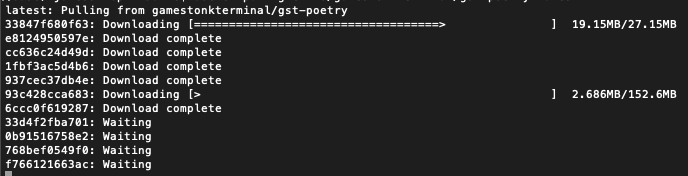
Upon running this the first time, you should see the various layers downloading (note the random series of letters
|
||
numbers will vary). The first time this is run, it will take a few minutes. Subsequent updates will be much faster,
|
||
as the changes will be in the MB instead of GB.
|
||
|
||
|
||
Once the download is complete, confirm that the image has been created by doing `docker images`. You should see
|
||
something similar to
|
||
|
||
```text
|
||
REPOSITORY TAG IMAGE ID CREATED SIZE
|
||
ghcr.io/gamestonkterminal/gst-poetry latest e2bbeebcc73c 42 hours ago 2.02GB
|
||
```
|
||
|
||
3. Run a container
|
||
|
||
You are now ready to run the terminal.
|
||
|
||
```docker run -it --rm ghcr.io/gamestonkterminal/gst-poetry:latest```
|
||
|
||
This will open up the terminal in your command prompt or terminal. Note that this has provided now environment file,
|
||
so you will not be able to view plots or use keys at this stage.
|
||
|
||
To read more on adding the environment keys and how to configure your X-server to show plots, hop over to the
|
||
[Advanced Docker Setup](/DOCKER_ADVANCED.md).
|
||
|
||
### Local Install - Anaconda and Python
|
||
|
||
If you'd like to see a video recording of the installation process, @JohnnyDankseed has made one available [here](https://www.youtube.com/watch?v=-DJJ-cfquDA).
|
||
|
||
This project supports Python 3.7, 3.8 and 3.9.
|
||
|
||
Our current recommendation is to use this project with Anaconda's Python distribution - either full
|
||
[__Anaconda3 Latest__](https://repo.anaconda.com/archive/) or [__Miniconda3 Latest__](https://repo.anaconda.com/archive/).
|
||
Several features in this project utilize Machine Learning. Machine Learning Python dependencies are optional.
|
||
If you decided to add Machine Learning features at a later point, you will likely have better user experience with
|
||
Anaconda's Python distribution.
|
||
|
||
0. Star the project
|
||
|
||
<img width="1272" alt="Github starts" src="https://user-images.githubusercontent.com/25267873/115989986-e20cfe80-a5b8-11eb-8182-d6d87d092252.png">
|
||
|
||
1. [Install Anaconda](https://docs.anaconda.com/anaconda/install/index.html) (It's on the AUR as anaconda or miniconda3!)
|
||
|
||
- Confirm that you have it with: `conda -V`. The output should be something along the lines of: `conda 4.9.2`
|
||
|
||
- If on Windows, install/update Microsoft C++ Build Tools from here: <https://visualstudio.microsoft.com/visual-cpp-build-tools/>
|
||
|
||
2. Install git
|
||
|
||
```bash
|
||
conda install -c anaconda git
|
||
````
|
||
|
||
3. Clone the Project
|
||
|
||
- Via HTTPS: `git clone https://github.com/GamestonkTerminal/GamestonkTerminal.git`
|
||
- via SSH: `git clone git@github.com:GamestonkTerminal/GamestonkTerminal.git`
|
||
|
||
4. Navigate into the project's folder
|
||
|
||
```bash
|
||
cd GamestonkTerminal/
|
||
```
|
||
|
||
5. Create Environment
|
||
|
||
You can name the environment whatever you want. Although you could use names such as: `welikethestock`, `thisistheway`
|
||
or `diamondhands`, we recommend something simple and intuitive like `gst`. This is because this name will be used
|
||
from now onwards.
|
||
|
||
```bash
|
||
conda env create -n gst --file build/conda/conda-3-8-env.yaml
|
||
````
|
||
|
||
6. Activate the virtual environment
|
||
|
||
```bash
|
||
conda activate gst
|
||
```
|
||
|
||
Note: At the end, you can deactivate it with: `conda deactivate`.
|
||
|
||
7. Install poetry dependencies
|
||
|
||
```bash
|
||
poetry install
|
||
```
|
||
|
||
If you are having trouble with Poetry (e.g. on a Windows system), simply install requirements.txt with pip
|
||
|
||
```bash
|
||
pip install -r requirements.txt
|
||
```
|
||
|
||
8. You're ready to Gamestonk it!
|
||
|
||
```bash
|
||
python terminal.py
|
||
```
|
||
|
||
9. (Windows - Optional) Speeding up opening process in the future
|
||
|
||
After you've installed Gamestonk Terminal, you'll find a file named "Gamestonk Terminal.bat". You can use this file
|
||
to open Gamestonk Terminal quicker. This file can be moved to your desktop if you'd like. If you run into issues
|
||
while trying to run the batch file. If you run into issues with the batch files, edit the file and check to see if
|
||
the directories match up. This file assumes you used the default directories when installing.
|
||
|
||
10. Jupyter Lab (Optional. Early alpha). User the Terminal from Jupyter Lab
|
||
|
||
You can install Jupyter Lab extensions that help you manage settings and launch the terminal in a JL bash console
|
||
using the commands in the [jupyterlab/README.md](jupyterlab/README.md)
|
||
|
||
**NOTE:** When you close the terminal and re-open it, the only command you need to re-call is `conda activate gst`
|
||
before you call `python terminal.py` again.
|
||
|
||
**TROUBLESHOOT:** If you are having troubles to install, check our *newest*
|
||
<a href="https://github.com/GamestonkTerminal/GamestonkTerminal/blob/master/TROUBLESHOOT.md"><strong>troubleshoot page</strong></a>
|
||
|
||
### Advanced User Install - Machine Learning
|
||
|
||
If you are an advanced user and use other Python distributions, we have several requirements.txt documents that you can
|
||
pick from to download project dependencies.
|
||
|
||
If you are using conda instead of build/conda/conda-3-8-env.yaml configuration file in Step 5, use build/conda/conda-3-8-env-full.
|
||
|
||
Note: The libraries specified in the [requirements.txt](/requirements.txt) file have been tested and work for
|
||
the purpose of this project, however, these may be older versions. Hence, it is recommended for the user to set up
|
||
a virtual python environment prior to installing these. This allows to keep dependencies required by different projects
|
||
in separate places.
|
||
|
||
*If you would like to use optional Machine Learning features:*
|
||
|
||
- Update your [feature_flags.py](/gamestonk_terminal/feature_flags.py) with:
|
||
|
||
```bash
|
||
ENABLE_PREDICT = os.getenv("GTFF_ENABLE_PREDICT") or True
|
||
```
|
||
|
||
- Install optional ML features dependencies:
|
||
|
||
```bash
|
||
poetry install -E prediction
|
||
```
|
||
|
||
### Update Terminal
|
||
|
||
The terminal is constantly being updated with new features and bug fixes, hence, for your terminal to be update,
|
||
you can run:
|
||
|
||
```bash
|
||
git pull
|
||
```
|
||
|
||
to get the latest changes.
|
||
|
||
If this fails due to the fact that you had modified some python files, and there's a conflict with the updates, you can use:
|
||
|
||
```bash
|
||
git stash
|
||
```
|
||
|
||
Then, re-run `poetry install` or `pip install -r requirements.txt` to get any new dependencies.
|
||
|
||
Once installation is finished, you're ready to gamestonk.
|
||
|
||
If you `stashed` your changes previously, you can un-stash them with:
|
||
|
||
```bash
|
||
git stash pop
|
||
```
|
||
|
||
### API Keys
|
||
|
||
The project is build around several different API calls, whether it is to access historical data or financials.
|
||
|
||
These are the ones where a key is necessary:
|
||
|
||
- Alpha Vantage: <https://www.alphavantage.co>
|
||
- Binance: <https://binance.us> (US) / <https://binance.com> (Outside US)
|
||
- CoinMarketCap API: <https://coinmarketcap.com/api>
|
||
- Degiro API : <https://www.degiro.fr>
|
||
- FRED: <https://fred.stlouisfed.org/docs/api/api_key.html>
|
||
- Financial Modeling Prep: <https://financialmodelingprep.com/developer>
|
||
- Finhub API: <https://finnhub.io>
|
||
- News API: <https://newsapi.org>
|
||
- Oanda API: <https://developer.oanda.com>
|
||
- Polygon: <https://polygon.io>
|
||
- Quandl: <https://www.quandl.com/tools/api>
|
||
- Reddit: <https://www.reddit.com/prefs/apps>
|
||
- SentimentInvestor: <https://sentimentinvestor.com>
|
||
- Tradier: <https://developer.tradier.com/getting_started>
|
||
- Twitter: <https://developer.twitter.com>
|
||
- Coinbase Pro API: <https://docs.pro.coinbase.com/>
|
||
- Whale Alert API: <https://docs.whale-alert.io/>
|
||
- Ethplorer API: <https://github.com/EverexIO/Ethplorer/wiki/Ethplorer-API>
|
||
- Cryptopanic API: <https://cryptopanic.com/developers/api/>
|
||
|
||
When these are obtained, don't forget to update [config_terminal.py](/gamestonk_terminal/config_terminal.py).
|
||
|
||
Alternatively, you can also set them to the following environment variables:
|
||
|
||
| Website | Variables |
|
||
| :--- | :--- |
|
||
| [Alpha Vantage](https://www.alphavantage.co) | GT_API_KEY_ALPHAVANTAGE |
|
||
| [Binance](https://binance.com) | GT_API_BINANCE_KEY <br/> GT_API_BINANCE_SECRET |
|
||
| [CoinMarketCap](https://coinmarketcap.com) | GT_CMC_API_KEY <br/> GT_CMC_API_KEY |
|
||
| [DEGIRO](https://www.degiro.fr) | GT_DG_USERNAME <br/> GT_DG_PASSWORD <br/> GT_DG_TOTP_SECRET |
|
||
| [FRED](https://fred.stlouisfed.org) | GT_API_FRED_KEY |
|
||
| [Financial Modeling Prep](https://financialmodelingprep.com) | GT_API_KEY_FINANCIALMODELINGPREP |
|
||
| [Finhub](https://finnhub.io) | GT_API_FINNHUB_KEY |
|
||
| [News](https://newsapi.org) | GT_API_NEWS_TOKEN |
|
||
| [Oanda](https://developer.oanda.com) | GT_OANDA_TOKEN <br/> GT_OANDA_ACCOUNT |
|
||
| [Polygon](https://polygon.io) | GT_API_POLYGON_KEY |
|
||
| [Quandl](https://www.quandl.com) | GT_API_KEY_QUANDL |
|
||
| [Reddit](https://www.reddit.com) | GT_API_REDDIT_CLIENT_ID <br> GT_API_REDDIT_CLIENT_SECRET <br/> GT_API_REDDIT_USERNAME <br/> GT_API_REDDIT_USER_AGENT <br/> GT_API_REDDIT_PASSWORD|
|
||
| [SentimentInvestor](https://sentimentinvestor.com) | GT_API_SENTIMENTINVESTOR_TOKEN <br> GT_API_SENTIMENTINVESTOR_KEY |
|
||
| [Tradier](https://developer.tradier.com) | GT_TRADIER_TOKEN |
|
||
| [Twitter](https://developer.twitter.com) | GT_API_TWITTER_KEY <br/> GT_API_TWITTER_SECRET_KEY <br/> GT_API_TWITTER_BEARER_TOKEN |
|
||
| [Coinbase](https://docs.pro.coinbase.com/) | GT_API_COINBASE_KEY <br/> GT_API_COINBASE_SECRET <br/> GT_API_COINBASE_PASS_PHRASE |
|
||
| [Whale Alert](https://docs.whale-alert.io/) | GT_API_WHALE_ALERT_KEY |
|
||
| [Ethplorer](https://github.com/EverexIO/Ethplorer/wiki/Ethplorer-API) | GT_API_ETHPLORER_KEY |
|
||
| [Cryptopanic](https://cryptopanic.com/developers/api/) | GT_API_CRYPTO_PANIC_KEY |
|
||
|
||
Example:
|
||
|
||
```bash
|
||
export GT_API_REDDIT_USERNAME=SexyYear
|
||
```
|
||
|
||
Environment variables can also be set in a `.env` file at the top of the repo. This file is ignored by git so your API
|
||
keys will stay secret. The above example stored in `.env` would be:
|
||
|
||
```bash
|
||
GT_API_REDDIT_USERNAME=SexyYear
|
||
```
|
||
|
||
Note that the `GT_API_REDDIT_USER_AGENT` is the name of the script that you set when obtained the Reddit API key.
|
||
Note that it is not necessary to have a valid Alpha Vantage key to get daily OHLC values.
|
||
|
||
### Usage
|
||
|
||
Start by selecting a context that you would like to work with. If you want to research stocks, you would start with
|
||
|
||
```bash
|
||
stocks
|
||
```
|
||
|
||
Alternatively, you can set a default context to be loaded in the config_terminal file by setting
|
||
|
||
```bash
|
||
DEFAULT_CONTEXT = "stocks"
|
||
```
|
||
|
||
From this menu, you can load a ticker of interest (note the -t is optional):
|
||
|
||
```bash
|
||
load -t GME
|
||
```
|
||
|
||
At this point, all available menus will be in full color and available to use.
|
||
|
||
To look at the candle chart of your stock, run:
|
||
|
||
```bash
|
||
candle
|
||
```
|
||
|
||
Slice the historical data by loading ticker and setting a starting point, e.g.
|
||
|
||
```bash
|
||
load -t GME -s 2020-06-04
|
||
```
|
||
|
||
To perform technical analysis, first enter the menu
|
||
|
||
```bash
|
||
ta
|
||
```
|
||
|
||
and run a SMA with:
|
||
|
||
```bash
|
||
sma
|
||
```
|
||
|
||
However, imagine that you wanted to change the length of the window because you don't want to go long but do a swing,
|
||
and therefore a smaller window is necessary. Check what settings are available on the SMA command:
|
||
|
||
```bash
|
||
sma -h
|
||
```
|
||
|
||
Once that has been seen, set the parameters that you want after flagging them. In this case, to change length window
|
||
to 10, we would have to do:
|
||
|
||
```bash
|
||
sma -l 10
|
||
```
|
||
|
||
Example:
|
||
|
||
<img src='/images/usage.gif' width="1000">
|
||
|
||
To return to the stocks menu to perform more research in a different menu, just use the `q` command. From the stocks
|
||
menu, using `q` again will return you to the main menu where you can enter a different context (crypto for example).
|
||
|
||
<!-- CONTRIBUTING -->
|
||
## Contributing
|
||
|
||
There are 3 main ways of contributing to this project.
|
||
|
||
For a 1h coding session where the architecture of the repo is explained while a new feature is added, check <https://www.youtube.com/watch?v=9BMI9cleTTg>.
|
||
|
||
**Become a Contributor 🦍**
|
||
|
||
Recommended if you bought the dip, and the share price keeps dipping. You may as well keep yourself busy while stonks
|
||
go up.
|
||
|
||
1. Fork the Project
|
||
2. Create your Feature Branch (`git checkout -b feature/AmazingFeature`)
|
||
3. Install the pre-commit hooks by running:
|
||
```pre-commit install```.
|
||
Any time you commit a change, linters will be run automatically. On changes, you will have to re-commit.
|
||
4. Commit your Changes (`git commit -m 'Add some AmazingFeature'`)
|
||
5. Push to your Branch (`git push origin feature/AmazingFeature`)
|
||
6. Open a Pull Request
|
||
|
||
**Become a Karen 🤷**
|
||
|
||
Recommended if you adopted a strategy of buying high and selling low.
|
||
|
||
We are interested in your view on what sort of [features](https://github.com/GamestonkTerminal/GamestonkTerminal/issues)
|
||
would make you buy even higher and selling even lower.
|
||
|
||
Also, if somehow you're sitting in several mils due to this terminal, don't forget to report a
|
||
[bug](https://github.com/GamestonkTerminal/GamestonkTerminal/issues) so that the team can fix, and keep the old ways.
|
||
|
||
**Join the 🙌 💎 Gang**
|
||
|
||
If red is your favorite color, and you never sell for a loss.
|
||
|
||
Welcome to the club, and feel free to support the developers behind this amazing open-source project.
|
||
|
||
## License
|
||
|
||
Distributed under the MIT License. See
|
||
[LICENSE](https://github.com/GamestonkTerminal/GamestonkTerminal/blob/main/LICENSE) for more information.
|
||
|
||
## Disclaimer
|
||
|
||
"A few things I am not. I am not a cat. I am not an institutional investor, nor am I a hedge fund. I do not have
|
||
clients and I do not provide personalized investment advice for fees or commissions." DFV
|
||
|
||
Trading in financial instruments involves high risks including the risk of losing some, or all, of your investment
|
||
amount, and may not be suitable for all investors. Before deciding to trade in financial instrument you should be fully
|
||
informed of the risks and costs associated with trading the financial markets, carefully consider your investment
|
||
objectives, level of experience, and risk appetite, and seek professional advice where needed. The data contained in GST
|
||
is not necessarily accurate. GST and any provider of the data contained in this website will not accept liability for
|
||
any loss or damage as a result of your trading, or your reliance on the information displayed.
|
||
|
||
## Contacts
|
||
|
||
[Didier Rodrigues Lopes](https://www.linkedin.com/in/didier-lopes/) - dro.lopes@campus.fct.unl.pt
|
||
|
||
[Artem Veremy](https://www.linkedin.com/in/veremey/) - artem@veremey.net
|
||
|
||
[James Maslek](https://www.linkedin.com/in/james-maslek-b6810186/) - jmaslek11@gmail.com
|
||
|
||
Feel free to share loss porn, memes or any questions at:
|
||
|
||
- Discord: <https://discord.gg/Up2QGbMKHY>
|
||
- Twitter: [@gamestonkt](https://twitter.com/gamestonkt)
|
||
|
||
### Contributors
|
||
|
||
- **pll_llq** and **Chavithra**: Working on JupyterLab integration. Also developed a GUI POOC.
|
||
- **jpp** : Responsible by developing `Crypto` menu.
|
||
- **northern-64bit** : Developing a discord bot for the terminal.
|
||
- **1lluz10n** and **crspy** : Working on our landing page <https://gamestonkterminal.netlify.app>.
|
||
- **Meghan Hone** : Managing Twitter account.
|
||
- **Chavithra** and **Deel18** : for Degiro's integration.
|
||
- **alokan** : Responsible by developing `Forex` menu.
|
||
- **Traceabl3** : By adding several preset screeners.
|
||
|
||
<a href="https://github.com/GamestonkTerminal/GamestonkTerminal/graphs/contributors">
|
||
<img src="https://contributors-img.web.app/image?repo=GamestonkTerminal/GamestonkTerminal" height="276"/>
|
||
</a>
|
||
|
||
## Acknowledgments
|
||
|
||
- [VICE article - Gamestonk Terminal Is a DIY, Meme Stock Version of Bloomberg Terminal](https://www.vice.com/en/article/qjp9vp/gamestonk-terminal-is-a-diy-meme-stock-version-of-bloomberg-terminal)
|
||
- [Daily Fintech article - Never underestimate Bloomberg, but here are 5 reasons why the Gamestonk Terminal is a contender](https://dailyfintech.com/2021/02/25/never-underestimate-bloomberg-but-here-are-5-reasons-why-the-gamestonk-terminal-is-a-contender/)
|
||
- [HackerNews - Show HN: Can’t afford Bloomberg Terminal? No prob, I built the next best thing](https://news.ycombinator.com/item?id=26258773)
|
||
- [Reddit r/algotrading - Gamestonk Terminal: The next best thing after Bloomberg Terminal.](https://www.reddit.com/r/algotrading/comments/m4uvza/gamestonk_terminal_the_next_best_thing_after/)
|
||
- [Reddit r/Python - Gamestonk Terminal: The equivalent to an open-source python Bloomberg Terminal.](https://www.reddit.com/r/Python/comments/m515yk/gamestonk_terminal_the_equivalent_to_an/)
|
||
- [Reddit r/Superstonk - Move over Bloomberg Terminal, here comes Gamestonk Terminal](https://www.reddit.com/r/Superstonk/comments/mx2cjh/move_over_bloomberg_terminal_here_comes_gamestonk/)
|
||
- [Spotlight: Didier Lopes. Creator of Gamestonk Terminal](https://deepsource.io/spotlight/didier-lopes/)
|
||
- [Reddit r/Superstonk - Gamestonk Terminal - We are very much alive](https://www.reddit.com/r/Superstonk/comments/o502i8/gamestonk_terminal_we_are_very_much_alive/)
|
||
- [Medium- Gamestonk Terminal. Can't Stop, Won't Stop](https://dro-lopes.medium.com/gamestonk-terminal-cant-stop-won-t-stop-e635662d6f2e)
|
||
|
||
<!-- MARKDOWN LINKS & IMAGES -->
|
||
<!-- https://www.markdownguide.org/basic-syntax/#reference-style-links -->
|
||
[contributors-shield]: https://img.shields.io/github/contributors/GamestonkTerminal/GamestonkTerminal.svg?style=for-the-badge
|
||
[contributors-url]: https://github.com/GamestonkTerminal/GamestonkTerminal/graphs/contributors
|
||
[forks-shield]: https://img.shields.io/github/forks/GamestonkTerminal/GamestonkTerminal.svg?style=for-the-badge
|
||
[forks-url]: https://github.com/GamestonkTerminal/GamestonkTerminal/network/members
|
||
[stars-shield]: https://img.shields.io/github/stars/GamestonkTerminal/GamestonkTerminal.svg?style=for-the-badge
|
||
[stars-url]: https://github.com/GamestonkTerminal/GamestonkTerminal/stargazers
|
||
[issues-shield]: https://img.shields.io/github/issues/GamestonkTerminal/GamestonkTerminal.svg?style=for-the-badge&color=blue
|
||
[issues-url]: https://github.com/GamestonkTerminal/GamestonkTerminal/issues
|
||
[bugs-open-shield]: https://img.shields.io/github/issues/GamestonkTerminal/GamestonkTerminal/bug.svg?style=for-the-badge&color=yellow
|
||
[bugs-open-url]: https://github.com/GamestonkTerminal/GamestonkTerminal/issues?q=is%3Aissue+label%3Abug+is%3Aopen
|
||
[bugs-closed-shield]: https://img.shields.io/github/issues-closed/GamestonkTerminal/GamestonkTerminal/bug.svg?style=for-the-badge&color=success
|
||
[bugs-closed-url]: https://github.com/GamestonkTerminal/GamestonkTerminal/issues?q=is%3Aissue+label%3Abug+is%3Aclosed
|
||
[license-shield]: https://img.shields.io/github/license/GamestonkTerminal/GamestonkTerminal.svg?style=for-the-badge
|
||
[license-url]: https://github.com/GamestonkTerminal/GamestonkTerminal/blob/main/LICENSE.txt
|
||
[linkedin-shield]: https://img.shields.io/badge/-LinkedIn-black.svg?style=for-the-badge&logo=linkedin&colorB=555
|
||
[linkedin-url]: https://linkedin.com/in/DidierRLopes
|