 6381b2ae7d
* fixing a url

* moving around menus

* Grammar Update

* many fixes to links and some added pics to install

* Add improvements

* fix: tabs

* Move support/feedback window to FAQ

* Forgot to save

* MVC moved around

* change installation Source -> Python

* fix: tabs

* guides to basics

* Add new README LINKS

* Change links

* Change forecasting to forecast

* fix: details

* more fixes

* Change markdown file so it is ready for pypi

Co-authored-by: Chavithra <chavithra@gmail.com>
Co-authored-by: Danglewood <85772166+deeleeramone@users.noreply.github.com>
Co-authored-by: Jeroen Bouma <jer.bouma@gmail.com>
Co-authored-by: Jeroen Bouma <jeroenbouma@Jeroens-MacBook-Pro.local>
Co-authored-by: jose-donato <zmcdonato@gmail.com>
26 KiB
Vendored
title
| title |
|---|
| Forecast |
The Forecast module provides programmatic access to the same commands found in the OpenBB Terminal Forecast menu. The extensive library of models, built on top of the u8darts library, are easily tuned with hyper-parameters.
How to Use
The Forecast menu was designed specifically for the CLI application, and consequently, the operation of these commands do not mirror the workflow of the OpenBB Terminal. This will be improved in the future to more closely resemble it, and this guide will highlight some notable differences.
Commands within the forecast module are representatives from three broad categories:
- Exploration
- Feature Engineering
- Model
Each command is listed below with a short description. A majority of functions will also have an additional syntax, _chart, for displaying the generated charts inline. For ease of use, we recommend using the _chart version for Model functions.
| Path | Type | Description |
|---|---|---|
| openbb.forecast.atr | Feature Engineering | Add a Column for the Average True Range |
| openbb.forecast.autoces | Model | Automatic Complex Exponential Smoothing Model |
| openbb.forecast.autoets | Model | Automatic ETS (Error, Trend, Seasonality) Model |
| openbb.forecast.autoselect | Model | Automatically Selects the Best Statistical Model From AutoARIMA, AutoETS, AutoCES, MSTL, etc. |
| openbb.forecast.brnn | Model | Block Recurrent Neural Network (RNN, LSTM, GRU) (feat. Past covariates) |
| openbb.forecast.clean | Exploration | Fill or Drop NaN Values |
| openbb.forecast.combine | Exploration | Combine Columns From Different Datasets |
| openbb.forecast.corr | Exploration | Correlation Coefficients Between Columns of a Dataset |
| openbb.forecast.delete | Exploration | Delete Columns From a Dataset |
| openbb.forecast.delta | Feature Engineering | Add a Column for % Change |
| openbb.forecast.desc | Exploration | Show Descriptive Statistics for a Dataset |
| openbb.forecast.ema | Feature Engineering | Add a Column for Exponentially Weighted Moving Average |
| openbb.forecast.expo | Model | Probabilistic Exponential Smoothing |
| openbb.forecast.export | Export | Export a Processed Dataset as a CSV or XLSX File |
| openbb.forecast.linregr | Model | Probabilistic Linear Regression (feat. Past covariates and Explainability) |
| openbb.forecast.load | Import | Import a Local CSV or XLSX File |
| openbb.forecast.mom | Feature Engineering | Add a Column for Momentum |
| openbb.forecast.nbeats | Model | Neural Bayesian Estimation (feat. Past covariates) |
| openbb.forecast.nhits | Model | Neural Hierarchical Interpolation (feat. Past covariates) |
| openbb.forecast.plot | Exploration | Plots Specific Columns From a Loaded Dataset |
| openbb.forecast.regr | Model | Regression (feat. Past covariates and Explainability) |
| openbb.forecast.rename | Exploration | Rename Columns in a Dataset |
| openbb.forecast.rnn | Model | Probabilistic Recurrent Neural Network (RNN, LSTM, GRU) |
| openbb.forecast.roc | Feature Engineering | Add a Column for Rate of Change |
| openbb.forecast.rsi | Feature Engineering | Add a Column for Relative Strength Index |
| openbb.forecast.rwd | Model | Random Walk with Drift Model |
| openbb.forecast.season | Exploration | Plot Seasonality of a Column in a Dataset |
| openbb.forecast.seasonalnaive | Model | Seasonal Naive Model |
| openbb.forecast.signal | Feature Engineering | Add a Column for Price Signal (Short vs. Long Term) |
| openbb.forecast.sto | Feature Engineering | Add a Column for Stochastic Oscillator %K and %D |
| openbb.forecast.tcn | Model | Temporal Convolutional Neural Network (feat. Past covariates) |
| openbb.forecast.tft | Model | Temporal Fusion Transformer Network(feat. Past covariates) |
| openbb.forecast.theta | Model | Theta Method |
| openbb.forecast.trans | Model | Transformer Network (feat. Past covariates) |
Alteratively, the contents of the menu is printed with:
help(openbb.forecast)
Type hints and code completion will be activated upon entering the ., after, openbb.forecast. The first step is always going to involve loading some data. Let's walk through a procedure for procuring a DataFrame with some examples below.
Examples
Import Statements
The examples provided below will assume that the following import block is included at the beginning of the Python script or Notebook file:
from openbb_terminal.sdk import openbb
import pandas as pd
# %matplotlib inline (uncomment if using a Jupyter Interactive Terminal or Notebook)
Loading Data
This library of models are specifically for time-series, and consequently, the data must follow some formatting guidelines:
- If the index is not a date, it must be sequentially ordered and evenly spaced - i.e., it can't be indexed like:
[1,2,5,11,50] - A datetime index must be spaced evenly - i.e., monthly data is better handled when the interval date is the first of the month.
- If the datetime index is a weekly interval, use a Monday-Friday format.
- Intraday data is not officially supported at this time.
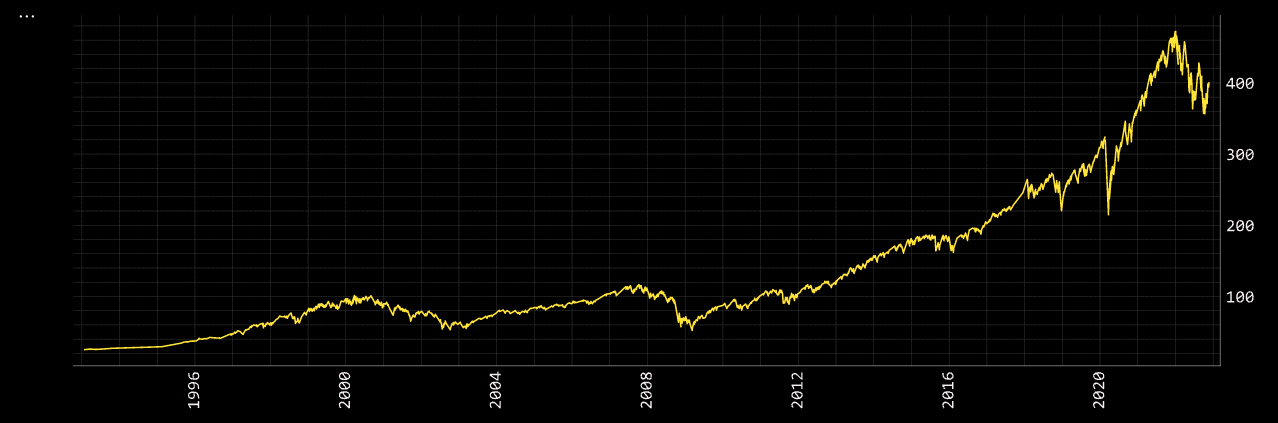
The equities market revolves around the S&P 500, so let's take a look at the ETF, SPY, from inception:
spy = openbb.stocks.load('SPY', start_date = '1990-01-01')
Loading Daily data for SPY with starting period 1993-01-29.
The printed message indicates that the first day of available data is not the same as the requested start date. Wikipedia shows the fund was launched on January 22, 1993. The product was marketed and sold to liquidity providers prior to trading on a public exchange, so this DataFrame is pretty darn close to the inception date. We can confirm that this data arrived as expected by printing the created DataFrame.
spy.head(5)
| date | Open | High | Low | Close | Adj Close | Volume |
|---|---|---|---|---|---|---|
| 1993-01-29 00:00:00 | 43.9688 | 43.9688 | 43.75 | 43.9375 | 25.334 | 1.0032e+06 |
| 1993-02-01 00:00:00 | 43.9688 | 44.25 | 43.9688 | 44.25 | 25.5142 | 480500 |
| 1993-02-02 00:00:00 | 44.2188 | 44.375 | 44.125 | 44.3438 | 25.5683 | 201300 |
| 1993-02-03 00:00:00 | 44.4062 | 44.8438 | 44.375 | 44.8125 | 25.8385 | 529400 |
| 1993-02-04 00:00:00 | 44.9688 | 45.0938 | 44.4688 | 45 | 25.9467 | 531500 |
Plot
The data can also be inspected visually, openbb.forecast.plot:
openbb.forecast.plot(data=spy, columns = ['Adj Close'])
Theta
Data consisting of a numeric value and a datetime index is sufficient enough for feeding the inputs to a forecast model. One important distinction between the Terminal and SDK is that the target_column must be explicitly declared when using the SDK, if it is not labeled as "close". It is case-sensitive.
To use a forecast model with default parameters, all that is required in the syntax is:
- The name of the dataset.
- The target column for the forecast.
A basic, default, syntax will look like:
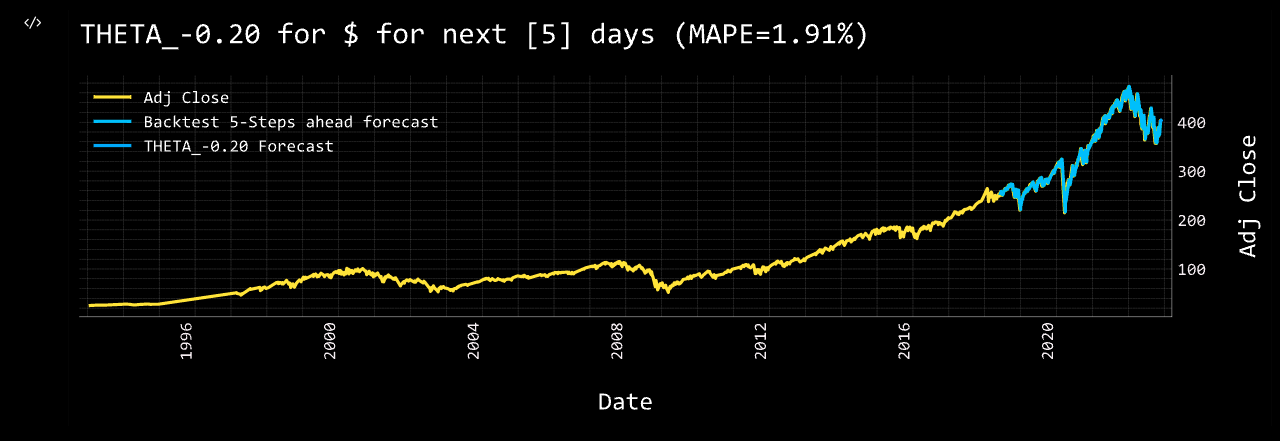
openbb.forecast.theta_chart(data = spy, target_column = 'Adj Close')
The default number of days to predict for all models is five. If the interval of the time-series is not daily, days equates to the interval of the index.
Theta Model obtains MAPE: 1.91%
| Datetime | Prediction |
|---|---|
| 2022-11-24 | 402.62 |
| 2022-11-25 | 402.92 |
| 2022-11-28 | 403.14 |
| 2022-11-29 | 403.38 |
| 2022-11-30 | 403.59 |
Refer to the docstrings to learn about each model's unique set of arguments.
help(openbb.forecast.theta_chart)
Feature Engineering
This category of functions are for adding columns to a dataset that are the results of calculations, like technical and quantitative analysis. Individual parameters will vary slightly between functions, but syntax construction will be similar.
EMA
A moving average provides an indication of the trend of the price movement by cutting down the amount of "noise" in a price chart.
help(openbb.forecast.ema)

    Parameters
    ----------
    dataset : pd.DataFrame
        The dataset you wish to clean
    target_column : str
        The column you wish to add the EMA to
    period : int
        Time Span

    Returns
    -------
    pd.DataFrame
        Dataframe with added EMA column
The example below adds a column to the spy dataset for the 150-day exponential moving average of the adjusted-close price.
spy = openbb.forecast.ema(spy, target_column = 'Adj Close', period = 150)

spy.tail(3)
| date | Open | High | Low | Close | Adj Close | Volume | EMA_150 | |
|---|---|---|---|---|---|---|---|---|
| 7508 | 2022-11-21 | 394.64 | 395.82 | 392.66 | 394.59 | 394.59 | 51243200 | 394.923 |
| 7509 | 2022-11-22 | 396.63 | 400.07 | 395.15 | 399.9 | 399.9 | 60429000 | 394.989 |
| 7510 | 2022-11-23 | 399.55 | 402.93 | 399.31 | 402.42 | 402.42 | 68161400 | 395.087 |
Additional columns can be added for each desired period length of the calculation:
spy = openbb.forecast.ema(spy, target_column = 'Adj Close', period = 20)

spy.tail(3)
| date | Open | High | Low | Close | Adj Close | Volume | EMA_150 | EMA_20 | |
|---|---|---|---|---|---|---|---|---|---|
| 7508 | 2022-11-21 | 394.64 | 395.82 | 392.66 | 394.59 | 394.59 | 51243200 | 394.923 | 387.237 |
| 7509 | 2022-11-22 | 396.63 | 400.07 | 395.15 | 399.9 | 399.9 | 60429000 | 394.989 | 388.443 |
| 7510 | 2022-11-23 | 399.55 | 402.93 | 399.31 | 402.42 | 402.42 | 68161400 | 395.087 | 389.775 |
The process can be repeated as required.
RSI
Similar to ema, rsi adds a column for the Relative Strength Index. The three variables are the same here as above. A period of ten equates to ten trading days, or two-weeks.
spy = openbb.forecast.rsi(spy, target_column = 'Adj Close', period = 10)

spy.tail(3)
| date | Open | High | Low | Close | Adj Close | Volume | EMA_150 | EMA_20 | RSI_10_Adj Close | |
|---|---|---|---|---|---|---|---|---|---|---|
| 7508 | 2022-11-21 | 394.64 | 395.82 | 392.66 | 394.59 | 394.59 | 51243200 | 394.923 | 387.237 | 58.837 |
| 7509 | 2022-11-22 | 396.63 | 400.07 | 395.15 | 399.9 | 399.9 | 60429000 | 394.989 | 388.443 | 63.7145 |
| 7510 | 2022-11-23 | 399.55 | 402.93 | 399.31 | 402.42 | 402.42 | 68161400 | 395.087 | 389.775 | 65.8484 |
Let's add another column for a twelve-week period:
spy = openbb.forecast.rsi(spy, target_column = 'Adj Close', period = 60)

spy.tail(3)
| date | Open | High | Low | Close | Adj Close | Volume | EMA_150 | EMA_20 | RSI_10_Adj Close | RSI_60_Adj Close | |
|---|---|---|---|---|---|---|---|---|---|---|---|
| 7508 | 2022-11-21 | 394.64 | 395.82 | 392.66 | 394.59 | 394.59 | 51243200 | 394.923 | 387.237 | 58.837 | 50.5453 |
| 7509 | 2022-11-22 | 396.63 | 400.07 | 395.15 | 399.9 | 399.9 | 60429000 | 394.989 | 388.443 | 63.7145 | 51.4456 |
| 7510 | 2022-11-23 | 399.55 | 402.93 | 399.31 | 402.42 | 402.42 | 68161400 | 395.087 | 389.775 | 65.8484 | 51.8685 |
STO
Some of the Feature Engineering commands require multiple columns, openbb.forecast.sto is one of them.
help(openbb.forecast.sto)
Stochastic Oscillator %K and %D : A stochastic oscillator is a momentum indicator comparing a particular closing price of a security to a range of its prices over a certain period of time. %K and %D are slow and fast indicators.

Requires Low/High/Close columns.
Note: This will drop first rows equal to period due to how this metric is calculated.

Parameters
----------
close_column: str
    Column name for closing price
high_column: str
    Column name for high price
low_column: str
    Column name for low price
dataset : pd.DataFrame
    The dataset you wish to calculate for
period : int
    Span

Returns
 -------
pd.DataFrame
    Dataframe with added STO K & D columns
The results of these calculations appends the dataset with two additional columns.
spy = openbb.forecast.sto(
    dataset = spy,
    high_column='High',
    low_column = 'Low',
    close_column = 'Adj Close',
    period = 20
)

spy.tail(3)
| date | Open | High | Low | Close | Adj Close | Volume | EMA_150 | EMA_20 | RSI_10_Adj Close | RSI_60_Adj Close | SO%K_20 | SO%D_20 |
|---|---|---|---|---|---|---|---|---|---|---|---|---|
| 2022-11-21 00:00:00 | 394.64 | 395.82 | 392.66 | 394.59 | 394.59 | 5.12432e+07 | 394.923 | 387.237 | 58.837 | 50.5453 | 76.969 | 79.1396 |
| 2022-11-22 00:00:00 | 396.63 | 400.07 | 395.15 | 399.9 | 399.9 | 6.0429e+07 | 394.989 | 388.443 | 63.7145 | 51.4456 | 92.8102 | 83.6814 |
| 2022-11-23 00:00:00 | 399.55 | 402.93 | 399.31 | 402.42 | 402.42 | 6.81614e+07 | 395.087 | 389.775 | 65.8484 | 51.8685 | 98.5062 | 89.4285 |
Exploration
As made evident by the composite dataset created, the name of a column can be undesirable. The exploration functions provide some tools for managing and maintaining the dataset.
Rename
Column names can be altered with openbb.forecast.rename. One column can be changed:
spy = openbb.forecast.rename(spy, 'RSI_10_Adj Close', 'RSI_10')

spy.tail(1)
| date | Open | High | Low | Close | Adj Close | Volume | EMA_150 | EMA_20 | RSI_10 | RSI_60_Adj Close | SO%K_20 | SO%D_20 |
|---|---|---|---|---|---|---|---|---|---|---|---|---|
| 2022-11-23 00:00:00 | 399.55 | 402.93 | 399.31 | 402.42 | 402.42 | 6.81614e+07 | 395.087 | 389.775 | 65.8484 | 51.8685 | 98.5062 | 89.4285 |
Let's rename a few more to make working with them a little easier, this time using the Python-method:
spy.rename(columns = {
    'RSI_60_Adj Close': 'RSI_60',
    'SO%K_20': 'STO_Slow',
    'SO%D_20': 'STO_Fast'}, inplace = True)
Verify the names were updated as intended with a console print:
spy.columns

    Index(['Open', 'High', 'Low', 'Close', 'Adj Close', 'Volume', 'EMA_150', 'EMA_20', 'RSI_10', 'RSI_60', STO_Slow', 'STO_Fast'], dtype='object')
Delete
Say, for example, that we would like to eliminate the Close column in favour of the adjusted-close values. First, delete the desired column:
openbb.forecast.delete(spy, 'Close')
Then, let's rename, 'Adj Close', as, 'Close', and verify the results:
openbb.forecast.rename(spy, 'Adj Close', 'Close')

spy.tail(1)
| date | Open | High | Low | Close | Volume | EMA_150 | EMA_20 | RSI_10 | RSI_60 | STO_Slow | STO_Fast |
|---|---|---|---|---|---|---|---|---|---|---|---|
| 2022-11-23 00:00:00 | 399.55 | 402.93 | 399.31 | 402.42 | 6.81614e+07 | 395.087 | 389.775 | 65.8484 | 51.8685 | 98.5062 | 89.4285 |
Models
Some models are more taxing on system resources than others, and some take considerably longer to run. Changes to parameters can have dramatic effects on the forecast, be sure to make note of the changes while tuning the hyper-parameters. There are also two distinct types of models:
- Those with the ability to target past-covariates.
- Those without the ability to target past-covarites.
We currently recommend using the _chart version for every model.
Models of the former type are:
linregrregrbrnnnbeatsnhitstcntranstft
All models default to past-covariates = None, and targets for past covariates are selected with a comma-separated list of names, as demonstrated below.
regr_chart
openbb.forecast.regr_chart is a regression model which can forecast with, or without, past-covariates. The first example below is without.
openbb.forecast.regr_chart(spy, target_column = 'Close')
Predicting Regression for 5 days

Regression model obtains MAPE: 1.90%

| Datetime | Prediction |
|---|---|
| 2022-11-24 | 403.06 |
| 2022-11-25 | 401.95 |
| 2022-11-28 | 402.69 |
| 2022-11-29 | 402.55 |
| 2022-11-30 | 399.84 |
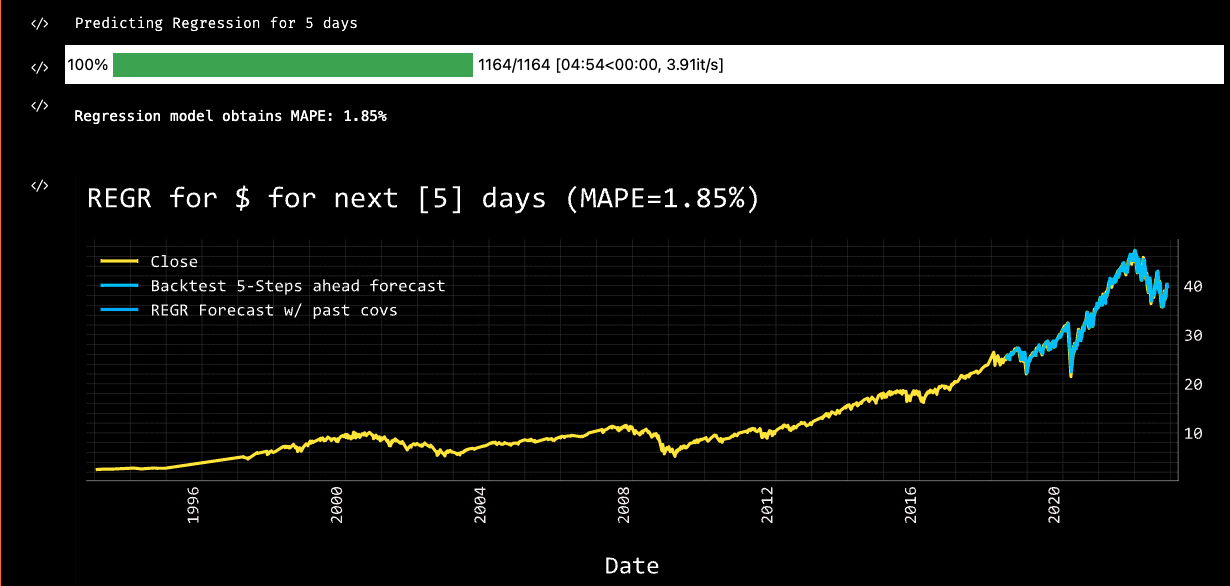
Then, targeting both EMA columns as past-covariates:
openbb.forecast.regr_chart(spy, target_column = 'Close', past_covariates= "EMA_150,EMA_20")
Warning: when using past covariates n_predict must equal output_chunk_length. We have changed your output_chunk_length to 5 to match your n_predict

Covariate #0: EMA_150
Covariate #1: EMA_20

Predicting Regression for 5 days

Regression model obtains MAPE: 1.85%
| Datetime | Prediction |
|---|---|
| 2022-11-24 | 403.20 |
| 2022-11-25 | 401.95 |
| 2022-11-28 | 402.15 |
| 2022-11-29 | 400.99 |
| 2022-11-30 | 398.01 |
Adding these past-covariates has improved the MAPE by 0.05%, which is a good thing; like golf, a lower score is better.
A second chart displayed by a regression model is for "explainability", SHAP values. It is an illustration of which past-covariates have the most impact on the model output.
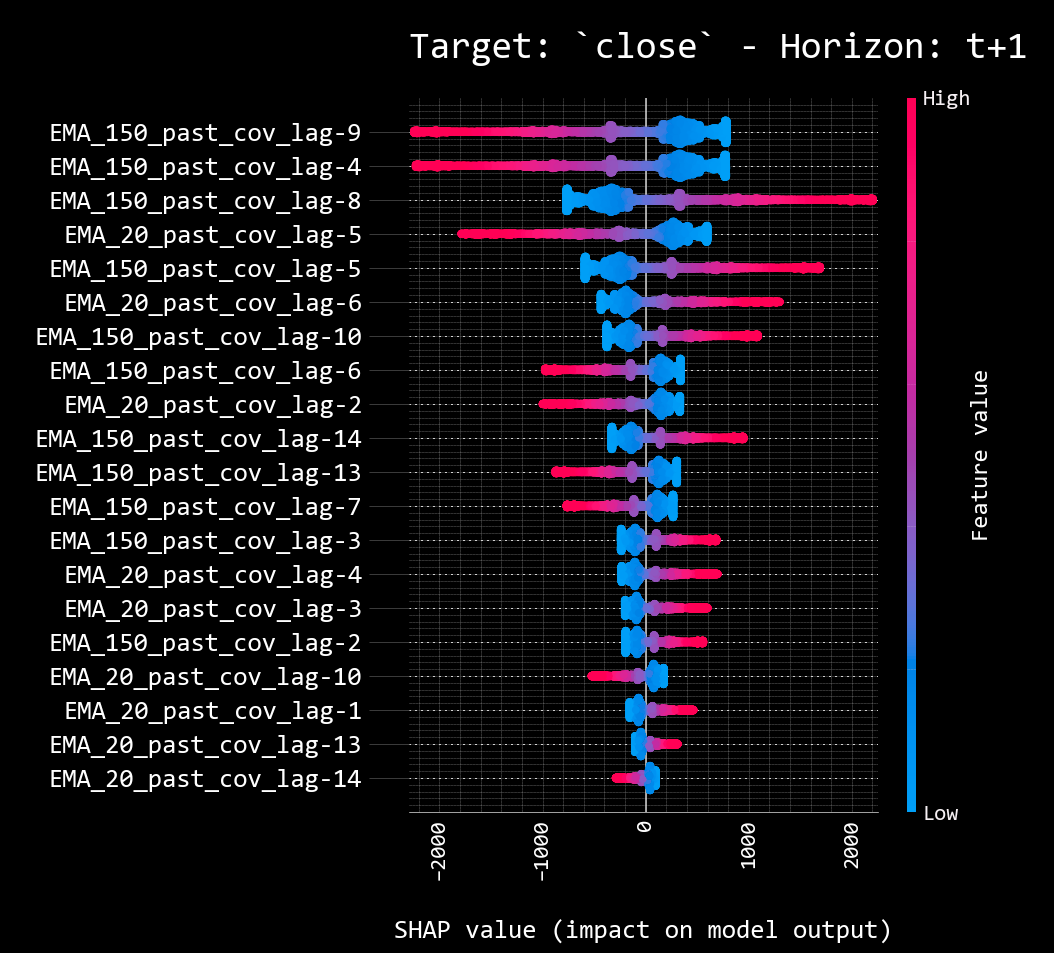
Targeting the Volume column as a past-covariate reveals it to be negatively impacting the forecast, in this particular instance and application.
openbb.forecast.regr_chart(spy, target_column = 'Close', past_covariates="Volume")

Combine
Let's add another potential past-covariate to the dataset by taking the adjusted-close value of XOM, and using combine to join the column with our existing DataFrame.
xom = openbb.stocks.load("XOM", start_date = '1993-01-29')
openbb.forecast.combine(df1 = spy, df2 = xom, column = 'Adj Close', dataset = 'XOM' )
spy.rename(columns = {'XOM_Adj Close': 'XOM'}, inplace = True)
Corr
openbb.forecast.corr calculates the correlation between all columns in a dataset.
openbb.forecast.corr(spy)
| Open | High | Low | Close | Volume | EMA_150 | EMA_20 | RSI_10_Adj Close | RSI_60 | STO_Slow | STO_Fast | XOM | |
|---|---|---|---|---|---|---|---|---|---|---|---|---|
| Open | 1 | 0.999928 | 0.999907 | 0.996296 | 0.102601 | 0.990844 | 0.995626 | 0.0485853 | 0.0685473 | 0.631412 | 0.635814 | 0.725111 |
| High | 0.999928 | 1 | 0.999845 | 0.996388 | 0.105301 | 0.991371 | 0.995819 | 0.0468199 | 0.0648085 | 0.63298 | 0.637221 | 0.724806 |
| Low | 0.999907 | 0.999845 | 1 | 0.996337 | 0.0988936 | 0.990313 | 0.995387 | 0.0548303 | 0.0740719 | 0.630126 | 0.634485 | 0.725668 |
| Close | 0.996296 | 0.996388 | 0.996337 | 1 | 0.115854 | 0.995506 | 0.99931 | 0.0544362 | 0.0708491 | 0.62215 | 0.626235 | 0.725945 |
| Volume | 0.102601 | 0.105301 | 0.0988936 | 0.115854 | 1 | 0.143554 | 0.125322 | -0.255959 | -0.3392 | 0.387554 | 0.384561 | 0.470041 |
| EMA_150 | 0.990844 | 0.991371 | 0.990313 | 0.995506 | 0.143554 | 1 | 0.997117 | 0.00795085 | 0.00294935 | 0.63139 | 0.635393 | 0.737946 |
| EMA_20 | 0.995626 | 0.995819 | 0.995387 | 0.99931 | 0.125322 | 0.997117 | 1 | 0.0295848 | 0.0530582 | 0.621829 | 0.625925 | 0.726945 |
| RSI_10_Adj Close | 0.0485853 | 0.0468199 | 0.0548303 | 0.0544362 | -0.255959 | 0.00795085 | 0.0295848 | 1 | 0.707723 | 0.00550661 | 0.00475805 | 0.0316687 |
| RSI_60 | 0.0685473 | 0.0648085 | 0.0740719 | 0.0708491 | -0.3392 | 0.00294935 | 0.0530582 | 0.707723 | 1 | -0.203022 | -0.201585 | 0.00254247 |
| STO_Slow | 0.631412 | 0.63298 | 0.630126 | 0.62215 | 0.387554 | 0.63139 | 0.621829 | 0.00550661 | -0.203022 | 1 | 0.991231 | 0.609652 |
| STO_Fast | 0.635814 | 0.637221 | 0.634485 | 0.626235 | 0.384561 | 0.635393 | 0.625925 | 0.00475805 | -0.201585 | 0.991231 | 1 | 0.613626 |
| XOM | 0.725111 | 0.724806 | 0.725668 | 0.725945 | 0.470041 | 0.737946 | 0.726945 | 0.0316687 | 0.00254247 | 0.609652 | 0.613626 | 1 |
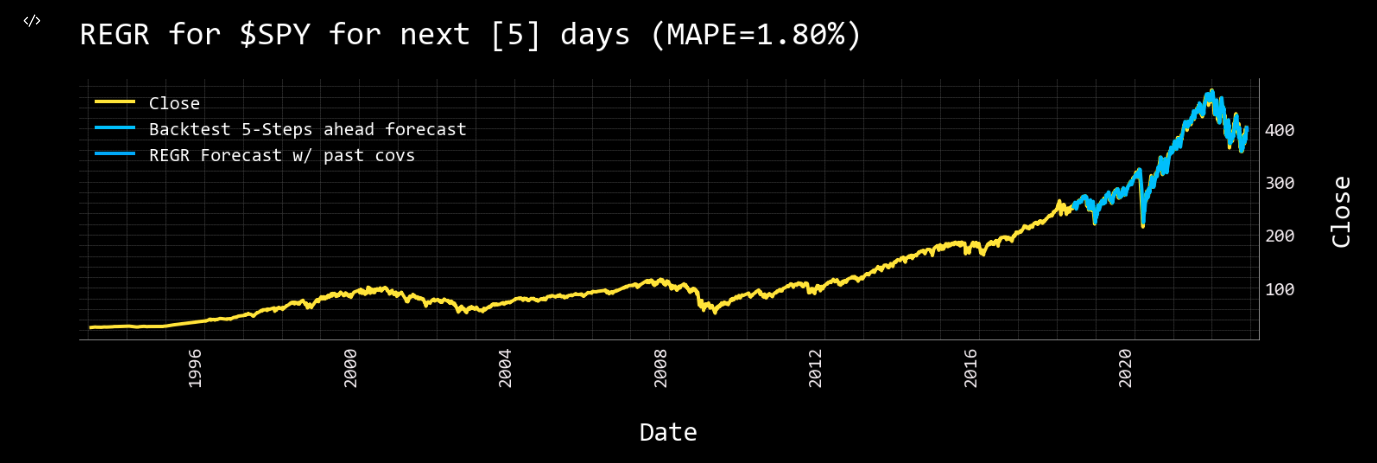
Let's see how Exxon impacts our previous forecast.
openbb.forecast.regr_chart(data = spy, target_column = "Close", dataset_name = 'SPY', past_covariates = "EMA_20,EMA_150,XOM")
Warning: when using past covariates n_predict must equal output_chunk_length. We have changed your output_chunk_length to 5 to match your n_predict

Covariate #0: EMA_20
Covariate #1: EMA_150
Covariate #2: XOM

Predicting Regression for 5 days

Regression model obtains MAPE: 1.80%
| Datetime | Prediction |
|---|---|
| 2022-11-24 | 401.70 |
| 2022-11-25 | 402.02 |
| 2022-11-26 | 402.25 |
| 2022-11-27 | 401.48 |
| 2022-11-28 | 397.16 |
To include pan/zoom functionality for charts, substitute %matplotlib widget in the import statement block. The code block below will recreate the DataFrame as shown in the examples above:
from openbb_terminal.sdk import openbb
import pandas as pd
# %matplotlib widget (uncomment if using a Jupyter Interactive Terminal or Notebook)

spy:pd.DataFrame = []

spy = openbb.stocks.load('SPY', start_date = '1990-01-01')

spy = openbb.forecast.ema(spy, target_column = 'Adj Close', period = 150)

spy = openbb.forecast.ema(spy, target_column = 'Adj Close', period = 20)

spy = openbb.forecast.rsi(spy, target_column = 'Adj Close', period = 10)

spy = openbb.forecast.rsi(spy, target_column = 'Adj Close', period = 60)

spy = openbb.forecast.sto(
    dataset = spy,
    high_column='High',
    low_column = 'Low',
    close_column = 'Adj Close',
    period = 20
)

openbb.forecast.delete(spy, 'Close')

spy.rename(columns = {
    'Adj Close': 'Close',
    'RSI_60_Adj Close': 'RSI_10',
    'RSI_60_Adj Close': 'RSI_60',
    'SO%K_20': 'STO_Slow',
    'SO%D_20': 'STO_Fast'}, inplace = True)

xom = openbb.stocks.load("XOM", start_date = '1993-01-29')
openbb.forecast.combine(df1 = spy, df2 = xom, column = 'Adj Close', dataset = 'XOM' )
spy.rename(columns = {'XOM_Adj Close': 'XOM'}, inplace = True)

spy
Hyper-Parameters
Hyper-parameters are the fine-tune dials for each model. Refer to the docstrings for the extensive list. The parameters below are the ways in which the regression model can be altered. Each model will be different, and their responses will vary. The demonstrated workflow is a simple way to begin experimenting with the functions. The same general processes can be applied for all models. The purpose of this guide is to help users get going with using the Forecast module, some assembly required.
help(openbb.forecast.regr_chart)

Help on Operation in module openbb_terminal.core.library.operation:

<openbb_terminal.core.library.operation.Operation object>
    Display Regression Forecasting

    Parameters
    ----------
    data: Union[pd.Series, pd.DataFrame]
        Input Data
    target_column: str
        Target column to forecast. Defaults to "close".
    dataset_name: str
        The name of the ticker to be predicted
    n_predict: int
        Days to predict. Defaults to 5.
    train_split: float
        Train/val split. Defaults to 0.85.
    past_covariates: str
        Multiple secondary columns to factor in when forecasting. Defaults to None.
    forecast_horizon: int
        Forecast horizon when performing historical forecasting. Defaults to 5.
    output_chunk_length: int
        The length of the forecast of the model. Defaults to 1.
    lags: Union[int, List[int]]
        lagged target values to predict the next time step
    export: str
        Format to export data
    residuals: bool
        Whether to show residuals for the model. Defaults to False.
    forecast_only: bool
        Whether to only show dates in the forecasting range. Defaults to False.
    start_date: Optional[datetime]
        The starting date to perform analysis, data before this is trimmed. Defaults to None.
    end_date: Optional[datetime]
        The ending date to perform analysis, data after this is trimmed. Defaults to None.
    naive: bool
        Whether to show the naive baseline. This just assumes the closing price will be the same
        as the previous day's closing price. Defaults to False.
    external_axes: Optional[List[plt.axes]]
        External axes to plot on