 6381b2ae7d
* fixing a url

* moving around menus

* Grammar Update

* many fixes to links and some added pics to install

* Add improvements

* fix: tabs

* Move support/feedback window to FAQ

* Forgot to save

* MVC moved around

* change installation Source -> Python

* fix: tabs

* guides to basics

* Add new README LINKS

* Change links

* Change forecasting to forecast

* fix: details

* more fixes

* Change markdown file so it is ready for pypi

Co-authored-by: Chavithra <chavithra@gmail.com>
Co-authored-by: Danglewood <85772166+deeleeramone@users.noreply.github.com>
Co-authored-by: Jeroen Bouma <jer.bouma@gmail.com>
Co-authored-by: Jeroen Bouma <jeroenbouma@Jeroens-MacBook-Pro.local>
Co-authored-by: jose-donato <zmcdonato@gmail.com>
6.9 KiB
Vendored
title, keywords, date, type, status, excerpt
| title | keywords | date | type | status | excerpt | ||||||||||||||||||||||||||||||||||||||||
|---|---|---|---|---|---|---|---|---|---|---|---|---|---|---|---|---|---|---|---|---|---|---|---|---|---|---|---|---|---|---|---|---|---|---|---|---|---|---|---|---|---|---|---|---|---|
| Quantitative Analysis |
|
2022-08-08 | guides | publish | This guide introduces the Quantitative Analysis menu, which is common across many sections of the OpenBB Terminal, briefly describes the features, and provides examples in context. |
Quantitative analysis (QA) in finance is an approach that emphasizes mathematical and statistical analysis to help determine the value of a financial asset, such as a stock or option. The ultimate goal of financial quantitative analysis is to use quantifiable statistics and metrics to assist investors in making profitable investment decisions. Quantitative analysis is different from qualitative analysis, which looks at factors such as how companies are structured, the makeup of their management teams, and what their strengths and weaknesses are.
The Quantitative Analysis menu is a common menu to three asset classes:
How to use
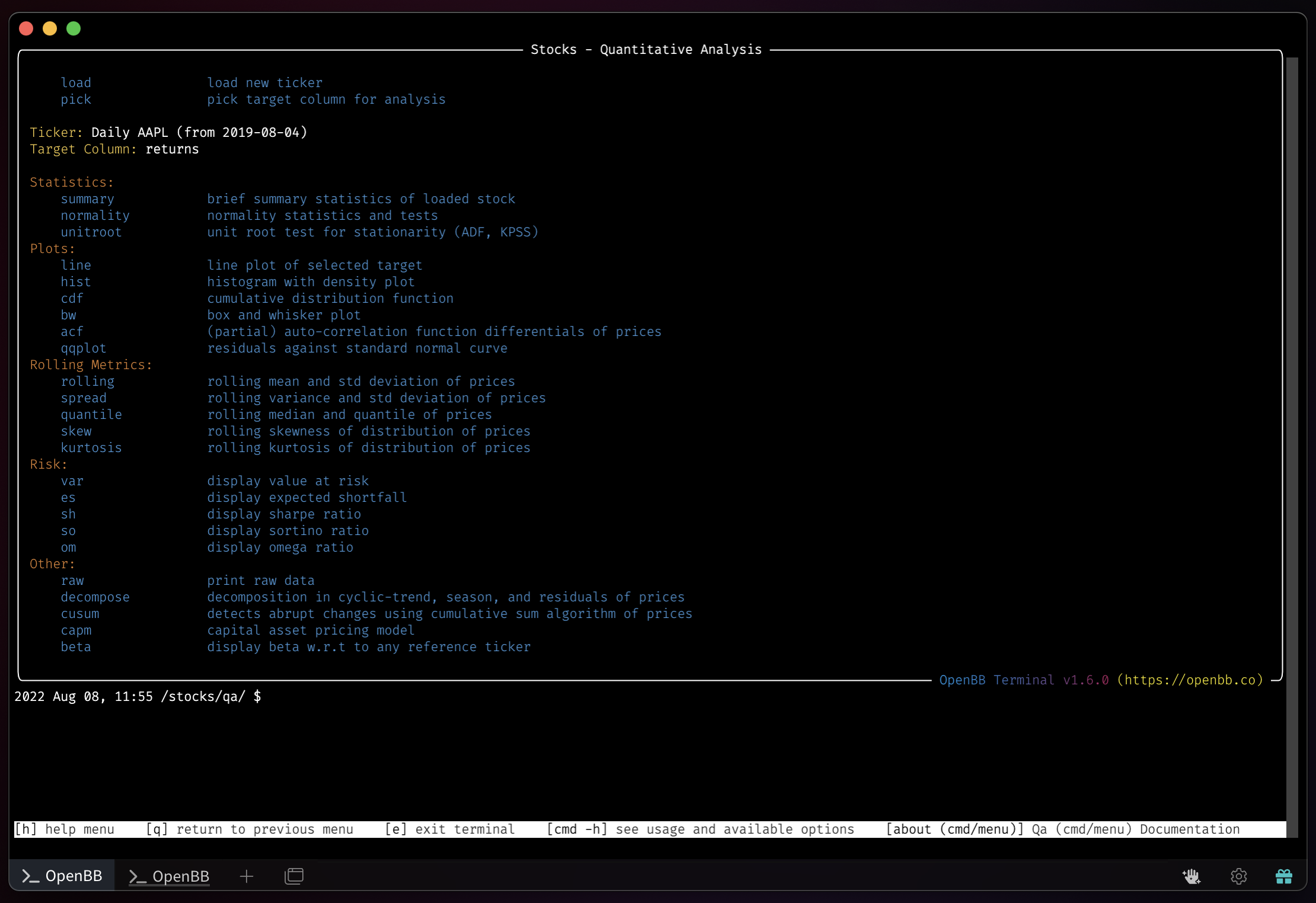
Enter the menu, through one of the asset classes listed above, by entering qa in the Terminal. The ticker that is loaded before entering the menu will determine the timeframe for the analysis. To alter it, use the load function and pick a new --start and --end for the observation window. The QA functions target a specified column of the data. By default, this is returns. Use the pick command to chose a new target column.

The menu is divided into five categories of functions:
- Statistics
- Plots
- Rolling Metrics
- Risk
- Other
A summary of exportable statistics is displayed with the command, summary. The example here shows $APPL.

A simple line chart for the target column as a time-series is called with the line command.

Optional arguments to this command allows the user to draw and annotate on the chart.
2022 Aug 08, 12:14 /stocks/qa/ $ line -h usage: line [--log] [-d] [--ml ML]
[--ms MS] [-h] [--export EXPORT]

Show line plot of selected data or highlight specific datetimes.

options: --log Plot with y on log scale (default: False) --ml ML Draw vertical
line markers to highlight certain events (default: ) --ms MS Draw scatter
markers to highlight certain events (default: ) -h, --help show this help
message (default: False) --export EXPORT Export figure into png, jpg, pdf, svg
(default: )

For more information and examples, use 'about line' to access the related guide.

2022 Aug 08, 12:20 /stocks/qa/ $ pick high

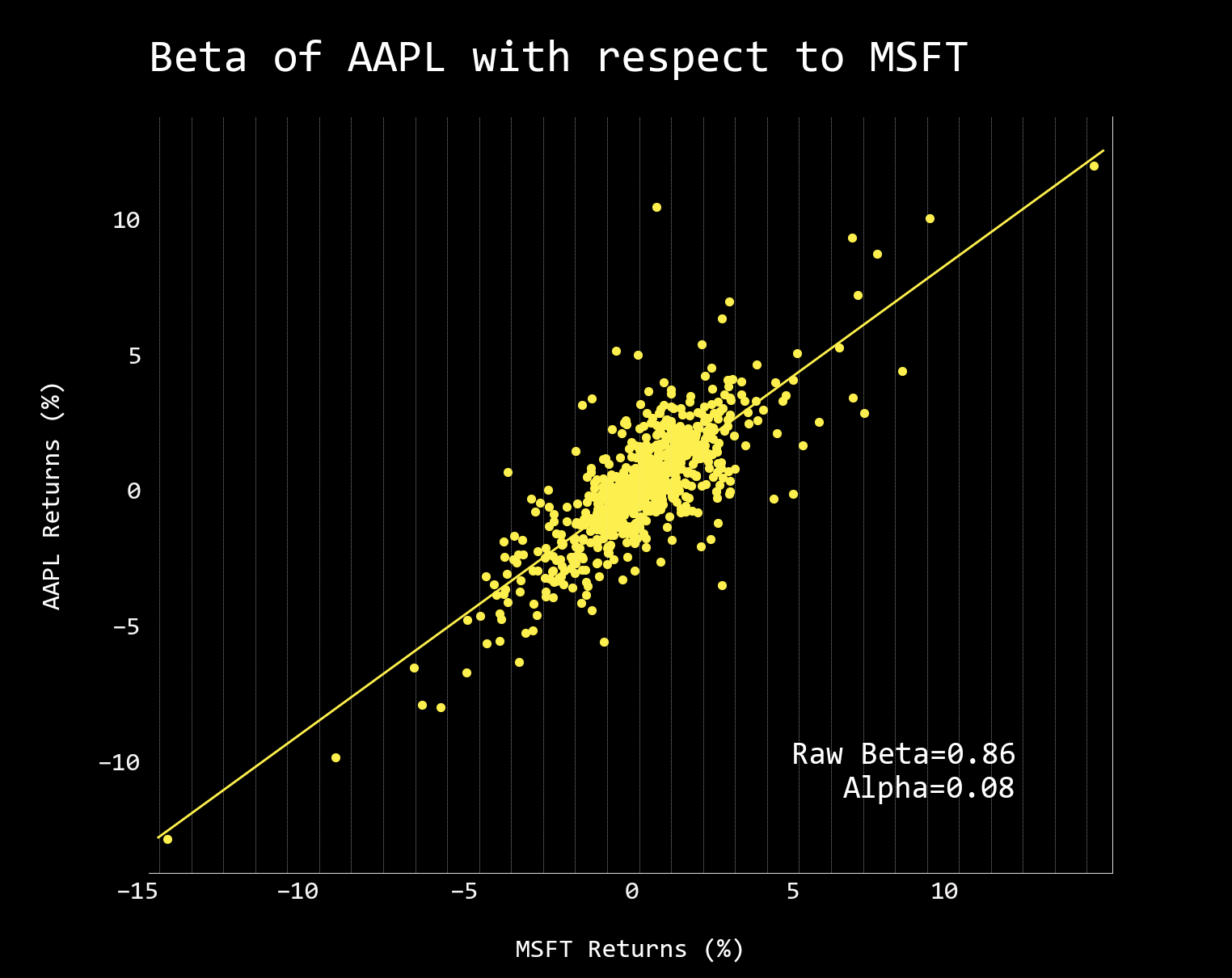
Compare the beta between the loaded asset and another, using the `-r` flag to
deviate from the defaulted comparison, $SPY.

2022 Aug 08, 12:34 /stocks/qa/ $ beta -r MSFT

Loading Daily MSFT stock with starting period 2019-08-05 for analysis.
Most outputs are equipped with an --export flag, allowing the user to save the tables as a CSV, JSON, or XLSX file. The exports can then be imported into other menus like Econometrics. Additional information on each specific command is displayed by attaching -h to it.
Examples
Box and Whisker plots for monthly and yearly scales:
2022 Aug 08, 12:47 /stocks/qa/ $ bw

2022 Aug 08, 12:47 /stocks/qa/ $ bw -y

Pick logret for rate of change to the returns of the asset:
2022 Aug 08, 12:47 /stocks/qa/ $ pick logret

2022 Aug 08, 12:51 /stocks/qa/ $ bw -y

decompose shows a visual representation of trend and seasonality.

skew shows the asymmetric distribution over a specified window (default of 14).

skew -w 5 Changing the window to five takes out some of the smoothness:

Sharpe Ratio over time, sh:

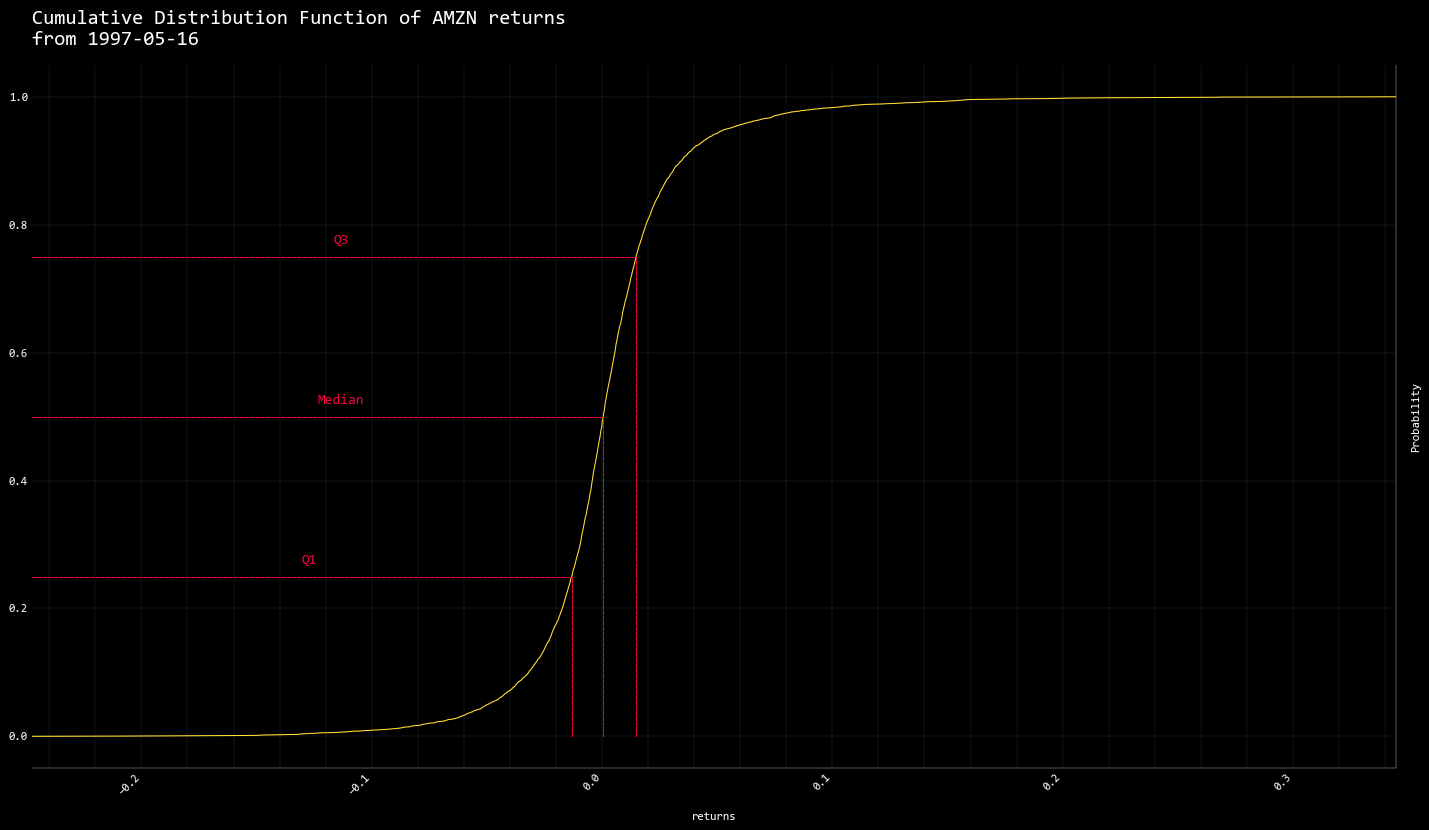
cdf calls the cumulative distribution function. Apple over the long term
exhibits a steep curve.

Compared with Apple, Amazon is a more gently sloping s-curve.
capm shows the stock's risk against the market's. $AAPL carries the risk of
whatever happens to the markets, happens to the stock.
2022 Aug 08, 13:51 /stocks/qa/ $ capm Beta: 1.15 Systematic Risk: 46.40%
Unsystematic Risk: 53.60%