mirror of
https://github.com/OpenBB-finance/OpenBB.git
synced 2026-10-27 04:31:13 +00:00
 6381b2ae7d
* fixing a url

* moving around menus

* Grammar Update

* many fixes to links and some added pics to install

* Add improvements

* fix: tabs

* Move support/feedback window to FAQ

* Forgot to save

* MVC moved around

* change installation Source -> Python

* fix: tabs

* guides to basics

* Add new README LINKS

* Change links

* Change forecasting to forecast

* fix: details

* more fixes

* Change markdown file so it is ready for pypi

Co-authored-by: Chavithra <chavithra@gmail.com>
Co-authored-by: Danglewood <85772166+deeleeramone@users.noreply.github.com>
Co-authored-by: Jeroen Bouma <jer.bouma@gmail.com>
Co-authored-by: Jeroen Bouma <jeroenbouma@Jeroens-MacBook-Pro.local>
Co-authored-by: jose-donato <zmcdonato@gmail.com>
583 lines
42 KiB
Markdown
Vendored
583 lines
42 KiB
Markdown
Vendored
---
|
|
title: Forecast
|
|
keywords:
|
|
[
|
|
"machine learning",
|
|
"statistics",
|
|
"deep learning",
|
|
"neural networks",
|
|
"time series",
|
|
"research",
|
|
"feature engineering",
|
|
"hyperparameters",
|
|
]
|
|
excerpt: "The introduction to Forecasting explains how to use the menu"
|
|
|
|
---
|
|
|
|
The Forecast menu is a machine learning toolkit that provides practitioners with high-level components that can quickly provide state-of-the-art results, be it with with classical or deep learning models, while also providing researchers with low-level components that can be mixed, matched and fine tuned to build new approaches and custom tuned models. Bring in multiple datasets and train machine learning models with unlimited external factors to see how underlying data may change future forecasting predictions and accuracy.
|
|
|
|
### Accessing the Forecast menu
|
|
|
|
The Forecast menu is called upon by typing `forecast` which opens the following menu:
|
|
|
|
```
|
|
(🦋) / $ forecast
|
|
```
|
|
|
|
<img width="1244" alt="image" src="https://user-images.githubusercontent.com/105685594/192546554-d75280d1-8d43-4c42-b1ba-e2f42bf5dc96.png"/>
|
|
|
|
### How to Use
|
|
|
|
To begin any machine learning, you must first load in data. The menu supports importing both terminal datasets found in `stocks` and `cryptocurrency`, along with external datasets in the form of `.csv` that can be placed in the following location: `~/OpenBBUserData/custom_imports/forecast/`
|
|
|
|
It is important to note, if you ever have troubles on running a command, please read the help commands to guide you on what is available. You can do this by trailing any command with a `-h`
|
|
|
|
```
|
|
(🦋) /forecast/ $ <command> -h
|
|
```
|
|
|
|
#### Loading Data
|
|
|
|
Importing data from within the terminal can be simply done as follows:
|
|
|
|
```
|
|
(🦋) / $ stocks
|
|
(🦋) /stocks/ $ load AAPL
|
|
(🦋) /stocks/ $ forecast
|
|
```
|
|
|
|
The menu can support loading in unlimited datasets. Once the first one is loaded, the menu options should turn blue to allow you to begin working through the menu options.
|
|
|
|
To load external data in the form as `.csv`, please place them into the folder shown within your terminal menu and then load them in as follows:
|
|
|
|
```
|
|
(🦋) / $ forecast
|
|
(🦋) /forecast/ $ load msft.csv
|
|
(🦋) /forecast/ $ load btc.csv
|
|
```
|
|
|
|
<img width="1244" alt="image" src="https://user-images.githubusercontent.com/105685594/192547582-33012e7a-4dbd-412d-a22d-8812d251981e.png"/>
|
|
|
|
#### Understanding the structure of the menu
|
|
|
|
The menu is broken up into three distinct sections. These sections represent the typical order of operations a machine learning professional would have to take in order to complete a project. Once data is loaded in, begin with `Exploration`.
|
|
|
|
##### Exploration
|
|
Explore the datasets loaded into the menu to further understand your data and create unique new datasets by combining and analyzing features. Functions to note: `plot`, `combine`, `desc`, `corr`.
|
|
|
|
<img width="692" alt="image" src="https://user-images.githubusercontent.com/105685594/189729792-079f151e-f2b4-41bf-99d9-c83849c59170.png"/>
|
|
|
|
##### Feature Engineering
|
|
Manuipulate datasets (addition, deletion, combination, mutation) of your data set to potentially improve machine learning model training, by providing new features and covariates that may leading to better performance and greater accuracy.
|
|
|
|
<img width="694" alt="image" src="https://user-images.githubusercontent.com/105685594/189730399-fc4051f2-4d8e-4ff1-8494-44528d8f5513.png"/>
|
|
|
|
##### imeSeries Forecasting
|
|
Train state of the art models on custom datasets and experiment tuning hyperparameters. For more information on specific model
|
|
implementations, please see [Darts Models](https://unit8co.github.io/darts/generated_api/darts.models.forecasting.html)
|
|
for in depth documentation.
|
|
<img width="694" alt="image" src="https://user-images.githubusercontent.com/105685594/189730287-1c5c8141-1801-4a35-b9e9-acb32be35c13.png"/>
|
|
|
|
### Sample workflow #1 (beginner)
|
|
|
|
Let's begin by using one of the datasets we loaded in previously : `AAPL`
|
|
|
|
We will be forecasting `5 Business days` ahead for the remaider of these workflows unless specified.
|
|
|
|
**Note:** All models automatically perform Historical backtesting on the test split before providing a prediction.
|
|
|
|
We use [MAPE](https://en.wikipedia.org/wiki/Mean_absolute_percentage_error) as it is quite convenient and scale independent since it calculates error as a percentage instead of an absolute value. THere are many more metrics to compare time series. The metrics will compare only common slices of series when the two series are not aligned, and parallelize computation over a large number of pairs of series. More metrics will be released in future versions of the menu.
|
|
|
|
```
|
|
(🦋) /forecast/ $ plot AAPL.close
|
|
```
|
|
|
|
<img width="792" alt="image" src="https://user-images.githubusercontent.com/105685594/189739347-476b24d5-ee68-43ac-9fad-e780f64ab72f.png"/>
|
|
|
|
```
|
|
(🦋) /forecast/ $ desc AAPL
|
|
|
|
Showing Descriptive Statistics for Dataset AAPL
|
|
┏━━━━━━━┳━━━━━━━━┳━━━━━━━━┳━━━━━━━━┳━━━━━━━━┳━━━━━━━━━━━┳━━━━━━━━━━━━━━┓
|
|
┃ ┃ open ┃ high ┃ low ┃ close ┃ adj_close ┃ volume ┃
|
|
┡━━━━━━━╇━━━━━━━━╇━━━━━━━━╇━━━━━━━━╇━━━━━━━━╇━━━━━━━━━━━╇━━━━━━━━━━━━━━┩
|
|
│ count │ 758.00 │ 758.00 │ 758.00 │ 758.00 │ 758.00 │ 758.00 │
|
|
├───────┼────────┼────────┼────────┼────────┼───────────┼──────────────┤
|
|
│ mean │ 121.57 │ 123.07 │ 120.15 │ 121.68 │ 120.72 │ 113864153.69 │
|
|
├───────┼────────┼────────┼────────┼────────┼───────────┼──────────────┤
|
|
│ std │ 36.37 │ 36.74 │ 35.95 │ 36.34 │ 36.61 │ 56098731.72 │
|
|
├───────┼────────┼────────┼────────┼────────┼───────────┼──────────────┤
|
|
│ min │ 53.47 │ 54.11 │ 52.77 │ 53.54 │ 52.38 │ 41000000.00 │
|
|
├───────┼────────┼────────┼────────┼────────┼───────────┼──────────────┤
|
|
│ 25% │ 83.10 │ 86.41 │ 83.04 │ 84.16 │ 83.00 │ 77032650.00 │
|
|
├───────┼────────┼────────┼────────┼────────┼───────────┼──────────────┤
|
|
│ 50% │ 128.18 │ 129.64 │ 126.63 │ 127.86 │ 126.70 │ 98135650.00 │
|
|
├───────┼────────┼────────┼────────┼────────┼───────────┼──────────────┤
|
|
│ 75% │ 149.05 │ 150.38 │ 147.69 │ 149.14 │ 148.50 │ 131152875.00 │
|
|
├───────┼────────┼────────┼────────┼────────┼───────────┼──────────────┤
|
|
│ max │ 182.63 │ 182.94 │ 179.12 │ 182.01 │ 181.26 │ 426510000.00 │
|
|
└───────┴────────┴────────┴────────┴────────┴───────────┴──────────────┘
|
|
```
|
|
|
|
Let's use a simple **Probabilistic Exponential Smoothing Model** to predict the close price. Keep in mind all models are perform automatic historical backtesting before providing future forecasts. Note that all models forecast `close` by default.
|
|
|
|
```
|
|
(🦋) /forecast/ $ expo AAPL
|
|
100%|███████████████████████████████████████████████████████████████████████████████████████████████████████████████████| 115/115 [00:17<00:00, 6.44it/s]
|
|
Exponential smoothing obtains MAPE: 3.86%
|
|
|
|
|
|
Actual price: 157.37
|
|
┏━━━━━━━━━━━━┳━━━━━━━━━━━━┓
|
|
┃ Datetime ┃ Prediction ┃
|
|
┡━━━━━━━━━━━━╇━━━━━━━━━━━━┩
|
|
│ 2022-09-12 │ 157.99 │
|
|
├────────────┼────────────┤
|
|
│ 2022-09-13 │ 157.89 │
|
|
├────────────┼────────────┤
|
|
│ 2022-09-14 │ 158.32 │
|
|
├────────────┼────────────┤
|
|
│ 2022-09-15 │ 158.25 │
|
|
├────────────┼────────────┤
|
|
│ 2022-09-16 │ 158.52 │
|
|
└────────────┴────────────┘
|
|
```
|
|
|
|
<img width="792" alt="image" src="https://user-images.githubusercontent.com/105685594/189740925-ed0fb214-8b1c-4aff-a149-517d122082c8.png"/>
|
|
|
|
That looks great, but we might want to see it a little more up close. Lets set the flag for `--forecast-only`.
|
|
|
|
<img width="791" alt="image" src="https://user-images.githubusercontent.com/105685594/189741811-21832a87-f05f-4191-88f8-6ac30eb3d7b6.png"/>
|
|
|
|
We can also play with some models that are bit more advanced. As we go down the list, models begin to become larger in parameter size and complexity. This will play a key role later on when we want to train models with `past_covariates` (aka. external factors).
|
|
|
|
This time lets test with a **Recurrent Neural Network** which by default uses an `LSTM` backbone. We can also choose to test out a `GRU` backbone to experiment. Let's do both and see if we can improve our accuracy and reduce the overall MAPE.
|
|
|
|
```
|
|
(🦋) /forecast/ $ rnn AAPL --forecast-only
|
|
Epoch 193: 100%|███████████████████████████████████████████████████████████| 25/25 [00:00<00:00, 129.49it/s, loss=-2.74, train_loss=-2.75, val_loss=-2.22]
|
|
Predicting RNN for 5 days
|
|
100%|███████████████████████████████████████████████████████████████████████████████████████████████████████████████████| 115/115 [00:01<00:00, 86.89it/s]
|
|
RNN model obtains MAPE: 3.69%
|
|
|
|
|
|
Actual price: 157.37
|
|
┏━━━━━━━━━━━━┳━━━━━━━━━━━━┓
|
|
┃ Datetime ┃ Prediction ┃
|
|
┡━━━━━━━━━━━━╇━━━━━━━━━━━━┩
|
|
│ 2022-09-12 │ 155.71 │
|
|
├────────────┼────────────┤
|
|
│ 2022-09-13 │ 155.42 │
|
|
├────────────┼────────────┤
|
|
│ 2022-09-14 │ 155.11 │
|
|
├────────────┼────────────┤
|
|
│ 2022-09-15 │ 154.81 │
|
|
├────────────┼────────────┤
|
|
│ 2022-09-16 │ 154.51 │
|
|
└────────────┴────────────┘
|
|
```
|
|
|
|
<img width="791" alt="image" src="https://user-images.githubusercontent.com/105685594/189743690-2f1be795-437e-4e4f-992e-3e8ad4de62f6.png"/>
|
|
|
|
Seems like we improved the performance and reduced MAPE!
|
|
|
|
Now for the second task, we would like to change the model type from `LSTM` --> `GRU`. Use the `-h` flag to understand the particular parameters one can change for RNN. (Please note that the parameters are different for each model).
|
|
|
|
```
|
|
(🦋) /forecast/ $ rnn -h
|
|
usage: rnn [--hidden-dim HIDDEN_DIM] [--training_length TRAINING_LENGTH] [--naive] [-d {AAPL,msft}] [-c TARGET_COLUMN] [-n N_DAYS] [-t TRAIN_SPLIT]
|
|
[-i INPUT_CHUNK_LENGTH] [--force-reset FORCE_RESET] [--save-checkpoints SAVE_CHECKPOINTS] [--model-save-name MODEL_SAVE_NAME]
|
|
[--n-epochs N_EPOCHS] [--model-type MODEL_TYPE] [--dropout DROPOUT] [--batch-size BATCH_SIZE] [--end S_END_DATE] [--start S_START_DATE]
|
|
[--learning-rate LEARNING_RATE] [--residuals] [--forecast-only] [-h] [--export EXPORT]
|
|
|
|
Perform RNN forecast (Vanilla RNN, LSTM, GRU)
|
|
|
|
optional arguments:
|
|
--hidden-dim HIDDEN_DIM
|
|
Size for feature maps for each hidden RNN layer (h_n) (default: 20)
|
|
--training_length TRAINING_LENGTH
|
|
The length of both input (target and covariates) and output (target) time series used during training. Generally speaking,
|
|
training_length should have a higher value than input_chunk_length because otherwise during training the RNN is never run for as
|
|
many iterations as it will during training. (default: 20)
|
|
--naive Show the naive baseline for a model. (default: False)
|
|
-d {AAPL,msft}, --target-dataset {AAPL,msft}
|
|
The name of the dataset you want to select (default: None)
|
|
-c TARGET_COLUMN, --target-column TARGET_COLUMN
|
|
The name of the specific column you want to use (default: close)
|
|
-n N_DAYS, --n-days N_DAYS
|
|
prediction days. (default: 5)
|
|
-t TRAIN_SPLIT, --train-split TRAIN_SPLIT
|
|
Start point for rolling training and forecast window. 0.0-1.0 (default: 0.85)
|
|
-i INPUT_CHUNK_LENGTH, --input-chunk-length INPUT_CHUNK_LENGTH
|
|
Number of past time steps for forecasting module at prediction time. (default: 14)
|
|
--force-reset FORCE_RESET
|
|
If set to True, any previously-existing model with the same name will be reset (all checkpoints will be discarded). (default:
|
|
True)
|
|
--save-checkpoints SAVE_CHECKPOINTS
|
|
Whether to automatically save the untrained model and checkpoints. (default: True)
|
|
--model-save-name MODEL_SAVE_NAME
|
|
Name of the model to save. (default: rnn_model)
|
|
--n-epochs N_EPOCHS Number of epochs over which to train the model. (default: 300)
|
|
--model-type MODEL_TYPE
|
|
Either a string specifying the RNN module type ("RNN", "LSTM" or "GRU") (default: LSTM)
|
|
--dropout DROPOUT Fraction of neurons afected by Dropout. (default: 0)
|
|
--batch-size BATCH_SIZE
|
|
Number of time series (input and output) used in each training pass (default: 32)
|
|
--end S_END_DATE The end date (format YYYY-MM-DD) to select for testing (default: None)
|
|
--start S_START_DATE The start date (format YYYY-MM-DD) to select for testing (default: None)
|
|
--learning-rate LEARNING_RATE
|
|
Learning rate during training. (default: 0.001)
|
|
--residuals Show the residuals for the model. (default: False)
|
|
--forecast-only Do not plot the hisotorical data without forecasts. (default: False)
|
|
-h, --help show this help message (default: False)
|
|
--export EXPORT Export figure into png, jpg, pdf, svg (default: )
|
|
```
|
|
|
|
Lets change the `--model-type` parameter to `GRU` and rerun.
|
|
|
|
```
|
|
(🦋) /forecast/ $ rnn AAPL --model-type GRU --forecast-only
|
|
Epoch 35: 100%|████████████████████████████████████████████████████████████| 25/25 [00:00<00:00, 125.85it/s, loss=-2.72, train_loss=-2.74, val_loss=-2.13]
|
|
Predicting RNN for 5 days
|
|
100%|███████████████████████████████████████████████████████████████████████████████████████████████████████████████████| 115/115 [00:01<00:00, 85.14it/s]
|
|
RNN model obtains MAPE: 3.64%
|
|
|
|
|
|
Actual price: 157.37
|
|
┏━━━━━━━━━━━━┳━━━━━━━━━━━━┓
|
|
┃ Datetime ┃ Prediction ┃
|
|
┡━━━━━━━━━━━━╇━━━━━━━━━━━━┩
|
|
│ 2022-09-12 │ 155.28 │
|
|
├────────────┼────────────┤
|
|
│ 2022-09-13 │ 155.02 │
|
|
├────────────┼────────────┤
|
|
│ 2022-09-14 │ 154.65 │
|
|
├────────────┼────────────┤
|
|
│ 2022-09-15 │ 154.30 │
|
|
├────────────┼────────────┤
|
|
│ 2022-09-16 │ 153.96 │
|
|
└────────────┴────────────┘
|
|
```
|
|
|
|
<img width="791" alt="image" src="https://user-images.githubusercontent.com/105685594/189745500-c079614c-9213-4fcb-8967-01a5b85a5722.png"/>
|
|
|
|
Looks like we squeezed out a little bit more accuracy! Good work.
|
|
|
|
The take away for this is that all models should work out of the box when forecasting for a particular Timeseries. One can switch the target by specifying a `-c` for `TARGET_COLUMN` and test out performance with multiple different models with a single command.
|
|
|
|
### Sample workflow #2 (advanced)
|
|
|
|
To build successful models and improve accuracy over time, it is important to capture external data related to the timeseries you are training on. This can be seen in everyday applications:
|
|
|
|
- Observed rainfalls and known weather forecasts can help to predict hydro and solar electricity production
|
|
- Recently-observed activity on an e-commerce website can help predict future sales.
|
|
- Making the model aware of up-coming holidays can help sales forecasting.
|
|
|
|
In fact, more often than not, strictly relying on the history of a time series
|
|
to predict its future is missing a lot of valuable information.
|
|
|
|
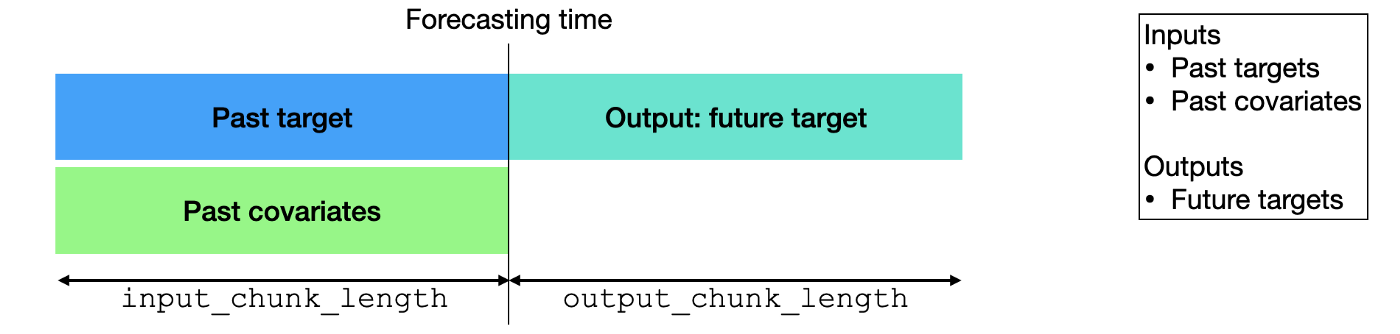
**Past covariates** are time series whose past values are known at prediction
|
|
time. Those series often contain values that have to be observed to be known.
|
|
|
|
|
|
|
|
If you would like to explore this topic more, please read the [blog post](https://medium.com/unit8-machine-learning-publication/time-series-forecasting-using-past-and-future-external-data-with-darts-1f0539585993) written by the authors of Darts.
|
|
|
|
Note that only the following models can handle `past_covariates`: `BlockRNNModel`, `NBEATSModel`, `TCNModel`, `TransformerModel`, `RegressionModel` (incl. `LinearRegressionModel`), `Temporal Fusion Transformer`
|
|
|
|
In this work flow lets do the following:
|
|
|
|
- add in some correlation analysis
|
|
- combine datasets
|
|
- perform feature engineering
|
|
- train models with `past_covariates`
|
|
|
|
Let's begin by loading in our datasets of AAPL and MSFT once again. In this work flow we are going to test if `close` price of MSFT is at all affected by the `close` of AAPL.
|
|
|
|
For a refresher, we will grab data from the `stocks` menu found on the terminal.
|
|
|
|
```
|
|
(🦋) / $ stocks
|
|
(🦋) /stocks/ $ load AAPL
|
|
(🦋) /stocks/ $ forecast
|
|
(🦋) /forecast/ $ ..
|
|
(🦋) /stocks/ $ load MSFT
|
|
(🦋) /stocks/ $ forecast
|
|
```
|
|
|
|
<img width="476" alt="image" src="https://user-images.githubusercontent.com/105685594/190245759-758e566f-ad35-49fe-8df1-7d87f5d9f935.png"/>
|
|
|
|
Before we go combining them, let's train a simple `Block RNN` model on MSFT `close` price to see how to use `past_covariates`
|
|
|
|
Make sure to always check your current data set to know the column names:
|
|
|
|
```
|
|
(🦋) /forecast/ $ show MSFT
|
|
MSFT dataset has shape (row, column): (759, 7)
|
|
|
|
Dataset MSFT | Showing 10 of 759 rows
|
|
┏━━━┳━━━━━━━━━━━━━━━━━━━━━┳━━━━━━━━┳━━━━━━━━┳━━━━━━━━┳━━━━━━━━┳━━━━━━━━━━━┳━━━━━━━━━━┓
|
|
┃ ┃ date ┃ open ┃ high ┃ low ┃ close ┃ adj_close ┃ volume ┃
|
|
┡━━━╇━━━━━━━━━━━━━━━━━━━━━╇━━━━━━━━╇━━━━━━━━╇━━━━━━━━╇━━━━━━━━╇━━━━━━━━━━━╇━━━━━━━━━━┩
|
|
│ 0 │ 2019-09-10 00:00:00 │ 136.80 │ 136.89 │ 134.51 │ 136.08 │ 132.22 │ 28903400 │
|
|
├───┼─────────────────────┼────────┼────────┼────────┼────────┼───────────┼──────────┤
|
|
│ 1 │ 2019-09-11 00:00:00 │ 135.91 │ 136.27 │ 135.09 │ 136.12 │ 132.26 │ 24726100 │
|
|
├───┼─────────────────────┼────────┼────────┼────────┼────────┼───────────┼──────────┤
|
|
│ 2 │ 2019-09-12 00:00:00 │ 137.85 │ 138.42 │ 136.87 │ 137.52 │ 133.62 │ 27010000 │
|
|
├───┼─────────────────────┼────────┼────────┼────────┼────────┼───────────┼──────────┤
|
|
│ 3 │ 2019-09-13 00:00:00 │ 137.78 │ 138.06 │ 136.57 │ 137.32 │ 133.42 │ 23363100 │
|
|
├───┼─────────────────────┼────────┼────────┼────────┼────────┼───────────┼──────────┤
|
|
│ 4 │ 2019-09-16 00:00:00 │ 135.83 │ 136.70 │ 135.66 │ 136.33 │ 132.46 │ 16731400 │
|
|
├───┼─────────────────────┼────────┼────────┼────────┼────────┼───────────┼──────────┤
|
|
│ 5 │ 2019-09-17 00:00:00 │ 136.96 │ 137.52 │ 136.43 │ 137.39 │ 133.49 │ 17814200 │
|
|
├───┼─────────────────────┼────────┼────────┼────────┼────────┼───────────┼──────────┤
|
|
│ 6 │ 2019-09-18 00:00:00 │ 137.36 │ 138.67 │ 136.53 │ 138.52 │ 134.59 │ 23982100 │
|
|
├───┼─────────────────────┼────────┼────────┼────────┼────────┼───────────┼──────────┤
|
|
│ 7 │ 2019-09-19 00:00:00 │ 140.30 │ 142.37 │ 140.07 │ 141.07 │ 137.07 │ 35772100 │
|
|
├───┼─────────────────────┼────────┼────────┼────────┼────────┼───────────┼──────────┤
|
|
│ 8 │ 2019-09-20 00:00:00 │ 141.01 │ 141.65 │ 138.25 │ 139.44 │ 135.48 │ 39167300 │
|
|
├───┼─────────────────────┼────────┼────────┼────────┼────────┼───────────┼──────────┤
|
|
│ 9 │ 2019-09-23 00:00:00 │ 139.23 │ 139.63 │ 138.44 │ 139.14 │ 135.19 │ 17139300 │
|
|
└───┴─────────────────────┴────────┴────────┴────────┴────────┴───────────┴──────────┘
|
|
```
|
|
|
|
Without any covariates:
|
|
|
|
```
|
|
(🦋) /forecast/ $ brnn MSFT --forecast-only
|
|
Epoch 87: 100%|█████████████████████████████████████████████████████████████| 25/25 [00:00<00:00, 33.84it/s, loss=-2.06, train_loss=-2.27, val_loss=-1.82]
|
|
Predicting Block RNN for 5 days
|
|
100%|███████████████████████████████████████████████████████████████████████████████████████████████████████████████████| 115/115 [00:06<00:00, 18.76it/s]
|
|
Block RNN model obtains MAPE: 4.62%
|
|
|
|
|
|
Actual price: 251.99
|
|
┏━━━━━━━━━━━━┳━━━━━━━━━━━━┓
|
|
┃ Datetime ┃ Prediction ┃
|
|
┡━━━━━━━━━━━━╇━━━━━━━━━━━━┩
|
|
│ 2022-09-14 │ 258.52 │
|
|
├────────────┼────────────┤
|
|
│ 2022-09-15 │ 258.01 │
|
|
├────────────┼────────────┤
|
|
│ 2022-09-16 │ 258.95 │
|
|
├────────────┼────────────┤
|
|
│ 2022-09-19 │ 257.20 │
|
|
├────────────┼────────────┤
|
|
│ 2022-09-20 │ 257.66 │
|
|
└────────────┴────────────┘
|
|
```
|
|
|
|
<img width="792" alt="image" src="https://user-images.githubusercontent.com/105685594/190246958-d97ca130-2d4c-448d-b880-81ac3d70e93b.png"/>
|
|
|
|
With covariates:
|
|
|
|
To use any covariates, you have 2 options:
|
|
|
|
- specify specific columns with `--past-covariates`
|
|
- specify all columns as past covariates except the one you are forecasting
|
|
`--all-past-covariates`
|
|
|
|
```
|
|
(🦋) /forecast/ $ brnn MSFT --forecast-only --past-covariates volume
|
|
Covariate #0: volume
|
|
Epoch 37: 100%|████████████████████████████████████████████████████████████| 25/25 [00:00<00:00, 149.03it/s, loss=-2.16, train_loss=-2.08, val_loss=-1.44]
|
|
Predicting Block RNN for 5 days
|
|
100%|███████████████████████████████████████████████████████████████████████████████████████████████████████████████████| 115/115 [00:01<00:00, 88.94it/s]
|
|
Block RNN model obtains MAPE: 5.10%
|
|
|
|
|
|
Actual price: 251.99
|
|
┏━━━━━━━━━━━━┳━━━━━━━━━━━━┓
|
|
┃ Datetime ┃ Prediction ┃
|
|
┡━━━━━━━━━━━━╇━━━━━━━━━━━━┩
|
|
│ 2022-09-14 │ 257.02 │
|
|
├────────────┼────────────┤
|
|
│ 2022-09-15 │ 255.82 │
|
|
├────────────┼────────────┤
|
|
│ 2022-09-16 │ 260.13 │
|
|
├────────────┼────────────┤
|
|
│ 2022-09-19 │ 258.32 │
|
|
├────────────┼────────────┤
|
|
│ 2022-09-20 │ 258.52 │
|
|
└────────────┴────────────┘
|
|
```
|
|
|
|
<img width="792" alt="image" src="https://user-images.githubusercontent.com/105685594/190247412-fe533231-17d9-4dc6-b41f-f5a27b6c2d57.png"/>
|
|
|
|
You can see here that adding in the external variable of `volume` negatively affected the accuracy.
|
|
|
|
Let's add in all remaining columns from our dataset as covariates and see what happens to the accuracy.
|
|
|
|
```
|
|
(🦋) /forecast/ $ brnn MSFT --forecast-only --all-past-covariates
|
|
Covariate #0: open
|
|
Covariate #1: high
|
|
Covariate #2: low
|
|
Covariate #3: adj_close
|
|
Covariate #4: volume
|
|
Epoch 50: 100%|████████████████████████████████████████████████████████████| 25/25 [00:00<00:00, 149.29it/s, loss=-2.41, train_loss=-2.53, val_loss=-1.71]
|
|
Predicting Block RNN for 5 days
|
|
100%|███████████████████████████████████████████████████████████████████████████████████████████████████████████████████| 115/115 [00:01<00:00, 89.43it/s]
|
|
Block RNN model obtains MAPE: 4.26%
|
|
|
|
|
|
Actual price: 251.99
|
|
┏━━━━━━━━━━━━┳━━━━━━━━━━━━┓
|
|
┃ Datetime ┃ Prediction ┃
|
|
┡━━━━━━━━━━━━╇━━━━━━━━━━━━┩
|
|
│ 2022-09-14 │ 259.28 │
|
|
├────────────┼────────────┤
|
|
│ 2022-09-15 │ 259.13 │
|
|
├────────────┼────────────┤
|
|
│ 2022-09-16 │ 259.42 │
|
|
├────────────┼────────────┤
|
|
│ 2022-09-19 │ 257.73 │
|
|
├────────────┼────────────┤
|
|
│ 2022-09-20 │ 258.64 │
|
|
└────────────┴────────────┘
|
|
```
|
|
|
|
<img width="792" alt="image" src="https://user-images.githubusercontent.com/105685594/190248547-2bd7801e-4ac4-43c0-868b-9aa2f79a3c3c.png"/>
|
|
|
|
**Final Result:** Using `open`, `high`, `low`, `adj_close`, `volume` as
|
|
`past_covariates` improved MAPE from 4.62 --> 4.26.
|
|
|
|
Now that we know how to use covariates and understand their effect, why don't we also use `AAPL`'s ticker data as `past_covariates` to check whether this correlates and improves our forecasting accuracy.
|
|
|
|
**Remember: You can use unlimited number of `past_covariates` but they must all be combined into a single dataframe with the target forecast timeseries before training.**
|
|
|
|
We will combine `MSFT` and `AAPL`.
|
|
|
|
```
|
|
(🦋) /forecast/ $ combine MSFT -c AAPL
|
|
(🦋) /forecast/ $ show MSFT
|
|
MSFT dataset has shape (row, column): (759, 13)
|
|
Dataframe has more than 10 columns. Please export to see all of the data.
|
|
|
|
|
|
Dataset MSFT | Showing 10 of 759 rows
|
|
┏━━━┳━━━━━━━━━━━━━━━━━━━━━┳━━━━━━━━┳━━━━━━━━┳━━━━━━━━┳━━━━━━━━┳━━━━━━━━━━━┳━━━━━━━━━━┳━━━━━━━━━━━┳━━━━━━━━━━━┳━━━━━━━━━━┓
|
|
┃ ┃ date ┃ open ┃ high ┃ low ┃ close ┃ adj_close ┃ volume ┃ AAPL_open ┃ AAPL_high ┃ AAPL_low ┃
|
|
┡━━━╇━━━━━━━━━━━━━━━━━━━━━╇━━━━━━━━╇━━━━━━━━╇━━━━━━━━╇━━━━━━━━╇━━━━━━━━━━━╇━━━━━━━━━━╇━━━━━━━━━━━╇━━━━━━━━━━━╇━━━━━━━━━━┩
|
|
│ 0 │ 2019-09-10 00:00:00 │ 136.80 │ 136.89 │ 134.51 │ 136.08 │ 132.22 │ 28903400 │ 53.47 │ 54.19 │ 52.93 │
|
|
├───┼─────────────────────┼────────┼────────┼────────┼────────┼───────────┼──────────┼───────────┼───────────┼──────────┤
|
|
│ 1 │ 2019-09-11 00:00:00 │ 135.91 │ 136.27 │ 135.09 │ 136.12 │ 132.26 │ 24726100 │ 54.52 │ 55.93 │ 54.43 │
|
|
├───┼─────────────────────┼────────┼────────┼────────┼────────┼───────────┼──────────┼───────────┼───────────┼──────────┤
|
|
│ 2 │ 2019-09-12 00:00:00 │ 137.85 │ 138.42 │ 136.87 │ 137.52 │ 133.62 │ 27010000 │ 56.20 │ 56.60 │ 55.72 │
|
|
├───┼─────────────────────┼────────┼────────┼────────┼────────┼───────────┼──────────┼───────────┼───────────┼──────────┤
|
|
│ 3 │ 2019-09-13 00:00:00 │ 137.78 │ 138.06 │ 136.57 │ 137.32 │ 133.42 │ 23363100 │ 55.00 │ 55.20 │ 54.26 │
|
|
├───┼─────────────────────┼────────┼────────┼────────┼────────┼───────────┼──────────┼───────────┼───────────┼──────────┤
|
|
│ 4 │ 2019-09-16 00:00:00 │ 135.83 │ 136.70 │ 135.66 │ 136.33 │ 132.46 │ 16731400 │ 54.43 │ 55.03 │ 54.39 │
|
|
├───┼─────────────────────┼────────┼────────┼────────┼────────┼───────────┼──────────┼───────────┼───────────┼──────────┤
|
|
│ 5 │ 2019-09-17 00:00:00 │ 136.96 │ 137.52 │ 136.43 │ 137.39 │ 133.49 │ 17814200 │ 54.99 │ 55.21 │ 54.78 │
|
|
├───┼─────────────────────┼────────┼────────┼────────┼────────┼───────────┼──────────┼───────────┼───────────┼──────────┤
|
|
│ 6 │ 2019-09-18 00:00:00 │ 137.36 │ 138.67 │ 136.53 │ 138.52 │ 134.59 │ 23982100 │ 55.26 │ 55.71 │ 54.86 │
|
|
├───┼─────────────────────┼────────┼────────┼────────┼────────┼───────────┼──────────┼───────────┼───────────┼──────────┤
|
|
│ 7 │ 2019-09-19 00:00:00 │ 140.30 │ 142.37 │ 140.07 │ 141.07 │ 137.07 │ 35772100 │ 55.50 │ 55.94 │ 55.09 │
|
|
├───┼─────────────────────┼────────┼────────┼────────┼────────┼───────────┼──────────┼───────────┼───────────┼──────────┤
|
|
│ 8 │ 2019-09-20 00:00:00 │ 141.01 │ 141.65 │ 138.25 │ 139.44 │ 135.48 │ 39167300 │ 55.35 │ 55.64 │ 54.37 │
|
|
├───┼─────────────────────┼────────┼────────┼────────┼────────┼───────────┼──────────┼───────────┼───────────┼──────────┤
|
|
│ 9 │ 2019-09-23 00:00:00 │ 139.23 │ 139.63 │ 138.44 │ 139.14 │ 135.19 │ 17139300 │ 54.74 │ 54.96 │ 54.41 │
|
|
└───┴─────────────────────┴────────┴────────┴────────┴────────┴───────────┴──────────┴───────────┴───────────┴──────────┘
|
|
```
|
|
|
|
Now we can run the same `BRNN` model with all `past_covariates` of both tickers. The output will show the model grabbing all covariates to bring into training to predict `close` of `MSFT`.
|
|
|
|
```
|
|
(🦋) /forecast/ $ brnn MSFT --forecast-only --all-past-covariates
|
|
Covariate #0: open
|
|
Covariate #1: high
|
|
Covariate #2: low
|
|
Covariate #3: adj_close
|
|
Covariate #4: volume
|
|
Covariate #5: AAPL_open
|
|
Covariate #6: AAPL_high
|
|
Covariate #7: AAPL_low
|
|
Covariate #8: AAPL_close
|
|
Covariate #9: AAPL_adj_close
|
|
Covariate #10: AAPL_volume
|
|
Epoch 116: 100%|████████████████████████████████████████████████████████████| 25/25 [00:00<00:00, 149.26it/s, loss=-2.5, train_loss=-2.61, val_loss=-1.93]
|
|
Predicting Block RNN for 5 days
|
|
100%|███████████████████████████████████████████████████████████████████████████████████████████████████████████████████| 115/115 [00:01<00:00, 90.26it/s]
|
|
Block RNN model obtains MAPE: 3.93%
|
|
|
|
|
|
Actual price: 251.99
|
|
┏━━━━━━━━━━━━┳━━━━━━━━━━━━┓
|
|
┃ Datetime ┃ Prediction ┃
|
|
┡━━━━━━━━━━━━╇━━━━━━━━━━━━┩
|
|
│ 2022-09-14 │ 259.78 │
|
|
├────────────┼────────────┤
|
|
│ 2022-09-15 │ 258.15 │
|
|
├────────────┼────────────┤
|
|
│ 2022-09-16 │ 261.44 │
|
|
├────────────┼────────────┤
|
|
│ 2022-09-19 │ 257.57 │
|
|
├────────────┼────────────┤
|
|
│ 2022-09-20 │ 257.99 │
|
|
└────────────┴────────────┘
|
|
```
|
|
|
|
<img width="792" alt="image" src="https://user-images.githubusercontent.com/105685594/190250934-61e55441-dd20-439e-bff1-a54904ecfec9.png"/>
|
|
|
|
For one last experiment, we can perform some other feature engineering on `MSFT` and add it to our `past_covariates` to train on.
|
|
|
|
In this case, let's add in `Momentum` over past 10 days of `MSFT` and append it to our `past_covariates`
|
|
|
|
```
|
|
(🦋) /forecast/ $ mom MSFT
|
|
Successfully added 'Momentum_10' to 'MSFT' dataset
|
|
|
|
(🦋) /forecast/ $ brnn MSFT --forecast-only --all-past-covariates
|
|
The data contains inf or nan values. They will be removed.
|
|
|
|
Covariate #0: open
|
|
Covariate #1: high
|
|
Covariate #2: low
|
|
Covariate #3: adj_close
|
|
Covariate #4: volume
|
|
Covariate #5: AAPL_open
|
|
Covariate #6: AAPL_high
|
|
Covariate #7: AAPL_low
|
|
Covariate #8: AAPL_close
|
|
Covariate #9: AAPL_adj_close
|
|
Covariate #10: AAPL_volume
|
|
Covariate #11: Momentum_10
|
|
Epoch 71: 100%|████████████████████████████████████████████████████████████| 24/24 [00:00<00:00, 147.87it/s, loss=-2.52, train_loss=-2.57, val_loss=-1.82]
|
|
Predicting Block RNN for 5 days
|
|
100%|███████████████████████████████████████████████████████████████████████████████████████████████████████████████████| 114/114 [00:01<00:00, 90.05it/s]
|
|
Block RNN model obtains MAPE: 3.72%
|
|
|
|
|
|
Actual price: 251.99
|
|
┏━━━━━━━━━━━━┳━━━━━━━━━━━━┓
|
|
┃ Datetime ┃ Prediction ┃
|
|
┡━━━━━━━━━━━━╇━━━━━━━━━━━━┩
|
|
│ 2022-09-14 │ 255.14 │
|
|
├────────────┼────────────┤
|
|
│ 2022-09-15 │ 256.20 │
|
|
├────────────┼────────────┤
|
|
│ 2022-09-16 │ 256.67 │
|
|
├────────────┼────────────┤
|
|
│ 2022-09-19 │ 258.63 │
|
|
├────────────┼────────────┤
|
|
│ 2022-09-20 │ 256.62 │
|
|
└────────────┴────────────┘
|
|
```
|
|
|
|
<img width="792" alt="image" src="https://user-images.githubusercontent.com/105685594/190255025-9f32d6ff-d1d7-4cdf-80a8-2a6ff4c0617d.png"/>
|
|
|
|
There we have it. Bringing in another ticker has allowed us to further improve the model accuracy. Furthermore, adding in a new feature to the dataset allowed us to improve the accuracy further.
|
|
|
|
**MAPE = 4.62%** (no past covariates)
|
|
|
|
**MAPE = 4.26%** (`open`,`high`,`low`,`adj_close`,`volume`)
|
|
|
|
**MAPE = 3.93%**
|
|
(`open`,`high`,`low`,`adj_close`,`volume`,`AAPL_open`,`AAPL_high`,`APPL_low`,`APPL_adj_close`,`APPL_volume`,`APPL_close`)
|
|
|
|
**MAPE = 3.72%**
|
|
(`open`,`high`,`low`,`adj_close`,`volume`,`AAPL_open`,`AAPL_high`,`APPL_low`,`APPL_adj_close`,`APPL_volume`,`APPL_close`,`Momentum_10`)
|
|
|
|
If you have any questions or would like to request for new feature engineering or model additions, please join us on [Discord](openbb.co/discord). Happy hacking! |