mirror of
https://github.com/OpenBB-finance/OpenBB.git
synced 2026-10-27 04:31:13 +00:00
 6381b2ae7d
* fixing a url

* moving around menus

* Grammar Update

* many fixes to links and some added pics to install

* Add improvements

* fix: tabs

* Move support/feedback window to FAQ

* Forgot to save

* MVC moved around

* change installation Source -> Python

* fix: tabs

* guides to basics

* Add new README LINKS

* Change links

* Change forecasting to forecast

* fix: details

* more fixes

* Change markdown file so it is ready for pypi

Co-authored-by: Chavithra <chavithra@gmail.com>
Co-authored-by: Danglewood <85772166+deeleeramone@users.noreply.github.com>
Co-authored-by: Jeroen Bouma <jer.bouma@gmail.com>
Co-authored-by: Jeroen Bouma <jeroenbouma@Jeroens-MacBook-Pro.local>
Co-authored-by: jose-donato <zmcdonato@gmail.com>
142 lines
11 KiB
Markdown
Vendored
142 lines
11 KiB
Markdown
Vendored
---
|
|
title: Forex
|
|
keywords: ["forex", "currency", "money", "hedge", "dollar", "euro"]
|
|
excerpt: "The Introduction to Forex explains how to use the
|
|
menu and provides a brief description of its sub-menus"
|
|
---
|
|
|
|
The Forex menu enables you to <a href="/terminal/reference/forex/load" target="_blank" rel="noreferrer noopener">load</a> any combination of currencies (e.g. USDEUR or JPYGBP), show current <a href="/terminal/reference/forex/quote" target="_blank" rel="noreferrer noopener">quote</a> and historical data (<a href="/terminal/reference/forex/candle" target="_blank" rel="noreferrer noopener">candle</a>) as well as forward rates (<a href="/terminal/reference/forex/fwd" target="_blank" rel="noreferrer noopener">fwd</a>). Furthermore, the menu has the ability to also apply <a href="/terminal/guides/intros/common/ta" target="_blank" rel="noreferrer noopener">Technical Analysis</a> and <a href="/terminal/guides/intros/forecast" target="_blank" rel="noreferrer noopener">Forecasting menu</a> while also having an integration with <a href="/terminal/reference#oanda" target="_blank" rel="noreferrer noopener">Oanda</a>.
|
|
|
|
### How to use
|
|
|
|
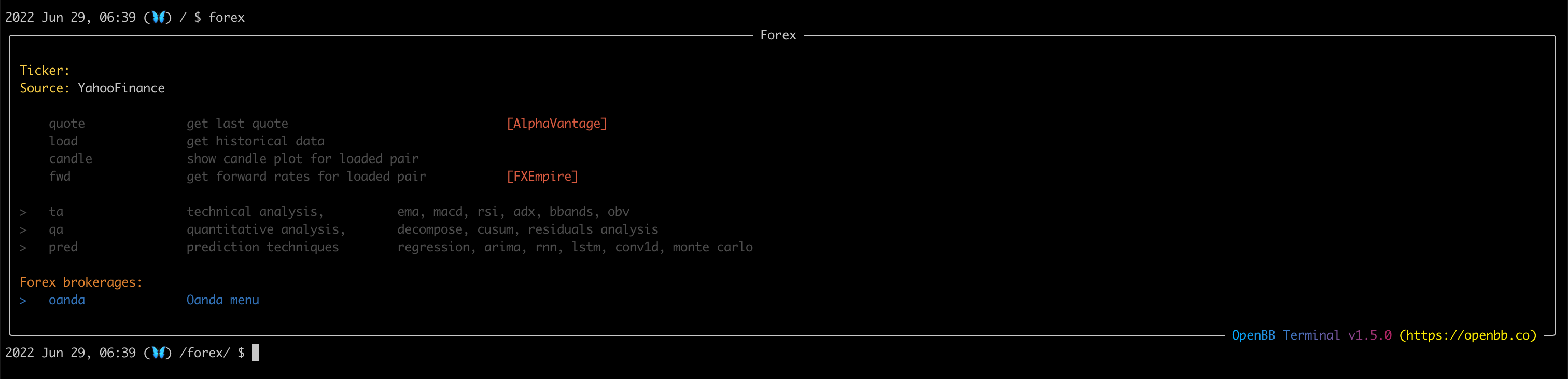
The Forex menu is called upon by typing `forex` which opens the following menu:
|
|
|
|
|
|
|
|
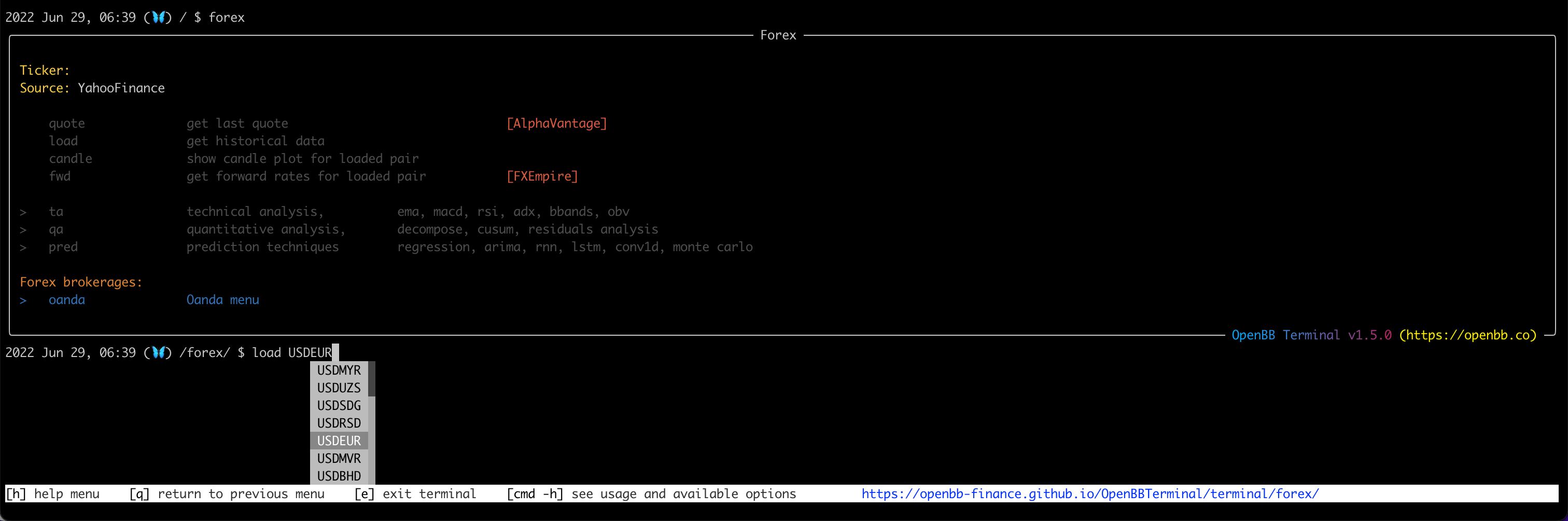
You have the ability to load any currency pair with <a href="/terminal/reference/forex/load" target="_blank" rel="noreferrer noopener">load</a> as follows:
|
|
|
|
|
|
|
|
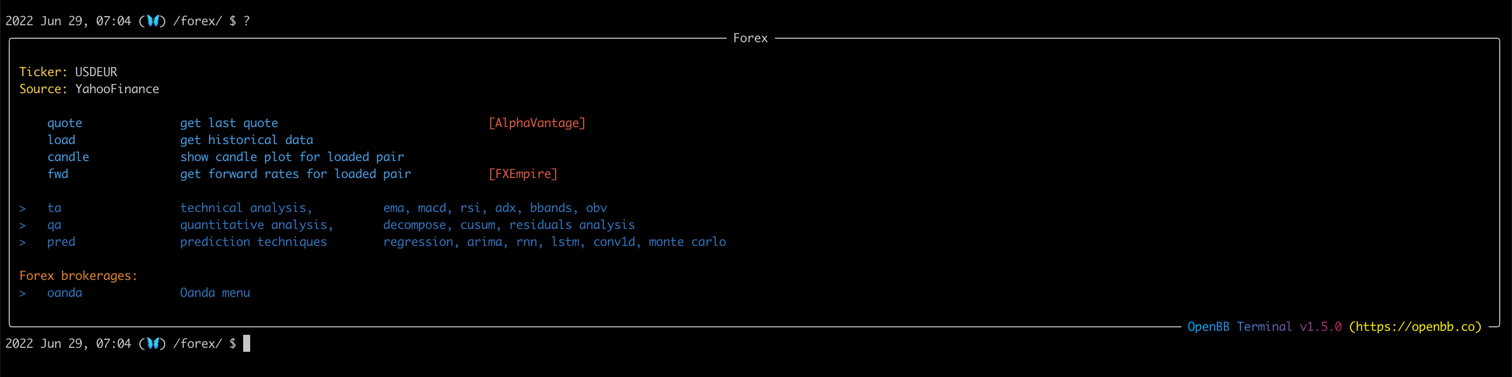
When you do so, a lot of commands turn <span className="text-blue-500">Blue</span>. These can now be used to analyse the selected currency pair.
|
|
|
|
|
|
|
|
For example, you are able to show the quote of the currency pair by using the <a href="/terminal/reference/forex/quote" target="_blank" rel="noreferrer noopener">quote</a> command:
|
|
|
|
```
|
|
2022 Jun 29, 07:04 (🦋) /forex/ $ quote
|
|
|
|
USD/EUR Quote
|
|
┏━━━━━━━━━━━━━━━━━━━━┳━━━━━━━━━━━━━━━━━━━━━━━━━━━━━━━━━┓
|
|
┃ ┃ Realtime Currency Exchange Rate ┃
|
|
┡━━━━━━━━━━━━━━━━━━━━╇━━━━━━━━━━━━━━━━━━━━━━━━━━━━━━━━━┩
|
|
│ From_Currency Code │ USD │
|
|
├────────────────────┼─────────────────────────────────┤
|
|
│ To_Currency Code │ EUR │
|
|
├────────────────────┼─────────────────────────────────┤
|
|
│ Last Refreshed │ 2022-06-29 11:08:00 │
|
|
├────────────────────┼─────────────────────────────────┤
|
|
│ Exchange Rate │ 0.94960000 │
|
|
├────────────────────┼─────────────────────────────────┤
|
|
│ Bid Price │ 0.94960000 │
|
|
├────────────────────┼─────────────────────────────────┤
|
|
│ Ask Price │ 0.94960000 │
|
|
└────────────────────┴─────────────────────────────────┘
|
|
```
|
|
|
|
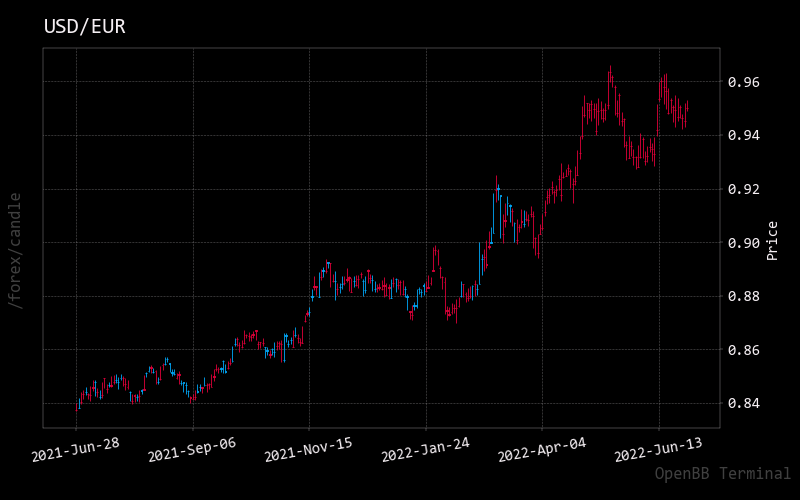
Or show the historical data on the currency pair with <a href="/terminal/reference/forex/candle" target="_blank" rel="noreferrer noopener">candle</a> as follows:
|
|
|
|
```
|
|
2022 Jun 29, 07:09 (🦋) /forex/ $ candle
|
|
```
|
|
|
|
Which returns the following:
|
|
|
|
|
|
|
|
Lastly, insights in the forward valuations can also be given with <a href="/terminal/reference/forex/fwd" target="_blank" rel="noreferrer noopener">fwd</a>.
|
|
|
|
```
|
|
2022 Jun 29, 07:19 (🦋) /forex/ $ fwd
|
|
|
|
Forward rates for USD/EUR
|
|
┏━━━━━━━━━━━━━━━┳━━━━━━━━┳━━━━━━━━┳━━━━━━━━┳━━━━━━━━━━━┓
|
|
┃ Expirations ┃ Ask ┃ Bid ┃ Mid ┃ Points ┃
|
|
┡━━━━━━━━━━━━━━━╇━━━━━━━━╇━━━━━━━━╇━━━━━━━━╇━━━━━━━━━━━┩
|
|
│ Overnight │ 0.9499 │ 0.9498 │ 0.9499 │ -0.5750 │
|
|
├───────────────┼────────┼────────┼────────┼───────────┤
|
|
│ Tomorrow Next │ 0.9499 │ 0.9498 │ 0.9498 │ -0.7250 │
|
|
├───────────────┼────────┼────────┼────────┼───────────┤
|
|
│ Spot Next │ 0.9497 │ 0.9496 │ 0.9497 │ -2.3450 │
|
|
├───────────────┼────────┼────────┼────────┼───────────┤
|
|
│ One Week │ 0.9495 │ 0.9495 │ 0.9495 │ -4.1550 │
|
|
├───────────────┼────────┼────────┼────────┼───────────┤
|
|
│ Two Weeks │ 0.9491 │ 0.9491 │ 0.9491 │ -8.2600 │
|
|
├───────────────┼────────┼────────┼────────┼───────────┤
|
|
│ Three Weeks │ 0.9487 │ 0.9486 │ 0.9487 │ -12.4150 │
|
|
├───────────────┼────────┼────────┼────────┼───────────┤
|
|
│ One Month │ 0.9481 │ 0.9480 │ 0.9480 │ -18.8850 │
|
|
├───────────────┼────────┼────────┼────────┼───────────┤
|
|
│ Two Months │ 0.9459 │ 0.9458 │ 0.9458 │ -40.8200 │
|
|
├───────────────┼────────┼────────┼────────┼───────────┤
|
|
│ Three Months │ 0.9436 │ 0.9435 │ 0.9436 │ -63.4650 │
|
|
├───────────────┼────────┼────────┼────────┼───────────┤
|
|
│ Four Months │ 0.9415 │ 0.9414 │ 0.9415 │ -84.5500 │
|
|
├───────────────┼────────┼────────┼────────┼───────────┤
|
|
│ Five Months │ 0.9394 │ 0.9392 │ 0.9393 │ -106.2650 │
|
|
├───────────────┼────────┼────────┼────────┼───────────┤
|
|
│ Six Months │ 0.9361 │ 0.9360 │ 0.9360 │ -138.8800 │
|
|
├───────────────┼────────┼────────┼────────┼───────────┤
|
|
│ Seven Months │ 0.9342 │ 0.9340 │ 0.9341 │ -158.3750 │
|
|
├───────────────┼────────┼────────┼────────┼───────────┤
|
|
│ Eight Months │ 0.9323 │ 0.9322 │ 0.9322 │ -176.9850 │
|
|
├───────────────┼────────┼────────┼────────┼───────────┤
|
|
│ Nine Months │ 0.9302 │ 0.9300 │ 0.9301 │ -198.1200 │
|
|
├───────────────┼────────┼────────┼────────┼───────────┤
|
|
│ Ten Months │ 0.9284 │ 0.9283 │ 0.9284 │ -215.5000 │
|
|
├───────────────┼────────┼────────┼────────┼───────────┤
|
|
│ Eleven Months │ 0.9268 │ 0.9267 │ 0.9268 │ -231.6250 │
|
|
├───────────────┼────────┼────────┼────────┼───────────┤
|
|
│ One Year │ 0.9252 │ 0.9250 │ 0.9251 │ -248.6650 │
|
|
├───────────────┼────────┼────────┼────────┼───────────┤
|
|
│ Two Years │ 0.9111 │ 0.9106 │ 0.9109 │ -390.6350 │
|
|
└───────────────┴────────┴────────┴────────┴───────────┘
|
|
```
|
|
|
|
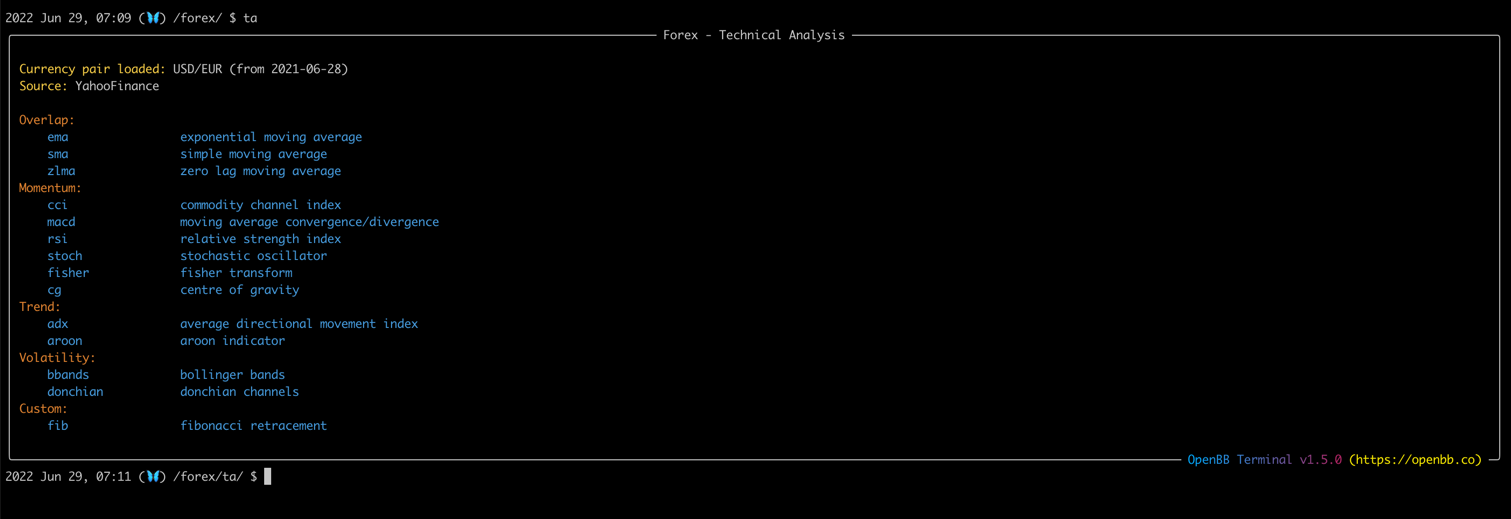
Furthermore, the ability exists to take the currency pair to the <a href="/terminal/guides/intros/common/ta" target="_blank" rel="noreferrer noopener">Technical Analysis</a> menu by typing `ta`:
|
|
|
|
|
|
|
|
### Examples
|
|
|
|
First, let's start with looking at the currency pair USD and GBP. These are the U.S. Dollars and the Pound sterling. This is done by using the `load` command as follows with the addition that the `-s` command is used to change the start date:
|
|
|
|
```
|
|
2022 Jun 29, 07:16 (🦋) /forex/ $ load USDGBP -s 2015-01-01
|
|
USD-GBP loaded.
|
|
```
|
|
|
|
Then, let's see how this currency pair has changed over the last years with `candle` also adding in the `--ma 60,120` argument:
|
|
|
|

|
|
|
|
Now it's time to take this to the <a href="/terminal/guides/intros/common/qa" target="_blank" rel="noreferrer noopener">Quantitative Analysis</a> menu by typing `qa`. This returns the following:
|
|
|
|

|
|
|
|
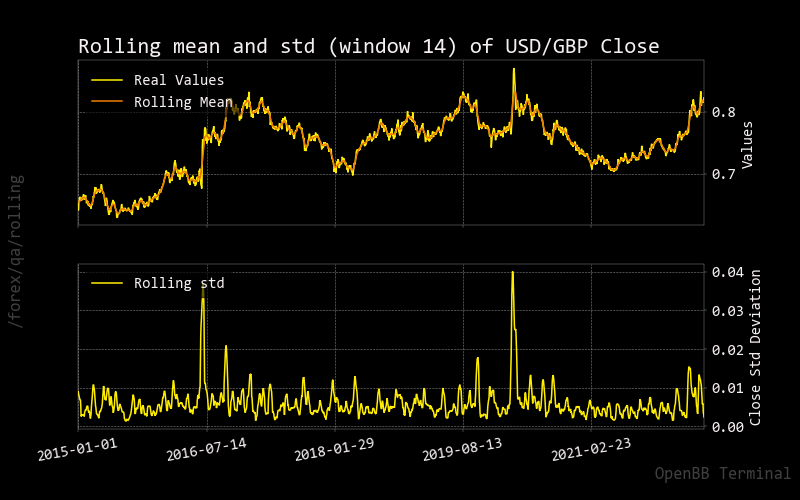
Within this menu we can show some rolling statistics, for example show the rolling values for the mean and standard deviation of the currency pair:
|
|
|
|
|
|
|
|
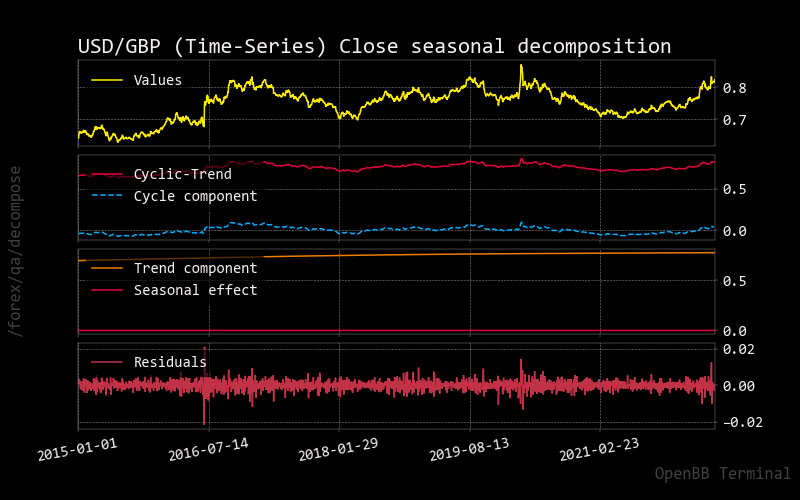
Lastly, more advanced techniques can also be applied regarding seasonality with `decompose`:
|
|
|
|
```
|
|
2022 Jun 29, 07:26 (🦋) /forex/qa/ $ decompose
|
|
|
|
Time-Series Level is 0.75
|
|
Strength of Trend: 421.7107
|
|
Strength of Seasonality: 0.0031
|
|
```
|
|
|
|
|