95431ecb85
* Many improvements to the documentation

* Remove redundant guides

* details

* Add guide backin

* linting

* Update FAQs

* Match it up with SDK

* add po to sdk

* Add PO in

* adding discovery

* adding BA and FA to sdk

* Add in Troubleshooting page

* quick fix on forecast

* onemore quickie

* fix sdk

* updates to troubleshooting

* Add in ticker to codespel so it doesn't whine

Co-authored-by: Jeroen Bouma <jeroenbouma@Jeroens-MacBook-Pro.local>
Co-authored-by: andrewkenreich <andrew.kenreich@gmail.com>
Co-authored-by: martinb-bb <105685594+martinb-bb@users.noreply.github.com>
Co-authored-by: james <jmaslek11@gmail.com>
5.1 KiB
Vendored
title, sidebar_position
| title | sidebar_position |
|---|---|
| Requirements | 1 |
import Tabs from '@theme/Tabs'; import TabItem from '@theme/TabItem';
The OpenBB SDK is a set of tools for financial and data analysis. The purpose of this page is to outline some of the background information required to get the most out of the software.
Minimum System Requirements
- 4GB RAM or more
- 5GB free storage
- A code editor or Jupyter Notebook
- Internet connection
:::note NOTES ON THE INTERNET CONNECTIVITY Installation of the SDK with all the toolkits would require downloading around 4GB of data. Querying data does not require a lot of bandwidth but you will certainly have a more pleasant experience if you will be on a fast internet line. 4G networks provide a good enough experience so if you're traveling your personal hot-spot will do. While it's technically possible to use a subset of the functionality in off-line mode, you will not be able to use any data that is queried from the APIs of data providers and services. :::info
:::info OS Specific Requirements
The OpenBB platform requires MacOS Catalina or higher. The oldest Mac configuration known to work is a MacPro 3,1 (OS Catalina) and functions relying on the Intel Math Kernel (Forecast models like RNN) are not compatible with the CPU.
Portfolio Optimization Toolkit and Forecasting Toolkit on Apple Silicon: To install the Forecasting toolkit on M1/M2 macs you need to use the x86_64 version of conda and install certain dependencies from conda-forge. Further Instructions can be found in the Installation section
Windows 10 or higher is required.
The OpenBB platform can be installed on a variety of Linux distributions. Due to the large number of system configuration variables, we are unable to verify compatibility across all distributions. It is known to work with up-do-date versions of Ubuntu, Debian and Raspberry Pi. Any 32-bit distributions are incompatible. Generally, if the system installs Miniconda3 then the OpenBB Terminal should also be installable.
Python
Virtual Environments
Virtual Python environments are containers for Python applications, and allows the operating system to remain unchanged. The OpenBB SDK is built on top of 300+ open-source libraries. The dependency tree is complex and the components are carefully selected to work with each other. This makes it critical to install the OpenBB SDK in an isolated, dedicated, virtual environment. We recommend a Conda virtual environment because this is currently the only package manager compatible with every function. Consequently, installations within a venv or other container will lack the ML and forecast features. The Forecast menu will not be installed unless:
- Miniconda3 is installed and the version is specifically x86/x64 architecture, regardless of the CPU-type.
- CMake must be installed within the environment created for the OpenBB installation.
conda install -c conda-forge cmake
It is not recommended to install in a Global environment, such as Homebrew or usr/local/bin/python3. Create and activate a new environment before installing the OpenBB SDK.
GitHub
GitHub is where the OpenBB source code is maintained. Cloning the repository is recommended for those wishing to develop functions, inspect the source code, or be on the bleeding-edge of development. Syncing the local folder - git pull - to the main branch of the repository will keep the installation up-to-date, and git checkout provides a way to test development or contributor branches. GitHub can also be used as a personal storage vault and take advantage of automated actions. It's a great place to build, store, and maintain small databases for free.
Users encountering bugs are encouraged to report them here by creating a new issue, if no open issue for the bug already exists.
View-Model-Control
OpenBB uses a View-Model-Control format for creating functionality in the terminal.
For example:
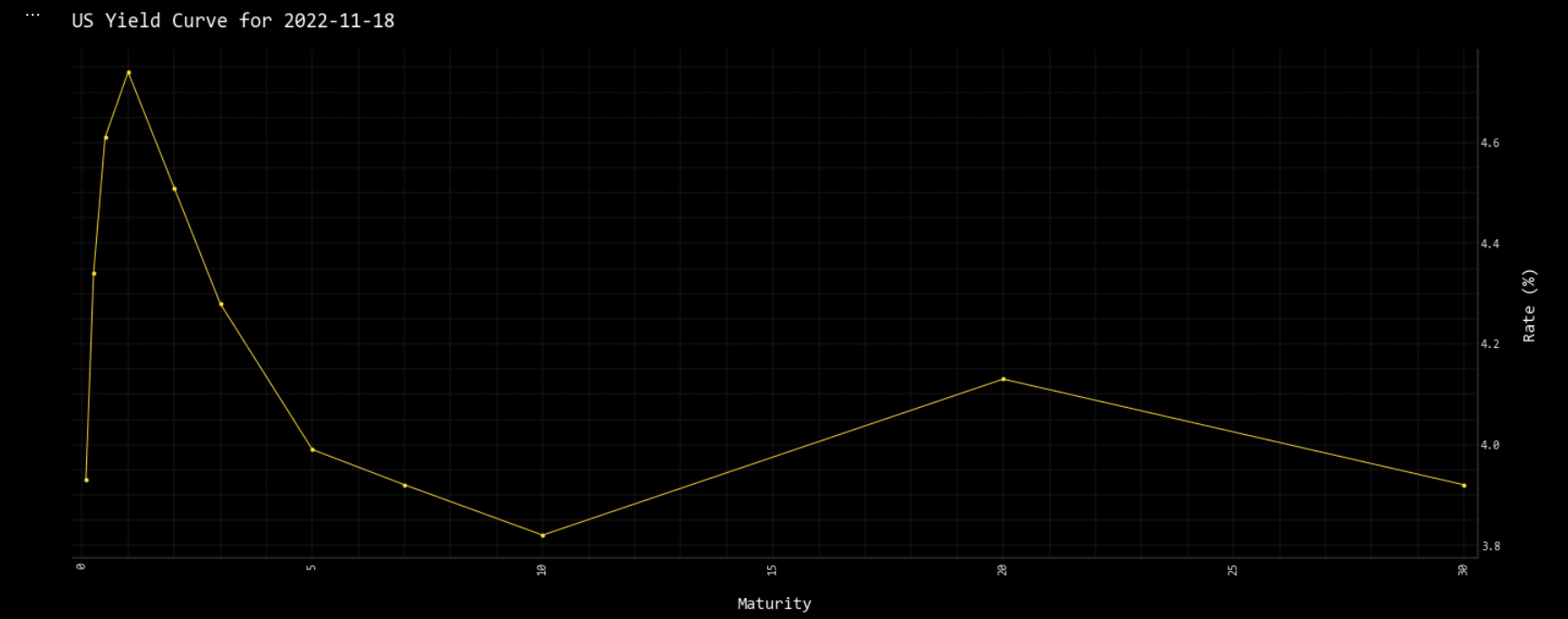
openbb.economy.ycrv()
| Maturity | Rate | |
|---|---|---|
| 0 | 0.0833333 | 3.93 |
| 1 | 0.25 | 4.34 |
| 2 | 0.5 | 4.61 |
| ... | ... | ... |
| 8 | 10 | 3.82 |
| 9 | 20 | 4.13 |
| 10 | 30 | 3.92 |
Then the view:
openbb.economy.ycrv_chart()