 95431ecb85
* Many improvements to the documentation

* Remove redundant guides

* details

* Add guide backin

* linting

* Update FAQs

* Match it up with SDK

* add po to sdk

* Add PO in

* adding discovery

* adding BA and FA to sdk

* Add in Troubleshooting page

* quick fix on forecast

* onemore quickie

* fix sdk

* updates to troubleshooting

* Add in ticker to codespel so it doesn't whine

Co-authored-by: Jeroen Bouma <jeroenbouma@Jeroens-MacBook-Pro.local>
Co-authored-by: andrewkenreich <andrew.kenreich@gmail.com>
Co-authored-by: martinb-bb <105685594+martinb-bb@users.noreply.github.com>
Co-authored-by: james <jmaslek11@gmail.com>
19 KiB
Vendored
title, keywords, excerpt
| title | keywords | excerpt | |||||
|---|---|---|---|---|---|---|---|
| Cryptocurrency |
|
The Introduction to Cryptocurrency explains how to use the Cryptocurrency and provides a brief description of its sub-menus |
The Cryptocurrency menu allows you to discover trending cryptocurrency (disc). Additionally, you can also perform research of a specific coin (dd), NFT (nft) or most lucrative Defi project (defi). It does so by handing you tools to (among other things) perform technical analysis (ta), quantitative analysis (qa), and give you access to onchain information (onchain).
How to use
The Cryptocurrency menu is called upon by typing crypto which opens the following menu:
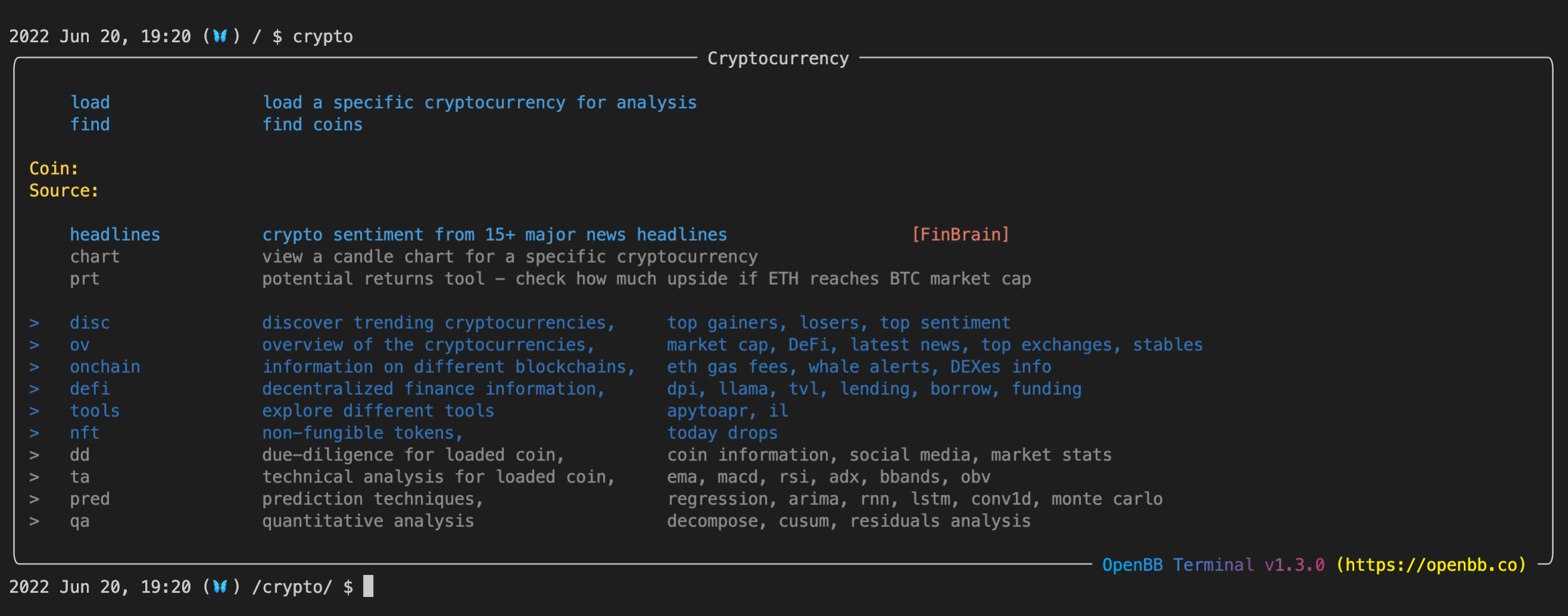
You have the ability to search a coin with find based on its name or symbol. An example:

As a result, you can see a list of coins matching your search criteria. Once you identify the coin you are looking for, next step is to load it. See the example below:
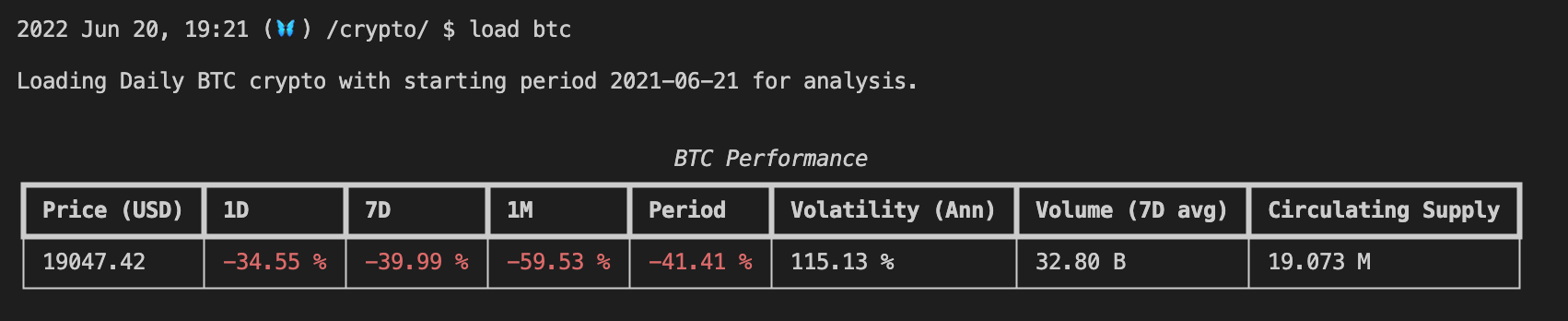
To view the candle chart for the loaded crypto, you can call candle. This will show you the coin's historical prices and volume, as follows:

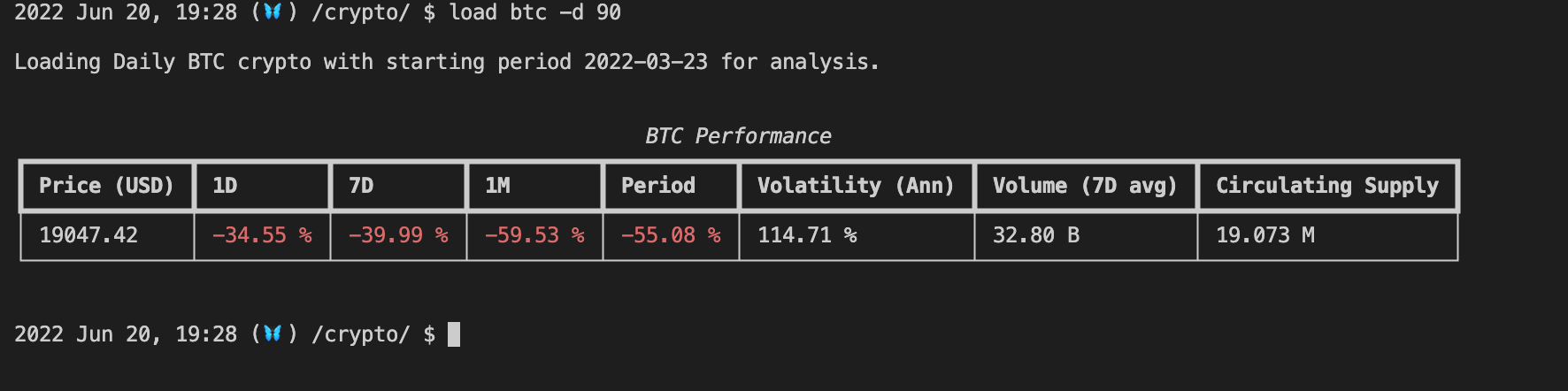
In case you want to adjust the default period, you can do so by specifying the number of days to go back in time.
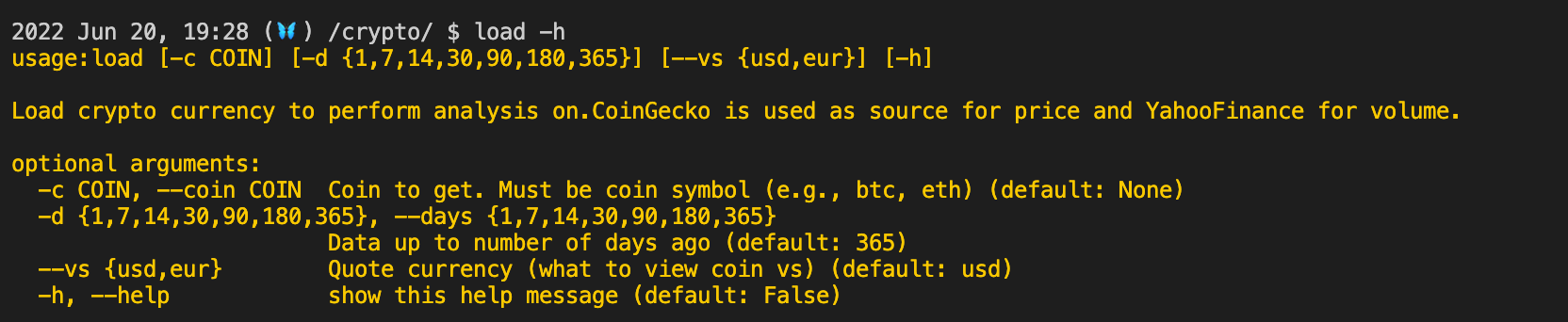
You might be wondering, how can I know about all possible options? You can type in command_name -h or load -h in this case. Here you will find available optional arguments that you can play with.
Lastly, by calling ? or help or h, the crypto menu will be re-populated. Here you can see that several menus have turned blue, which mean you can enter any of them now. In order to use these menus, you are required to first load a coin.

Sub-menus available
The Cryptocurrency menu has an extensive list of available sub-menus ranging from due diligence to NFT to onchain analysis. To find more information about each menu, you can click on one of the following:
- Introduction to Cryptocurrency Discovery: discovers top trending, top gainers or losers coins, as well as top NFTs, dApps and exchanges based on prices.
- Introduction to Cryptocurrency Overview: gives the overview of the cryptocurrency market, including global Defi market, stablecoins, exchanges as well as latest news.
- Introduction to Cryptocurrency Onchain: provides information on different blockchains, whales transaction and traded volumes on certain crypto pair. You can also specify a Ethereum address and look up past transactions and balance history.
- Introduction to Cryptocurrency Decentralized Finance (DeFi): explore the decentralized finance market through a variety of indicators and data, from lending interests, staking ratio, Uniswap pools to top Defi dApps.
- Introduction to Cryptocurrency Tools: gives you the tool to calculate crypto metrics, such as impermanent loss and converting APR to APY.
- Introduction to Non Fungible Tokens (NFTs): Discover latest NFT drops and OpenSea's NFT Collection statistics.
- Introduction to Cryptocurrency Due Diligence: performs due diligence on a chosen coin based on, among other things, tokenomics, roadmaps, news, and community.
- Introduction to Technical Analysis: analyzes the chosen coin's historical data extensively with moving averages and momentum, trend, volatility and volume indicators.
- Introduction to Forecasting Menu: applies advanced AI and Machine Learning models to form prediction of future stock prices including Recurrent Neural Network (RNN), Autoregressive Integrated Moving Average (ARIMA) and Monte Carlo forecasting
Examples
When entering the crypto menu, you would typically want to load in a coin. Let's go with Ethereum. You can do this by specifying its symbol: load eth
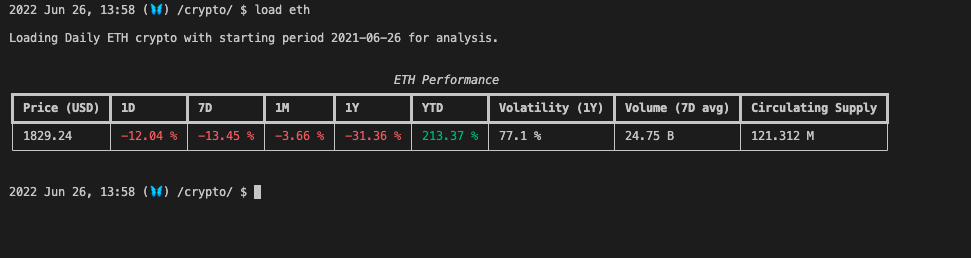
Let's checkout its sentiments from major headlines news by typing: headlines

To perform further analysis, the best menu to enter is dd:
2022 Jun 29, 08:58 (🦋) /crypto/ $ dd
╭────────────────────────────────────────────────────────────────────────────────────────────── Crypto - Due Diligence ──────────────────────────────────────────────────────────────────────────────────────────────╮
│ │
│ load load a specific cryptocurrency for analysis │
│ │
│ Coin: eth │
│ Source: │
│ │
│ Overview: │
│ info basic information about loaded coin [CoinGecko] │
│ basic basic information about loaded coin [CoinPaprika] │
│ ath all time high related stats for loaded coin [CoinGecko] │
│ atl all time low related stats for loaded coin [CoinGecko] │
│ web found websites for loaded coin e.g forum, homepage [CoinGecko] │
│ pi project information e.g. technology details, public repos, audits, vulns [Messari] │
│ gov governance details [Messari] │
│ stats coin stats [Coinbase] │
│ bc links to blockchain explorers for loaded coin [CoinGecko] │
│ Market: │
│ market market stats about loaded coin [CoinGecko] │
│ mkt all markets for loaded coin [CoinPaprika] │
│ binbook order book [Binance] │
│ balance coin balance [Binance] │
│ cbbook order book [Coinbase] │
│ trades last trades [Coinbase] │
│ ex all exchanges where loaded coin is listed [CoinPaprika] │
│ oi open interest per exchange [Coinglass] │
│ eb total balance held on exchanges (in percentage and units) [Glassnode] │
│ Metrics: │
│ mcapdom market cap dominance [Messari] │
│ active active addresses [Glassnode] │
│ nonzero addresses with non-zero balances [Glassnode] │
│ change 30d change of supply held on exchange wallets [Glassnode] │
│ ps price and supply related metrics for loaded coin [CoinPaprika] │
│ mt messari timeseries e.g. twitter followers, circ supply, etc [Messari] │
│ Contributors and Investors: │
│ team contributors (individuals and organizations) [Messari] │
│ inv investors (individuals and organizations) [Messari] │
│ Tokenomics: │
│ tk tokenomics e.g. circulating/max/total supply, emission type, etc [Messari] │
│ fr fundraising details e.g. treasury accounts, sales rounds, allocation [Messari] │
│ Roadmap and News: │
│ rm roadmap [Messari] │
│ events events related to loaded coin [CoinPaprika] │
│ news loaded coin's most recent news [CryptoPanic] │
│ Activity and Community: │
│ links links e.g. whitepaper, github, twitter, youtube, reddit, telegram [Messari] │
│ social social portals urls for loaded coin, e.g reddit, twitter [CoinGecko] │
│ twitter tweets for loaded coin [CoinPaprika] │
│ score different kind of scores for loaded coin, e.g developer score, sentiment score [CoinGecko] │
│ dev github, bitbucket coin development statistics [CoinGecko] │
│ gh github activity over time [Santiment] │
│ │
╰─────────────────────────────────────────────────────────────────────────────────────────────────────────────────────────────────────────────────────────────────────── OpenBB Terminal v1.5.0 (https://openbb.co) ─╯
We can check out the project's roadmap and its effect to historical price, by typing rm

Once you have finished analyzing a specific coin, you would want to get a good understanding of the overall crypto market. To do that, head over to ov by typing ../ov.
Hint:
..basically took you back to the previous menu. Instead of performing 2 separate commands, you can combine them together using/. As such../ovwill take us back to previous menu, and then enter theovmenu.

Bitcoin has such a big influence on the entire crypto market. So seeing whether we are in a Bitcoin season or a Altcoin season will be useful to your investment decisions. altindex is a great command for this purpose.
