 9e1a58e2db
* Update api.py

* Updated forex menu

* refactor ycrv command

* refactor ycrv command black

* refactor ecocal command

* Minh changes

* Adding space to test pushing

* title fix ecocal df

* get economic calendar annotation

* fix investingcom tests

* refactor index command

* refactor overview command

* give defaults to wsj view function args

* rename date args investincom

* refacto bigmac command

* fix ecocal typo

* refactor rtps command

* alphavantage gdp

* alphavantage gdp per capita

* alphavantage cpi

* alphavantage tyld

* alphavantage inf

* refactor macro command

* refactor macro command w helpers

* refactor treasury command

* fix macro on terminal

* treasury labels

* refactor maturities

* update treasury maturities doc strings

* refactor get economic calendar finhub

* refactor map command api

* display map filter choices

* route economy api to performance map

* route economy api to performance map

* display group choices on valuation command

* refactor performance and valuation commands

* refactor spectrum model and view

* add choices to spectrum controller

* delete image after view

* fix model tests finviz

* fix finciz view tests

* refactor futures

* fix some tests

* fix more tests

* fix controller test

* refactor fred series notes

* update fred notes docstring

* refacto fred series ids

* fix pred and qa when empty datasets

* refactor fred

* uncomment stuff

* refacto get series data

* fix some tests

* set defaults on args

* refactor fred yield curve

* black

* fix spell and remove ecocal names

* fix linting

* linting

* pylint fix

* change dangerous defaults

* Working through crypto fixes (#2256)

* Working through crypto fixes

* Continued adding crypto stuff

* Added crypto overview

* Added test fixes

* Added fixtures

* Fixed tests

* Fixed charting issue

* Removed broken APIs

* Final adjustments

* Added test fixes

* map get groups and get ycrv countries into old api

* exposed econdb helper funcs

* remove helpers

* refactor search indices

* linting

* refactor arg currency

* pylint from currency

* Started switching crpyto ascending to ascend

* Merging

* Portfolio model arguements, params, and docstring

* Refactored for etf commands (#2292)

* Refactored for etf commands

* Fixed tests

* Added load command

* Fixed menu

* Portfolio logic fixes

* Added econometrics (#2260)

* Added econometrics

* Fixed tests

* Simplified API

* Added test fixes

* Added test csv

* Allowed examples to be loaded

* Fund refactor (#2291)

* Fund refactor

* Changed fund_name and fund to name

* Changed ascending to ascend

* Stock menu refactoring for easier API usage (#2194)

* Stocks  refactoring for easier API usage

* Linting

* Refactor newly added features

* Linting

* Fixing tests

* Refactor common files used by stocks menu

* Fixing flake8

* Fix linting and tests

* Linting

* Fix flake8

* refactor insider_data

* refactor mentions

* refactor watchlist

* refactor sentiment

* refactor sentiment

* fix yahoofinance tests

* refactor load and candle

* refactor get_news and display_news

* refactor stocks.ins.act

* candle default matplotlib

* fix yahoofinance_view tests

* fix ark model tests

* fix ark view tests

* fix business insider model

* fix business insider view

* refactor csimarket model

* fix tests csi market model

* update dd controller

* fix get suppliers tests

* fix dd controller tests

* fix finhub tests

* fix finviz tests

* fix fmp tests

* fix marketwatch tests

* corrected argument keywords in test_bt_model

* corrected argument keywords in test_bt_view

* refactor fa controller

* refactor marketwatch view

* refactor gov controller

* fix tests fa av

* fix tests elect

* fix dcf tests

* fix polygon tests

* fix fmp tests

* fix quiverquant tests

* fix yahoofinance fa tests

* fix more fa tests

* fix insider tests

* fix more tests

* fix more tests

* fix options tests

* fix stock gov tests

* fix tests test_ba_controller

* fix tests for test_finviz_compare_model.py

* fixed 2 tests

* fixed tests

* fixed tests

* fixed tests

* fixed tests

* fixed tests

* fixed tests

* fixed tests

* fixed tests

* fixed tests

* fixed tests

* fix final tests

* fixed tests

* fixed tests

* Fix tests

* black

* forgot to black tests

* fixed tests

* fixed tests

* fixed tests

* fixed tests

* flakefix

* Tests + code : Stocks / Discovery

* fix tests

* added recorder

* fixed tests

* fixed tests

* black

* black

* remove unused imports

* refactor display raw

* sia dicts fix

* pylint

* linting

* remove dangerous default

* fix tests

* fix beta model test

* black

* skip screener qa test

* change sector path to sectors

* update tests readme

* fix metric defaults

* black

* substitute lost ticker

* defaults cpic

* another round on sia

* refactor cramer

* reduce default tweets on sentiment

* refactor yf hist, corr, volume

* arkorders default

* refactor income, balance, cashflow

* refacto scorr, screener, getfinnhub

* refactor stockgrid

* ibkr refactor

* another round on stockgrid

* add dividens end point

* refactor discovery endpoints

* update docstrings with similar input

* refactor messages

* refactor ba

* refactor regioons

* refactor twitter sentiment

* refactor hist

* refactor regions

* give default to timeframe

* refactor bunch of defaults and arg names

* remove leftover imports

* refactor vwap

* let tests run

* fix tests

* fix stock tests

* fix stockanalysis tests

* flake

* MYPY

* Made important changes

* added fixes

* Fixed big issue

* Added fixes to tests

* fix qa tests

* fix tests

* fix 1 more test

* last stocks failing

* fix crypto test

Co-authored-by: Chavithra PARANA <chavithra@gmail.com>
Co-authored-by: montezdesousa <montezdesousa@gmail.com>
Co-authored-by: hjoaquim <h.joaquim@campus.fct.unl.pt>
Co-authored-by: montezdesousa <79287829+montezdesousa@users.noreply.github.com>
Co-authored-by: colin99d <colin99delahunty@gmail.com>

* fix portfolio tests

* change period to window

* update ca docstrings

* refactor get_similar_companies func

* Fixed

* Update CI

* Update CI 2

* Update CI 3

* Update dependencies

Co-authored-by: colin99d <colin99delahunty@gmail.com>
Co-authored-by: Colin Delahunty <72827203+colin99d@users.noreply.github.com>
Co-authored-by: montezdesousa <montezdesousa@gmail.com>
Co-authored-by: James Simmons <simmonsj330@gmail.com>
Co-authored-by: Theodore Aptekarev <aptekarev@gmail.com>
Co-authored-by: minhhoang1023 <40023817+minhhoang1023@users.noreply.github.com>
Co-authored-by: jose-donato <43375532+jose-donato@users.noreply.github.com>
Co-authored-by: montezdesousa <79287829+montezdesousa@users.noreply.github.com>
Co-authored-by: northern-64bit <75195383+northern-64bit@users.noreply.github.com>
Co-authored-by: hjoaquim <h.joaquim@campus.fct.unl.pt>
OpenBB Terminal
Table of Contents
There are currently four options to install the terminal:
- Using the Installer (recommended if you just want to use the terminal)
- Using Python (recommended if you want to develop new features)
- Using Docker (alternative option to the installer if preferred)
- Using Docker Web UI (if you want to deploy the web UI for users to access over your LAN)
First step in all options is to star the project

Anaconda & Python
This installation type supports both Windows and Unix systems (Linux + MacOS). However, on Windows it can become messy so it is easier to use Windows Subsystem Linux (WSL) on this operating system. WSL emulates a Linux machine inside your Windows system.
If you are using macOS or other Linux operating systems you can jump the next section Installing the terminal.
Installing WSL (Only for Windows users)
If you are using Windows you first you need to install WSL. The process is simple and a tutorial can be found here. Once you reach the section Update Linux on that tutorial, you should have a linux machine installed and can proceed to the next steps.
Since WSL installation is headless by default (i.e., you have only access to a terminal running a linux distribution) you need some extra steps to be able to visualize the charts produced by the terminal (more detailed tutorial here):
-
Dynamically export the DISPLAY environment variable in WSL2:
# add to the end of ~/.bashrc file export DISPLAY=$(cat /etc/resolv.conf | grep nameserver | awk '{print $2}'):0 # source the file source ~/.bashrc -
Download and install VcXsrv
-
When running the program is important to check "Disable access control"
After this, VcXsrv should be running successfully and we can proceed to terminal installation.
Although we extremely recommend using WSL to run the terminal on windows, if you don't want or can't for some reason, you can try install the terminal directly on Windows without WSL. If you'd like to see a video recording of the installation on Windows without WSL, @JohnnyDankseed has made one available here.
Installing the terminal
These steps are common in all operating systems (Windows with or without WSL, MacOS or Linux).
This project supports Python 3.8 and 3.9. By default, the newly created virtual environment will use Python 3.9.13
Our current recommendation is to use this project with Anaconda's Python distribution - either full Anaconda3 Latest or Miniconda3 Latest (recommended). Several features in this project utilize Machine Learning. Machine Learning Python dependencies are optional. For MacOS systems, the "Miniconda3 MacOSX 64-bit" version that works on both Intel and M1 macs is recommended.
NOTE: We recommend using conda and poetry because it just works. You can use other python
distributions and use raw pip instead of poetry but you will very likely bump into installation
issues.
-
Install Anaconda (It's on the AUR as anaconda or miniconda3!)
-
Follow the instructions specified on the website above:
- If you are using macOS click Installing on MacOS
- If you are using WSL or Linux click Installing on Linux
- If you are using Windows click Installing on Windows. ONLY REQUIRED IF NOT USING WSL, you also need to install/update Microsoft C++ Build Tools from here: https://visualstudio.microsoft.com/visual-cpp-build-tools/
-
After following the steps, confirm that you have it by opening a terminal and running:
conda -V. The output should be something along the lines of:conda 4.11.0
-
-
Install git
conda install -c anaconda gitFor Linux users only, run these additional commands:
sudo apt update sudo apt install -y cmake gcc pip install cmake -
Clone the Project
- Via HTTPS:
git clone https://github.com/OpenBB-finance/OpenBBTerminal.git - via SSH:
git clone git@github.com:OpenBB-finance/OpenBBTerminal.git
- Via HTTPS:
-
Navigate into the project's folder
cd OpenBBTerminal/ -
Create Environment
You can name the environment whatever you want. Although you could use names such as:
welikethestock,thisisthewayordiamondhands, we recommend something simple and intuitive likeobb. This is because this name will be used from now onwards.conda env create -n obb --file build/conda/conda-3-9-env.yaml -
Activate the virtual environment
conda activate obbNote: At the end, you can deactivate it with:
conda deactivate. -
Install dependencies with poetry
Install the main dependencies with
poetry installTo enable the
predictionmenu install additional dependencies after installing main dependencies:conda install -c conda-forge tensorflowIf you are having trouble with Poetry (e.g. on a non-conda python), simply install requirements.txt with pip
pip install -r requirements.txt -
You're ready to use the terminal!
python terminal.pyIf you are using macOS and if you get SyntaxError, you might need to run this instead
python3 terminal.py -
(Windows - Optional and only if you are not using WSL) Speeding up opening process in the future
After you've installed OpenBB Terminal, you'll find a file named "OpenBB Terminal.bat". You can use this file to open OpenBB Terminal quicker. This file can be moved to your desktop if you'd like. If you run into issues while trying to run the batch file. If you run into issues with the batch files, edit the file and check to see if the directories match up. This file assumes you used the default directories when installing.
-
Jupyter Lab (Optional. Early alpha). User the Terminal from Jupyter Lab
You can install Jupyter Lab extensions that help you manage settings and launch the terminal in a JL bash console using the commands in the jupyterlab/README.md
NOTE: When you close the terminal and re-open it, the only command you need to re-call is conda activate gst
before you call python terminal.py again.
TROUBLESHOOT: If you are having troubles to install, check our newest troubleshoot page. You can also reach for help on our discord.
Advanced User Install - Custom installation procedures
By default we advice using conda and poetry for environment setup and dependency management.
Conda ships binaries for packages like numpy and tensorflow so these dependencies are
not built from source locally by pip.
Poetry solves the dependency tree in a way that the dependencies of dependencies of dependencies
use versions that are compatible with each other.
If you are using a conda environment the build/conda folder contains multiple .yaml configuration
files that you can choose from.
If you are using other python distributions we highly recommend that you use some virtual
environment like virtualenv or pyenv for installing the terminal dependency libraries.
Requirements files that you can find in the project root:
requirements.txtlist all the dependencies without Machine Learning librariesrequirements-full.txtlist all the dependencies without Machine Learning libraries
The dependency tree is solved by poetry.
Note: The libraries specified in the requirements files have been tested and work for the purpose of this project, however, these may be older versions. Hence, it is recommended for the user to set up a virtual python environment prior to installing these. This allows to keep dependencies required by different projects in separate places.
Update Terminal
The terminal is constantly being updated with new features and bug fixes, hence, for your terminal to be update, you can run:
git pull
to get the latest changes.
If this fails due to the fact that you had modified some python files, and there's a conflict with the updates, you can use:
git stash
Then, re-run poetry install or pip install -r requirements.txt to get any new dependencies.
Once installation is finished, you're ready to openbb.
If you stashed your changes previously, you can un-stash them with:
git stash pop
Docker Installation
-
Make sure docker desktop is installed. Install links can be found here. To confirm that your docker desktop is downloaded and running, open a command prompt or terminal and enter
docker info. If you get the following you are not running the docker desktop:Server: ERROR: Cannot connect to the Docker daemon at unix:///var/run/docker.sock. Is the docker daemon running?Open the docker desktop app in this case.
-
Download the latest docker image.
docker pull ghcr.io/openbb-finance/openbbterminal-poetry:latestUpon running this the first time, you should see the various layers downloading (note the random series of letters numbers will vary). The first time this is run, it will take a few minutes. Subsequent updates will be much faster, as the changes will be in the MB instead of GB.
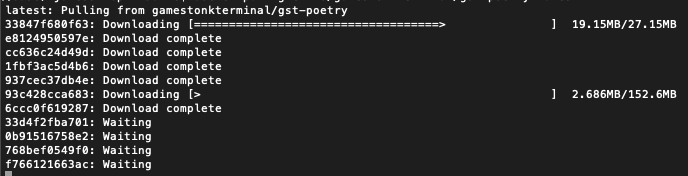
Once the download is complete, confirm that the image has been created by doing
docker images. You should see something similar toREPOSITORY TAG IMAGE ID CREATED SIZE ghcr.io/openbb-finance/openbbterminal-poetry latest b1409a304750 42 hours ago 2.29GB -
Run a container
You are now ready to run the terminal (every time you want to use the terminal you need to run this command):
docker run -it --rm ghcr.io/openbb-finance/openbbterminal-poetry:latestThis will open up the terminal in your command prompt or terminal. Note that this has provided now environment file, so you will not be able to view plots or use keys at this stage.
At this point, you should be able to use the majority of the features using Docker. To read more on adding the environment keys and how to configure your X-server to show plots, hop over to the Advanced Docker Setup.
Web UI - Docker
- Ensure Docker is installed.
- Navigate to the location of the Dockerfile in the repo (
cd openbb_terminal_web) - Ensure the launcher is executable with
chmod +x ./launch - Launch it with
./launch. If you get a permission denied error, dosudo ./launchinstead - Once it's launched, you will be able to access it by going to
http://host-ip:8080in a browser, orhttp://localhost:8080if you are running it on your local machine.
For API keys, create the setenv file if it doesn't already exist.
It will automatically get created on the first launch, and won't get committed to Git because it is on the .gitignore.
Set the API keys as explained here.
Once you've put the API keys in that file, re-run the launch script, and it will use your API keys.
There are a few things that still don't work, and you can see what works and what doesn't here.
Local Installation of GST on Raspberry Pi
-
Running raspbian lite(headless) or desktop (both 64bit) we should first start off with an update/upgrade.
sudo apt update && sudo apt upgradeOnce completed reboot and lets reopen.
-
Install Miniforge The community version of anaconda/miniconda that has Arm support.
- Follow the on screen prompts to install miniforge(conda).
wget https://github.com/conda-forge/miniforge/releases/latest/download/Miniforge3-Linux-aarch64.sh- After following the steps, confirm that you have it by opening a terminal and running:
conda -V. The output should be something along the lines of:conda 4.9.2
-
Install git
conda install -c anaconda git -
Install Cmake
sudo apt update sudo apt install -y cmake pip install cmake -
Clone the Project
- Via HTTPS:
git clone https://github.com/OpenBB-finance/OpenBBTerminal.git - via SSH:
git clone git@github.com:OpenBB-finance/OpenBBTerminal.git
- Via HTTPS:
-
Navigate into the project's folder
cd OpenBB/ -
Create Environment
You can name the environment whatever you want. Although you could use names such as:
welikethestock,thisisthewayordiamondhands, we recommend something simple and intuitive likegst. This is because this name will be used from now onwards.conda env create -n openbb python=3.8.13 -
Activate the virtual environment
conda activate openbbNote: At the end, you can deactivate it with:
conda deactivate. -
Update all poetry dependencies
poetry update --lockNote: This is done to solve any issues with poetry dependencies for the arm architecture of the rpi
-
Install using our updated poetry installation
poetry install -
Ready to rock on a Raspbery Pi!
python terminal.pyNote: For a headless installation using raspbian lite also follow the Jupyter Lab installation
-
Jupyter Lab (Optional. Early alpha). User the Terminal from Jupyter Lab
You can install Jupyter Lab extensions that help you manage settings and launch the terminal in a JL bash console using the commands in the jupyterlab/README.md
NOTE: When you close the terminal and re-open it, the only command you need to re-call is conda activate gst
before you call python terminal.py again.
API Keys
The project is build around several different API calls, whether it is to access historical data or financials. The table below shows the ones where a key is necessary. The easiest way is of updating the keys is by using the terminal, see this guide.
You can also use the environment variable to set your API Keys directly instead of using the Terminal, for the variable name in the code one just needs to remove the "GT_", this can be found in config_terminal.py.
| Website | Environment Variables |
|---|---|
| Alpha Vantage | OPENBB_API_KEY_ALPHAVANTAGE |
| Binance | OPENBB_API_BINANCE_KEY OPENBB_API_BINANCE_SECRET |
| BitQuery | OPENBB_API_BITQUERY_KEY |
| Coinbase | OPENBB_API_COINBASE_KEY OPENBB_API_COINBASE_SECRET OPENBB_API_COINBASE_PASS_PHRASE |
| Coinglass | OPENBB_API_COINGLASS_KEY |
| CoinMarketCap | OPENBB_API_CMC_KEY |
| Cryptopanic | OPENBB_API_CRYPTO_PANIC_KEY |
| DEGIRO | OPENBB_DG_USERNAME OPENBB_DG_PASSWORD OPENBB_DG_TOTP_SECRET |
| Ethplorer | OPENBB_API_ETHPLORER_KEY |
| Financial Modeling Prep | OPENBB_API_KEY_FINANCIALMODELINGPREP |
| Finnhub | OPENBB_API_FINNHUB_KEY |
| FRED | OPENBB_API_FRED_KEY |
| GitHub | OPENBB_API_GITHUB_KEY |
| Glassnode | OPENBB_API_GLASSNODE_KEY |
| News | OPENBB_API_NEWS_TOKEN |
| Oanda | OPENBB_OANDA_TOKEN OPENBB_OANDA_ACCOUNT |
| Polygon | OPENBB_API_POLYGON_KEY |
| Quandl | OPENBB_API_KEY_QUANDL |
| OPENBB_API_REDDIT_CLIENT_ID OPENBB_API_REDDIT_CLIENT_SECRET OPENBB_API_REDDIT_USERNAME OPENBB_API_REDDIT_USER_AGENT OPENBB_API_REDDIT_PASSWORD |
|
| SentimentInvestor | OPENBB_API_SENTIMENTINVESTOR_TOKEN OPENBB_API_SENTIMENTINVESTOR_KEY |
| Tradier | OPENBB_TRADIER_TOKEN |
| OPENBB_API_TWITTER_KEY OPENBB_API_TWITTER_SECRET_KEY OPENBB_API_TWITTER_BEARER_TOKEN |
|
| Whale Alert | OPENBB_API_WHALE_ALERT_KEY |
Example:
export OPENBB_API_REDDIT_USERNAME=SexyYear
Environment variables can also be set in a .env file at the top of the repo. This file is ignored by git so your API
keys will stay secret. The above example stored in .env would be:
OPENBB_API_REDDIT_USERNAME=SexyYear
Note that the OPENBB_API_REDDIT_USER_AGENT is the name of the script that you set when obtained the Reddit API key.
Note that it is not necessary to have a valid Alpha Vantage key to get daily OHLC values.