
15 KiB
Vendored
DISCOVERY CRYPTO
This menu aims to discover crypto currencies. You can find the most trending coins, top nfts, best defi tokens and many others. The usage of the following commands along with an example will be exploited below.
- cg_coins
- show coins available on CoinGecko
- cg_trending
- show trending coins on CoinGecko
- cg_most_voted
- show most voted coins on CoinGecko
- cg_top_volume
- show coins with highest volume on CoinGecko
- cg_recently
- show recently added on CoinGecko
- cg_sentiment
- show coins with most positive sentiment
- cg_gainers
- show top gainers - coins which price gained the most in given period
- cg_losers
- show top losers - coins which price dropped the most in given period
- cg_yfarms
- show top Yield Farms
- cg_top_defi
- show top DeFi Protocols
- cg_top_dex
- show top Decentralized Exchanges
- cg_top_nft
- show top Non Fungible Tokens
- cmc_top
- show top coin from coinmarketcap.com
- bin_coins
- show coins available on Binance
CoinGecko
cg_coins
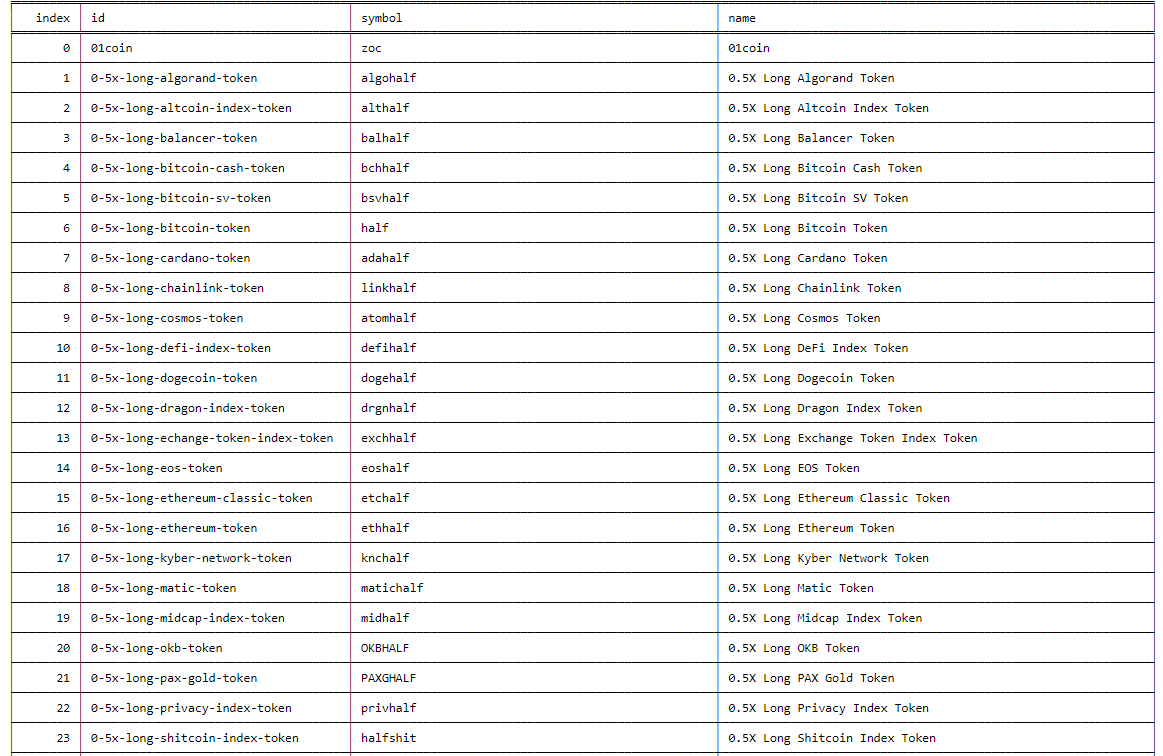
usage: cg_coins [-s --skip] [-t --top] [-l --letter] [-k --key]
Display all available coins in coingecko. You can search with pagination mechanism with cg_coins --skip [num] --top [num]
or you can just search by letter like cg_coins --letter d --key name --top 10 it will display top 10 matches for coins
which name starts with letter d and search will be done in column name
- -s/--skip - number of records to skip. Default is 0. There are thousands of coins, so there is mechanism to paginate
through them. e.q if you want to see only records from 500-750 you should use
cg_coins --skip 500 --top 250or if you want to see 1200-1880 you should usecoins --skip 1200 --top 680. - -t/--top - number of news to display. One page of news contains 25 news, so to get 250 news script needs to scrape 10
pages (it can take some time). Default 100. E.g
news --top 150 - -l/--letter - first letters of coin by which you want to search
- -k/--key - search key. With this parameter you can specify in which column you would like to search. Choose on from
name, id, symbol
cg_trending
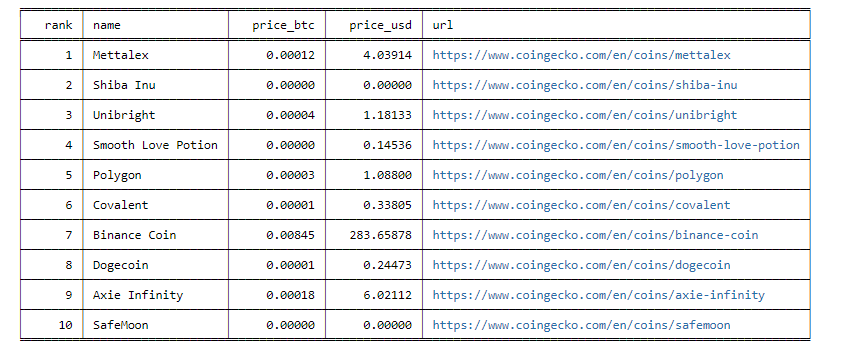
usage: cg_trending [-t --top] [-s --sortby] [--descend] [-l --links]
Shows most trending coins on CoinGecko.
- -t/--top - number of coins to display. To display top 10 coins:
cg_trending --top 10 - -s/--sortby - sort by given column. You can chose on from
rank, name, price_usd, price_btc - --descend - flag to sort in descending order (lowest first)
- -l/--links - flag to show urls. Using this flag will add additional column with urls e.g.
cg_trending --top 10 --links
cg_most_voted
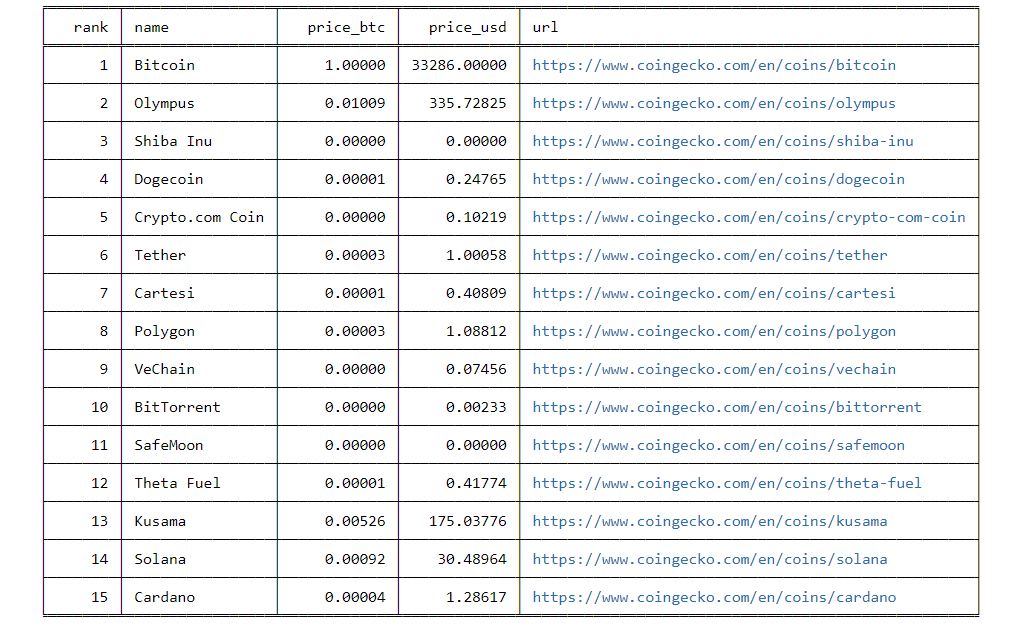
usage: cg_most_voted [-t --top] [-s --sortby] [--descend] [-l --links]
Shows most voted coins on CoinGecko.
- -t/--top - number of coins to display. To display top 10 coins:
cg_most_voted --top 10 - -s/--sortby - sort by given column. You can chose on from
rank, name, price_usd, price_btc - --descend - flag to sort in descending order (lowest first)
- -l/--links - flag to show urls. Using this flag will add additional column with urls e.g.
cg_most_voted --top 10 --links
cg_most_visited
usage: cg_most_visited [-t --top] [-s --sortby] [--descend] [-l --links]
Shows most visited coins on CoinGecko.
- -t/--top - number of coins to display. To display top 10 coins:
cg_most_visited --top 10 - -s/--sortby - sort by given column. You can chose on from
rank, name, price_usd, price_btc - --descend - flag to sort in descending order (lowest first)
- -l/--links - flag to show urls. Using this flag will add additional column with urls e.g.
cg_most_visited --top 10 --links
cg_sentiment
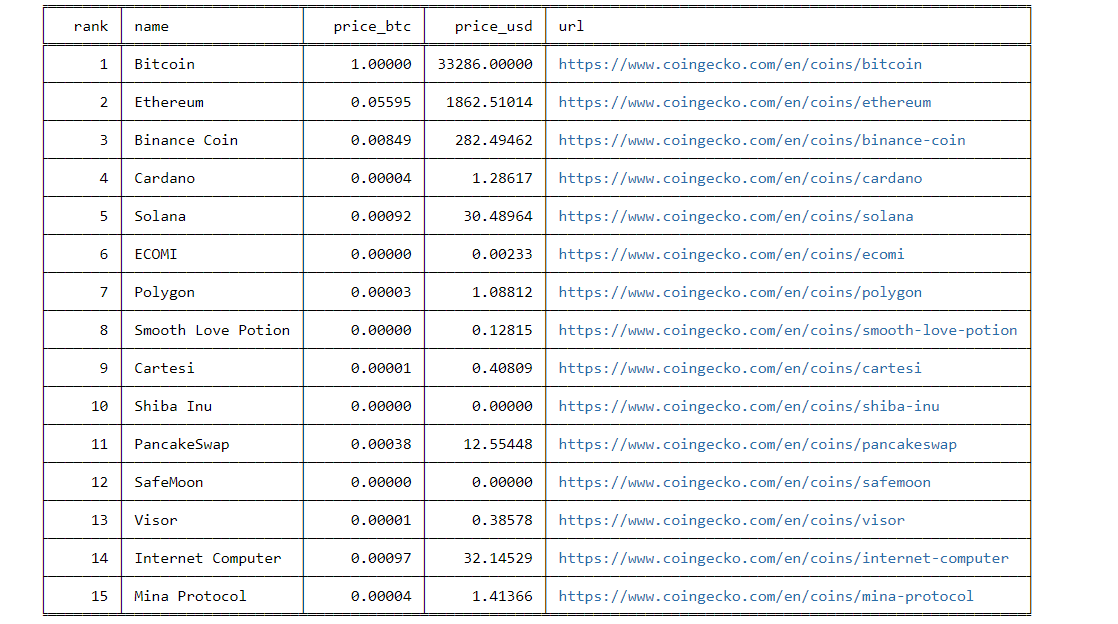
usage: cg_sentiment [-t --top] [-s --sortby] [--descend] [-l --links]
Shows coins with the most positive sentiment on CoinGecko
- -t/--top - number of coins to display. To display top 10 coins:
cg_sentiment --top 10 - -s/--sortby - sort by given column. You can chose on from
rank, name, price_usd, price_btc - --descend - flag to sort in descending order (lowest first)
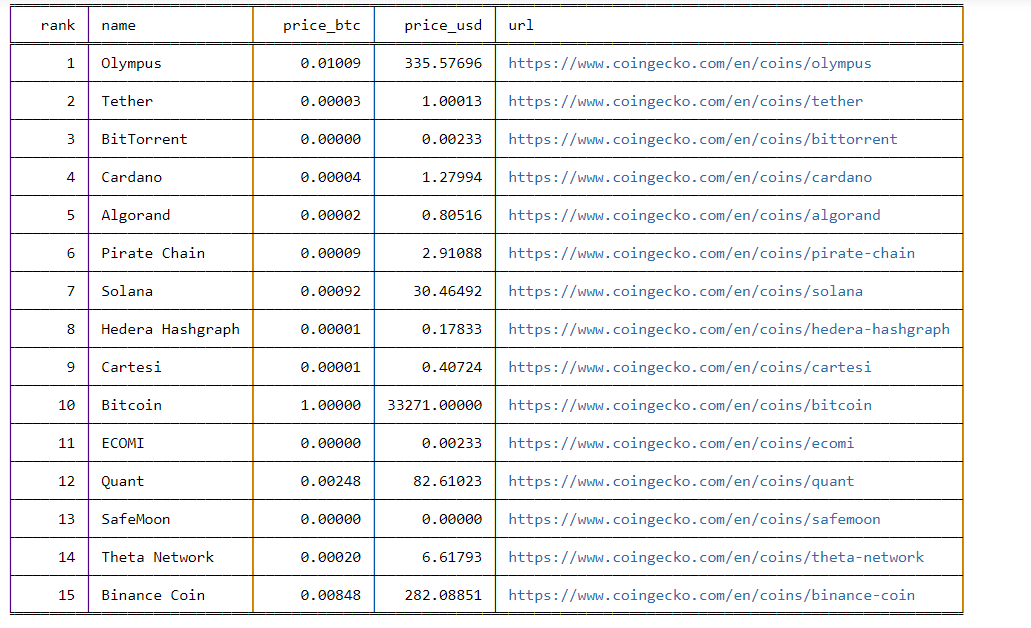
- -l/--links - flag to show urls. Using this flag will add additional column with urls e.g.
cg_sentiment --top 10 --links
cg_recently
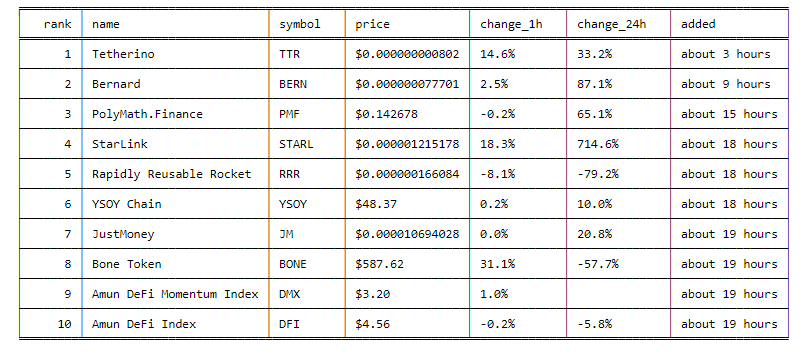
usage: cg_recently [-t --top] [-s --sortby] [--descend] [-l --links]
Shows coins which were recently added on CoinGecko
- -t/--top - number of coins to display. To display top 10 coins:
cg_recently --top 10 --sortby rank - -s/--sortby - sort by given column. You can chose on from
rank, name, symbol, price, change_24h, change_1h, added - --descend - flag to sort in descending order (lowest first)
- -l/--links - flag to show urls. Using this flag will add additional column with urls e.g.
cg_recently --top 10 --links
cg_top_volume
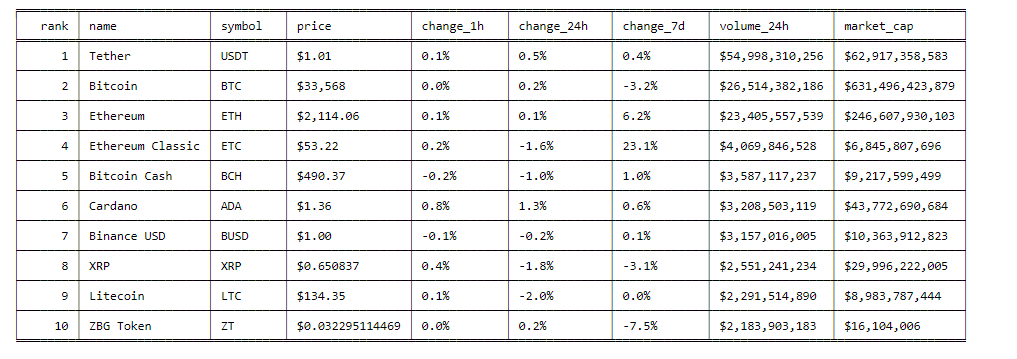
usage: cg_top_volume [-t --top] [-s --sortby] [--descend]
Shows coins with the highest transactions volume on CoinGecko
- -t/--top - number of coins to display. To display top 10 coins:
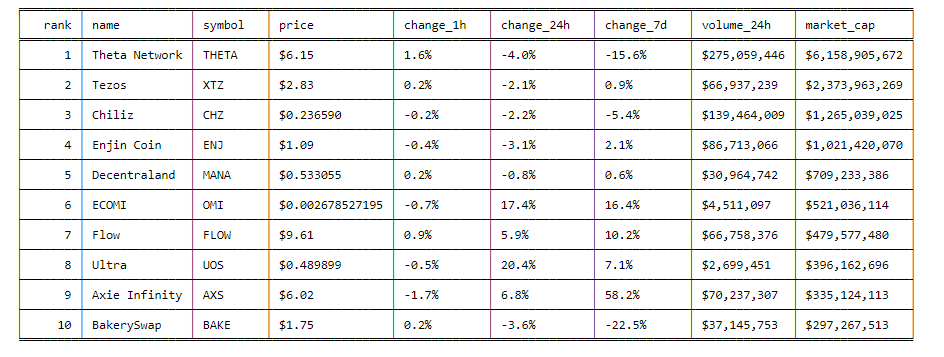
cg_top_volume --top 10 --sortby rank - -s/--sortby - sort by given column. You can chose on from
rank, name, symbol, price, change_1h, change_24h, change_7d , volume_24h - --descend - flag to sort in descending order (lowest first)
cg_gainers
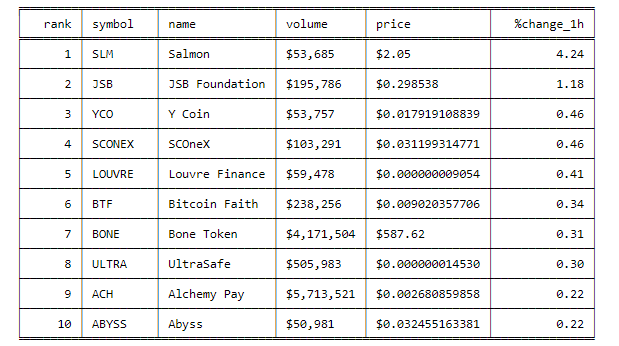
usage: cg_gainers [-p --period] [-t --top] [-s --sortby] [--descend] [-l --links]
Shows largest gainers - coins which gain the most in given period.
- -p/--period - time period in which coins gained the most in price. One from
1h, 24h, 7d, 14d, 30d, 60d, 1y. If you want to see top gainers in last 24hcg_gainers -p 24hor top gainers in last 60dayscg_gainers -p 60d - -t/--top - number of coins to display. To display top 10 coins:
cg_gainers --top 10 --sortby rank - -s/--sortby - sort by given column. You can chose on from
rank, name, symbol, price, change, volume. - --descend - flag to sort in descending order (lowest first)
- -l/--links - flag to show urls. Using this flag will add additional column with urls e.g.
cg_gainers --period 24h --links
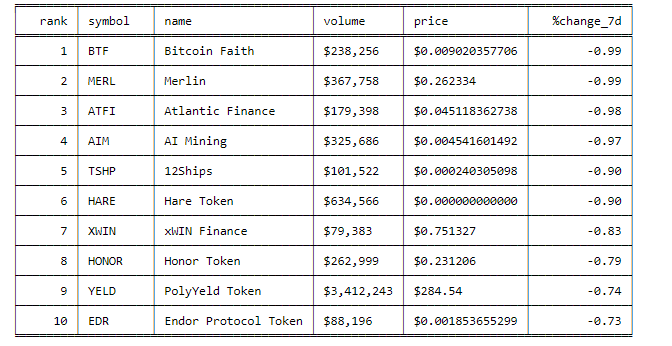
cg_losers
usage: cg_losers [-p --period] [-t --top] [-s --sortby] [--descend] [-l --links]
Shows largest losers - coins which lost the most in given period.
- -p/--period - time period in which coins lost the most in price. One from
1h, 24h, 7d, 14d, 30d, 60d, 1y. If you want to see top losers in last 24hcg_losers -p 24hor top losers in last 60dayscg_losers -p 60d - -t/--top - number of coins to display. To display top 10 coins:
cg_losers --top 10 --sortby rank - -s/--sortby - sort by given column. You can chose on from
rank, name, symbol, price, change, volume. - --descend - flag to sort in descending order (lowest first)
- -l/--links - flag to show urls. Using this flag will add additional column with urls e.g.
cg_losers --period 24h --links
 )
)
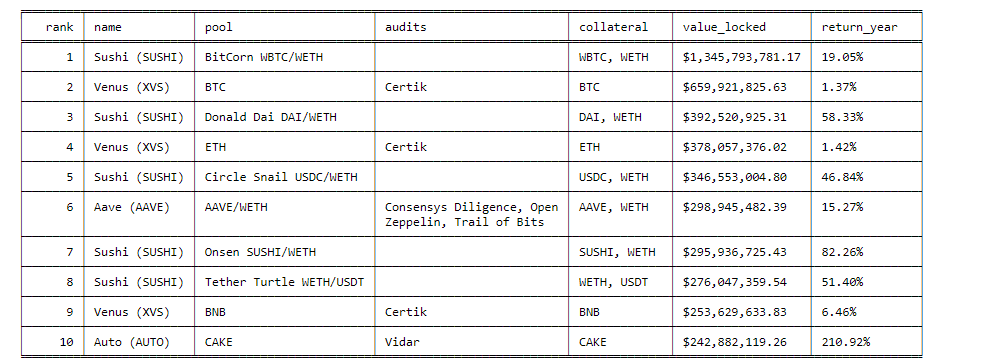
cg_yfarms
usage: cg_yfarms [-t --top] [-s --sortby] [--descend]
Shows Top Yield Farming Pools by Value Locked from https://www.coingecko.com/en/yield-farming Yield farming, also referred to as liquidity mining, is a way to generate rewards with cryptocurrency holdings. In simple terms, it means locking up cryptocurrencies and getting rewards.
- -t/--top - number of yield farms to display. To display top 10 yield farms:
cg_yfarms --top 10 --sortby rank - -s/--sortby - sort by given column. You can sort data by
rank, name, value_locked, return_year - --descend - flag to sort in descending order (lowest first)
cg_top_defi
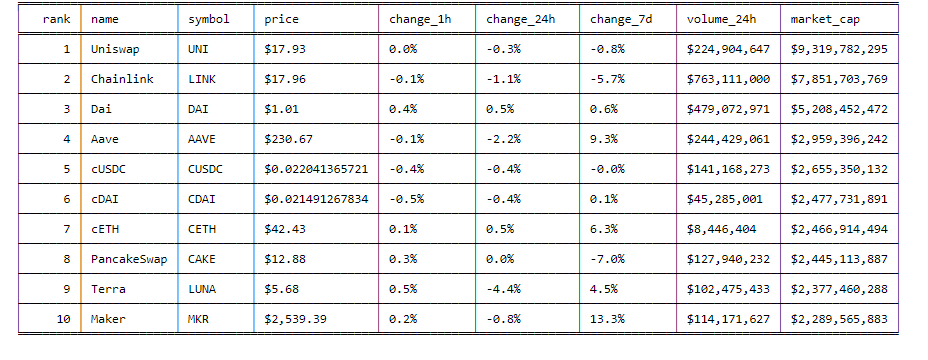
usage: cg_top_defi [-t --top] [-s --sortby] [--descend] [-l --links]
Shows Top DeFi Coins by Market Capitalization from https://www.coingecko.com/en/defi DeFi or Decentralized Finance refers to financial services that are built on top of distributed networks with no central intermediaries.
- -t/--top - number of defi coins to display. To display top 10 defi coins:
cg_top_defi --top 10 --sortby rank - -s/--sortby - sort by given column. You can sort data by
rank, name, symbol, price, change_24h, change_1h, change_7d - --descend - flag to sort in descending order (lowest first)
- -l/--links - flag to show urls. Using this flag will add additional column with urls e.g.
cg_top_defi --links.
cg_top_dex
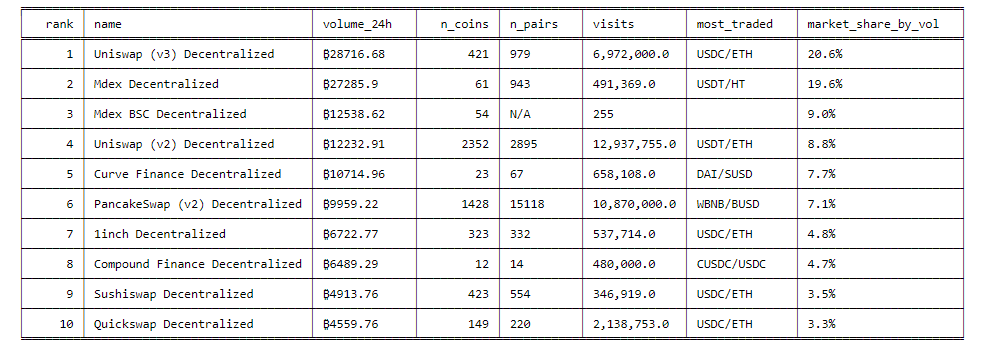
usage: cg_top_dex [-t --top] [-s --sortby] [--descend]
Shows Top Decentralized Exchanges on CoinGecko by Trading Volume from https://www.coingecko.com/en/dex Decentralized exchanges or DEXs are autonomous decentralized applications (DApps) that allow cryptocurrency buyers or sellers to trade without having to give up control over their funds to any intermediary or custodian. Source: coinmarketcap
- -t/--top - number of Decentralized Exchanges to display. To display top 10 DEX:
cg_top_dex --top 10 --sortby rank - -s/--sortby - sort by given column. You can sort data by
rank, name, volume_24h, n_coins, n_pairs, visits, most_traded, market_share_by_vol most_traded_pairs, market_share_by_volume - --descend - flag to sort in descending order (lowest first)
cg_top_nft
usage: cg_top_nft [-t --top] [-s --sortby] [--descend] [-l --links]
Shows Top NFT Coins by Market Capitalization from https://www.coingecko.com/en/nft NFT (Non-fungible Token) refers to digital assets with unique characteristics. Examples of NFT include crypto artwork, collectibles, game items, financial products, and more.
- -t/--top - number of NFT to display. To display top 10 NFT Coins:
cg_top_nft --top 10 --sortby rank - -s/--sortby - sort by given column. You can sort data by
rank, name, symbol, price, change_24h, change_1h, change_7d, volume_24h, market_cap - --descend - flag to sort in descending order (lowest first)
- -l/--links - flag to show urls. Using this flag will add additional column with urls e.g.
cg_top_nft --links.
CoinPaprika
cp_coins
usage: cp_coins [-s --skip] [-t --top] [-l --letter] [-k --key]
Display all available coins in coinpaprika. You can search with pagination mechanism with cp_coins --skip [num] --top [num]
or you can just search by letter like cp_coins --letter d --key name --top 10 it will display top 10 matches for coins
which name starts with letter d and search will be done in column name
- -s/--skip: Number of records to skip. Default is 0. There are thousands of coins, so there is mechanism to paginate
through them. e.q if you want to see only records from 500-750 you should use
cp_coins --skip 500 --top 250or if you want to see 1200-1880 you should usecp_coins --skip 1200 --top 680. - -t/--top: Number of coins to display. E.g
cp_coins --top 150 - -l/--letter: First letters of coin by which you want to search
- -k/--key: Search key. With this parameter you can specify in which column you would like to search. Choose on from
name, id, symbol
cp_search
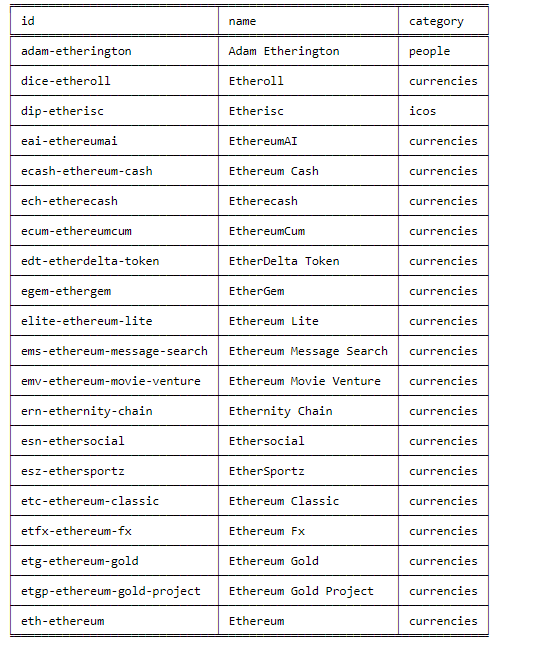
usage: cp_search [-q --query] [-c --cat] [-s --sort] [-t --top] [--descend]
Search over CoinPaprika API
- -q/--query: Phrase for search
- -c/--cat: Categories to search: currencies|exchanges|icos|people|tags|all. Default: all
- -t/--top: Number of found records to display.
- -s/--sort: Sort by given column. You can chose on from
category, id, name. - --descend: Flag to sort in descending order (lowest first)
CoinMarketCap
cmc_top
cmc_top [-n] [-s --sort SORTBY] [--descend]
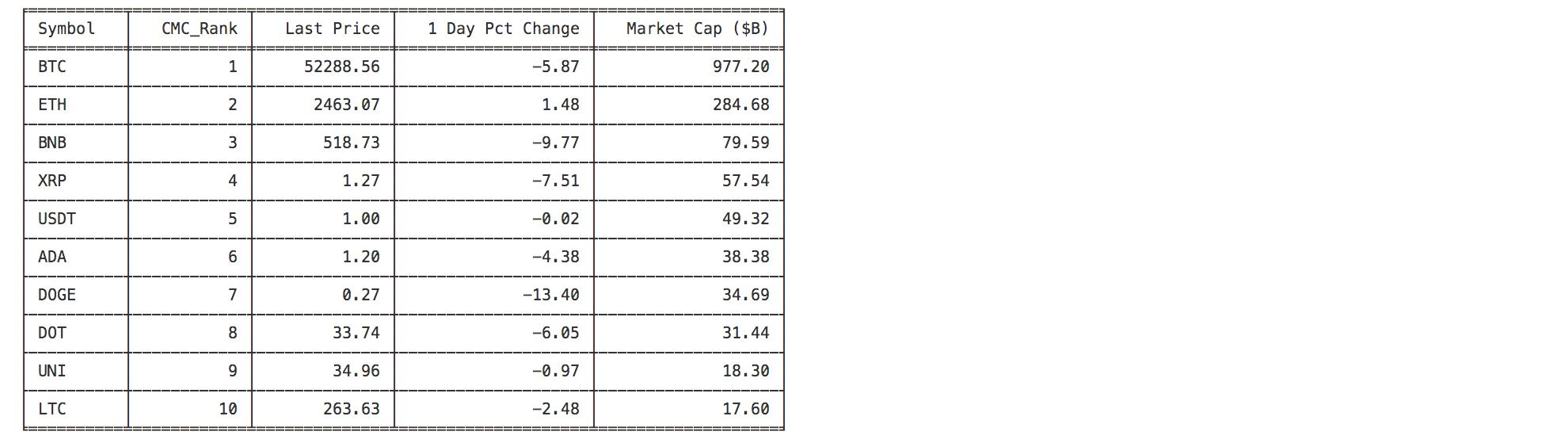
This command displays the top n cryptocurrencies from coinmarketcap.com.
- -n: Number of coins to look at (after sort). Defaults to 10.
- -s/--sort : Column to sort by. One of {Symbol,CMC_Rank,LastPrice,DayPctChange,MarketCap}. Defaults to sorting by the CMC rank.
- --descend : Flag to change the sorting order. Sorts in ascending order (since default order is the Rank which starts at 1).
Binance
bin_coins
usage: bin_coins [-s --skip] [-t --top] [-l --letter] [-k --key]
Display all available coins on Binance. In Binance terminology symbol means a pair of 2 coins e.g symbol is ETHBTC - it
means that baseAsset is ETH and quoteAsset is BTC. You can search with pagination mechanism with
bin_coins --skip [num] --top [num] or you can just search by letter like bin_coins --letter d --key symbol --top 10
it will display top 10 matches for coins which symbol starts with letter d and search will be done in column symbol
- -s/--skip: Number of records to skip. Default is 0. There are thousands of coins, so there is mechanism to paginate
through them. e.q if you want to see only records from 500-750 you should use
bin_coins --skip 500 --top 250 - -t/--top: Number of coins to display.
- -l/--letter: First letters of coin by which you want to search
- -k/--key: Search key. With this parameter you can specify in which column you would like to search. Choose on from
symbol, quoteAsset, baseAsset