
17 KiB
Vendored
OVERVIEW
This menu aims to explore most important crypto statistics, read latest news, find best exchanges, crypto indexes and derivatives. The usage of the following commands along with an example will be exploited below.
- cg_global
- show global crypto market info
- cg_defi
- show global DeFi market info
- cg_stables
- show Stable Coins
- cg_nft_today
- show NFT Of The Day
- cg_nft
- show NFT Market Status
- cg_exchanges
- show Top Crypto Exchanges
- cg_exrates
- show Coin Exchange Rates
- cg_platforms
- show Crypto Financial Platforms
- cg_products
- show Crypto Financial Products
- cg_indexes
- show Crypto Indexes
- cg_derivatives
- show Crypto Derivatives
- cg_categories
- show Crypto Categories
- cg_hold
- show eth, btc holdings overview statistics
- cg_companies
- show eth, btc holdings by public companies
- cp_global
- show global crypto market info
- cp_info
- show basic info about all coins available on CoinPaprika
- cp_markets
- show market related info about all coins available on CoinPaprika
- cp_exchanges
- list all exchanges available on CoinPaprika
- cp_exmarkets
- show all available markets on given exchange
- cp_platforms
- list blockchain platforms/ecosystems eg. ethereum, solana, kusama, terra
- cp_contracts
- show all smart contracts for given platform
CoinGecko
cg_global
usage: cg_global
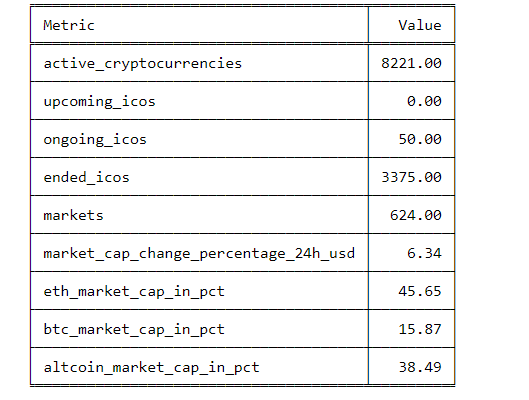
Display global statistics about Crypto Market like: active_cryptocurrencies, upcoming_icos, ongoing_icos, ended_icos, markets, market_cap_change_percentage_24h, eth_market_cap_in_pct, btc_market_cap_in_pct, altcoin_market_cap_in_pct.
news
usage: cg_news [-t --top] [-s --sortby] [--descend] [-l --links]
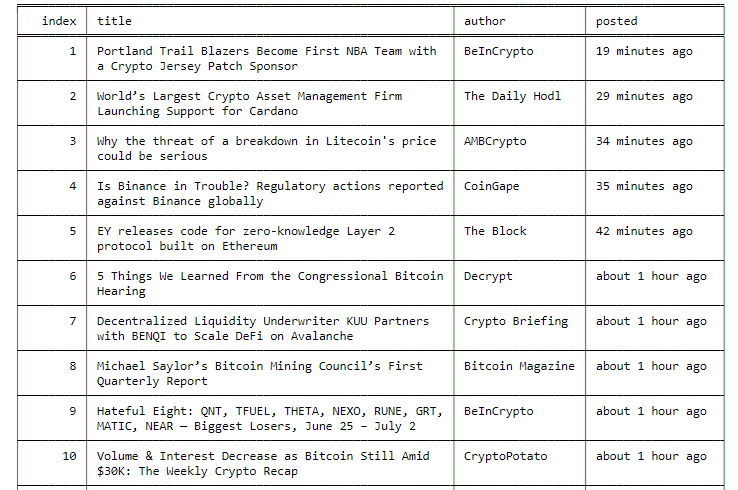
Shows latest news from https://www.coingecko.com/en/news. Display columns: index, title, author, posted columns.
You can sort by each of column above, using --sort parameter and also do it descending with --descend flag. It is
also possible to display urls to news with --links flag. If you want to display top 75 news, sorted by author use
cg_news -t 75 -s author if you want to see urls to source of the news use cg_news -t 75 -l
- -t/--top - number of news to display. One page of news contains 25 news, so to get 250 news script needs to scrape 10
pages (it can take some time). Default 100. E.g
news --top 150 - -s/--sortby - sort by given column. You can chose on from
index, title, author, posted - --descend - flag to sort in descending order (lowest first)
- -l/--links - flag to show urls. Using this flag will add additional column with urls and display only
index, urlcolumns
cg_defi
usage: cg_defi
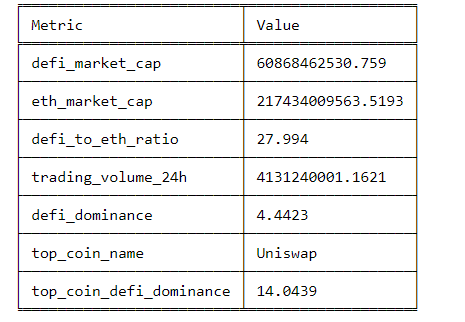
Shows global DeFi statistics. DeFi or Decentralized Finance refers to financial services that are built on top of distributed networks with no central intermediaries. Displays metrics like: defi_market_cap, eth_market_cap, defi_to_eth_ratio, trading_volume_24h, defi_dominance, top_coin_name, top_coin_defi_dominance.
cg_stables
usage: cg_stables [-t --top] [-s --sortby] [--descend] [-l --links]
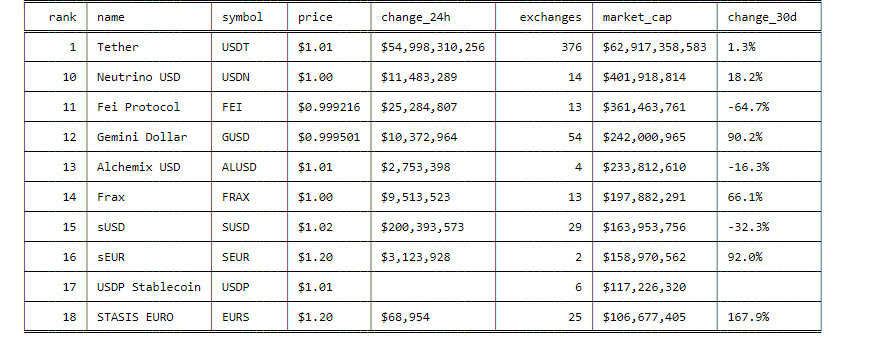
Shows stablecoins by market capitalization. Stablecoins are cryptocurrencies that attempt to peg their market value to some external reference like the U.S. dollar or to a commodity's price such as gold.
- -t/--top - number of coins to display. To display top 10 coins:
cg_stables --top 10 --sortby rank - -s/--sortby - sort by given column. You can sort data by
rank, name, symbol, price, change_24h, exchanges, market_cap, change_30d - --descend - flag to sort in descending order (lowest first)
- -l/--links - flag to show urls. Using this flag will add additional column with urls e.g.
cg_stables --links. If you will use this flagrank, name, symbol, urlcolumns will be displayed.
cg_nft_today
usage: cg_nft_today
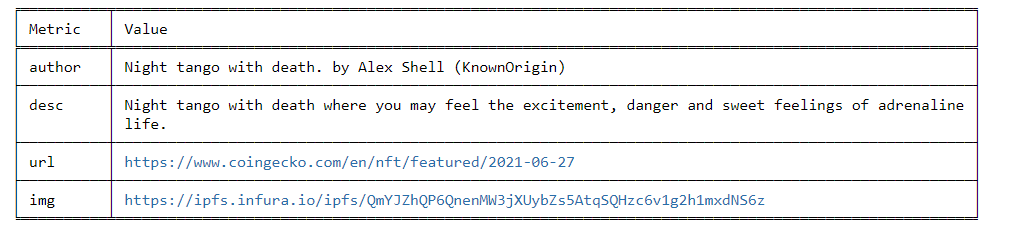
Get Non-fungible Token of the Day. Everyday on CoinGecko there is chosen new NFT. NFT (Non-fungible Token) refers to
digital assets with unique characteristics. Examples of NFT include crypto artwork, collectibles, game items, financial
products, and more. cg_nft_today command you will display: author, description, url, img url.
cg_nft
usage: nft
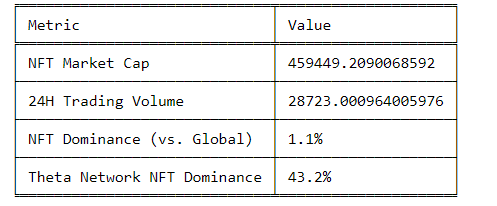
Get current state of NFTs market. NFT (Non-fungible Token) refers to digital assets with unique characteristics.
Examples of NFT include crypto artwork, collectibles, game items, financial products, and more.
cg_nft will display: NFT Market Cap, 24h Trading Volume, NFT Dominance vs Global market, Theta Network NFT Dominance.
cg_exchanges
usage: cg_exchanges [-t --top] [-s --sortby] [--descend] [-l --links]
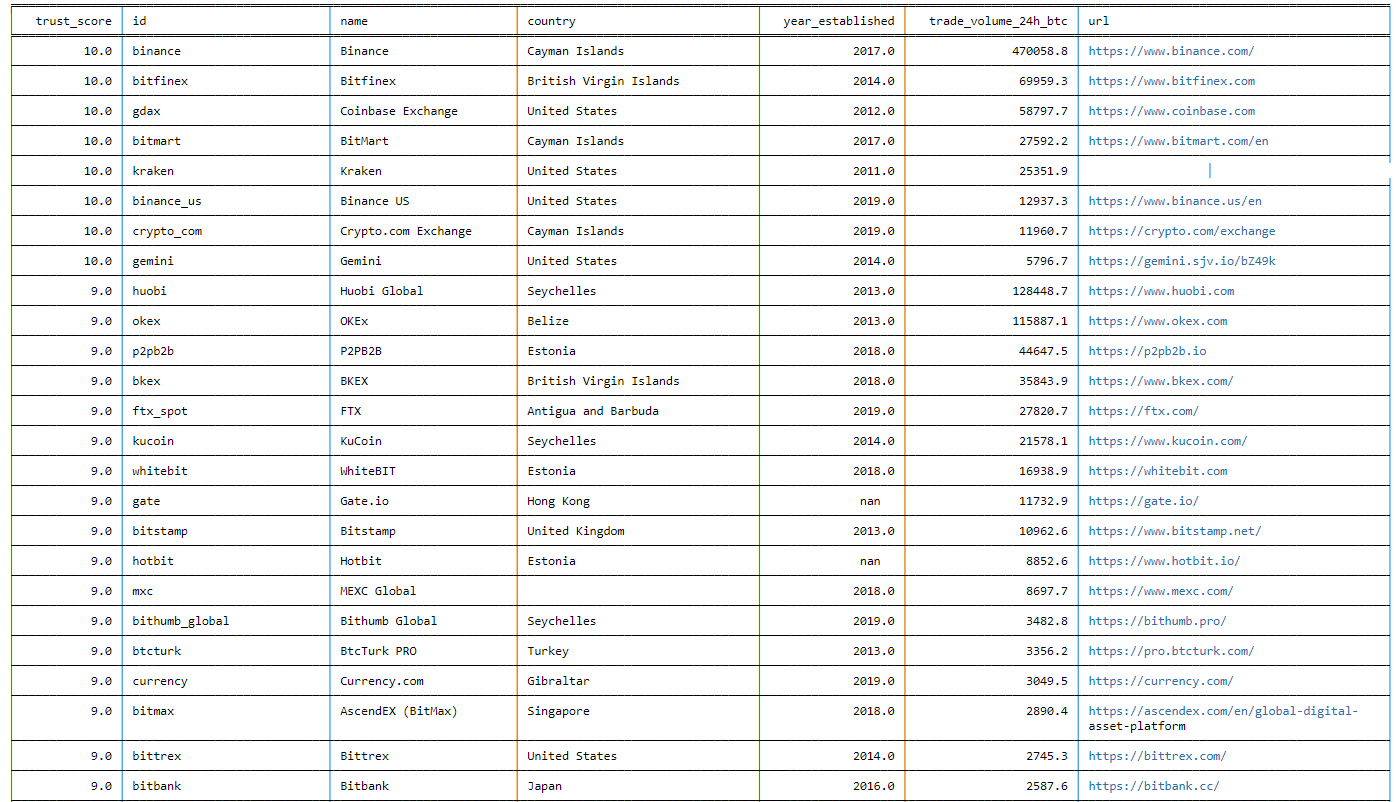
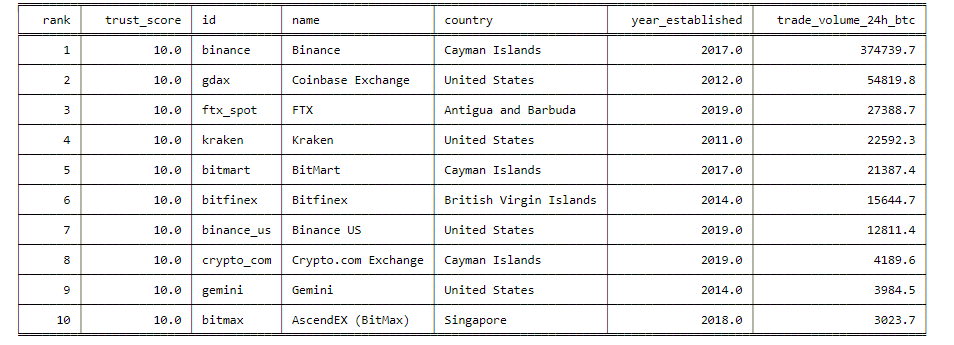
Shows top crypto exchanges base on trust score.
- -t/--top - number of exchanges to display. To display top 10 exchanges by trust_score:
cg_exchanges --top 10 --sortby trust_score --descend - -s/--sortby - sort by given column. You can sort data by
rank, trust_score, id, name, country, established, trade_volume_24h_btc - --descend - flag to sort in descending order (lowest first)
- -l/--links - flag to show urls. Using this flag will add additional column with urls e.g.
cg_exchanges --links. Usinglinksparameter will display onlyrank, name, urlcolumns
cg_exrates
usage: cg_exrates [-t --top] [-s --sortby] [--descend]
Shows list of crypto, fiats, commodity exchange rates from CoinGecko
- -t/--top - number of exchanges to display. To display top 10 exchanges by trust_score:
cg_exrates --top 10 --sortby name --descend - -s/--sortby - sort by given column. You can sort by
index,name,unit, value, type - --descend - flag to sort in descending order (lowest first)
platforms
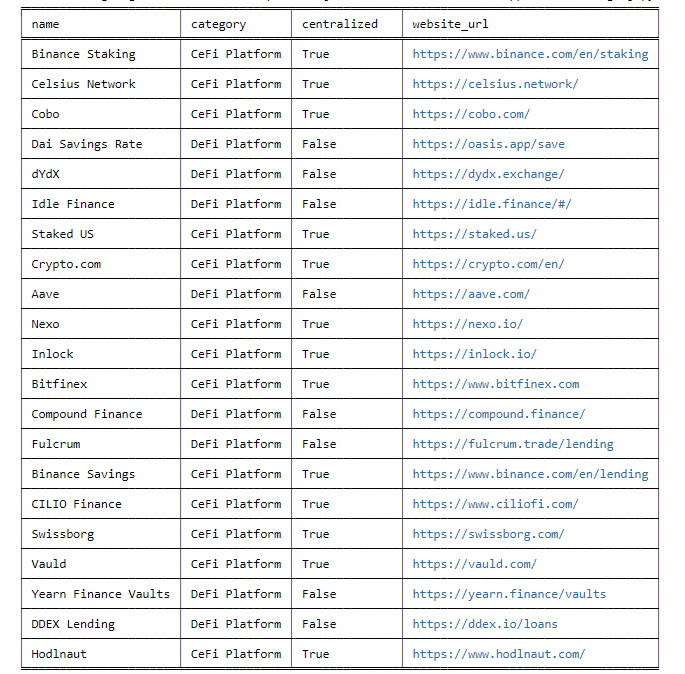
usage: cg_platforms [-t --top] [-s --sortby] [--descend]
Shows Top Crypto Financial Platforms in which you can borrow or lend your crypto e.g. Celsius, Nexo, Crypto.com, Aave and others.
- -t/--top - number of crypto platforms to display. To display top 10 platforms:
cg_platforms --top 10 --sortby name - -s/--sortby - sort by given column. You can sort data by
rank, name, category, centralized - --descend - flag to sort in descending order (lowest first)
cg_products
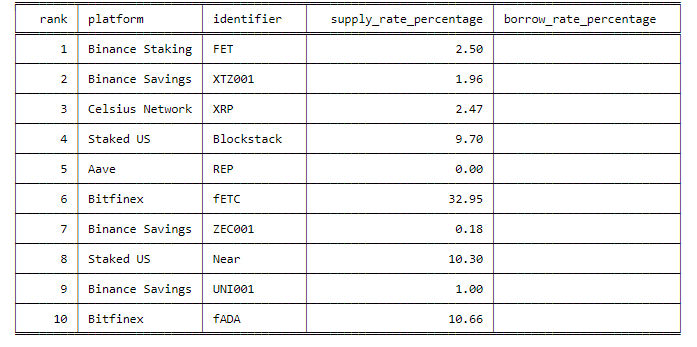
usage: cg_products [-t --top] [-s --sortby] [--descend]
Shows Top Crypto Financial Products with which you can earn yield, borrow or lend your crypto.
- -t/--top - number of crypto products to display. To display top 10 products:
cg_products --top 10 --sortby name - -s/--sortby - sort by given column. You can sort data by
rank, platform, identifier, supply_rate_percentage, borrow_rate_percentage - --descend - flag to sort in descending order (lowest first)
indexes
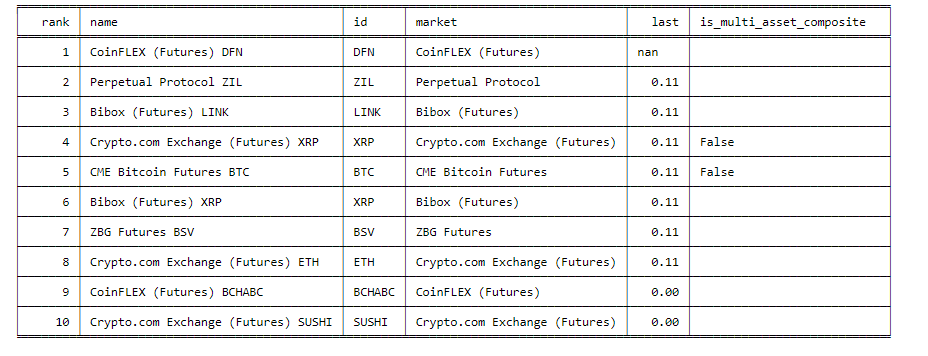
usage: cg_indexes [-t --top] [-s --sortby] [--descend]
Shows list of crypto indexes from CoinGecko.Each crypto index is made up of a selection of cryptocurrencies, grouped together and weighted by market cap.
- -t/--top - number of crypto indexes to display. To display top 10 indexes:
cg_indexes --top 10 --sortby name - -s/--sortby - sort by given column. You can sort data by
rank, name, id, market, last, is_multi_asset_composite - --descend - flag to sort in descending order (lowest first)
cg_derivatives
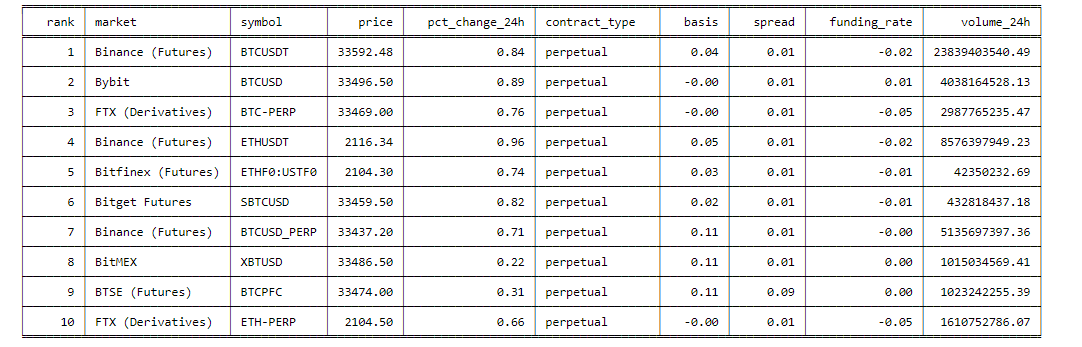
usage: cg_derivatives [-t --top] [-s --sortby] [--descend]
Shows list of crypto derivatives from CoinGecko. Crypto derivatives are secondary contracts or financial tools that derive their value from a primary underlying asset. In this case, the primary asset would be a cryptocurrency such as Bitcoin. The most popular crypto derivatives are crypto futures, crypto options, and perpetual contracts.
- -t/--top - number of crypto derivatives to display. To display top 10 derivatives:
cg_derivatives --top 10 --sortby symbol - -s/--sortby - sort by given column. You can sort by
rank, market, symbol, price, pct_change_24h, contract_type, basis, spread, funding_rate, volume_24h - --descend - flag to sort in descending order (lowest first)
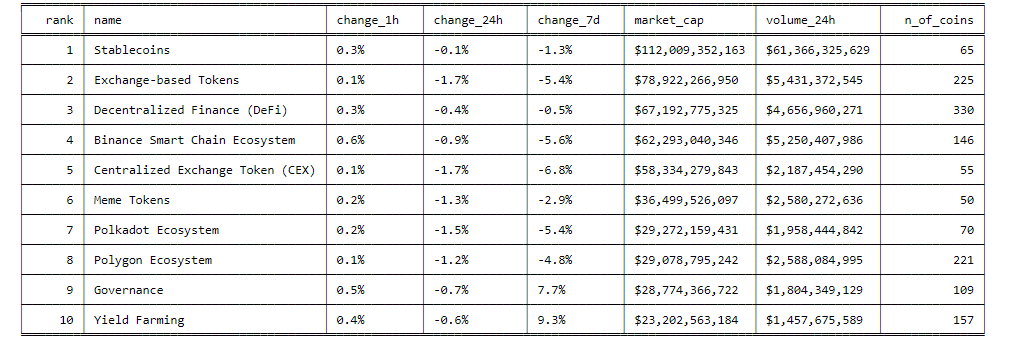
cg_categories
usage: cg_categories [-t --top] [-s --sortby] [--descend] [-l --links]
Shows top cryptocurrency categories by market capitalization from https://www.coingecko.com/en/categories It includes categories like: stablecoins, defi, solana ecosystem, polkadot ecosystem and many others.
- -t/--top - number of crypto categories to display. To display top 10 crypto categories:
cg_categories --top 10 --sortby rank - -s/--sortby - sort by given column. You can sort by
rank, name, change_1h, change_24h, change_7d, market_cap, volume_24h, n_of_coins - --descend - flag to sort in descending order (lowest first)
- -l/--links - flag to show urls. Using this flag will add additional column with urls e.g.
cg_categories --links. Usinglinksparameter will display onlyrank, name, urlcolumns
cg_hold
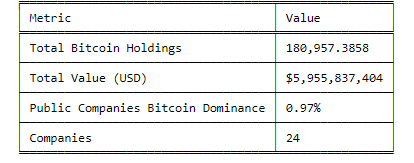
usage: cg_hold [-c --coin]
Shows overview of public companies that holds ethereum or bitcoin Displays most important metrics like: Total Bitcoin/Ethereum Holdings, Total Value (USD), Public Companies Bitcoin/Ethereum Dominance, Companies.
- -c/--coin - chose a coin. Only available for ethereum or bitcoin. If you want to see overview of public companies
that holds ethereum use
hold --coin ethereumfor bitcoinhold --coin bitcoin
cg_companies
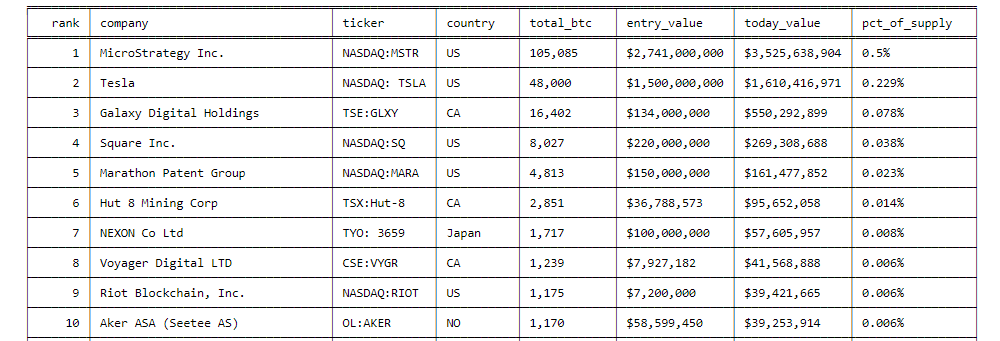
usage: cg_companies [-c --coin] [- --links]
Shows Ethereum/Bitcoin Holdings by Public Companies. Track publicly traded companies around the world that are buying ethereum as part of corporate treasury
- -c/--coin - chose a coin. Only available for ethereum or bitcoin. List of public companies that holds ethereum
cg_companies --coin ethereumfor bitcoincg_companies --coin bitcoin - -l/--links - You can use additional flag
--linksto see urls to announcement about buying btc or eth by given company. In this case of usagelinksonly columnsrank, company, urlwill be displayed
CoinPaprika
cp_global
usage: cp_global
Show most important global crypto statistics like: market_cap_usd, volume_24h_usd, bitcoin_dominance_percentage, cryptocurrencies_number, market_cap_ath_value, market_cap_ath_date, volume_24h_ath_value, volume_24h_ath_date, market_cap_change_24h, volume_24h_change_24h, last_updated
cp_info
usage: cp_info [-t --top] [-s --sort] [--descend]
Show basic coin information for all coins from CoinPaprika
- --vs: The currency to look against. Available options are:
BTC,ETH,USD,EUR,PLN,KRW,GBP,CAD,JPY,RUB,TRY,NZD,AUD,CHF,UAH,HKD,SGD,NGN,PHP,MXN,BRL,THB,CLP,CNY,CZK,DKK,HUF,IDR,ILS,INR,MYR,NOK,PKR,SEK,TWD,ZAR,VND,BOB,COP,PEN,ARS,ISK. Default: USD - -t/--top: Number of coins to display. To display top 10 coins:
cp_info --top 10 --sort rank - -s/--sort: Sort by given column. You can chose on from
rank, name, symbol, price, volume_24h, circulating_supply, total_supply, max_supply, ath_price,market_cap, beta_value. - --descend: Flag to sort in descending order (lowest first)
cp_markets
usage: cp_markets [--vs] [-t --top] [-s --sort] [--descend]
Show market related (price, supply, volume) coin information for all coins on CoinPaprika
- --vs: The currency to look against. Available options are:
BTC,ETH,USD,EUR,PLN,KRW,GBP,CAD,JPY,RUB,TRY,NZD,AUD,CHF,UAH,HKD,SGD,NGN,PHP,MXN,BRL,THB,CLP,CNY,CZK,DKK,HUF,IDR,ILS,INR,MYR,NOK,PKR,SEK,TWD,ZAR,VND,BOB,COP,PEN,ARS,ISK. Default: USD - -t/--top: Number of coins to display. To display top 10 coins:
cp_markets --top 10 --sort rank - -s/--sort: Sort by given column. You can chose on from
rank, name, symbol, price, volume_24h, mcap_change_24h, pct_change_1h, pct_change_24h, ath_price, pct_from_ath. - --descend: Flag to sort in descending order (lowest first)
cp_exchanges
usage: cp_exchanges [--vs] [-t --top] [-s --sort] [--descend]
Show all exchanges from CoinPaprika
- --vs: The currency to look against. Available options are:
BTC,ETH,USD,EUR,PLN,KRW,GBP,CAD,JPY,RUB,TRY,NZD,AUD,CHF,UAH,HKD,SGD,NGN,PHP,MXN,BRL,THB,CLP,CNY,CZK,DKK,HUF,IDR,ILS,INR,MYR,NOK,PKR,SEK,TWD,ZAR,VND,BOB,COP,PEN,ARS,ISK. Default: USD - -t/--top: Number of coins to display. To display top 10 coins:
cp_exchanges --top 10 --sort rank - -s/--sort: Sort by given column. You can chose on from
rank, name, currencies, markets, fiats, confidence, volume_24h, volume_7d, volume_30d, sessions_per_month. - --descend: Flag to sort in descending order (lowest first)
cp_exmarkets
usage: cp_exmarkets [-e --exchange] [-t --top] [-s --sort] [--descend] [-l --links]
Get all exchange markets found for given exchange
- -e/--exchange: Identifier of exchange e.g for Binance Exchange:
binance - -t/--top: Number of markets to display. To display top 10 markets:
cp_exmarkets --top 10 --sort reported_volume_24h_share - -s/--sort: Sort by given column. You can chose on from
pair , base_currency_name, quote_currency_name, category, reported_volume_24h_share, trust_score, market_url. - --descend: Flag to sort in descending order (lowest first)
- -l/--links: Flag to show urls. Using this flag will add additional column with urls e.g.
cp_exmarkets --links. If you will use this flag url column will be displayed.
cp_platforms
usage: cp_platforms
List all smart contract platforms like ethereum, solana, cosmos, eos
cp_contracts
usage: cp_contracts [-p --platform] [-t --top] [-s --sort] [--descend]
Gets all contract addresses for given blockchain platform
- -p/--platform: smart contract platform id. Available coins:
btc-bitcoin, eos-eos, eth-ethereum, xrp-xrp, bch-bitcoin-cash, xem-nem, neo-neo, xlm-stellar, etc-ethereum-classic,
qtum-qtum, zec-zcash, bts-bitshares, waves-waves, nxt-nxt, act-achain, ubq-ubiq, xcp-counterparty, etp-metaverse-etp,
burst-burst, omni-omni, trx-tron, bnb-binance-coin, ardr-ardor, ht-huobi-token, blvr-believer, cake-pa
ncakeswap, fsxu-flashx-ultra, chik-chickenkebab-finance, jgn-juggernaut7492, crx-cryptex, whirl-whirl-finance,
 eubi-eubi-token, swam-swapmatic-token, shells-shells
- -t/--top: Number of smart contracts to display. To display 10 smart contracts:
cp_contracts -p eth-ethereum --top 10 --sort index - -s/--sort: Sort by given column. You can chose on from
index, id, type, active, address. - --descend: Flag to sort in descending order (lowest first)