 a85758c9ec
Co-authored-by: jmaslek <jmaslek11@gmail.com>
Co-authored-by: Chavithra <chavithra@gmail.com>
Co-authored-by: Theodore Aptekarev <aptekarev@gmail.com>
Co-authored-by: Danglewood <85772166+deeleeramone@users.noreply.github.com>
Co-authored-by: Didier Rodrigues Lopes <dro.lopes@campus.fct.unl.pt>

* improve user experience phase 1

* add difflib replacement

* implement auto-complete on discovery menu

* auoto-complete, difflib,jump through menus with cd

* Updating tests : terminal

* improve navigation on gst

* add q command to terminal.py

* usage instructions

* Updating tests : terminal

* fix cd command

* vars updated

* show menu when user is going through menus

* allow user to forget the intiail / on scripting

* terminal to accept text file with configuration

* refactor -n to -l and clean code

* add all commands to the tests_stocks_disc

* remove fds from disc since we have search on stocks/ and stocks/sia

* hopefully fix tests

* skip test

* fix completer type and calling menu after command for stocks/disc

* show help menu when moving forward/backwards in menus

* skip test

* skip test - bug fix

* add reset, help and quit to choices

* improve stocks/disc controller

* refactor sia menu

* UX improvements for sia menu

* improve ux design

* refactor ca controller

* fix infinite loop

* improve ux on dps controller

* Add capability of going back from a menu going into a menu

* Ux economy (#1056)

* First round of UX improvements on economy menu

* Do fred menu + sample tests file

* revert to > on menu

* rename jobs file to .gst

* remove cd option

* improve return

* final refactoring of disc_controller

* fix ca,dps,sia,disc,stocks and terminal controllers

* work on ba_controller menu

* fix reset and try_except

* UX on screener controller

* fix for full reset name

* Ux etfs (#1059)

* Refactor ETF menu for new UX

* Add couple more examples to test

* r->reset

* Clean up switch

* gov menu refactored

* fix reset issue

* 80% of refactoring options and pricing/payoff menu is done

* improve payoff controller

* minor fix

* fix: refactor pred and ta stocks controller

* fix: refactor fa(and fmp) controllers

* fix: refactored dd controller (still missing .gst tests)

* fix infinite loop bug

* refactor options controller

* add tests for payoff and pricing

* fix reset for options

* UX Upgrade for Crypto controller(s) (#1049)

* refactor crypto controller

* refactor crypto/defi controller

* added simple test and fixes not returning queue in commands

* Clean up unused functions / iex load (#1047)

* Clean up unused functions and adjust iex load function to not depend on dates

* Had an incorrect tab on s_start definition

* wrong default arg

* regenerate pytest yml

* Comment out parametrization

* Tests : Stocks > Discovery (#1050)

* Updating tests : stocks/discovery/ark

* Updating tests : stocks/discovery/fidelity

* Updating tests : stocks/discovery/fidelity

* Updating tests : stocks/discovery/fidelity

* Updating tests : stocks/discovery/seeking_alpha

* Updating tests : stocks/discovery/seeking_alpha

* Updating tests : stocks/discovery/shortinterest

* Updating tests : stocks/discovery/shortinterest

* Updating tests : stocks/discovery/seeking_alpha

* Updating tests : stocks/discovery/shortinterest

* Updating tests : stocks/discovery/disc_controller

* Updating tests : stocks/dd

* Updating tests : stocks/fa

* Updating tests : stocks/discovery/financedatabase

* Updating tests : stocks/discovery/finnhub

* Updating tests : stocks/discovery/geekofwallstreet

* Updating tests : stocks/discovery/marketbeat

* Updating tests : stocks/discovery/nasdaq

* Updating tests : stocks / discovery / yahoofinance

* Updating tests : black

* Updating tests : unused import

* Updating tests : stocks/discovery/ark

* Tests : Stocks > Doc + Helpers + Government (#1051)

* Updating tests : stocks/government/controller

* Updating tests : stocks/government

* Updating tests : conftest

* Updating tests : stocks > government

* Updating tests : stocks/government

* Updating tests : docs

* Tests : Stocks > Insider (#1054)

* Updating tests : stocks > helper

* Updating tests : doc

* Updating tests : clean stocks > fa > av

* Updating tests : stocks/insider/controller

* Updating tests : stocks/insider/business insider

* Updating tests : stocks/insider/finviz

* Updating tests :  stocks/insider/openinsider

* Updating tests :  stocks/insider/controller

* Updating tests : black

* Updating tests : stocks/insider/controller

* Tests : Stocks > Backtesting + Behavioural Analysis  (#1057)

* Updating tests : add __init__ files

* Updating tests : stocsk/behavioural_analysis

* Updating tests : black

* Updating tests : stocks/backtesting

* Updating tests : stocks/backtesting

* fix: converted top to limit arguments

* fix: refactor disc controller, updated docs

* fix: refactor dd_controller and docs

* fix: refactor nft controller and docs

* fix: pass test temporarily, onchain controller refactor, docs

* fix: overview controller refactor, fix quit command

* fix: linting issues

* fix: refacot ta controller

* fix: refactor pred controller

* fix: linting

* fix: crypto controller

* fix: added tests, updated all controlers

* fix: menu print renamed from stocks to crypto controller, added tests

* fix: fix faster function execution

* Fix annoying pylint C0201 error

* fix: renamed commands to long format

* DISC Cleanup (#1058)

* Get rid/cleanup of marketbeat functions

* Get rid of last unused disc function + fix related tests

* fix test

* Dividend History Chart (#1053)

* Dividend History Chart

* changed to default number 10

* changed divs flag default to false

* updating the expected result for test_fa_controller.

* else statement

* fix: added load on dd

* fix: added autocompletion in all commands with argument choices

* fix: linting

* Workflows + Stocks > Insider (#1061)

* Updating code : stocks/insider remove unused file

* Updating workflows : tests - set mypy==0.910

* fix: linting

* Fixing Linting (#1062)

* Updating code : fixing linting

mypy message = Too many arguments for <lambda>

* Updating workflows : allow newest mypy version

* Updating code : apply black

* Updating code : black

* fix: updated predict controller help to match stocks

* Ux: portfolio (#1063)

* First step of portfolio UX

* Add all broker controllers to UX stuff

* UX Improvement for PO

Co-authored-by: Didier Rodrigues Lopes <dro.lopes@campus.fct.unl.pt>

* UX Improvement for resources (#1064)

Co-authored-by: Didier Rodrigues Lopes <dro.lopes@campus.fct.unl.pt>

* UX: stock/bt (#1065)

* UX: stocks>qa (#1068)

* fix mypy lambda

* skip tests for now

* remove unused paths.py

* rename tests/simulator to tests/e2e

* refactor options/screener menu

* UX : move `gst` files location

* fix stocks_controller

* UX upgrade of the Forex menu (#1048)

* Add basic forex menu test

* Add forex routes to terminal paths

* Remove commands from paths because they're not menus

* WIP Refactor forex controller

* refactor crypto controller

* Remove commented code

* Improve user output with printed text

* Add "help" back to the list of choices

* Enable the command queue for the forex controller

* refactor crypto/defi controller

* Fix candle chart blocking the terminal

* Black

* Return help and reset to the list of known args

* added simple test and fixes not returning queue in commands

* Add currency codes loading to the av_model

* Return the queue in edge cases (when commands don't process)

* Split select into to and from to enable autocompletion

* Style text output

* Stop printing help after the execution of every command

* Update test scenarios

* Black

* fix: converted top to limit arguments

* fix: refactor disc controller, updated docs

* Delete oanda the old view file that was moved into the oanda menu

* fix: refactor dd_controller and docs

* fix: refactor nft controller and docs

* fix: pass test temporarily, onchain controller refactor, docs

* fix: overview controller refactor, fix quit command

* fix: linting issues

* fix: refacot ta controller

* fix: refactor pred controller

* fix: linting

* fix: crypto controller

* fix: added tests, updated all controlers

* fix: menu print renamed from stocks to crypto controller, added tests

* fix: fix faster function execution

* Implement basic UX improvement of the oanda controller

* Update the forex controller

* Fix annoying pylint C0201 error

* Add latest convention changes to the forex controller

* fix: renamed commands to long format

* fix: added load on dd

* Merge the latest updates of the controller design

* fix: added autocompletion in all commands with argument choices

* fix: linting

* fix: linting

* fix: updated predict controller help to match stocks

* Update the forex menu e2e test scripts

* Add check_non_negative_float helper

* Update the controller with the latest changes to the convention

* Update the currency pair loading mechanism

* Move data models logic to the models file

* Update update oanda views to be interact with the models

* Upgrade oanda controller

* Remove raw stocks ba and eda code from the forex menu

* Update "help wanted" banner for ba and eda in forex menu

* Remove remainders of stocks ba and eda from forex context

* Improve typing, docstrings and error messages

* Remove stocks ba and eda code that was merged from other ux branches

* Add fixes that prevented incorrect argument handling

* Remove -argument from the candles call
If there is an expected agr `-g` and you put an incorrect argument
`-argument` the difflib will interpret `argument` as `g`

Co-authored-by: jose-donato <zmcdonato@gmail.com>
Co-authored-by: Didier Rodrigues Lopes <dro.lopes@campus.fct.unl.pt>

* fix reset for menus that require ticker

* UX improvement on research menu

* skip insider controller test

* initial refactoring of insider_controller

* improve insider controller ux part 2

* finish refactoring ins controller ux menu

* fix bug of when commands in queue have args

* skip test

* comment test stuff

* UX: stocks>qa (#1071)

* refactor return self.queue

* fix return None

* minor fix

* minor tabulate fix

* Get rid of leading '/' in terminal and add some newlines on quits. (#1074)

* Get rid of leading '/' in terminal and add some newlines on quits.

* print crypto help on menu entry

* looks like a format issue here...

* newlines on quit

* remove unnecessary line break

* fix pylint issue

* refactor

* refactor

* allow portfolio optimization to quit context

* add exit at end of scripts

* improve dd_controller

* test ux in stocks/dd menu

* Ux upgrade for reports context (#1075)

* Refactor reports and upgrade them with the latest controller convention

* Add test scenarios for the reports context

* test ux stocks/ta

* ux branch scripts/ta

* improvement on main param

* Upgrades for the UX upgrade for the fa and fa/fmp menus (#1076)

* Change --num to --limit

* Remove inconsistent/unreliable functions from the choices list

* Improve docstring compliance with numpy doc format

* Fix hardcoded class id in dcf scrapper

* Fix annoying pylint error in discordbot that was blocking the hook

* Add test scenarios for the fa and fa/fmp menus

* Fix forgotten replacement of --num to --limit

* Fix tests

* Return some excluded commands to the choices list

* Fix dd report to reflect the updates

* Fix set function not returning the queue

* Update gst test files

* fix exit on ca from another submenu

* fix changes of options/screener

* fix dps controller

* fix fa when running out of AV calls

* Fix TVL plot locking interpreter during defi test

* Add exception handling for broken coingecko scrapper

* skip fa/av test that fails

* fix dps tests

Co-authored-by: Chavithra PARANA <chavithra@gmail.com>
Co-authored-by: jmaslek <jmaslek11@gmail.com>
Co-authored-by: jose-donato <zmcdonato@gmail.com>
Co-authored-by: jose-donato <43375532+jose-donato@users.noreply.github.com>
Co-authored-by: Theodore Aptekarev <aptekarev@gmail.com>
Co-authored-by: Danglewood <85772166+deeleeramone@users.noreply.github.com>








Gamestonk Terminal 🚀
The next best thing after Bloomberg Terminal. #weliketheterminal
≪ ROADMAP
·
FEATURES »
Report Bug
·
Suggest Improvement
·
Request Feature
Table of Contents
About The Project
How it started:
Gamestonk Terminal is an awesome stock and crypto market terminal that has been developed for fun, while I saw my GME shares tanking. But hey, I like the stock 💎🙌.
How it's going:
Gamestonk Terminal provides a modern Python-based integrated environment for investment research, that allows an average joe retail trader to leverage state-of-the-art Data Science and Machine Learning technologies.
As a modern Python-based environment, GamestonkTerminal opens access to numerous Python data libraries in Data Science (Pandas, Numpy, Scipy, Jupyter), Machine Learning (Pytorch, Tensorflow, Sklearn, Flair), and Data Acquisition (Beautiful Soup, and numerous third-party APIs).
Getting Started
Docker Installation - new and improved
-
First step is to make sure docker desktop is installed. Install links can be found here. To confirm that your docker desktop is downloaded and running, open a command prompt or terminal and enter
docker info. If you get the following you are not running the docker desktop:Server: ERROR: Cannot connect to the Docker daemon at unix:///var/run/docker.sock. Is the docker daemon running?Open the docker desktop app in this case.
-
Download the latest docker image.
docker pull ghcr.io/gamestonkterminal/gst-poetry:latestUpon running this the first time, you should see the various layers downloading (note the random series of letters numbers will vary). The first time this is run, it will take a few minutes. Subsequent updates will be much faster, as the changes will be in the MB instead of GB.
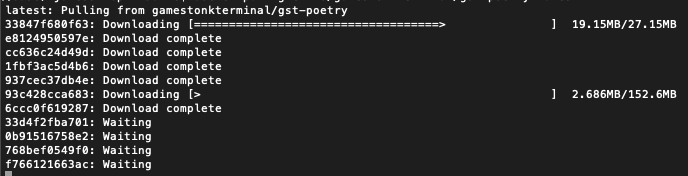
Once the download is complete, confirm that the image has been created by doing
docker images. You should see something similar toREPOSITORY TAG IMAGE ID CREATED SIZE ghcr.io/gamestonkterminal/gst-poetry latest e2bbeebcc73c 42 hours ago 2.02GB -
Run a container
You are now ready to run the terminal.
docker run -it --rm ghcr.io/gamestonkterminal/gst-poetry:latestThis will open up the terminal in your command prompt or terminal. Note that this has provided now environment file, so you will not be able to view plots or use keys at this stage.
To read more on adding the environment keys and how to configure your X-server to show plots, hop over to the Advanced Docker Setup.
Local Install - Anaconda and Python
If you'd like to see a video recording of the installation process, @JohnnyDankseed has made one available here.
This project supports Python 3.7, 3.8 and 3.9.
Our current recommendation is to use this project with Anaconda's Python distribution - either full Anaconda3 Latest or Miniconda3 Latest. Several features in this project utilize Machine Learning. Machine Learning Python dependencies are optional. If you decided to add Machine Learning features at a later point, you will likely have better user experience with Anaconda's Python distribution.
-
Star the project

-
Install Anaconda (It's on the AUR as anaconda or miniconda3!)
-
Confirm that you have it with:
conda -V. The output should be something along the lines of:conda 4.9.2 -
If on Windows, install/update Microsoft C++ Build Tools from here: https://visualstudio.microsoft.com/visual-cpp-build-tools/
-
-
Install git
conda install -c anaconda git -
Clone the Project
- Via HTTPS:
git clone https://github.com/GamestonkTerminal/GamestonkTerminal.git - via SSH:
git clone git@github.com:GamestonkTerminal/GamestonkTerminal.git
- Via HTTPS:
-
Navigate into the project's folder
cd GamestonkTerminal/ -
Create Environment
You can name the environment whatever you want. Although you could use names such as:
welikethestock,thisisthewayordiamondhands, we recommend something simple and intuitive likegst. This is because this name will be used from now onwards.conda env create -n gst --file build/conda/conda-3-8-env.yaml -
Activate the virtual environment
conda activate gstNote: At the end, you can deactivate it with:
conda deactivate. -
Install poetry dependencies
poetry installIf you are having trouble with Poetry (e.g. on a Windows system), simply install requirements.txt with pip
pip install -r requirements.txt -
You're ready to Gamestonk it!
python terminal.py -
(Windows - Optional) Speeding up opening process in the future
After you've installed Gamestonk Terminal, you'll find a file named "Gamestonk Terminal.bat". You can use this file to open Gamestonk Terminal quicker. This file can be moved to your desktop if you'd like. If you run into issues while trying to run the batch file. If you run into issues with the batch files, edit the file and check to see if the directories match up. This file assumes you used the default directories when installing.
-
Jupyter Lab (Optional. Early alpha). User the Terminal from Jupyter Lab
You can install Jupyter Lab extensions that help you manage settings and launch the terminal in a JL bash console using the commands in the jupyterlab/README.md
NOTE: When you close the terminal and re-open it, the only command you need to re-call is conda activate gst
before you call python terminal.py again.
TROUBLESHOOT: If you are having troubles to install, check our newest troubleshoot page
Advanced User Install - Machine Learning
If you are an advanced user and use other Python distributions, we have several requirements.txt documents that you can pick from to download project dependencies.
If you are using conda instead of build/conda/conda-3-8-env.yaml configuration file in Step 5, use build/conda/conda-3-8-env-full.
Note: The libraries specified in the requirements.txt file have been tested and work for the purpose of this project, however, these may be older versions. Hence, it is recommended for the user to set up a virtual python environment prior to installing these. This allows to keep dependencies required by different projects in separate places.
If you would like to use optional Machine Learning features:
- Update your feature_flags.py with:
ENABLE_PREDICT = os.getenv("GTFF_ENABLE_PREDICT") or True
- Install optional ML features dependencies:
poetry install -E prediction
Update Terminal
The terminal is constantly being updated with new features and bug fixes, hence, for your terminal to be update, you can run:
git pull
to get the latest changes.
If this fails due to the fact that you had modified some python files, and there's a conflict with the updates, you can use:
git stash
Then, re-run poetry install or pip install -r requirements.txt to get any new dependencies.
Once installation is finished, you're ready to gamestonk.
If you stashed your changes previously, you can un-stash them with:
git stash pop
API Keys
The project is build around several different API calls, whether it is to access historical data or financials.
These are the ones where a key is necessary:
- Alpha Vantage: https://www.alphavantage.co
- Binance: https://binance.us (US) / https://binance.com (Outside US)
- CoinMarketCap API: https://coinmarketcap.com/api
- Degiro API : https://www.degiro.fr
- FRED: https://fred.stlouisfed.org/docs/api/api_key.html
- Financial Modeling Prep: https://financialmodelingprep.com/developer
- Finhub API: https://finnhub.io
- News API: https://newsapi.org
- Oanda API: https://developer.oanda.com
- Polygon: https://polygon.io
- Quandl: https://www.quandl.com/tools/api
- Reddit: https://www.reddit.com/prefs/apps
- SentimentInvestor: https://sentimentinvestor.com
- Tradier: https://developer.tradier.com/getting_started
- Twitter: https://developer.twitter.com
- Coinbase Pro API: https://docs.pro.coinbase.com/
- Whale Alert API: https://docs.whale-alert.io/
- Ethplorer API: https://github.com/EverexIO/Ethplorer/wiki/Ethplorer-API
- Cryptopanic API: https://cryptopanic.com/developers/api/
- BitQuery API: https://bitquery.io/pricing
- Glassnode API: https://docs.glassnode.com/basic-api/api-key#how-to-get-an-api-key
- Coinglass API: https://coinglass.github.io/API-Reference/#api-key
When these are obtained, don't forget to update config_terminal.py.
Alternatively, you can also set them to the following environment variables:
| Website | Variables |
|---|---|
| Alpha Vantage | GT_API_KEY_ALPHAVANTAGE |
| Binance | GT_API_BINANCE_KEY GT_API_BINANCE_SECRET |
| CoinMarketCap | GT_CMC_API_KEY GT_CMC_API_KEY |
| DEGIRO | GT_DG_USERNAME GT_DG_PASSWORD GT_DG_TOTP_SECRET |
| FRED | GT_API_FRED_KEY |
| Financial Modeling Prep | GT_API_KEY_FINANCIALMODELINGPREP |
| Finhub | GT_API_FINNHUB_KEY |
| News | GT_API_NEWS_TOKEN |
| Oanda | GT_OANDA_TOKEN GT_OANDA_ACCOUNT |
| Polygon | GT_API_POLYGON_KEY |
| Quandl | GT_API_KEY_QUANDL |
| GT_API_REDDIT_CLIENT_ID GT_API_REDDIT_CLIENT_SECRET GT_API_REDDIT_USERNAME GT_API_REDDIT_USER_AGENT GT_API_REDDIT_PASSWORD |
|
| SentimentInvestor | GT_API_SENTIMENTINVESTOR_TOKEN GT_API_SENTIMENTINVESTOR_KEY |
| Tradier | GT_TRADIER_TOKEN |
| GT_API_TWITTER_KEY GT_API_TWITTER_SECRET_KEY GT_API_TWITTER_BEARER_TOKEN |
|
| Coinbase | GT_API_COINBASE_KEY GT_API_COINBASE_SECRET GT_API_COINBASE_PASS_PHRASE |
| Whale Alert | GT_API_WHALE_ALERT_KEY |
| Ethplorer | GT_API_ETHPLORER_KEY |
| Cryptopanic | GT_API_CRYPTO_PANIC_KEY |
| Glassnode | GT_API_GLASSNODE_KEY |
| Coinglass | GT_API_COINGLASS_KEY |
| BitQuery | GT_API_BITQUERY_KEY |
Example:
export GT_API_REDDIT_USERNAME=SexyYear
Environment variables can also be set in a .env file at the top of the repo. This file is ignored by git so your API
keys will stay secret. The above example stored in .env would be:
GT_API_REDDIT_USERNAME=SexyYear
Note that the GT_API_REDDIT_USER_AGENT is the name of the script that you set when obtained the Reddit API key.
Note that it is not necessary to have a valid Alpha Vantage key to get daily OHLC values.
Usage
Start by selecting a context that you would like to work with. If you want to research stocks, you would start with
stocks
Alternatively, you can set a default context to be loaded in the config_terminal file by setting
DEFAULT_CONTEXT = "stocks"
From this menu, you can load a ticker of interest (note the -t is optional):
load -t GME
At this point, all available menus will be in full color and available to use.
To look at the candle chart of your stock, run:
candle
Slice the historical data by loading ticker and setting a starting point, e.g.
load -t GME -s 2020-06-04
To perform technical analysis, first enter the menu
ta
and run a SMA with:
sma
However, imagine that you wanted to change the length of the window because you don't want to go long but do a swing, and therefore a smaller window is necessary. Check what settings are available on the SMA command:
sma -h
Once that has been seen, set the parameters that you want after flagging them. In this case, to change length window to 10, we would have to do:
sma -l 10
Example:

To return to the stocks menu to perform more research in a different menu, just use the q command. From the stocks
menu, using q again will return you to the main menu where you can enter a different context (crypto for example).
Contributing
There are 3 main ways of contributing to this project.
For a 1h coding session where the architecture of the repo is explained while a new feature is added, check https://www.youtube.com/watch?v=9BMI9cleTTg.
Become a Contributor 🦍
Recommended if you bought the dip, and the share price keeps dipping. You may as well keep yourself busy while stonks go up.
- Fork the Project
- Create your Feature Branch (
git checkout -b feature/AmazingFeature) - Install the pre-commit hooks by running:
pre-commit install. Any time you commit a change, linters will be run automatically. On changes, you will have to re-commit. - Commit your Changes (
git commit -m 'Add some AmazingFeature') - Push to your Branch (
git push origin feature/AmazingFeature) - Open a Pull Request
Become a Karen 🤷
Recommended if you adopted a strategy of buying high and selling low.
We are interested in your view on what sort of features would make you buy even higher and selling even lower.
Also, if somehow you're sitting in several mils due to this terminal, don't forget to report a bug so that the team can fix, and keep the old ways.
Join the 🙌 💎 Gang
If red is your favorite color, and you never sell for a loss.
Welcome to the club, and feel free to support the developers behind this amazing open-source project.
License
Distributed under the MIT License. See LICENSE for more information.
Disclaimer
"A few things I am not. I am not a cat. I am not an institutional investor, nor am I a hedge fund. I do not have clients and I do not provide personalized investment advice for fees or commissions." DFV
Trading in financial instruments involves high risks including the risk of losing some, or all, of your investment amount, and may not be suitable for all investors. Before deciding to trade in financial instrument you should be fully informed of the risks and costs associated with trading the financial markets, carefully consider your investment objectives, level of experience, and risk appetite, and seek professional advice where needed. The data contained in GST is not necessarily accurate. GST and any provider of the data contained in this website will not accept liability for any loss or damage as a result of your trading, or your reliance on the information displayed.
Contacts
Didier Rodrigues Lopes - dro.lopes@campus.fct.unl.pt
Artem Veremy - artem@veremey.net
James Maslek - jmaslek11@gmail.com
Feel free to share loss porn, memes or any questions at:
- Discord: https://discord.gg/Up2QGbMKHY
- Twitter: @gamestonkt
Contributors
- pll_llq and Chavithra: Working on JupyterLab integration. Also developed a GUI POOC.
- jpp : Responsible by developing
Cryptomenu. - northern-64bit : Developing a discord bot for the terminal.
- 1lluz10n and crspy : Working on our landing page https://gamestonkterminal.netlify.app.
- Meghan Hone : Managing Twitter account.
- Chavithra and Deel18 : for Degiro's integration.
- alokan : Responsible by developing
Forexmenu. - Traceabl3 : By adding several preset screeners.
Acknowledgments
- VICE article - Gamestonk Terminal Is a DIY, Meme Stock Version of Bloomberg Terminal
- Daily Fintech article - Never underestimate Bloomberg, but here are 5 reasons why the Gamestonk Terminal is a contender
- HackerNews - Show HN: Can’t afford Bloomberg Terminal? No prob, I built the next best thing
- Reddit r/algotrading - Gamestonk Terminal: The next best thing after Bloomberg Terminal.
- Reddit r/Python - Gamestonk Terminal: The equivalent to an open-source python Bloomberg Terminal.
- Reddit r/Superstonk - Move over Bloomberg Terminal, here comes Gamestonk Terminal
- Spotlight: Didier Lopes. Creator of Gamestonk Terminal
- Reddit r/Superstonk - Gamestonk Terminal - We are very much alive
- Medium- Gamestonk Terminal. Can't Stop, Won't Stop