 4ad995fdd0
* add first iteration of content for Terminal Pro

* Update index.md

* Update dashboards.md

* Update folders.md

* Update grouping.md

* Update report.md

* Update templates.md

* Update quick-start.md

* Update index.md

* Update index.md

* Update home.md

* Update news.md

* Update index.md

* Update index.md

* Update index.md

* Update data-provider.md

* Update chat-with-widget.md

* Update data-manipulation.md

* Update forecasting.md

* fix: images self closing tags

* fix: only pro visitors can see pro

* inter font

* improve SEO content and restructuring

* add new package for toggle on tutorials

* move folder around

* improve main page of each prod

* small updates and improvements

* fix logo above

* small improvement in headtitle for portfolio funcs

* fix typos from OpenAI's GPT-4

* fix _category_ json

* remove generic SEO words

* add script that generates SEO for documentation

* add missing file

* remove sdk warning message

* fix links for andrew

---------

Co-authored-by: jose-donato <zmcdonato@gmail.com>
Co-authored-by: jose-donato <43375532+jose-donato@users.noreply.github.com>
Co-authored-by: andrewkenreich <andrew.kenreich@gmail.com>
5.9 KiB
Vendored
title, description, keywords
| title | description | keywords | ||||||||||
|---|---|---|---|---|---|---|---|---|---|---|---|---|
| Futures | Learn how to use the Futures module of the OpenBB SDK in a Python script or Jupyter Notebook. This guide includes descriptions of each function and examples of how to access futures forward curve data and chart, search available futures, and fetch and visualize historical data. |
|
import HeadTitle from '@site/src/components/General/HeadTitle.tsx';
The functions from the OpenBB Terminal Futures menu is part of the SDK layer, and provides methods for programmatically accessing the data and charts associated with them. Get started by importing the OpenBB SDK to the Python script or Jupyter Notebook file.
How to Use
Below is a brief description of each function within the Futures module:
| Path | Type | Description |
|---|---|---|
| openbb.futures.curve | Function | Futures Forward Curve Data |
| openbb.futures.curve_chart | Function | Futures Forward Curve Chart |
| openbb.futures.search | Function | Search Available Futures |
| openbb.futures.historical | Function | Historical OHLC+V Data |
| openbb.futures.historical_chart | Function | Chart Historical Price of Individual Contracts |
Examples
Import Statements
The examples here will assume that the block below is included at the top of the file:
from openbb_terminal.sdk import openbb
import pandas as pd
%matplotlib inline
Search
Futures can be searched by description, exchange, or category.
openbb.futures.search(description = 'Eurodollar')
| Ticker | Description | Exchange | Category | |
|---|---|---|---|---|
| 66 | GE | Eurodollar Futures | CME | currency |
| 67 | GLB | One-Month Eurodollar Futures | CME | currency |
| 152 | SED | SED (SOFR-Eurodollar) Spread Futures | CME | bonds |
The historical front-month price is captured to a DataFrame with:
Curve
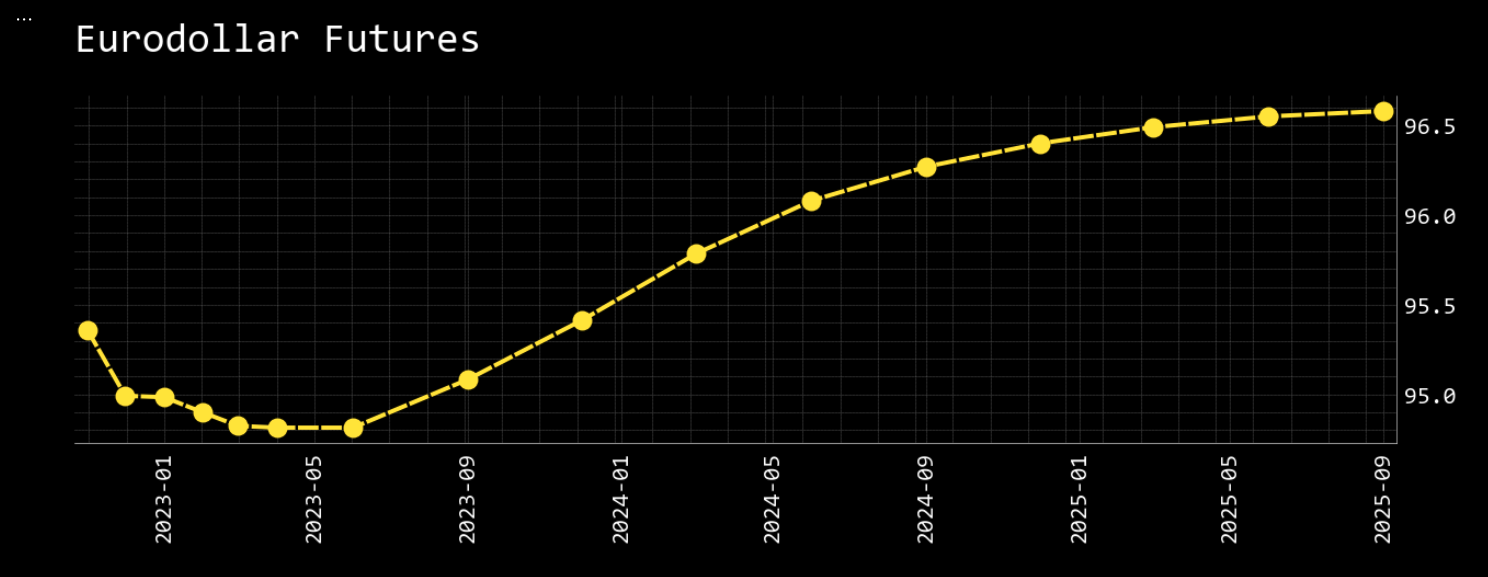
The forward curve data for a symbol is fetched with:
eurodollar = openbb.futures.curve('GE')
| Expiration | Futures |
|---|---|
| 2022-11-01 00:00:00 | 95.3561 |
| 2022-12-01 00:00:00 | 94.9925 |
| 2023-01-01 00:00:00 | 94.985 |
| 2023-02-01 00:00:00 | 94.9 |
| 2023-03-01 00:00:00 | 94.825 |
To display a chart of the data, use curve_chart:
openbb.futures.curve_chart(symbol = 'GE')
Historical
The historical function can fetch the historical front-month price:
wti_continuous = obb.futures.historical('CL')
Or, while actively trading, individual contracts. The example below requests historical data for the December WTI contract from 2023 to 2030, starting at the first recorded trading day of the December 2030 contract.
cl_2312 = openbb.futures.historical(symbols = ['CL'], expiry = '2023-12')
cl_2312 = cl_2312.rename(columns={'Adj Close':'2023-12'})
cl_2412 = openbb.futures.historical(symbols = ['CL'], expiry = '2024-12')
cl_2412 = cl_2412.rename(columns={'Adj Close':'2024-12'})
cl_2512 = openbb.futures.historical(symbols = ['CL'], expiry = '2025-12')
cl_2512 = cl_2512.rename(columns={'Adj Close':'2025-12'})
cl_2612 = openbb.futures.historical(symbols = ['CL'], expiry = '2026-12')
cl_2612 = cl_2612.rename(columns={'Adj Close':'2026-12'})
cl_2712 = openbb.futures.historical(symbols = ['CL'], expiry = '2027-12')
cl_2712 = cl_2712.rename(columns={'Adj Close':'2027-12'})
cl_2812 = openbb.futures.historical(symbols = ['CL'], expiry = '2028-12')
cl_2812 = cl_2812.rename(columns={'Adj Close':'2028-12'})
cl_2912 = openbb.futures.historical(symbols = ['CL'], expiry = '2029-12')
cl_2912 = cl_2912.rename(columns={'Adj Close':'2029-12'})
cl_3012 = openbb.futures.historical(symbols = ['CL'], expiry = '2030-12')
cl_3012 = cl_3012.rename(columns={'Adj Close':'2030-12'})

historical = pd.DataFrame(data = [cl_2312['2023-12'],cl_2412['2024-12'],cl_2512['2025-12'],cl_2612['2026-12'],cl_2712['2027-12'],cl_2812['2028-12'],cl_2912['2029-12'],cl_3012['2030-12']]).transpose()
historical = historical.dropna()

historical
| Date | 2023-12 | 2024-12 | 2025-12 | 2026-12 | 2027-12 | 2028-12 | 2029-12 | 2030-12 |
|---|---|---|---|---|---|---|---|---|
| 2020-01-24 00:00:00 | 49.61 | 50.14 | 50.7 | 51.56 | 51.63 | 51.63 | 51.63 | 51.63 |
| 2020-01-27 00:00:00 | 49.94 | 50.6 | 51.18 | 51.05 | 51.12 | 51.12 | 51.12 | 51.12 |
| 2020-01-28 00:00:00 | 50.17 | 50.78 | 51.23 | 51.55 | 51.62 | 51.62 | 51.62 | 51.62 |
| 2020-01-29 00:00:00 | 50.07 | 50.64 | 51.13 | 51.6 | 51.67 | 51.67 | 51.67 | 51.67 |
| 2020-01-30 00:00:00 | 50.27 | 50.91 | 51.44 | 51.49 | 51.56 | 51.56 | 51.56 | 51.56 |
| 2022-11-09 00:00:00 | 76.69 | 71.62 | 68.01 | 65.1 | 62.52 | 60.17 | 58.12 | 56.49 |
| 2022-11-10 00:00:00 | 77 | 71.64 | 67.89 | 64.86 | 62.26 | 59.91 | 57.86 | 56.23 |
| 2022-11-11 00:00:00 | 78.81 | 73.1 | 69.22 | 66.19 | 63.6 | 61.25 | 59.2 | 57.57 |
| 2022-11-14 00:00:00 | 77.4 | 72.35 | 68.89 | 66.15 | 63.62 | 61.25 | 59.13 | 57.5 |
| 2022-11-15 00:00:00 | 78.82 | 73.66 | 70.14 | 67.36 | 64.94 | 62.62 | 60.49 | 58.68 |