 757fc57174
* update Terminal about URLs and some other broken links

* ruff

* intro

* changing the heading levels

* dependency management sections

* structure

* developer guides

* structure

* contributor guides

* keywords and descriptions

* broken urls

* cool cards

* Cool cards (#5727)

* tidy up terminal/content

* some more tidy up

* fix styling for platform that was missing

* more tidy up

* improve color for dark and light mode

* create new reference card for more basic cards

* rename back to menus

* implement all index.md for terminal, except reference

* improve bot title

* more refactoring

* fix remaining index

* header styling

* more styling

* heheheheheheeh

* Revert "heheheheheheeh"

This reverts commit 7d095fcfd2.

* Ccards (#5733)

* links

* more links

* improved styling and chevron aligned to title

* fix index.mdx urls for Terminal

* update package.json

* update index.mdx

* fix generation

* spelling

* toolkit_extensions

* update data extensions

* couple of links

* add tiingo to data extensions list

---------

Co-authored-by: hjoaquim <h.joaquim@campus.fct.unl.pt>
Co-authored-by: andrewkenreich <andrew.kenreich@gmail.com>
Co-authored-by: DidierRLopes <dro.lopes@campus.fct.unl.pt>
Co-authored-by: James Maslek <jmaslek11@gmail.com>
14 KiB
Vendored
title, sidebar_position, description, keywords
| title | sidebar_position | description | keywords | |||||||
|---|---|---|---|---|---|---|---|---|---|---|
| Portfolio | 0 | Docusaurus page focuses on the usage of the OpenBB Terminal Portfolio module, detailing its features and examples of use like portfolio performance benchmarking, risk metrics calculation or maximum drawdown calculation. |
|
The Portfolio menu, from the OpenBB Terminal, is wrapped into a Python SDK layer, enabling users to programmatically work with the data in a flexible environment, fully customizable for the needs of any user. This guide will introduce the functions within the main Portfolio module, and walk through examples demonstrating how to work with a portfolio file and object.
How to Use
Below is a brief description of each function within the Portfolio module:
| Path | Type | Description |
|---|---|---|
| openbb.portfolio.alloc | Sub-Module | Allocation Metrics Compared to the Benchmark |
| openbb.portfolio.bench | Function | Select a Benchmark for the Portfolio |
| openbb.portfolio.distr | Function | Distribution of Daily Returns |
| openbb.portfolio.dret | Function | Daily Returns |
| openbb.portfolio.es | Function | Expected Shortfall |
| openbb.portfolio.holdp | Function | Holdings of Assets as a % |
| openbb.portfolio.holdv | Function | Holdings of Assets as an Absolute Value |
| openbb.portfolio.load | Function | Load a Portfolio File |
| openbb.portfolio.maxdd | Function | Maximum Drawdown |
| openbb.portfolio.metric | Sub-Module | Risk and Portfolio Metrics |
| openbb.portfolio.mret | Function | Monthly Returns |
| openbb.portfolio.om | Function | Omega Ratio |
| openbb.portfolio.perf | Function | Portfolio Performance vs Benchmark |
| openbb.portfolio.po | Sub-Module | Portfolio Optimization Sub Menu |
| openbb.portfolio.rbeta | Function | Rolling Beta of Portfolio and Benchmark Returns |
| openbb.portfolio.rsharpe | Function | Rolling Sharpe Ratio |
| openbb.portfolio.rsort | Function | Rolling Sortino Ratio |
| openbb.portfolio.rvol | Function | Rolling Volatility |
| openbb.portfolio.show | Function | Portfolio Transactions |
| openbb.portfolio.summary | Function | Summary of Portfolio and Benchmark Returns |
| openbb.portfolio.var | Function | Portfolio VaR |
| openbb.portfolio.yret | Function | Yearly Returns |
Alternatively, the contents of the Porfolio module is printed with:
help(openbb.portfolio)
Many of the functions in this module will also have a companion command, _chart.
Portfolio Files
Portfolio files are spreadsheets (xlsx or csv files) containing historical trades which add up to represent a net balance in the Portfolio Engine. Users should keep their collection of holdings files in the OpenBBUserData folder, ~/OpenBBUserData/portfolio/holdings.
:::note If you wish to load in your own Excel holdings file, please follow the following steps:
- Download the Excel file that can be used as a template here.
- Move the file inside the
portfolio/holdingsfolder within the OpenBBUserData folder and, optionally, adjust the name to your liking. - Open the Excel file and remove, edit or add to the values as you desire (e.g. your own orders). This is the default template that is also loaded in with
load --example. - Open up the OpenBB Terminal, go to
portfolioand typeload --file. Your Excel file should then be one of the options. :::
Note that the Excel sheet requires the following columns:
- Date - The date the trade occurred
- Name - The name of the security
- Type - The type of the security. Use Cash/Stock/Crypto/ETF as appropriate
- Price - The price the security was added or removed at, on a per-unit basis
- Quantity - How much of the security in question was added or removed
- Side - Whether you bought or sold. Use Buy/Deposit/1 to add to the portfolio or Sell/Withdrawal/0 to remove from the portfolio a search criteria, country, sector or industry.
The table below illustrates the required column titles:
| Date | Type | Ticker | Side | Price | Quantity | Fees | Investment | Currency | Sector | Industry | Country | Region |
|---|---|---|---|---|---|---|---|---|---|---|---|---|
| 2021-10-29 | STOCK | K.TO | Buy | 7.93 | 190 | 20 | 1526.7 | CAD | Basic Materials | Gold | Canada | North America |
| 2015-01-02 | ETF | SPY | Buy | 178.28 | 5.6 | 0 | 998.368 | USD | - | - | - | - |
| 2015-01-01 | CRYPTO | BTC-USD | Buy | 1000 | 2 | 0 | 2000 | USD | Crypto | Crypto | Crypto | Crypto |
| 2011-01-03 | STOCK | AMZN | Buy | 9.22 | 100 | 0 | 922 | USD | Consumer Cyclical | Internet Retail | United States | North America |
| 2011-01-03 | STOCK | AAPL | Buy | 11.74 | 100 | 0 | 1174 | USD | Technology | Consumer Electronics | United States | North America |
| 2011-01-03 | STOCK | MSFT | Buy | 28.04 | 100 | 0 | 2804 | USD | Technology | Software-Infrastructure | United States | North America |
| 2011-01-03 | STOCK | TSLA | Buy | 1.76 | 100 | 0 | 176 | USD | Consumer Cyclical | Auto Manufacturers | United States | North America |
| 2011-01-03 | STOCK | GOOG | Buy | 15.01 | 100 | 0 | 1501 | USD | Communication Services | Internet Content & Information | United States | North America |
The template Excel file also has additional columns but these are optional. The OpenBB SDK can figure out by itself what industry, sector, country and region belongs to the loaded in Equity. So the field can be left blank if your holdings do not include this information.
Examples
The examples in this guide will assume that the import statements below are included at the top of the Python script or Jupyter Notebook.
Import Statements
from openbb_terminal.sdk import openbb
import pandas as pd
# %matplotlib inline (uncomment if using a Jupyter Notebook or an Interactive Window)
Load
Taking the downloaded holdings_example.xlsx file from the previous section, let's load it into the Portfolio Engine. There are a few parameters available for this function, and an object is returned.
help(openbb.portfolio.load)
    Get PortfolioEngine object

    Parameters
    ----------
    transactions_file_path : str
        Path to transactions file
    benchmark_symbol : str
        Benchmark ticker to download data
    full_shares : bool
        Whether to mimic the portfolio trades exactly (partial shares) or round down the
        quantity to the nearest number
    risk_free_rate : float
        Risk free rate in float format

    Returns
    -------
    PortfolioEngine
        PortfolioEngine class instance, this will hold transactions and perform calculations

    Examples
    --------
    >>> from openbb_terminal.sdk import openbb
    >>> p = openbb.portfolio.load("openbb_terminal/miscellaneous/portfolio_examples/holdings/example.csv")
The syntax should resemble something like the sample below; don't forget to modify the path to match the local path.
P = openbb.portfolio.load(
  transactions_file_path = '/Users/path_to/OpenBBUserData/portfolio/holdings/holdings_example.xlsx',
  benchmark_symbol = 'VTI',
  full_shares = False,
  risk_free_rate = 3.0
)
Preprocessing transactions: 100%|██████████| 14/14 [00:01<00:00,  8.82it/s]
        Loading price data: 100%|██████████| 3/3 [00:01<00:00,  2.64it/s]
       Calculating returns: 100%|██████████| 1/1 [00:00<00:00, 14.52it/s]
         Loading benchmark: 100%|██████████| 4/4 [00:04<00:00,  1.21s/it]
The Portfolio Object
A Portfolio Object is assigned to the variable, P. The created object, or parts of it, are used as inputs to the other functions in this module. It can also be interacted with directly, for example, to change the benchmark ticker. SPY is a holding in the example portfolio, so let's stick with VTI as the performance benchmark.
P.set_benchmark(symbol = 'SPY')

 Loading benchmark:  50%|█████     | 2/4 [00:00<00:00,  5.69it/s]

print(P.benchmark_ticker)

SPY
Populating a list of tickers from the Portfolio Object is accomplished by assigning a variable to it:
tickers = P.tickers_list
print(tickers)

['SPY', 'TSLA', 'K.TO', 'AAPL', 'AMZN', 'MSFT', 'BTC-USD', 'GOOG']
Show
openbb.portfolio.show is for displaying the transactions from the loaded portfolio file. Scroll back up to view the output of this function again.
openbb.portfolio.show(P)
Perf
Performance against the benchmark is summarized in a table with, openbb.portfolio.perf.
print(openbb.portfolio.perf(P))
| Portfolio | Benchmark | Difference | |
|---|---|---|---|
| Total Investment | 11102.07 | 11102.07 | - |
| Total Value | 114027.38 | 36203.96 | 77823.43 |
| Total % Return | 927.08% | 226.10% | 700.98% |
| Total Abs Return | 102925.31 | 25101.89 | 77823.43 |
Summary
openbb.portfolio.summary prints a table of risk metrics, comparing the portfolio against the benchmark.
print(openbb.portfolio.summary(P))
| Portfolio | Benchmark | Difference | |
|---|---|---|---|
| Volatility | 1.65% | 0.99% | 0.66% |
| Skew | -0.32 | -0.61 | 0.29 |
| Kurtosis | 8.80 | 16.87 | -8.079 |
| Maximum Drawdown | -59.05% | -35.00% | -24.05% |
| Sharpe ratio | 0.05 | 0.039 | 0.011 |
| Sortino ratio | 0.06 | 0.04 | 0.021 |
| R2 Score | 41.36% | 41.36% | 0.00% |
MaxDD
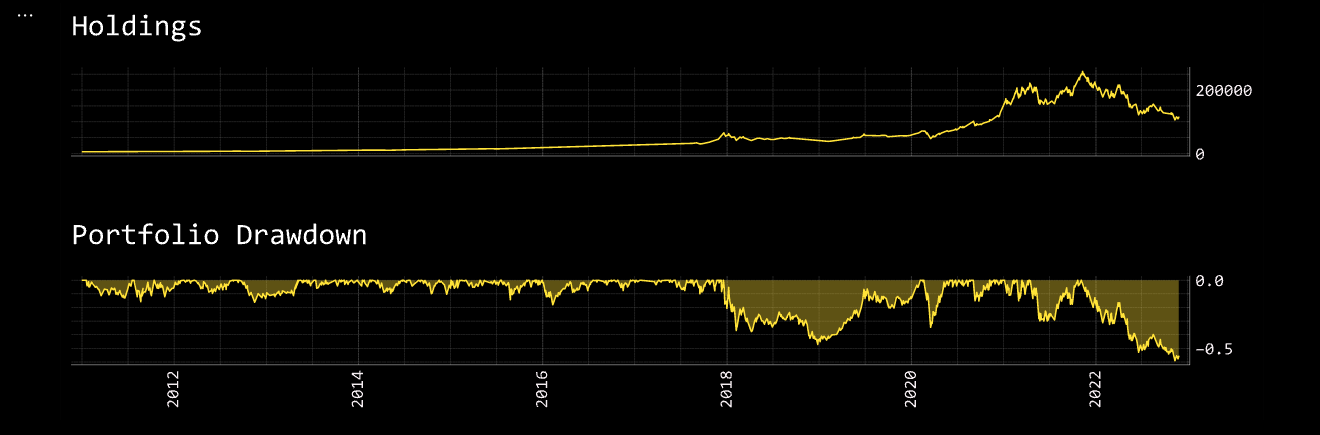
openbb.portfolio.maxdd calculates the maximum drawdown as price and % value; it returns a Tuple.
holdings,dd = openbb.portfolio.maxdd(P)
dd = pd.DataFrame(dd)
dd.rename(columns = {'Total': 'Portfolio % Drawdown'}, inplace = True)
holdings = pd.DataFrame(holdings)
holdings.rename(columns = {'Total': 'Portfolio Value'}, inplace = True)
dd = dd.join(holdings)
dd.index = dd.index.strftime(date_format='%Y-%m-%d')
print(dd.tail(5))
| Date | Portfolio % Drawdown | Portfolio Value |
|---|---|---|
| 2022-11-21 | -0.58 | 109442 |
| 2022-11-22 | -0.57 | 111257 |
| 2022-11-23 | -0.56 | 114017 |
| 2022-11-24 | -0.56 | 114027 |
| 2022-11-25 | -0.56 | 113302 |
MaxDD also has a _chart command, and is called with:
openbb.portfolio.maxdd_chart(P)
RSharpe
Calculate a rolling sharpe ratio over a specified window.
rs = openbb.portfolio.rsharpe(P, window = '3m')
rs.rename(columns = {'portfolio': 'Portfolio Sharpe', 'benchmark': 'Benchmark Sharpe'}, inplace = True)
rs.index = rs.index.strftime(date_format='%Y-%m-%d')
print(rs.tail(5))
| Date | Portfolio Sharpe | Benchmark Sharpe |
|---|---|---|
| 2022-11-21 | -0.15 | 0.02 |
| 2022-11-22 | -0.13 | 0.05 |
| 2022-11-23 | -0.09 | 0.07 |
| 2022-11-24 | -0.09 | 0.08 |
| 2022-11-25 | -0.09 | 0.11 |
RVol
openbb.portfolio.rvol has the same input parameters as rsharpe.
rv = openbb.portfolio.rvol(P, window = '3m')
rv.rename(columns={'portfolio': 'Portfolio Volatility', 'benchmark': 'Benchmark Volatility'}, inplace = True)
rv.index = rv.index.strftime(date_format='%Y-%m-%d')

print(rv.tail(5))
| Date | Portfolio Volatility | Benchmark Volatility |
|---|---|---|
| 2022-11-23 | 0.021727 | 0.014490 |
| 2022-11-24 | 0.021715 | 0.014439 |
| 2022-11-25 | 0.021596 | 0.014256 |
| 2022-11-26 | 0.021591 | 0.014256 |
| 2022-11-27 | 0.021592 | 0.014256 |
DRet
openbb.portfolio.dret returns a DataFrame with daily returns of the portfolio and benchmark.
returns = openbb.portfolio.dret(P)
returns.rename(columns = {'portfolio': 'Portfolio % Returns', 'benchmark': 'Benchmark % Returns'}, inplace = True)
returns.index = returns.index.rename('Date')

print(returns.tail(5))
| Date | Portfolio % Returns | Benchmark % Returns |
|---|---|---|
| 2022-11-21 | -0.03 | -0.00 |
| 2022-11-22 | 0.02 | 0.01 |
| 2022-11-23 | 0.02 | 0.01 |
| 2022-11-24 | 0.00 | 0.00 |
| 2022-11-25 | -0.01 | 0.00 |
Read the Portfolio Optimization Intro to learn about the optimization features, and the parameters preset template.