mirror of
https://github.com/OpenBB-finance/OpenBB.git
synced 2026-11-02 23:41:27 +00:00
 4ad995fdd0
* add first iteration of content for Terminal Pro

* Update index.md

* Update dashboards.md

* Update folders.md

* Update grouping.md

* Update report.md

* Update templates.md

* Update quick-start.md

* Update index.md

* Update index.md

* Update home.md

* Update news.md

* Update index.md

* Update index.md

* Update index.md

* Update data-provider.md

* Update chat-with-widget.md

* Update data-manipulation.md

* Update forecasting.md

* fix: images self closing tags

* fix: only pro visitors can see pro

* inter font

* improve SEO content and restructuring

* add new package for toggle on tutorials

* move folder around

* improve main page of each prod

* small updates and improvements

* fix logo above

* small improvement in headtitle for portfolio funcs

* fix typos from OpenAI's GPT-4

* fix _category_ json

* remove generic SEO words

* add script that generates SEO for documentation

* add missing file

* remove sdk warning message

* fix links for andrew

---------

Co-authored-by: jose-donato <zmcdonato@gmail.com>
Co-authored-by: jose-donato <43375532+jose-donato@users.noreply.github.com>
Co-authored-by: andrewkenreich <andrew.kenreich@gmail.com>
79 lines
5.2 KiB
Markdown
Vendored
79 lines
5.2 KiB
Markdown
Vendored
---
|
||
title: AskOBB Feature
|
||
sidebar_position: 5
|
||
description: This documentation page presents the innovative use of language learning
|
||
machines (LLMs), in particular, the LlamaIndex in transforming natural language
|
||
queries into commands in OpenBB Terminal.
|
||
keywords:
|
||
- AskOBB
|
||
- natural language query
|
||
- LLMs
|
||
- LlamaIndex
|
||
- BloombergGPT
|
||
---
|
||
|
||
import HeadTitle from '@site/src/components/General/HeadTitle.tsx';
|
||
|
||
<HeadTitle title="AskOBB Feature - Usage | OpenBB Terminal Docs" />
|
||
|
||
import TutorialVideo from '@site/src/components/General/TutorialVideo.tsx';
|
||
|
||
<TutorialVideo
|
||
youtubeLink="https://www.youtube.com/embed/GPMFO08115s?si=D86B3sl8g9-FTKtI"
|
||
videoLegend="Short introduction on leveraging natural language for data retrieval using AskOBB"
|
||
/>
|
||
|
||
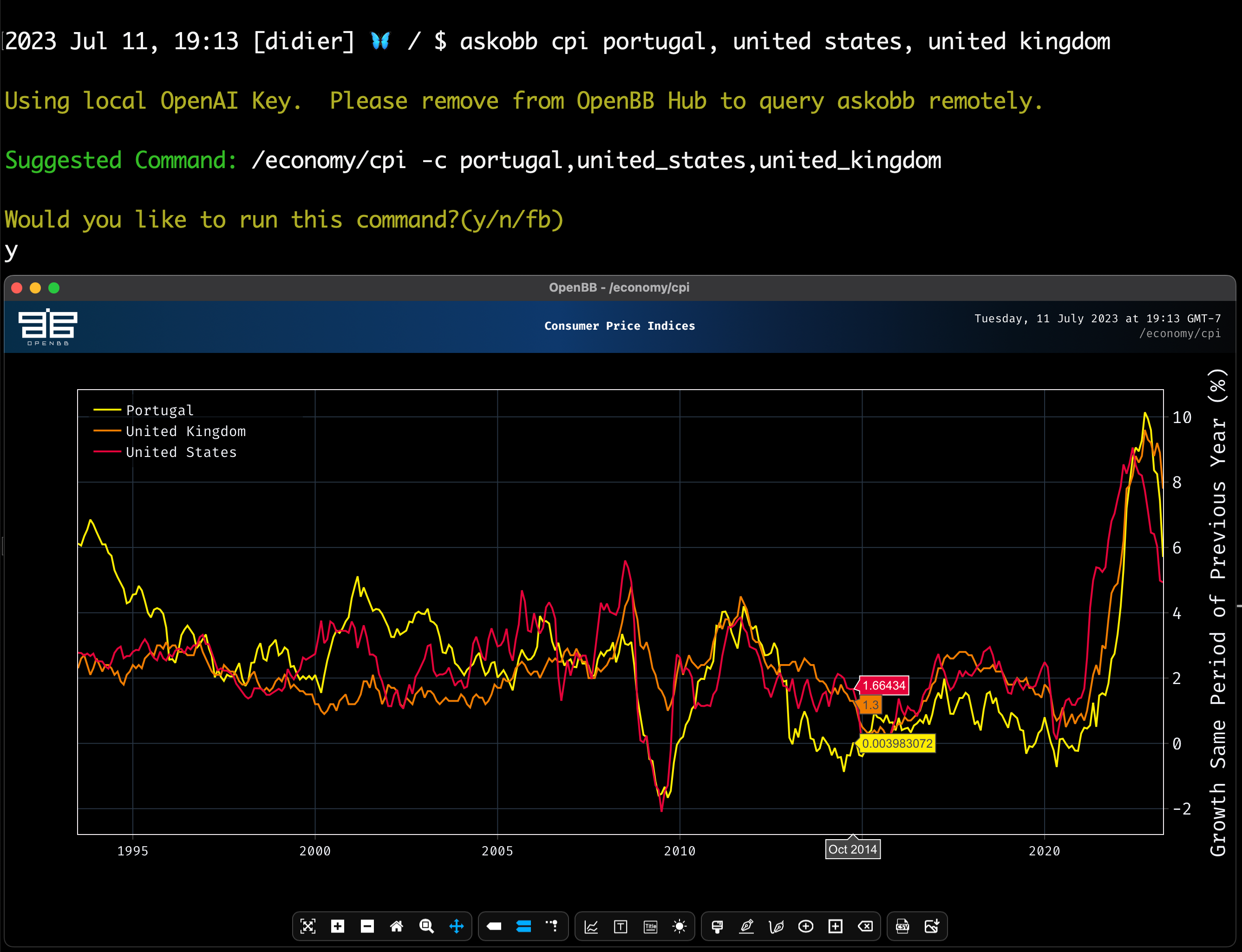
AskOBB allows users to do a query using natural language and we convert it directly into a command. This makes it easier for newcomers to get started with the OpenBB Terminal.
|
||
|
||
|
||
|
||
|
||
## Background
|
||
|
||
With the rise of LLMs, it was only a matter of time before LlamaIndex became prevalent in the finance space. While emergent technologies like [BloombergGPT](https://www.bloomberg.com/company/press/bloomberggpt-50-billion-parameter-llm-tuned-finance/) is trained on financial information and financial documents, OpenBB is taking a different approach. With over 900 different commands accessing data from almost 100 different sources, we wanted to map natural language to these to reduce the barrier of entry to newcomers.
|
||
|
||
While this may not sound like a complex problem, as we just need to classify natural language queries into one of 900 possible options, there are quite a few intricacies. Among these is the tree-type structure of OpenBB terminal commands. For example, if you want to view a candle chart looking at the so-called “Golden Cross” (where a 50 and a 200-day EMA cross), you would use the command `stocks/ta/ema -l 50,200`. However, this requires that we have some previous context - i.e. the data should be previously selected. So the full command to use would actually be `stocks/load <TICKER>/ta/ema -l 50,200` with `<TICKER>` being the data of interest.
|
||
|
||
Another intricacy is that there are many different asset classes covered, which have their individual `load` commands. Loading in a cryptocurrency, such as Bitcoin, is a different command than loading an equity like AAPL. This means that the language model needs to understand the difference in mapping `load bitcoin` to `crypto/load btc` and `load AAPL` to `stocks/load AAPL`.
|
||
|
||
|
||
## Solution: LlamaIndex
|
||
|
||
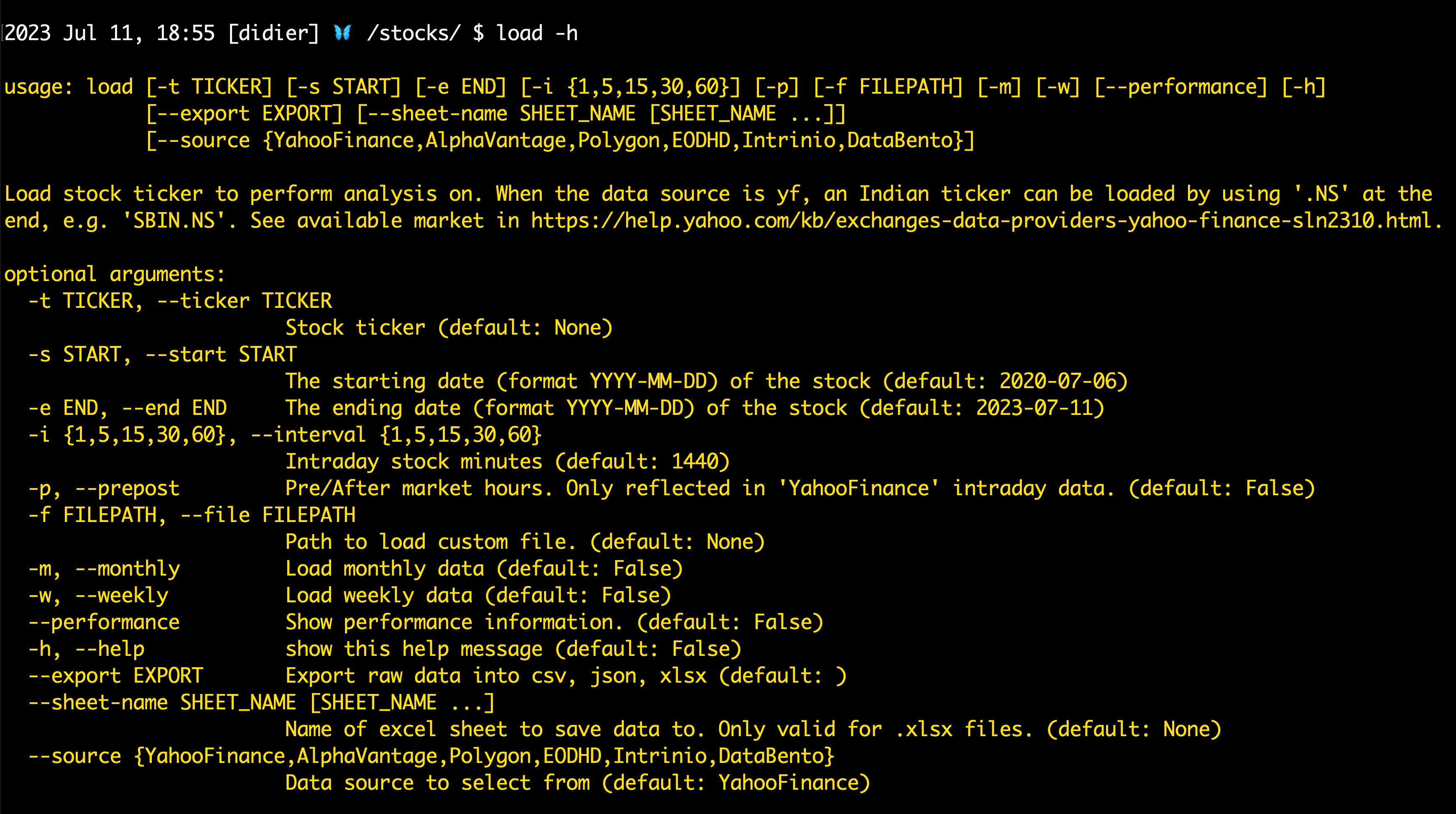
This is where LlamaIndex comes into play. Each of our OpenBB Terminal commands has an associated usage string in the form of a typical CLI help argument. An example for the stocks load command:
|
||
|
||
|
||
|
||
You can find this on our docs here: OpenBB Docs.
|
||
|
||
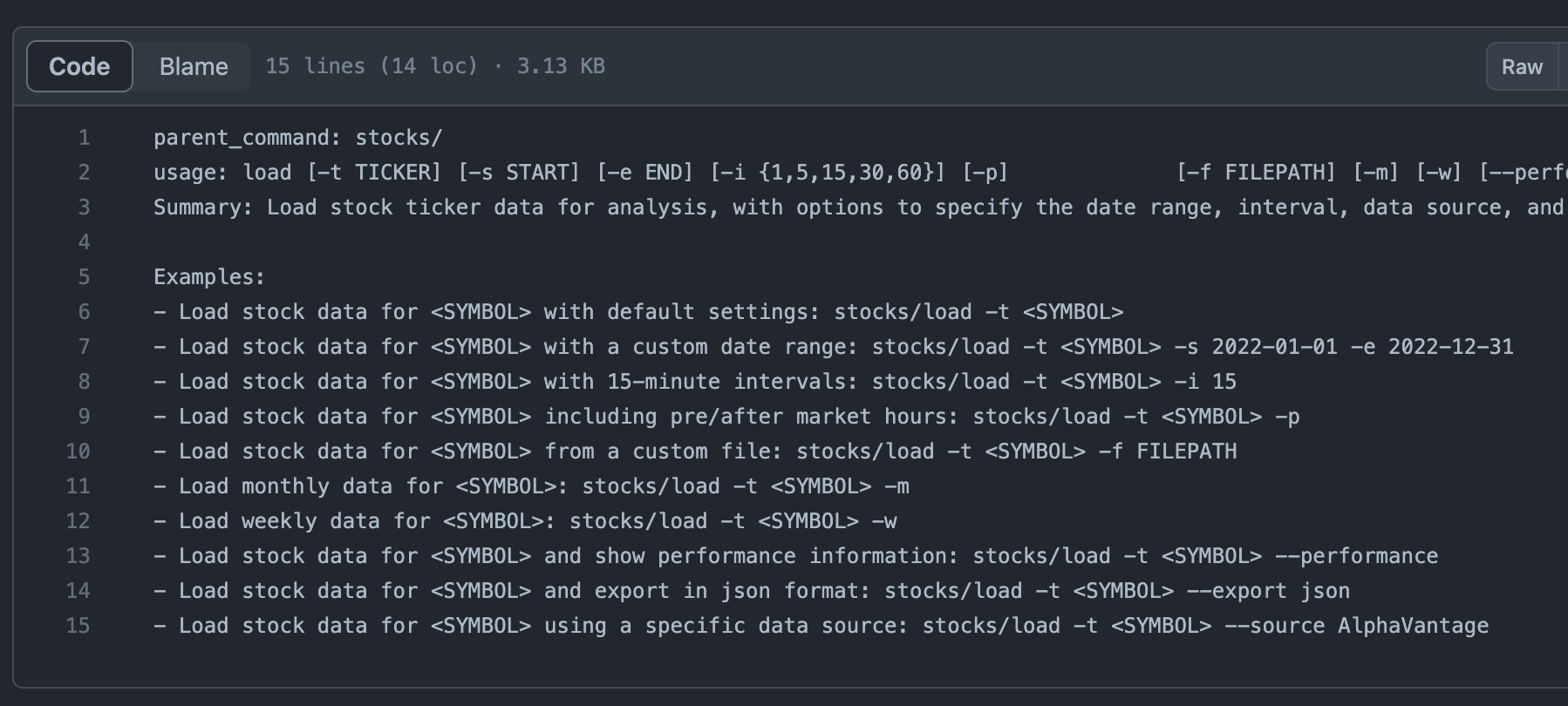
If this help string is provided to an LLM, we can ask it for a command based on the context. So what we did was copy all of these command helps into txt files. In order to help out the model, we provided a few examples of each command. In our [stocks load file](https://github.com/OpenBB-finance/OpenBBTerminal/blob/d3126b414aac77fe4086661214535975ac55ba95/openbb_terminal/miscellaneous/gpt_index/data/stocks_load.txt), we add the following examples:
|
||
|
||
|
||
|
||
This process is repeated for EVERY function in the OpenBB Terminal. Once we have these, we can pass them to a Vector Index in two lines of code:
|
||
|
||
```bash
|
||
documents = SimpleDirectoryReader(GPT_INDEX_DIRECTORY / "data/").load_data()
|
||
index = VectorStoreIndex.from_documents(documents, service_context=service_context)
|
||
```
|
||
|
||
What this Vector Index does is load in each file and create an embedding using the OpenAI embeddings API. In essence, this means each file is associated with a vector (a series of numbers such as `[0.001, 0.002, .2, ..., 0.03]`), and these are all saved in memory through LlamaIndex.
|
||
|
||
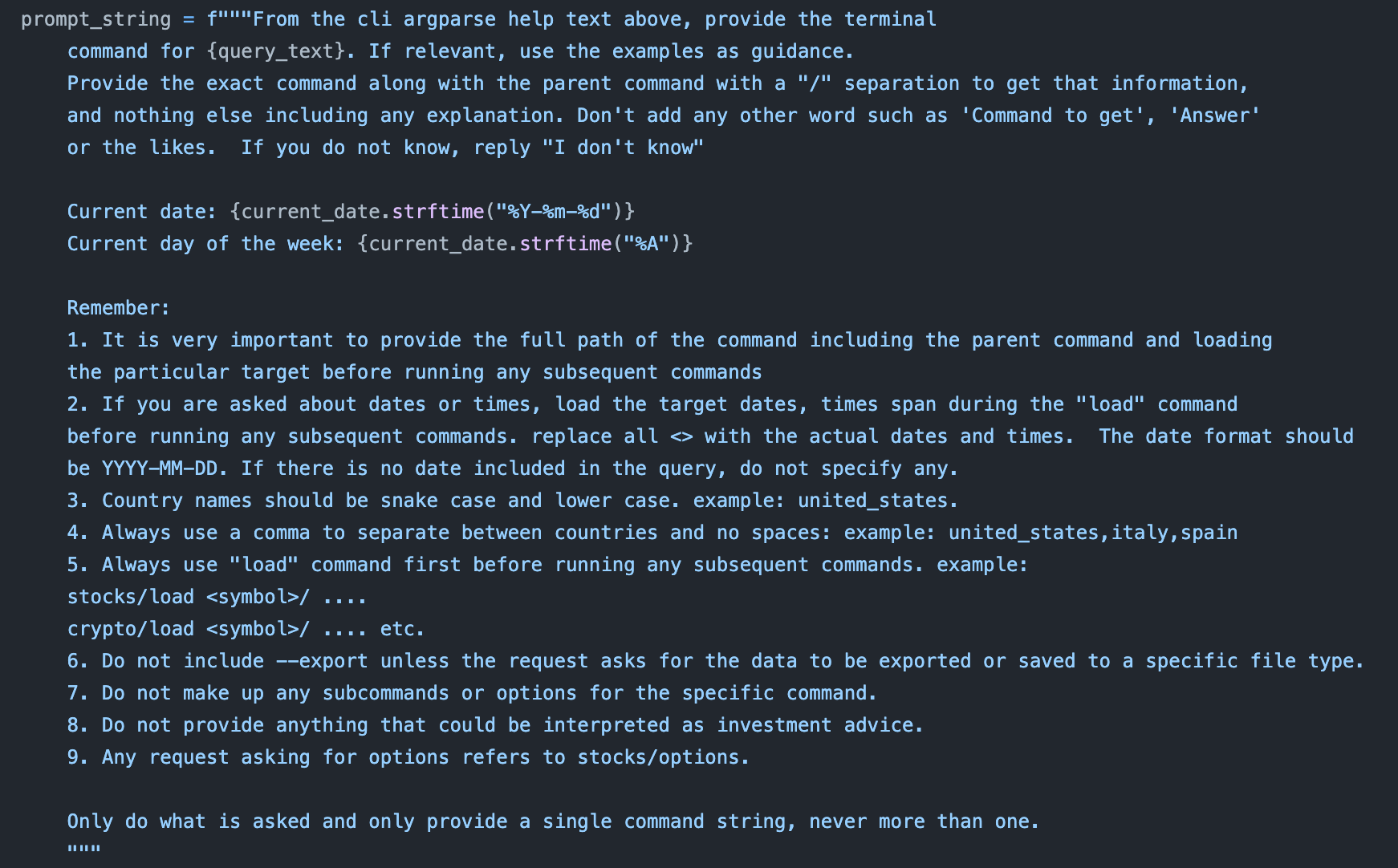
Now that we have the context of our documentation and examples saved, it is time to query the LLM. For AskOBB, we are using OpenAI’s gpt3.5-turbo model by default, but allow users to specify others (e.g. GPT-4). We provide a prompt string to the query, indicating to only return a command and to follow certain rules when querying. The prompt string we provide is:
|
||
|
||
|
||
|
||
To get the LLM response, it is just another 2 lines of code with LlamaIndex:
|
||
|
||
```bash
|
||
query_engine = index.as_query_engine() response = query_engine.query(prompt_string)
|
||
```
|
||
|
||
And that is all we need!
|
||
|
||
What this process does is take our previously defined Vector Index, which stores all the relevant embeddings, and it creates an embedding from our prompt, which includes the query. To determine which txt file to use, the Vector Index finds the index with the “closest” embedding and provides that as context to the LLM.
|
||
|
||
<TutorialVideo
|
||
youtubeLink="https://www.youtube.com/embed/s8ZNLqi9hzc?si=u0tr6471z32jFzu0"
|
||
videoLegend="Watch LlamaIndex Webinar: LLMs for Investment Research"
|
||
/>
|