mirror of
https://github.com/block/buzz.git
synced 2026-11-24 10:12:19 +00:00
 3689241672
On iOS, a notification that shows a channel or DM message now offers
**Reply**. The user types a reply in the notification and sends it
without opening the app.
- The reply goes in a subthread under the notified message (its thread
root is the message's own root, or the message itself when top-level). A
Solo chat takes no thread replies, so there it goes at the chat's top
level.
- It always mentions the notified message's sender, so the person or
agent being answered is notified. Typed `@name` text stays plain, since
a notification has no mention autocomplete.
- It is sent by the app's own send path. iOS starts the Flutter engine
when it wakes the app in the background, and the reply reopens the relay
connection (closed after the background grace period), waiting a bounded
time for it before sending.
- A sent reply marks the conversation read **up to the notified
message** (newer messages stay unread) and clears that notification and
earlier ones from the same conversation.
- An unsent reply (offline, relay error, timeout, a channel the user
isn't in) keeps the typed text as a draft, after any draft already
there, and shows a "Reply not sent" notification that opens the
conversation.
For now only notifications from the community selected in the app offer
Reply: replying must not switch communities, and the app can only reach
the selected one. Forum posts and fallback notifications that show no
message offer none. The design and the options considered are in
`docs/adr/0004-notification-reply.md`.
### Before / after
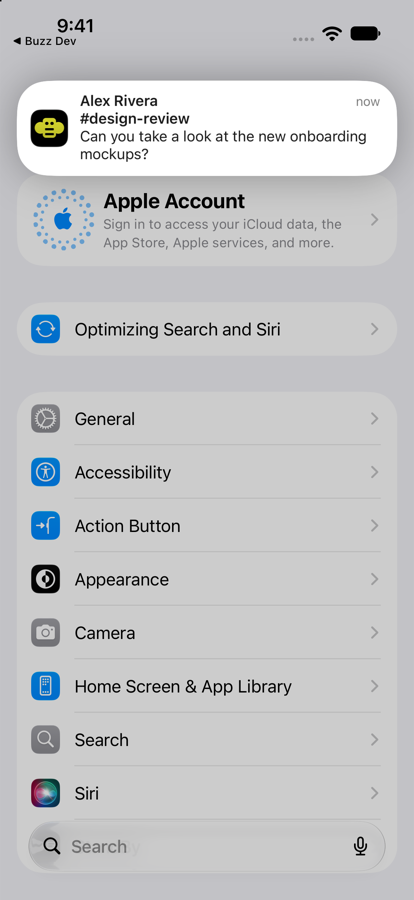
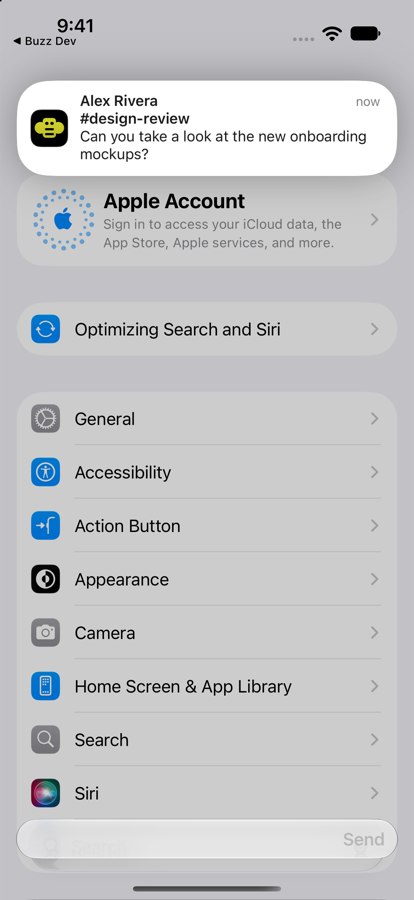
Long-pressing a message notification (synthetic names and text). Before
has no reply field (captured by sending the notification without its new
reply category, which is how main presents it); after shows one with
Send.
| Before | After |
| --- | --- |
|
|
|
### Demo
With the app backgrounded past the relay grace period, replying from the
notification lands the reply in a subthread under the message:
https://github.com/user-attachments/assets/37df7e28-aa46-4521-938e-8af5faa77b83
### Regressions
Nothing existing changes unless the user taps Reply. Notifications gain
a category and a small reply context in `userInfo`; tapping a
notification still opens the conversation as before. The relay reconnect
only happens for a pending reply and then falls back to the normal
background disconnect, so idle background behavior and network use are
unchanged. Reply failures end in a draft and a "Reply not sent"
notification rather than touching other state.
### Validation
- End to end on an iOS 27 simulator against a real community: with the
app backgrounded past the relay grace period, replied from the
notification; the reply appeared in a subthread under the message,
mentioning its sender. The demo above was recorded before the review
fixes (session hold, community fence, origin-community drafts, composer
draft sync); the same run was repeated on the current head, 9b9c8b0, and
the reply again appeared in the subthread with no "Reply not sent"
notification.
- Human testing is waived for this repo's mobile client; the simulator
run above replaces it. Not yet exercised on a physical device or on a
cold launch (app not running).
- Added tests: a Dart journey covering top-level, in-thread and Solo
replies, another community (draft kept in that community), a failed
send, a channel the user isn't in (draft appended), a reply arriving
while running, an unreachable relay, and a community switch while
connecting (not sent, draft kept in the reply's community); a
relay-session test that a background-work hold keeps the grace
disconnect off, including one already waiting on cleanup, until released
or its limit; a composer step showing a draft appended elsewhere appears
in the mounted composer and survives its next edit; a relay-session test
for reconnecting a paused session and timing out (fails without the
fix); Swift tests for reply context encoding, NIP-10 root parsing
aligned with the app, and request validation.
- `relay_session.dart` was at its 1200-line cap, so the background
connect lives in a new part file and three existing test hooks moved
unchanged into another.
- Full `mobile-test`, `mobile-check` and BuzzPushKit `swift test` pass.
---------
Signed-off-by: Tom Brow <tomb@squareup.com>
Signed-off-by: Tom Brow <tomb@block.xyz>
Co-authored-by: studio <dc2fc481343672df31a689840c09299972e704dac592e0da6f18486646a7ee3e@buzz.block.builderlab.xyz>


29 lines
5.5 KiB
Markdown
29 lines
5.5 KiB
Markdown
# Replying from a notification
|
|
|
|
A [mobile push notification](../../CONTEXT.md#mobile-push-notification) that shows a message offers a [notification reply](../../CONTEXT.md#notification-reply): the user types a reply in the notification, and the app sends it without opening.
|
|
|
|
The reply goes in a new subthread rooted at the notified message: its parent is that message, and its thread root is the message's own thread root, or the message itself when it is top-level. A Solo chat takes no thread replies, so there the reply goes at the same level as the notified message, the chat's top level.
|
|
|
|
The reply mentions the notified message's sender, in every kind of conversation including DMs and Solo chats, so the person or agent being answered is notified. A sender who has since left the conversation can't be mentioned, so the reply goes without the mention rather than failing. A notification has no mention autocomplete, so it adds no other mentions; text typed as `@name` stays plain text.
|
|
|
|
After the reply is accepted, the app marks the conversation read up to the notified message and removes the delivered notifications that read marker covers (for a message in a thread, that thread's earlier ones; for a top-level message, the whole conversation's, threads included), because replying means the user has seen that message. Newer messages stay unread: the user may not have seen them. When the reply can't be sent (offline, a channel the user isn't in, no time left), the app shows a "Reply not sent" notification instead; tapping it opens the subthread the reply would have gone in, with the typed text in its composer after any draft already there, so nothing typed is lost. A recovered draft doesn't carry the automatic mention. iOS keeps each reply on disk from the moment it's typed until the app reports what happened to it, or until the app has saved its draft, so the text survives even when the app never got to the reply, or was stopped partway. A later launch never sends a reply an earlier one was given: it makes it a draft, unless the earlier launch had reached the point where the reply could go out, which iOS records before the app publishes; then it only says the reply may not have sent, so it can't be posted twice.
|
|
|
|
A reply has one deadline, set when iOS hands it to the app, about 25 seconds later. The app checks the deadline at the moment the message goes out, after any wait including a rate limit's, and publishes only while there's still time to hear the relay's answer before it. So a reply reported as not sent was never published, or the relay refused it, and retrying its draft can't post it twice. A reply that was published but got no answer may have gone out: the app says so ("Reply may not have sent") and keeps no draft. iOS says the same when the deadline passes after the app recorded that the reply could go out.
|
|
|
|
Only a notification that shows a resolved channel or DM message offers Reply. A fallback notification that shows no message (for example "Open Buzz to view this message") offers none, whatever the reason for the fallback. There is no other per-account rule. Forum posts and comments don't offer Reply yet: a forum reply is a different kind of event with its own threading rules.
|
|
|
|
The reply is sent by the same app code as a reply typed in the app, so mentions, read state and drafts behave the same. That code runs only while the app's Flutter engine runs, and on iOS the engine starts only once the app creates its screen, which a background launch for a notification action doesn't do. So a reply typed while the app isn't running ends as "Reply not sent", and its text becomes a draft when the app next opens. The app closes its relay connection soon after going to the background, so a reply reopens it and waits a bounded time for it before sending. The connection stays open until the reply finishes, within a fixed limit, and then closes after the usual background grace period.
|
|
|
|
For now, only notifications from the community selected in the app offer Reply. Replying must not switch the selected community, and the app can currently reach only the selected community, so a notification from another one offers none. If the selection changes between the notification arriving and the reply being sent, the reply is treated as not sent, and its text is kept in the drafts of the community it came from. Ideally the selected community would decide only what the interface shows, not which writes are possible; replying in other communities can follow once the app can reach them without switching.
|
|
|
|
## Considered options
|
|
|
|
- **Reply at the same level as the notified message.** Rejected: a reply to a top-level message would then land in the channel's main flow, where it can read as a new topic and reach people who weren't part of the exchange. A subthread keeps it attached to the message it answers.
|
|
- **No automatic mention, typed `@name` resolved against channel members.** Rejected: typing an exact name without autocomplete is error-prone, and the person being answered is nearly always the one who should be notified.
|
|
- **Opening the app to send.** Rejected: it loses the main benefit of replying from the notification.
|
|
- **Sending from native code, without Flutter.** Rejected: it would duplicate the app's send, membership, read-state and draft logic in a second language for the sake of a background wake that the app's Flutter engine can handle once it's started.
|
|
|
|
## Consequences
|
|
|
|
A reply sent from a notification always notifies the sender of the message it answers, even in a DM, where the sender would be notified anyway.
|