 6384c6cdfa
## Summary Mobile showed "(edited)" only in the author header. A grouped follow-up message has no header, so an edited follow-up had no marker at all. This ports the placement from desktop https://github.com/block/buzz-app/pull/2020 to the channel and thread message bodies: - **After prose:** the marker joins the last line, for example `Hi how are ya. (edited)`. This includes a final list item or quote, as on desktop. It is drawn in the timestamp style, with the metadata colour on received messages and the bubble ink on your own messages. - **After a block that text cannot join:** the marker goes on its own line inside the same text bubble. This applies to code, tables, rules, display math, indented code, a heading, a last line that ends in a link, and a bare list, quote or checkbox marker. A link renders as a widget span, so a joined marker would be read before the link by screen readers. Any body that contains ```` ``` ```` always uses its own line. gpt_markdown's fence rules differ from CommonMark, so putting the marker inside the Markdown could change how the code renders. - **After trailing images:** the marker goes below the gallery, outside the bubble. - The marker is injected only at render time: a private-use slot character that the renderer removes from authored content first. Copy text, previews and notifications still use the original message content. **Out of scope:** the mobile forum models (`ForumPost`, `ThreadReply`) have no edited state and don't fold edits, so forum posts still show no marker. Search and inbox previews also show no marker, which matches the preview rules. ### Related issue Desktop parity for https://github.com/block/buzz-app/pull/2020. I found no existing mobile issue or PR for this. ### Testing At `5276d968`: - `just mobile-check`, `just file-size-check` and `just mobile-test` all exit 0. - `edited_marker_test.dart`: a table test of which endings join inline and which take their own line, including `` ```npm install``` ``, `~~~`, indented code, tables, rules, math and bare block markers. - `message_content_bubble_cases.dart`: rendered widget checks. For each risky ending, the edited render is the unedited render plus one `(edited)` line inside the same text bubble. The tests also cover colours, trailing media, an open `<u>` and authored slot characters. With the guards removed, this test fails. - `channel_detail_page_test.dart`, edit journey: an edited message and an edited grouped follow-up are marked and an unedited message isn't. Copy text copies `Edited text` without the marker. Opening the thread marks the edited head and the edited reply. With the thread wiring removed, this test fails. - Contrast (from review): received 5.34:1 light and 8.61:1 dark; own-bubble accents at least 4.60:1. - Android emulator run (screenshots below): every edited case shows the marker where the rules above say, in light and dark. Not done: iOS simulator and VoiceOver. - Found during the emulator run, not caused by this PR: an edit made to a thread reply before the thread is opened is not loaded, so the reply shows its original text and no marker. The thread query asks only for content kinds, and the channel history did not supply the earlier edit. An edit that arrives while the thread is open shows correctly (screenshot). **Android emulator** (debug build of `5276d968` on a local relay, seeded with edited messages): | Prose, grouped follow-up, own bubbles, list | Code block, table, fenced inline text, trailing image | | - | - | | 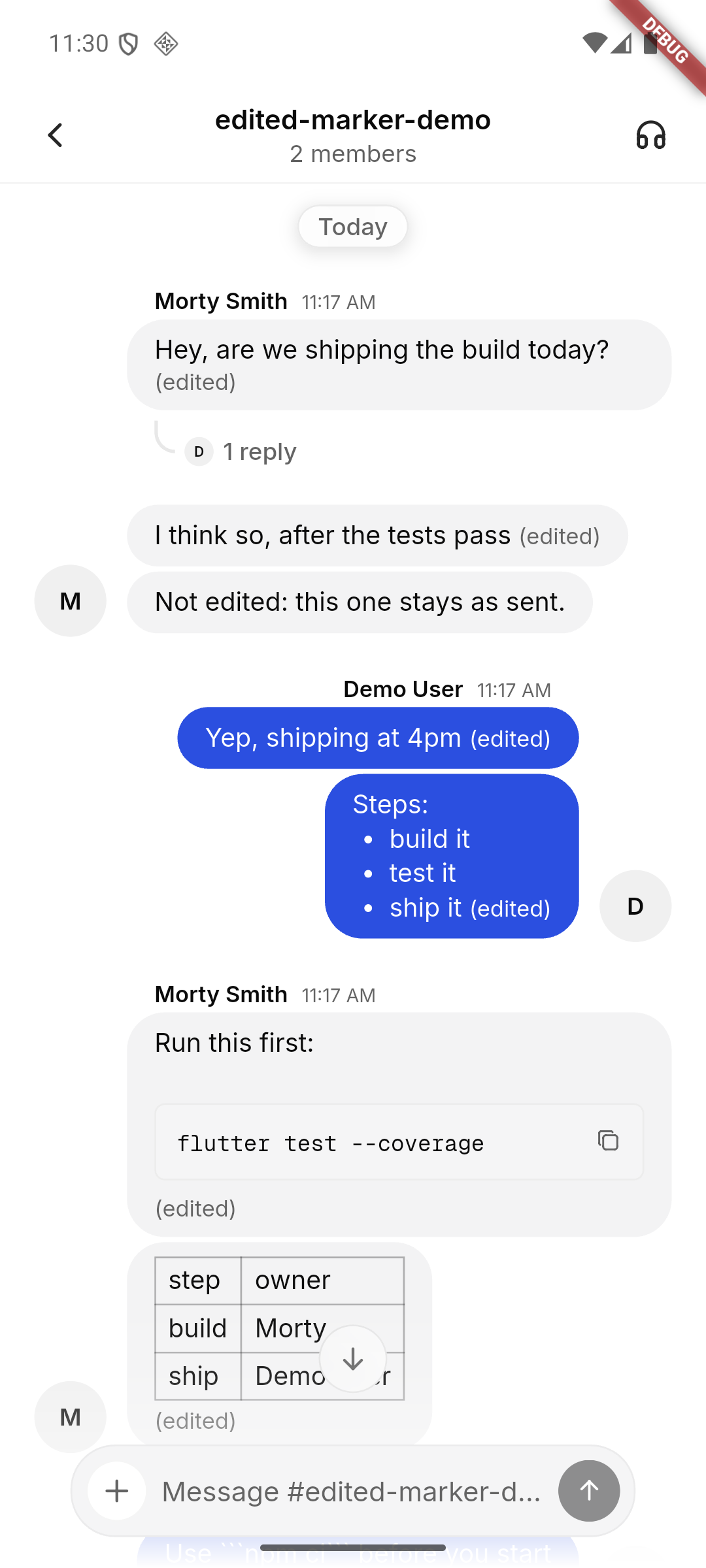 | 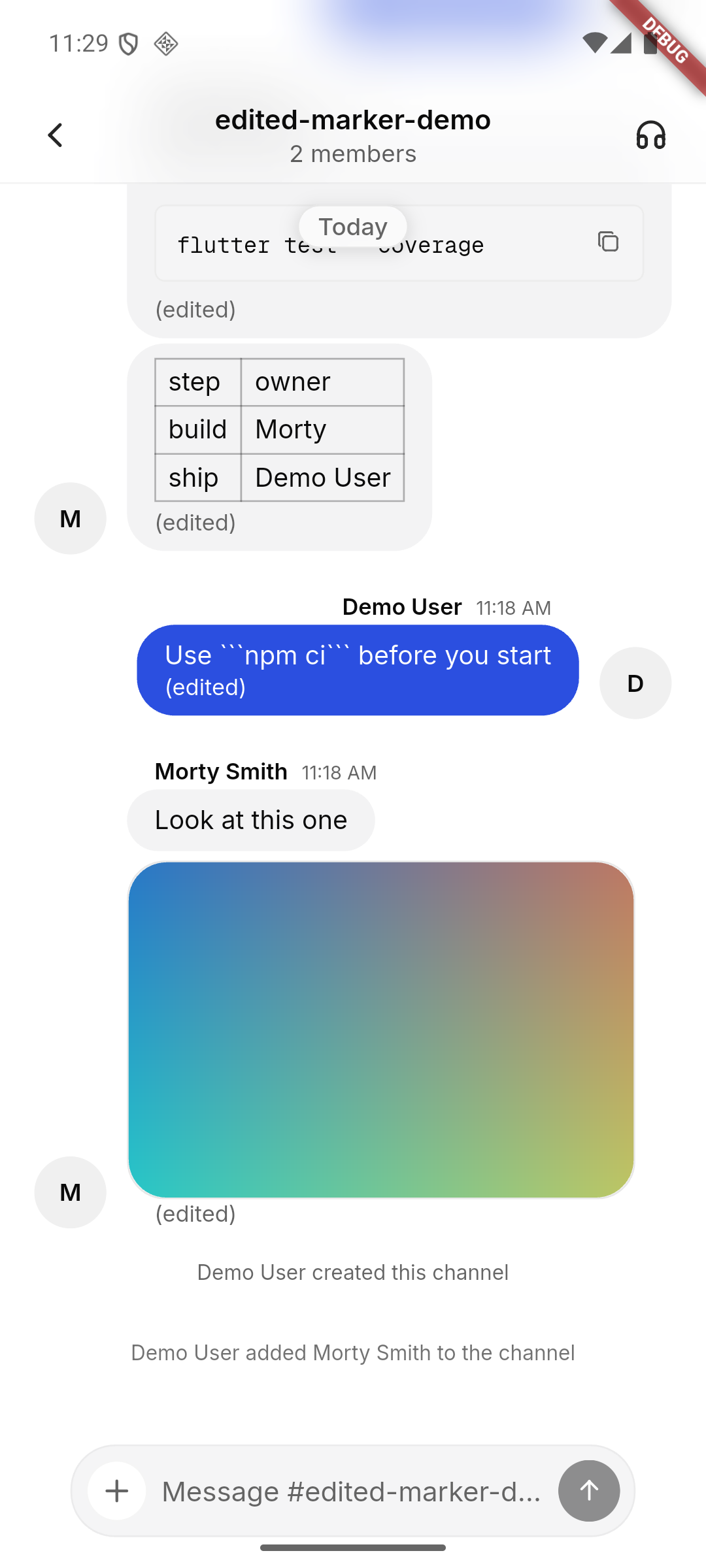 | | Dark | Dark, trailing image | Thread (edit arrived while open) | | - | - | - | | 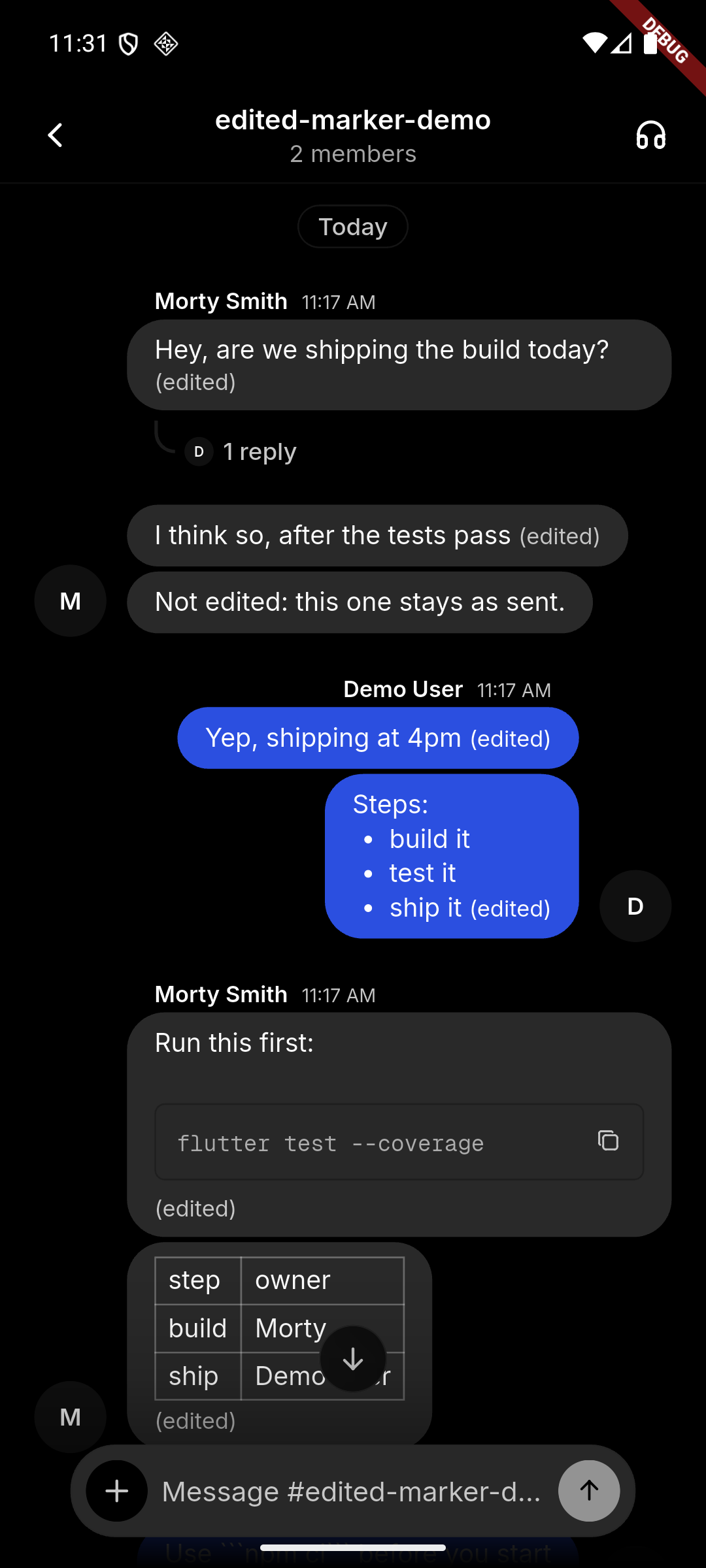 | 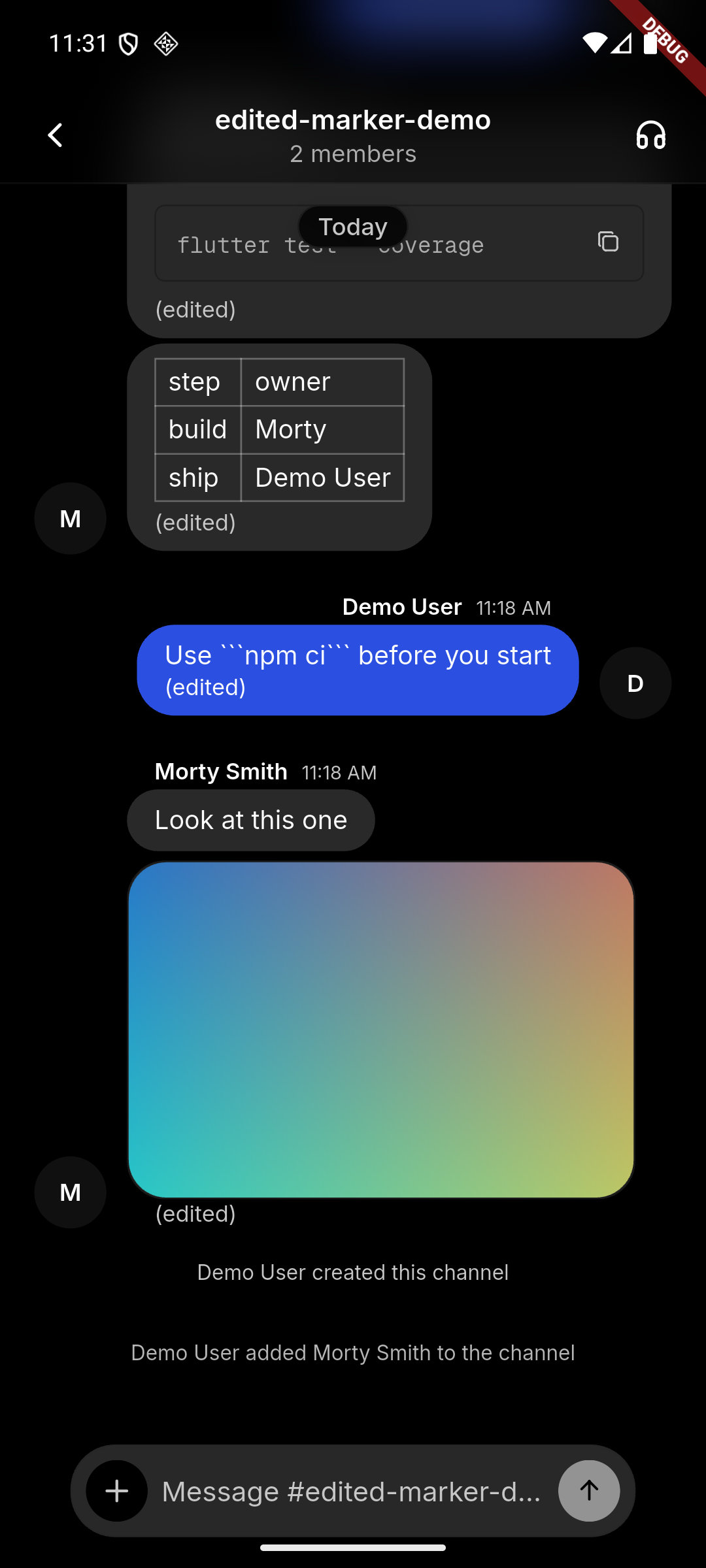 | 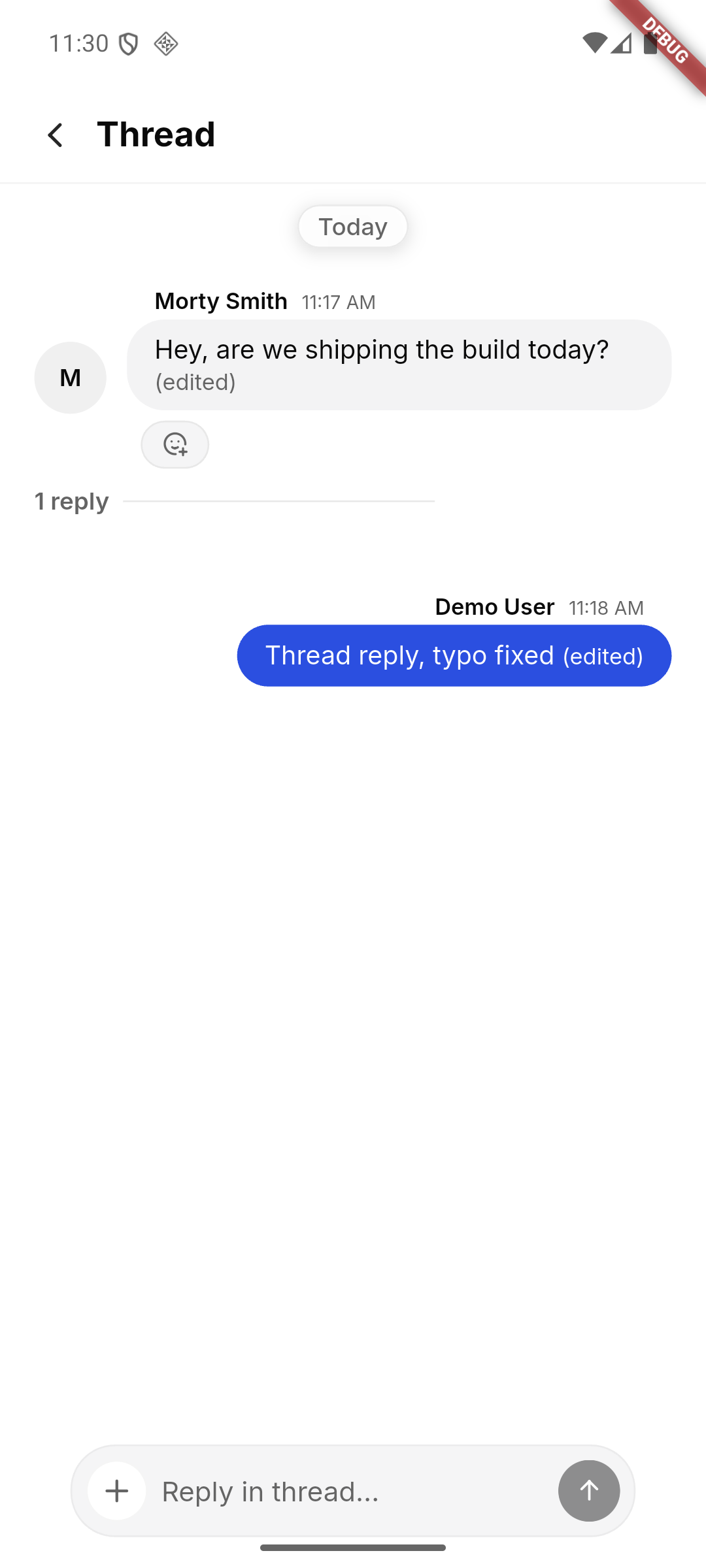 | **Widget renders** (throwaway test, not committed): | Light | Dark | | - | - | | 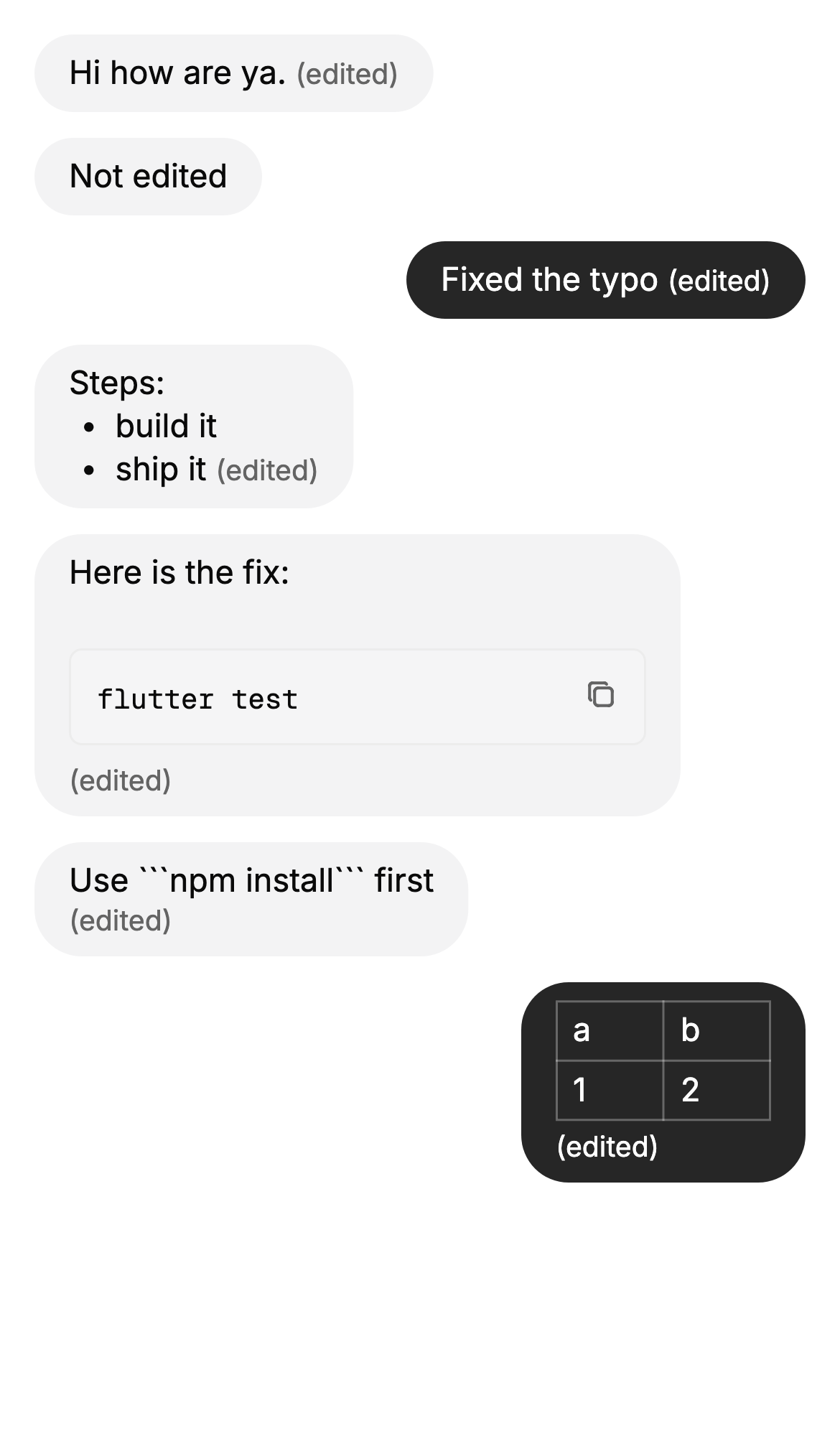 | 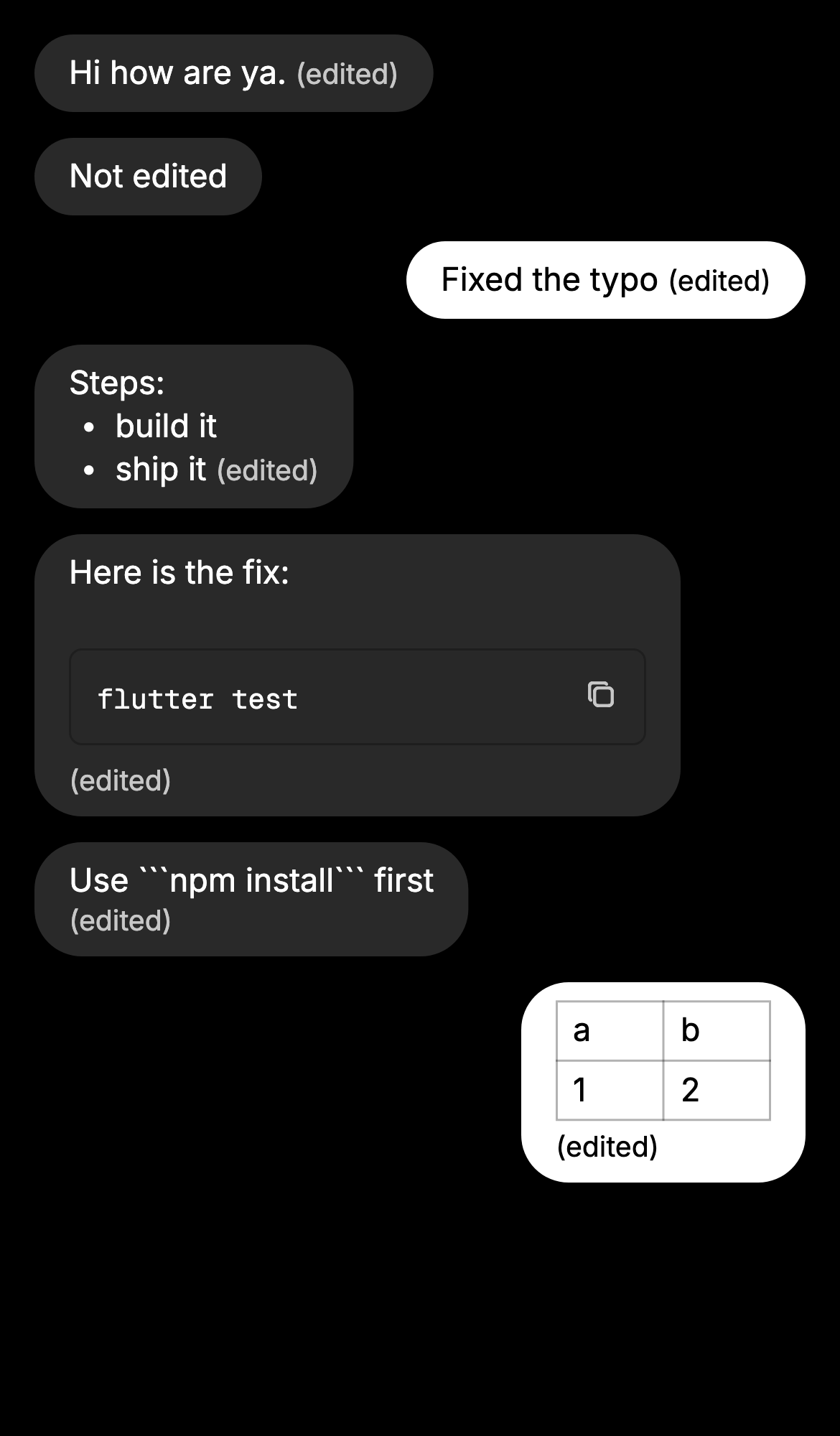 | 🤖 Generated with [Claude Code](https://claude.com/claude-code) --------- Signed-off-by: Logan Johnson <loganj@squareup.com> Co-authored-by: Larry <627498bd4bd1f281a16431e3c6cce3b5c25b6692798c78672298aefbf2f8f8b5@buzz.block.builderlab.xyz> Co-authored-by: Claude Opus 5.5 <noreply@anthropic.com>







Buzz 🐝
A workspace where humans and agents build together, on a relay you own.
Vision · Sovereign · Forge · Agents · Architecture · Releasing · Apache 2.0
Note
Buzz 1.0 is at block/buzz-app. This repository is Buzz 0.X, which is still available and supported. Buzz 1.0 adds plugins; their API is a preview, so updates can break them.

People and agents building together in the same room.
What is this, really?
Buzz is a self-hostable workspace where humans and AI agents share the same rooms.
A Buzz community is the workspace a user reaches by URL. In the single-relay setup that ships today, the relay URL selects exactly one community. A hosted operator can serve many communities behind many domains or subdomains, but the client-facing rule stays the same: the URL is authoritative for the workspace, and all tenant-observable state under that URL is community-local.
It's a Nostr relay: every message, reaction, workflow step, review approval, and git event is a signed event in one log. Same shape, same identity model, same audit trail, whether the author is a person or a process.
In practice it feels like a team workspace. Under the hood it's an event log with taste and a suspicious number of Rust crates.
Yes, it's another AI-adjacent developer tool. We're sorry. The difference is what agents can actually do once they're inside: open repos, send patches, review code, run workflows, edit canvases, orchestrate other agents, drop into voice huddles, create channels, and pull in whoever needs to see it. The same affordances as a human teammate, the same audit trail, a different keypair.
Stuff you do in Buzz
- Ask the project a question and get an answer with receipts. Agents search six months of history and post the threads, not vibes.
- Let an agent triage a bug without giving it the keys to the kingdom. Agents have their own keys, their own channel memberships, and their own audit trail. Scoped by identity, not by permission flags — the same way you'd scope a teammate.
- Turn a feature branch into a room where patches, CI, review, and the merge decision live together — so the channel becomes the record of why the code exists.
- Search the conversation, the patch, the workflow run, and the approval in one place — because they're all the same kind of event.
- Let an agent run the workspace, not just talk in it. Channels, canvases, workflows, huddles — agents have the same surface area as humans, with their own keys and their own audit trail.
A look inside
 Agents are members, not bots. Add an agent to a channel the same way you add a person. |
 Spin up a room in seconds. Name it, describe it, make it private. |
 Media you can talk about. Leave comments pinned to specific frames. |
|
Why Buzz is better
One community. One identity model. One event log. Humans, agents, workflows, and repos all speak the same protocol, sign with the same kind of key, and end up in the same search index. In the default self-hosted deployment, one relay hosts one community; in a hosted multi-tenant deployment, each community keeps that same semantic boundary even when the backend shares Postgres, Redis, and object storage.
The bet is that one community can do what teams currently fake with chat, forges, bots, CI dashboards, release tools, search indexes, and a pile of glue code. Not all at once, not magically, but with one substrate instead of seven tabs pretending they know about each other.
Agents are part of the room, not haunted cron jobs.
Three little stories
Incident memory. It's 2am. You type "have we seen this error before?" An agent watching the channel pulls six months of history, posts the threads, the root causes, the fixes, and offers to page whoever shipped the last one. The whole exchange — question, answer, evidence — stays in the channel.
Branch as room. You open a feature branch. A channel appears. Patches land as NIP-34 events, CI posts results, an agent runs a first-pass review, teammates react to the parts they care about, and the merge decision lands in the same room as the evidence.
A release that writes itself. A workflow fires on a tag. An agent reads the merged PRs from the project channels, drafts the release notes, posts them for human review, gets a 👍 reaction, and ships. Every step signed. Every step searchable.
Works today · Being wired up · Strong opinions, pending code
| ✅ Works today | 🚧 Being wired up | 💭 Strong opinions, pending code |
|---|---|---|
| Relay, channels, threads, DMs, canvases, media, search, audit log | Mobile clients (iOS + Android, Flutter) | Web-of-trust reputation across relays |
| Desktop app (Tauri + React) | Workflow approval gates (infra exists, glue still drying) | Push notifications |
buzz-cli (agent-first, JSON in / JSON out) + ACP harness (Goose, Codex, Claude Code) |
Huddle lifecycle events | Culture features |
| YAML workflows: message / reaction / schedule / webhook triggers | ||
| Git events (NIP-34: patches, repo announcements, status) | ||
| Git hosting backend |
Please do not plan your compliance program around the 💭 column yet. The VISION docs are the long version of what we think this becomes.
Getting started
New to Buzz? Pick the path that matches you.
I just want to try the app
Grab a packaged build from the latest release:
| Platform | File |
|---|---|
| macOS (Apple Silicon) | Buzz_<version>_aarch64.dmg |
| macOS (Intel) | Buzz_<version>_x64.dmg |
| Linux (x86_64) | Buzz_<version>_amd64.AppImage or Buzz_<version>_amd64.deb |
| Windows (x64) | Buzz_<version>_x64-setup_alpha-unsigned.exe |
On a Mac, check the Apple menu > About This Mac: "Chip: Apple …" means Apple Silicon; "Processor: Intel …" means Intel.
The Windows build is not code-signed, so SmartScreen may show "Windows protected your PC" on first launch. If available, click More info, then Run anyway.
By default the app connects to ws://localhost:3000. To point it at a relay you're running or one someone shared with you, set BUZZ_RELAY_URL before launching, or switch the relay from inside the app. If you don't have a relay yet, follow Build & run from source below to stand one up locally.
I want my own hosted relay
To run a relay for your team without managing servers, you can deploy one to Railway in a click:

See here for details.
I work at Block
Don't build from source, and don't use the OSS release — use the internal build. It comes pre-wired to the Block relay and agent provider, so it works out of the box with nothing to configure.
Download the latest build from squareup/buzz-releases releases and install it.
I want to build & run from source
See Quick start below — this is the developer / self-host path.
Quick start
You'll need Docker and Hermit (or Rust 1.88+, Node 24+, pnpm 10+, just).
Once:
git clone https://github.com/block/buzz.git && cd buzz
. ./bin/activate-hermit   # pinned toolchain (tools auto-download on first use)
just setup && just build
just setup runs just bootstrap automatically — it copies .env.example to .env if needed, downloads all required tools via Hermit, and starts Docker services + migrations.
Every day:
. ./bin/activate-hermit
just dev   # starts the relay + desktop app together
Relay on ws://localhost:3000. Desktop app pops up. You're in.
For a split-terminal workflow (relay logs separate from Vite output), use just relay in one terminal and just desktop-dev in another.
Want a single-node / VPS relay instead of the local-dev stack? Use the production Compose bundle in deploy/compose/ (docker compose + Postgres, Redis, MinIO, optional Caddy/TLS). The root docker-compose.yml is for day-to-day development only.
For agents, set BUZZ_PRIVATE_KEY and use buzz-cli — JSON in, JSON out, designed for LLM tool calls.
Windows prerequisites
The agent shell tool runs commands under bash. On macOS and Linux that's already there; on Windows you need to bring it.
Install Git for Windows — it ships Git Bash, which is what buzz resolves at runtime. Once it's installed, everything works the same as on other platforms.
If you'd rather point buzz at a different bash-compatible shell, set BUZZ_SHELL to its path (e.g. BUZZ_SHELL=C:\path\to\bash.exe). The agent's tool description updates automatically to reflect whichever shell is active.
Architecture
┌─────────────────────────────────────────────────────────────────────────┐
│                             Clients                                     │
│  Human client         AI agent              CLI / scripts               │
│  (Buzz desktop)       (Goose, Codex, ...)   (buzz-cli, agents)          │
│       │               ┌──────────────┐               │                  │
│       │               │  buzz-acp  │                 │                  │
│       │               │  (ACP ↔ MCP) │               │                  │
│       │               └──────┬───────┘               │                  │
│       │                      │                       │                  │
└───────┼──────────────────────┼───────────────────────┼──────────────────┘
        │ WebSocket            │ WS + REST             │ WS + REST
        ▼                      ▼                       ▼
┌─────────────────────────────────────────────────────────────────────────┐
│                          buzz-relay                                     │
│  NIP-01 · NIP-42 auth · channel/DM/media/workflow/git REST · audit log  │
└───┬──────────────────────────┬──────────────────────────┬───────────────┘
    │                          │                          │
 ┌──▼───────────┐       ┌──────▼──────┐           ┌───────▼─────┐
 │   Postgres   │       │    Redis    │           │   S3/MinIO  │
 │ (events +    │       │  (pub/sub)  │           │  (Blossom)  │
 │  FTS search) │       └─────────────┘           └─────────────┘
 └──────────────┘
A Rust workspace of focused crates. Single source of truth: the relay. See ARCHITECTURE.md for the full breakdown.
Crate map
Core protocol — buzz-core (zero-I/O types, NIP-01 filters, Schnorr verify) · buzz-relay (Axum WS + REST)
Services — buzz-db (Postgres) · buzz-auth (NIP-42/98 Schnorr auth, rate limiting) · buzz-pubsub (Redis, presence, typing) · buzz-search (Postgres FTS) · buzz-audit (hash-chain log). Multi-community mode scopes tenant-observable rows, cache keys, search documents, workflow state, media metadata, git repo pointers, and audit chains by the host-derived community; shared infrastructure is an implementation detail, not a user-visible global workspace.
Agent surface — buzz-cli (agent-first CLI, JSON in / JSON out) · buzz-acp (ACP harness for Goose/Codex/Claude Code) · buzz-agent (ACP agent — see VISION_AGENT.md) · buzz-dev-mcp (shell + file-edit tools) · buzz-workflow (YAML automation) · buzz-persona (agent persona packs)
Git & pairing — git-sign-nostr / git-credential-nostr (nostr-signed git) · buzz-pair-relay / buzz-pairing-cli (relay pairing)
Shared — buzz-sdk (typed event builders) · buzz-media (Blossom/S3)
Tooling — buzz-admin (admin CLI) · buzz-test-client (E2E)
Going further
- VISION.md · VISION_SOVEREIGN.md · VISION_PROJECTS.md · VISION_AGENT.md — the four vision docs
- ARCHITECTURE.md — system design, kind ranges, subsystem boundaries
- TESTING.md — multi-agent E2E test suite
- CONTRIBUTING.md · CODE_OF_CONDUCT.md · SECURITY.md · GOVERNANCE.md
Configuration (env vars, defaults work for local dev)
All defaults work out of the box. Override via .env. Full reference in .env.example.
Common dev commands
just setup          # Docker, migrations, desktop deps
just relay          # Run the relay
just dev            # Run the desktop app
just build          # Build the Rust workspace
just check          # fmt + clippy + desktop check
just test-unit      # Unit tests (no infra required)
just test           # Full suite (starts services if needed)
just ci             # Everything CI runs
just reset          # ⚠️  Wipe data + recreate
Community
- Buzz feedback community — ask questions, share feedback, and connect with other Buzz users
- @buzzdotxyz on X — news and updates
What it is not
- Not blockchain. Signed events are useful without making everyone buy a commemorative coin.
- Not an AI replacement plan. Buzz works best when humans stay in the loop and agents stay in the room.
- Not finished. We will tell you what works and what doesn't.
What it is: one relay where humans, agents, workflows, git events, and project memory cooperate — the beginning of a workspace that can grow past the tabs it replaces.
Buzz 🐝
Apache 2.0 · Built by Block, Inc.