 3689241672
On iOS, a notification that shows a channel or DM message now offers
**Reply**. The user types a reply in the notification and sends it
without opening the app.
- The reply goes in a subthread under the notified message (its thread
root is the message's own root, or the message itself when top-level). A
Solo chat takes no thread replies, so there it goes at the chat's top
level.
- It always mentions the notified message's sender, so the person or
agent being answered is notified. Typed `@name` text stays plain, since
a notification has no mention autocomplete.
- It is sent by the app's own send path. iOS starts the Flutter engine
when it wakes the app in the background, and the reply reopens the relay
connection (closed after the background grace period), waiting a bounded
time for it before sending.
- A sent reply marks the conversation read **up to the notified
message** (newer messages stay unread) and clears that notification and
earlier ones from the same conversation.
- An unsent reply (offline, relay error, timeout, a channel the user
isn't in) keeps the typed text as a draft, after any draft already
there, and shows a "Reply not sent" notification that opens the
conversation.
For now only notifications from the community selected in the app offer
Reply: replying must not switch communities, and the app can only reach
the selected one. Forum posts and fallback notifications that show no
message offer none. The design and the options considered are in
`docs/adr/0004-notification-reply.md`.
### Before / after
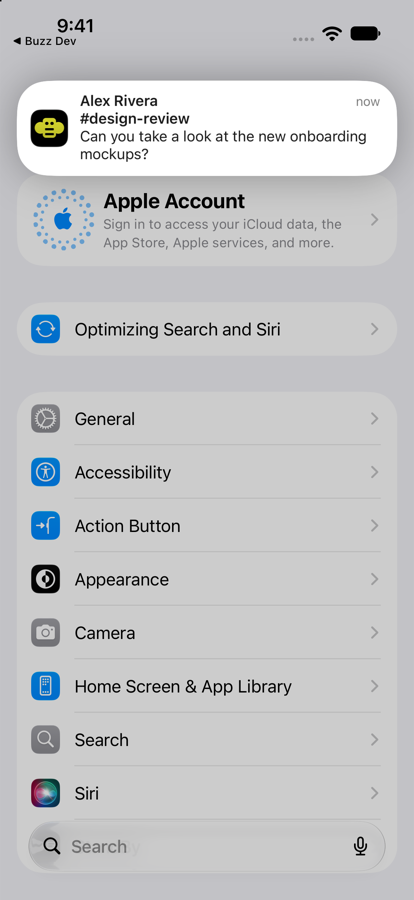
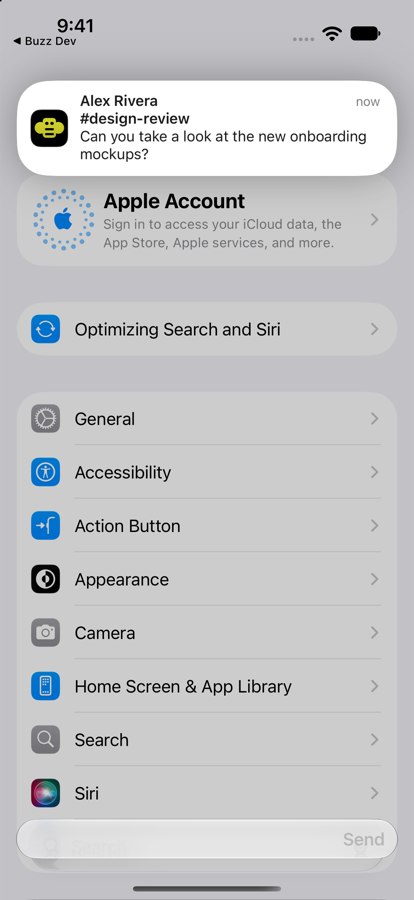
Long-pressing a message notification (synthetic names and text). Before
has no reply field (captured by sending the notification without its new
reply category, which is how main presents it); after shows one with
Send.
| Before | After |
| --- | --- |
|
|
|
### Demo
With the app backgrounded past the relay grace period, replying from the
notification lands the reply in a subthread under the message:
https://github.com/user-attachments/assets/37df7e28-aa46-4521-938e-8af5faa77b83
### Regressions
Nothing existing changes unless the user taps Reply. Notifications gain
a category and a small reply context in `userInfo`; tapping a
notification still opens the conversation as before. The relay reconnect
only happens for a pending reply and then falls back to the normal
background disconnect, so idle background behavior and network use are
unchanged. Reply failures end in a draft and a "Reply not sent"
notification rather than touching other state.
### Validation
- End to end on an iOS 27 simulator against a real community: with the
app backgrounded past the relay grace period, replied from the
notification; the reply appeared in a subthread under the message,
mentioning its sender. The demo above was recorded before the review
fixes (session hold, community fence, origin-community drafts, composer
draft sync); the same run was repeated on the current head, 9b9c8b0, and
the reply again appeared in the subthread with no "Reply not sent"
notification.
- Human testing is waived for this repo's mobile client; the simulator
run above replaces it. Not yet exercised on a physical device or on a
cold launch (app not running).
- Added tests: a Dart journey covering top-level, in-thread and Solo
replies, another community (draft kept in that community), a failed
send, a channel the user isn't in (draft appended), a reply arriving
while running, an unreachable relay, and a community switch while
connecting (not sent, draft kept in the reply's community); a
relay-session test that a background-work hold keeps the grace
disconnect off, including one already waiting on cleanup, until released
or its limit; a composer step showing a draft appended elsewhere appears
in the mounted composer and survives its next edit; a relay-session test
for reconnecting a paused session and timing out (fails without the
fix); Swift tests for reply context encoding, NIP-10 root parsing
aligned with the app, and request validation.
- `relay_session.dart` was at its 1200-line cap, so the background
connect lives in a new part file and three existing test hooks moved
unchanged into another.
- Full `mobile-test`, `mobile-check` and BuzzPushKit `swift test` pass.
---------
Signed-off-by: Tom Brow <tomb@squareup.com>
Signed-off-by: Tom Brow <tomb@block.xyz>
Co-authored-by: studio <dc2fc481343672df31a689840c09299972e704dac592e0da6f18486646a7ee3e@buzz.block.builderlab.xyz>


6.5 KiB
Buzz domain language
Shared terminology for Buzz product behavior. This glossary currently covers mobile push suppression, the notification body, the notification reply, mobile builds, diagnostic reporting, sharing, quick send and the open-channel directory; it is not a complete model of Buzz.
Notifications
Mobile push notification
A notification directed to a user's mobile installation through the platform's push service.
Wake signal
The fixed push a push gateway sends to an installation, telling it to fetch new events from its relays. It carries nothing about any event.
Avoid: Silent push, content push
Push gateway
The service that holds one mobile app's platform push credentials (an internal build, the public build or a fork's app) and sends wake signals to that app's installations on every platform. See ADR 0004.
Avoid: Push server, APNs gateway
Notification body
The text a mobile push notification shows for a message: the message's text with its Markdown syntax removed, cut only where the platform would cut it. See ADR 0002.
Notification reply
A reply the user types into a mobile push notification for a message and sends without opening the app. It goes in a subthread under that message and mentions its sender. See ADR 0004.
Push suppression
Withholding an otherwise eligible mobile push notification based on desktop activity and a working connection to the relevant community. It does not depend on whether desktop alerts can be shown.
Avoid: Read receipt, mark as read, mute
Desktop activity
User interaction with the computer running Buzz, including interaction with another application. It is the interaction itself, not a state that lasts afterward, and does not imply that a particular Buzz message was displayed or read.
Avoid: Message visibility, read activity
In-app activity
User interaction inside Buzz. Recent in-app activity remains evidence of desktop activity after Buzz loses focus; current window focus is a separate condition.
Desktop inactivity
The state reached when the duration specified in the spec has elapsed since the last observed desktop activity.
Additional notification delay
A waiting period after desktop inactivity begins before mobile push notifications resume. This is distinct from the inactivity threshold itself.
Suppressed message
A message whose otherwise eligible mobile push notification was withheld. The term refers to its notification, not withholding the message itself, and says nothing about whether the message has been read.
Suppression activity signal
Information communicated for deciding whether desktop activity warrants push suppression. It is distinct from visible presence and is not a read receipt.
Visible presence
The availability status shown to other members, such as online, away, or offline. A chosen visible presence status does not necessarily reflect actual desktop activity.
Suppression renewal
A suppression activity signal that extends how long push suppression applies based on activity on one desktop.
Inactivity cutoff
The time of the last observed desktop activity plus the duration specified in the spec, when desktop inactivity begins. New desktop activity moves this cutoff forward.
Mobile builds
Internal build
A mobile app an organization distributes only to its own members, for example through device management. It uses only that organization's Builderlab and reaches only that organization's community.
Avoid: Dogfood build, enterprise build, org build
Public build
The mobile app distributed through the App Store and TestFlight. It uses only the public Builderlab and cannot reach any organization's community.
Avoid: App Store build, external build
Diagnostic reporting
Sending crash, error and performance data from a mobile installation to a reporting destination. It exists to diagnose faults: it is not a record of how people use the app, and it never includes what they write. See ADR 0007.
Avoid: Telemetry, analytics, tracking, observability
Reporting destination
Where a mobile build's diagnostic reporting is sent, chosen at build time by whoever distributes the build. A build with no reporting destination reports nothing.
Avoid: DSN, Sentry project
Sharing
Share
Bringing content such as a screenshot, screen recording, URL or text from another app into a Buzz conversation through the system share sheet. A share ends in that conversation's composer, where the person adds their own text and sends it.
Avoid: Forward, post
Share target
A conversation offered among the share sheet's suggested destinations: an existing channel or DM, or a new Solo chat. Share targets are learned from top-level messages a person sends in a conversation; thread replies and incoming messages never count.
Avoid: Recipient, contact, suggestion
Agents and conversations
Bestie
The one agent a person has chosen as their default in a community. A community has at most one Bestie per person.
Avoid: Default agent, main agent, assistant
Quick send
Sending a message to Buzz from outside the app (Siri, Shortcuts, the Action button) without opening Buzz. A quick send to the Bestie posts the message in the person's DM with the Bestie.
Avoid: Siri message, dictation, background send
Channels
Open-channel directory
The open, listed channels of a community that a person can find and preview without being a member. Private channels, DMs and unlisted channels are never in it. A client's saved copy is the set it last saw, so a channel that has since turned private, unlisted or deleted can linger in it until the next full read.
Avoid: Channel list, public channels, discovery