 6381b2ae7d
* fixing a url

* moving around menus

* Grammar Update

* many fixes to links and some added pics to install

* Add improvements

* fix: tabs

* Move support/feedback window to FAQ

* Forgot to save

* MVC moved around

* change installation Source -> Python

* fix: tabs

* guides to basics

* Add new README LINKS

* Change links

* Change forecasting to forecast

* fix: details

* more fixes

* Change markdown file so it is ready for pypi

Co-authored-by: Chavithra <chavithra@gmail.com>
Co-authored-by: Danglewood <85772166+deeleeramone@users.noreply.github.com>
Co-authored-by: Jeroen Bouma <jer.bouma@gmail.com>
Co-authored-by: Jeroen Bouma <jeroenbouma@Jeroens-MacBook-Pro.local>
Co-authored-by: jose-donato <zmcdonato@gmail.com>
6.1 KiB
Vendored
title, sidebar_position
| title | sidebar_position |
|---|---|
| FAQ | 3 |
General
How do I update the OpenBB SDK?
With new releases of the OpenBB SDK, it would suffice to use pip install openbb. If this doesn't update to the latest version you can include the version number as follows pip install openbb==2.0.0. Please find the latest version here.
Where does the data from the OpenBB SDK come from?
The OpenBB platform does not provide any data itself as the platform is a data aggregator that connects to almost a hundred different data providers and APIs to access the data.
What programs need to be allowed for Windows Firewall?
When issues arise regarding Windows Firewall, please allow the following applications through (if not already):
- BranchCache
- Hyper-V
- VcXsrv
- Windows Terminal
From the Windows Security menu, click on the Firewall & Network Protection tab, then click on "Allow an app through firewall". If the applications below are not allowed to communicate through Windows Defender Firewall, change the settings to allow.
On what Operating Systems can I run OpenBB SDK?
The OpenBB Terminal is compatible with Windows, Mac Os and Linux. Check the installation guide and requirements outline for more details.
How much hard drive space is required?
An installation will use approximately 4GB of space.
How do I launch Jupyter Lab or Jupyter Notebook for use with the OpenBB SDK?
Once the installation is finished via pip and you have activated the conda environment, as explained in the installation guide you are able to activate a Jupyter Notebook by running jupyter notebook or Jupyter Lab with jupyter lab. Then, you should be able to use the OpenBB SDK by following along with the How to use the SDK guide.
How can I contribute to the OpenBB SDK
There are three main ways of contributing to this project.
BECOME A CONTRIBUTOR
- Fork the Project
- Create your Feature Branch (
git checkout -b feature/AmazingFeature) - Install the pre-commit hooks by running:
pre-commit installAny time you commit a change, linters will be run automatically. On changes, you will have to re-commit - Commit your Changes (
git commit -m 'Add some AmazingFeature') - Push to your Branch (
git push origin feature/AmazingFeature) - Open a Pull Request
You can read more details about adding a feature in our CONTRIBUTING GUIDELINES.
RAISE AN ISSUE OR REQUEST A FEATURE
- Raise an issue by opening a bug ticket.
- Request a new feature through a feature request ticket.
Support
How do I report a bug?
First, search the open issues for another report. If one already exists, attach any relevant information and screenshots as a comment. If one does not exist, start one with this link
How can I get help with OpenBB SDK?
You can get help with OpenBB SDK by joining our Discord server or contact us in our support form here.
How can I give feedback about the OpenBB SDK?
Being an open source platform that wishes to tailor to the needs of any type of investor, we highly encourage anyone to share with us their experience and/or how we can further improve the OpenBB Terminal. This can be anything from a very small bug, a new feature, or the implementation of a highly advanced Machine Learning model.
You can contact us via the following routes:
- If you notice that a feature is missing inside the terminal, please fill in the Request a Feature form.
- If you wish to report a bug, have a question/suggestion or anything else, please fill in the Support form.
- If you wish to speak to us directly, please contact us via Discord.
Functionality
What kind of architectural pattern does the OpenBB SDK use?
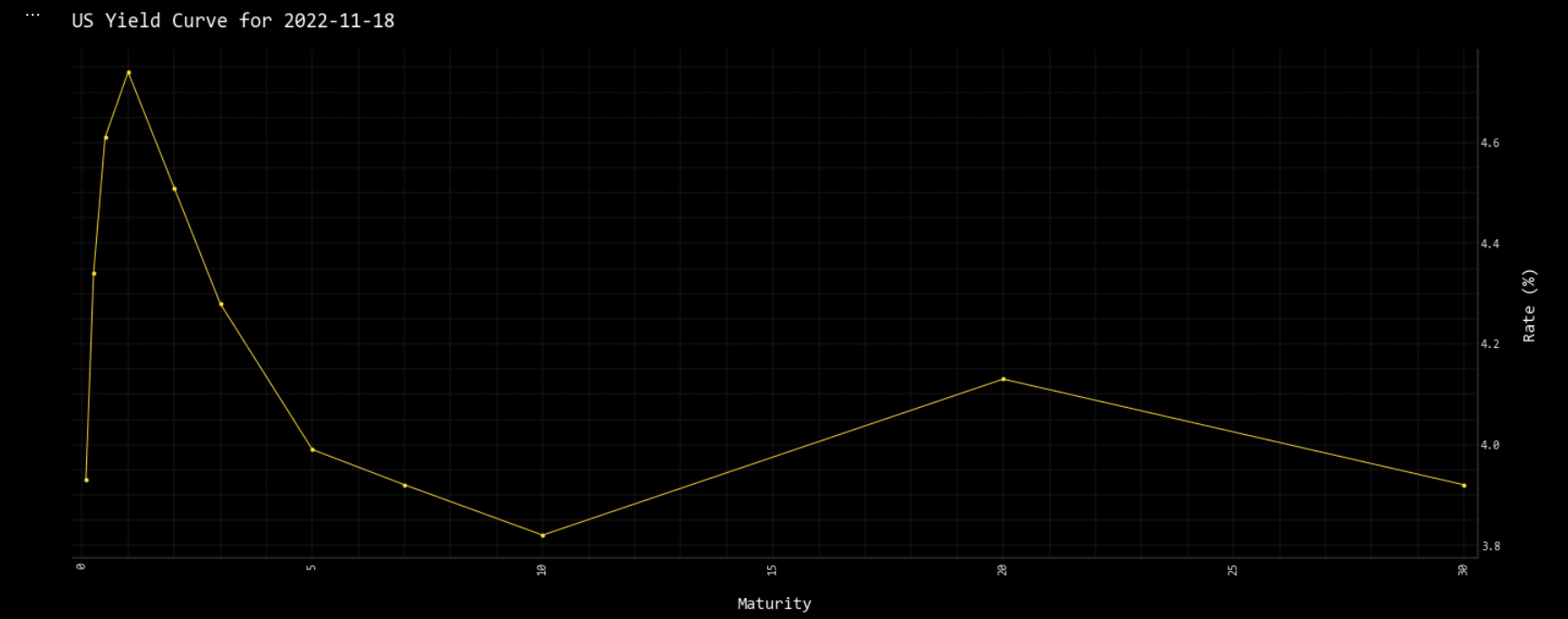
Throughout the entire OpenBB Platform, the Model-view-controller architectural pattern is used for creating functionality in the terminal.
This is visible in the OpenBB SDK with the addition of _chart within functions relating to the view portfion of the pattern.
For example the model is displayed with:
openbb.economy.ycrv()
| Maturity | Rate | |
|---|---|---|
| 0 | 0.0833333 | 3.93 |
| 1 | 0.25 | 4.34 |
| 2 | 0.5 | 4.61 |
| ... | ... | ... |
| 8 | 10 | 3.82 |
| 9 | 20 | 4.13 |
| 10 | 30 | 3.92 |
And the view with:
openbb.economy.ycrv_chart()
Why is data from today missing when I use the load function?
By default, the load function requests end-of-day daily data and is not included until the EOD summary has been published. The current day's data is considered intraday and is loaded when the interval argument is present.