mirror of
https://github.com/OpenBB-finance/OpenBB.git
synced 2026-10-27 04:31:13 +00:00
 6381b2ae7d
* fixing a url

* moving around menus

* Grammar Update

* many fixes to links and some added pics to install

* Add improvements

* fix: tabs

* Move support/feedback window to FAQ

* Forgot to save

* MVC moved around

* change installation Source -> Python

* fix: tabs

* guides to basics

* Add new README LINKS

* Change links

* Change forecasting to forecast

* fix: details

* more fixes

* Change markdown file so it is ready for pypi

Co-authored-by: Chavithra <chavithra@gmail.com>
Co-authored-by: Danglewood <85772166+deeleeramone@users.noreply.github.com>
Co-authored-by: Jeroen Bouma <jer.bouma@gmail.com>
Co-authored-by: Jeroen Bouma <jeroenbouma@Jeroens-MacBook-Pro.local>
Co-authored-by: jose-donato <zmcdonato@gmail.com>
166 lines
6.1 KiB
Markdown
Vendored
166 lines
6.1 KiB
Markdown
Vendored
---
|
|
title: FAQ
|
|
sidebar_position: 3
|
|
---
|
|
|
|
## General
|
|
|
|
<details><summary>How do I update the OpenBB SDK?</summary>
|
|
<p>
|
|
|
|
With new releases of the OpenBB SDK, it would suffice to use `pip install openbb`. If this doesn't update to the latest version you can include the version number as follows `pip install openbb==2.0.0`. Please find the latest version [here](https://pypi.org/project/openbb/).
|
|
|
|
</p>
|
|
</details>
|
|
|
|
<details><summary>Where does the data from the OpenBB SDK come from?</summary>
|
|
<p>
|
|
|
|
The OpenBB platform does not provide any data itself as the platform is a data aggregator that connects to almost a hundred different data providers and APIs to access the data.
|
|
|
|
</p>
|
|
</details>
|
|
|
|
<details><summary>What programs need to be allowed for Windows Firewall?</summary>
|
|
<p>
|
|
|
|
When issues arise regarding Windows Firewall, please allow the following applications through (if not already):
|
|
|
|
- BranchCache
|
|
- Hyper-V
|
|
- VcXsrv
|
|
- Windows Terminal
|
|
|
|
From the Windows Security menu, click on the Firewall & Network Protection tab, then click on "Allow an app through firewall". If the applications below are not allowed to communicate through Windows Defender Firewall, change the settings to allow.
|
|
|
|
</p>
|
|
</details>
|
|
|
|
<details><summary>On what Operating Systems can I run OpenBB SDK?</summary>
|
|
<p>
|
|
|
|
The OpenBB Terminal is compatible with Windows, Mac Os and Linux. Check the
|
|
[installation guide](/sdk/quickstart/installation) and [requirements outline](/sdk/quickstart/requirements) for more details.
|
|
|
|
</p>
|
|
</details>
|
|
|
|
<details><summary>How much hard drive space is required?</summary>
|
|
<p>
|
|
|
|
An installation will use approximately 4GB of space.
|
|
|
|
</p>
|
|
</details>
|
|
|
|
<details><summary>How do I launch Jupyter Lab or Jupyter Notebook for use with the OpenBB SDK?</summary>
|
|
<p>
|
|
|
|
Once the installation is finished via `pip` and you have activated the conda environment, as explained in the [installation guide](/sdk/quickstart/installation) you are able to activate a Jupyter Notebook by running `jupyter notebook` or Jupyter Lab with `jupyter lab`. Then, you should be able to use the OpenBB SDK by following along with the [How to use the SDK](/sdk/guides/basics#how-to-use-the-sdk) guide.
|
|
|
|
</p>
|
|
</details>
|
|
|
|
<details><summary>How can I contribute to the OpenBB SDK</summary>
|
|
<p>
|
|
|
|
There are three main ways of contributing to this project.
|
|
|
|
**BECOME A CONTRIBUTOR**
|
|
|
|
1. Fork the [Project](https://github.com/OpenBB-finance/OpenBBTerminal)
|
|
2. Create your Feature Branch (`git checkout -b feature/AmazingFeature`)
|
|
3. Install the pre-commit hooks by running: `pre-commit install`
|
|
Any time you commit a change, linters will be run automatically. On changes, you will have to re-commit
|
|
4. Commit your Changes (`git commit -m 'Add some AmazingFeature'`)
|
|
5. Push to your Branch (`git push origin feature/AmazingFeature`)
|
|
6. Open a Pull Request
|
|
|
|
You can read more details about adding a feature in our [CONTRIBUTING GUIDELINES](https://github.com/OpenBB-finance/OpenBBTerminal/blob/main/CONTRIBUTING.md).
|
|
|
|
**RAISE AN ISSUE OR REQUEST A FEATURE**
|
|
|
|
- Raise an issue by opening a [bug ticket](https://github.com/OpenBB-finance/OpenBBTerminal/issues).
|
|
- Request a new feature through a [feature request ticket](https://github.com/OpenBB-finance/OpenBBTerminal/issues).
|
|
|
|
</p>
|
|
</details>
|
|
|
|
## Support
|
|
|
|
<details><summary>How do I report a bug?</summary>
|
|
<p>
|
|
|
|
First, search the open issues for another report. If one already exists, attach any relevant information and screenshots as a comment. If one does not exist, start one with this [link](https://github.com/OpenBB-finance/OpenBBTerminal/issues/new?assignees=&labels=type%3Abug&template=bug_report.md&title=%5BBug%5D)
|
|
|
|
</p>
|
|
</details>
|
|
|
|
<details><summary>How can I get help with OpenBB SDK?</summary>
|
|
<p>
|
|
|
|
You can get help with OpenBB SDK by joining our [Discord server](https://openbb.co/discord) or contact us in our support form [here](https://openbb.co/support).
|
|
|
|
</p>
|
|
</details>
|
|
|
|
<details><summary>How can I give feedback about the OpenBB SDK?</summary>
|
|
<p>
|
|
|
|
Being an open source platform that wishes to tailor to the needs of any type of investor, we highly encourage anyone to share with us their experience and/or how we can further improve the OpenBB Terminal. This can be anything from a very small bug, a new feature, or the implementation of a highly advanced Machine Learning model.
|
|
|
|
You can contact us via the following routes:
|
|
|
|
- If you notice that a feature is missing inside the terminal, please fill in the <a href="https://openbb.co/request-a-feature" target="_blank" rel="noreferrer noopener">Request a Feature form</a>.
|
|
- If you wish to report a bug, have a question/suggestion or anything else, please fill in the <a href="https://openbb.co/support" target="_blank" rel="noreferrer noopener">Support form</a>.
|
|
- If you wish to speak to us directly, please contact us via <a href="https://openbb.co/discord" target="_blank" rel="noreferrer noopener">Discord</a>.
|
|
|
|
</p>
|
|
</details>
|
|
|
|
|
|
## Functionality
|
|
|
|
<details><summary>What kind of architectural pattern does the OpenBB SDK use?</summary>
|
|
<p>
|
|
|
|
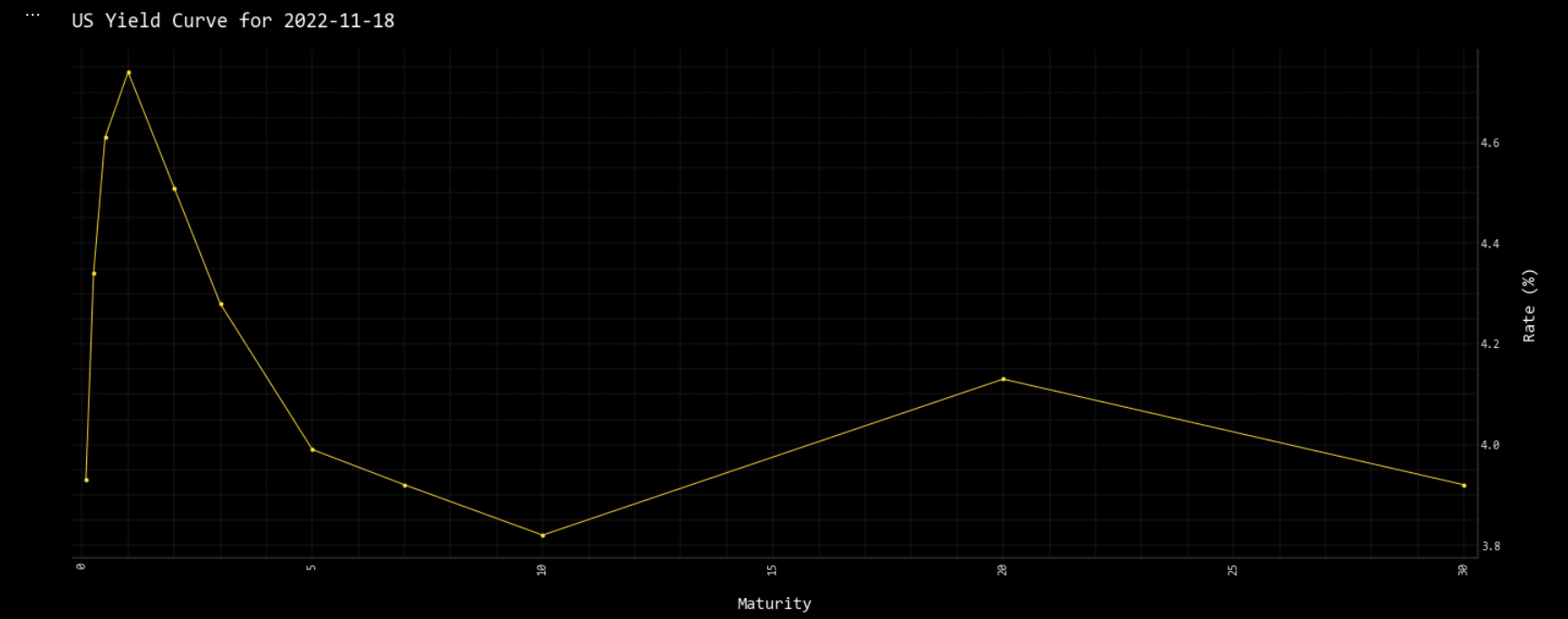
Throughout the entire OpenBB Platform, the [Model-view-controller](https://en.wikipedia.org/wiki/Model%E2%80%93view%E2%80%93controller) architectural pattern is used for creating functionality in the terminal.
|
|
|
|
This is visible in the OpenBB SDK with the addition of `_chart` within functions relating to the `view` portfion of the pattern.
|
|
|
|
For example the model is displayed with:
|
|
|
|
```
|
|
openbb.economy.ycrv()
|
|
```
|
|
|
|
| | Maturity | Rate |
|
|
| --: | --------: | ---: |
|
|
| 0 | 0.0833333 | 3.93 |
|
|
| 1 | 0.25 | 4.34 |
|
|
| 2 | 0.5 | 4.61 |
|
|
| ... | ... | ... |
|
|
| 8 | 10 | 3.82 |
|
|
| 9 | 20 | 4.13 |
|
|
| 10 | 30 | 3.92 |
|
|
|
|
And the view with:
|
|
|
|
```
|
|
openbb.economy.ycrv_chart()
|
|
```
|
|
|
|
|
|
|
|
</p>
|
|
</details>
|
|
|
|
|
|
<details><summary>Why is data from today missing when I use the load function?</summary>
|
|
<p>
|
|
|
|
By default, the load function requests end-of-day daily data and is not included until the EOD summary has been published. The current day's data is considered intraday and is loaded when the `interval` argument is present.
|
|
|
|
</p>
|
|
</details>
|