mirror of
https://github.com/OpenBB-finance/OpenBB.git
synced 2026-11-03 07:51:49 +00:00

192 lines
7.8 KiB
Markdown
Vendored
192 lines
7.8 KiB
Markdown
Vendored
# CRYPTOCURRENCY
|
|
|
|
This menu aims to explore crypto world. You will have access to discovery menu where you can find most popular coins,
|
|
yield farms, top defi tokens or nfts. In overview menu you can find overall crypto statistics, latest news, info about
|
|
exchanges, stable coins, defi and many others. If you will load given coin from source like coinpaprika, coingecko or
|
|
binance you will have access to due-diligence menu where you can find more coin related information. You can also go
|
|
to technical analysis menu, or plot a chart for your coin. The usage of the following commands along with an example
|
|
will be explained below.
|
|
|
|
Note that we have added the ability to look at technical analysis in the ta menu. Data loaded from CoinGecko has no
|
|
candle data, so indicators that rely on anything other than close will fail with an error.
|
|
|
|
* [load](#load)
|
|
* load coin
|
|
* [chart](#chart)
|
|
* load coin
|
|
* [find](#find)
|
|
* load coin
|
|
* [clear](#clear)
|
|
* load coin
|
|
* [finbrain](#finbrain)
|
|
* crypto sentiment from 15+ major news headlines for more then 100 coins
|
|
|
|
[Discovery standalone menu](/gamestonk_terminal/cryptocurrency/discovery/)
|
|
|
|
[Overview standalone menu](/gamestonk_terminal/cryptocurrency/overview/)
|
|
|
|
[Due diligence standalone menu](/gamestonk_terminal/cryptocurrency/due_diligence/)
|
|
|
|
[Technical analysis standalone menu](/gamestonk_terminal/cryptocurrency/technical_analysis/)
|
|
|
|
[Report generation standalone menu](/gamestonk_terminal/cryptocurrency/report/)
|
|
|
|
## load <a name="load"></a>
|
|
|
|
```text
|
|
usage: load [-c --coin] [--source]
|
|
```
|
|
|
|
Load a given coin. You can specify source of the data. Available sources are CoinGecko(cg), CoinPaprika(cp),
|
|
Binance(bin). Based on source which you will use to load a coin different commands will be available in due diligence
|
|
menu. By loading a coin you will have access to a lot of statistics on that coin like price data, available markets,
|
|
exchanges where coin is listed and also open access to technical analysis menu.
|
|
|
|
* -c/--coin: The coin you wish to load. Every data source has different style of coin ids and names.
|
|
In CoinGecko and CoinPaprika you can either use symbol or id of the coin, but in Binance only symbol (coin ticker) is
|
|
available.
|
|
* --source: Source of the data which you want to use to load coin. Available sources are:
|
|
`cp(CoinPaprika), cg(CoinGecko), bin(Binance)`. Default: `cg`
|
|
|
|
To load a coin from CoinGecko use: `load -c bitcoin --source cg`. In other case if you want to load coin from
|
|
CoinPaprika `load -c btc-bitcoin --source cp` (using id) or using symbol `load -c BTC --source cp`. To load coin from
|
|
Binance: `load -c BTC --source bin`.
|
|
If you not sure about coin symbol or coin id. You can go to discovery menu and try to list all coins with commands:
|
|
`cg_coins`, `cp_coins`, `bin_coins` or you can try to use in current menu `find` commands (only available for
|
|
CoinGecko and CoinPaprika)
|
|
|
|
## disc <a name="disc"></a>
|
|
|
|
```text
|
|
usage: disc
|
|
```
|
|
|
|
Go to discovery menu. You can find there trending coins, top gainers, losers, coins with highest sentiment and many others.
|
|
|
|
## ov <a name="ov"></a>
|
|
|
|
```text
|
|
usage: ov
|
|
```
|
|
|
|
Go to overview menu. You can find there different crypto statistics, list of exchanges, best stablecoins, defi metrics
|
|
and others.
|
|
|
|
## dd <a name="dd"></a>
|
|
|
|
```text
|
|
usage: dd
|
|
```
|
|
|
|
Go to due-diligence menu for loaded coin. Depends on source of the data for loaded coin different statistics will be available.
|
|
|
|
## chart <a name="chart"></a>
|
|
|
|
Display chart for loaded coin. Depends from which source you loaded the coin different parameters for chart will be available:
|
|
|
|
### Chart: CoinGecko and CoinPaprika
|
|
|
|
```bash
|
|
usage: chart [-d --days] [--vs]
|
|
```
|
|
|
|
You can specify currency vs which you want to show chart and also number of days to get data for.
|
|
Maximum range for chart is 1 year (365 days). If you use bigger range it will be automatically converted to 365 limit.
|
|
By default currency: usd and days: 30. E.g. if you loaded in previous step Bitcoin and you want to see it's price vs
|
|
USD in last 90 days range use `chart --vs USD --days 90`
|
|
|
|
* -d/--days: The number of days to look. Maximum 365 days. Default: 30
|
|
* --vs: The currency to look against. Default: `USD`
|
|
|
|
### Chart: Binance
|
|
|
|
```bash
|
|
usage: chart [-d --days] [--vs] [-i --interval] [-l --limit]
|
|
```
|
|
|
|
* --vs: The currency to look against. Default: `USDT`
|
|
* -i/--interval. Interval for candles. One of [1day,3day,1hour,2hour,4hour,6hour,8hour,12hour,1week,1min,3min,5min,15min,30min,1month].
|
|
Defaults to 1day.
|
|
* -l/--limit. Number of candles to get. Defaults to 100
|
|
|
|
## ta <a name="ta"></a>
|
|
|
|
Open Technical Analysis menu for loaded coin
|
|
|
|
### TA: CoinGecko and CoinPaprika
|
|
|
|
```bash
|
|
usage: ta [-d --days] [--vs]
|
|
```
|
|
|
|
You can specify currency vs which you want to show chart and also number of days to get data for.
|
|
Maximum range for chart is 1 year (365 days). If you use bigger range it will be automatically converted to 365 limit.
|
|
By default currency: usd and days: 30. E.g. if you loaded in previous step Bitcoin and you want to see it's price vs
|
|
USD in last 90 days range use `chart --vs USD --days 90`
|
|
|
|
* -d/--days: The number of days to look. Maximum 365 days. Default: 30
|
|
* --vs: The currency to look against. Default: `USD`
|
|
|
|
### TA: Binance
|
|
|
|
```bash
|
|
usage: ta [-d --days] [--vs] [-i --interval] [-l --limit]
|
|
```
|
|
|
|
* --vs: The currency to look against. Default: `USDT`
|
|
* -i/--interval. Interval for candles. One of [1day,3day,1hour,2hour,4hour,6hour,8hour,12hour,1week,1min,3min,5min,15min,30min,1month].
|
|
Defaults to 1day.
|
|
* -l/--limit. Number of candles to get. Defaults to 100
|
|
|
|
## clear <a name="clear"></a>
|
|
|
|
```text
|
|
usage: clear
|
|
```
|
|
|
|
Just remove previously loaded coin.
|
|
|
|
## find <a name="find"></a>
|
|
|
|
```text
|
|
usage: find [-c --coin] [-t --top] [-k --key] [--source]
|
|
```
|
|
|
|
Find similar coin by coin name,symbol or id. If you don't remember exact name or id of the Coin at Coinpaprika, you can
|
|
use this command to display coins with similar name, symbol or id to your search query.
|
|
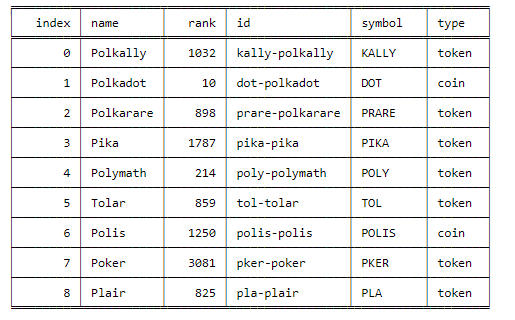
Example of usage: coin name is something like `polka`. So you can try: `find -c polka -k name -t 25`
|
|
It will search for coin that has similar name to polka and display top 25 matches.
|
|
If you want to search coins in CoinPaprika source then use `--source cp` flag.
|
|
|
|
* -c, --coin: Stands for coin - you provide here your search query
|
|
* --source: Source which you want to search in. Available sources: `cg`, `cp`. Default `cg`
|
|
* -k, --key: It's a searching key. You can search by symbol, id or name of coin
|
|
* -t, --top: It displays top N number of records.
|
|
|
|
|
|
|
|
## finbrain <a name="finbrain"></a>
|
|
|
|
```bash
|
|
usage: finbrain [-c --coin]
|
|
```
|
|
|
|
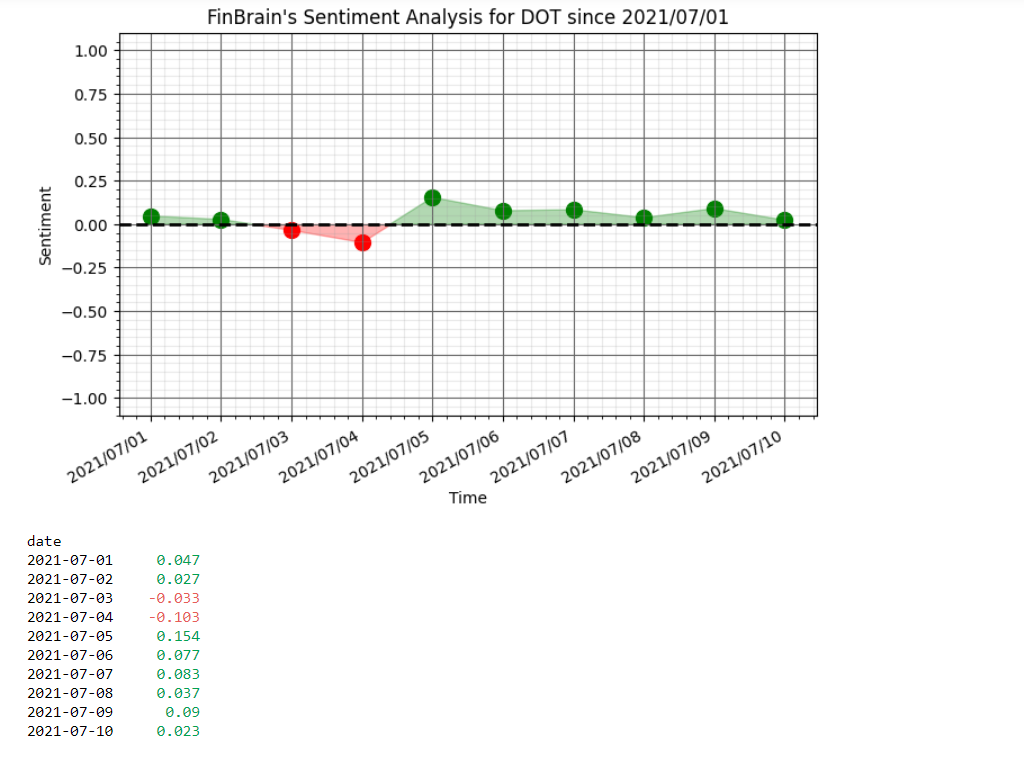
FinBrain collects the news headlines from 15+ major financial news sources on a daily basis and analyzes them to
|
|
generate sentiment scores for more than 4500 US stocks. FinBrain Technologies develops deep learning algorithms for
|
|
financial analysis and prediction, which currently serves traders from more than 150 countries all around the world.
|
|
[Source: See <https://finbrain.tech>]
|
|
|
|
Currently all sentiment is gathered for `COIN-USD` pairs. Please use upper case symbols of coins.
|
|
|
|
* -c/--coin - Symbol of the Coin for which you want to analyse sentiment. Currently available coins are:
|
|
|
|
```text
|
|
AAVE, ADA, ADX, AE, ANT, ARDR, ARK, ATOM, BAT, BCCOIN, BCH, BCN, BLOCK, BNB, BNT, BTC, BTCD, BTG, BTM, BTS, CVC, DASH,
|
|
DCN, DCR, DGB, DGD, DNT, DOGE, DOT, EDG, EOS, ETH, ETP, FAIR, FCT, FUN, GAME, GAS, GBYTE, GNO, GNT, HSR, ICX, IOC, KIN,
|
|
KMD, KNC, LINK, LKK, LRC, LSK, LTC, MAID, MCAP, MCO, MGO, MKR, MLN, MONA, MTL, NAV, NEBL, NEO, NLC2, NXS, NXT, OMG, PAY,
|
|
PIVX, PPT, QASH, QRL, QTUM, REP, RLC, SALT, SC, SMART, SNGLS, STEEM, STORJ, SUB, SYS, TAAS, TRX, UBQ, UNI, USDT, VEN,
|
|
VERI, VTC, WAVES, WINGS, WTC, XCP, XLM, XMR, XRP, XTZ, XVG, YFI, ZEC, ZEN, ZRX
|
|
```
|
|
|
|
|