 757fc57174
* update Terminal about URLs and some other broken links

* ruff

* intro

* changing the heading levels

* dependency management sections

* structure

* developer guides

* structure

* contributor guides

* keywords and descriptions

* broken urls

* cool cards

* Cool cards (#5727)

* tidy up terminal/content

* some more tidy up

* fix styling for platform that was missing

* more tidy up

* improve color for dark and light mode

* create new reference card for more basic cards

* rename back to menus

* implement all index.md for terminal, except reference

* improve bot title

* more refactoring

* fix remaining index

* header styling

* more styling

* heheheheheheeh

* Revert "heheheheheheeh"

This reverts commit 7d095fcfd2.

* Ccards (#5733)

* links

* more links

* improved styling and chevron aligned to title

* fix index.mdx urls for Terminal

* update package.json

* update index.mdx

* fix generation

* spelling

* toolkit_extensions

* update data extensions

* couple of links

* add tiingo to data extensions list

---------

Co-authored-by: hjoaquim <h.joaquim@campus.fct.unl.pt>
Co-authored-by: andrewkenreich <andrew.kenreich@gmail.com>
Co-authored-by: DidierRLopes <dro.lopes@campus.fct.unl.pt>
Co-authored-by: James Maslek <jmaslek11@gmail.com>
2.6 KiB
Vendored
title, sidebar_position, description, keywords
| title | sidebar_position | description | keywords | |||||||||
|---|---|---|---|---|---|---|---|---|---|---|---|---|
| Structure and Navigation | 1 | Learn about the OpenBB Terminal, an interactive Command Line Interface application. Understand the structure and navigation of the terminal, functions or commands input via a keyboard, and the presentation of results in the form of interactive charts, tables, or text. Get introduced to terminal commands, terminal menus, OpenBB Hub's theme style, and the concept of absolute paths. |
|
import HeadTitle from '@site/src/components/General/HeadTitle.tsx';
Structure
import TutorialVideo from '@site/src/components/General/TutorialVideo.tsx';
The OpenBB Terminal is a Command Line Interface (CLI) application. Functions (commands) are called through the keyboard with results returned as charts, tables, or text. Charts and tables (if enabled) are displayed in a new window, and are fully interactive, while text prints directly to the Terminal screen.
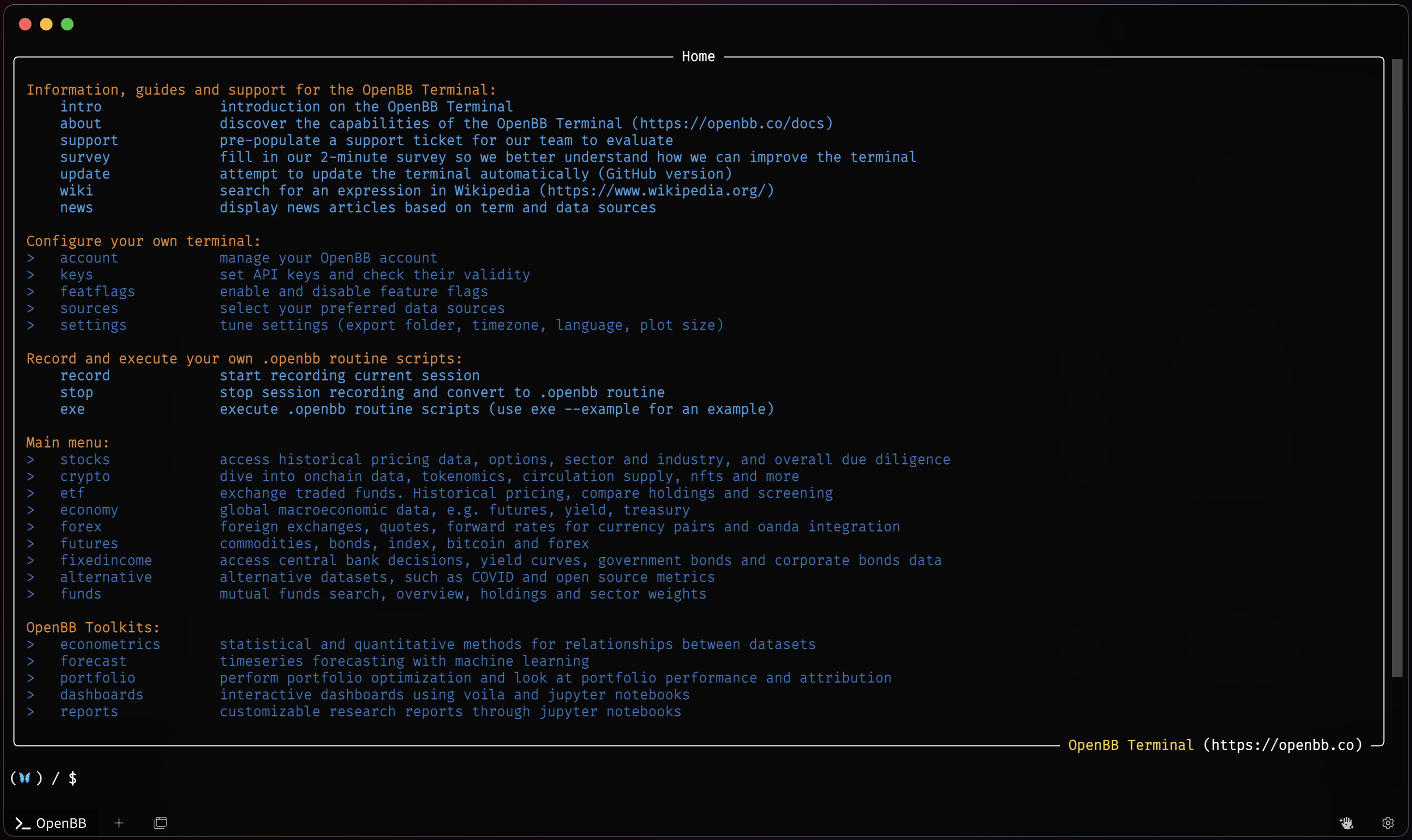
A menu is a collection of commands (and sub-menus). A menu can be distinguished from a command because the former has a > on the left. The color of a command and a menu also differ, but these can be changed in OpenBB Hub's theme style.
Navigation
Navigating through the Terminal menus is similar to traversing folders from any operating system's command line prompt. The /home screen is the main directory where everything begins, and the menus are paths branched from the main. Instead of C:\Users\OpenBB\Documents, you'll have something like /stocks/options. Instead of cd .., you can do .. to return the menu right above. To go back to the root menu you can do /.
Absolute paths are also valid to-and-from any point. From the /stocks/options menu, you can go directly to crypto menu with: /crypto. Note the forward slash at the start to denote the "absolute" path.