mirror of
https://github.com/OpenBB-finance/OpenBB.git
synced 2026-11-02 23:41:27 +00:00
 757fc57174
* update Terminal about URLs and some other broken links

* ruff

* intro

* changing the heading levels

* dependency management sections

* structure

* developer guides

* structure

* contributor guides

* keywords and descriptions

* broken urls

* cool cards

* Cool cards (#5727)

* tidy up terminal/content

* some more tidy up

* fix styling for platform that was missing

* more tidy up

* improve color for dark and light mode

* create new reference card for more basic cards

* rename back to menus

* implement all index.md for terminal, except reference

* improve bot title

* more refactoring

* fix remaining index

* header styling

* more styling

* heheheheheheeh

* Revert "heheheheheheeh"

This reverts commit 7d095fcfd2.

* Ccards (#5733)

* links

* more links

* improved styling and chevron aligned to title

* fix index.mdx urls for Terminal

* update package.json

* update index.mdx

* fix generation

* spelling

* toolkit_extensions

* update data extensions

* couple of links

* add tiingo to data extensions list

---------

Co-authored-by: hjoaquim <h.joaquim@campus.fct.unl.pt>
Co-authored-by: andrewkenreich <andrew.kenreich@gmail.com>
Co-authored-by: DidierRLopes <dro.lopes@campus.fct.unl.pt>
Co-authored-by: James Maslek <jmaslek11@gmail.com>
51 lines
2.6 KiB
Markdown
Vendored
51 lines
2.6 KiB
Markdown
Vendored
---
|
|
title: Structure and Navigation
|
|
sidebar_position: 1
|
|
description: Learn about the OpenBB Terminal, an interactive Command Line Interface
|
|
application. Understand the structure and navigation of the terminal, functions
|
|
or commands input via a keyboard, and the presentation of results in the form of
|
|
interactive charts, tables, or text. Get introduced to terminal commands, terminal
|
|
menus, OpenBB Hub's theme style, and the concept of absolute paths.
|
|
keywords:
|
|
- CLI application
|
|
- terminal structure
|
|
- Terminal navigation
|
|
- Command Line Interface
|
|
- Interactive Charts and Tables
|
|
- Terminal commands
|
|
- terminal menus
|
|
- OpenBB Hub Theme Style
|
|
- Absolute paths
|
|
---
|
|
|
|
import HeadTitle from '@site/src/components/General/HeadTitle.tsx';
|
|
|
|
<HeadTitle title="Structure and Navigation - Overview - Usage | OpenBB Terminal Docs" />
|
|
|
|
## Structure
|
|
|
|
import TutorialVideo from '@site/src/components/General/TutorialVideo.tsx';
|
|
|
|
<TutorialVideo
|
|
youtubeLink="https://www.youtube.com/embed/8qjG_SyuQgY?si=kc948AQLp3yrfkgB"
|
|
videoLegend="Short introduction to terminal structure"
|
|
/>
|
|
|
|
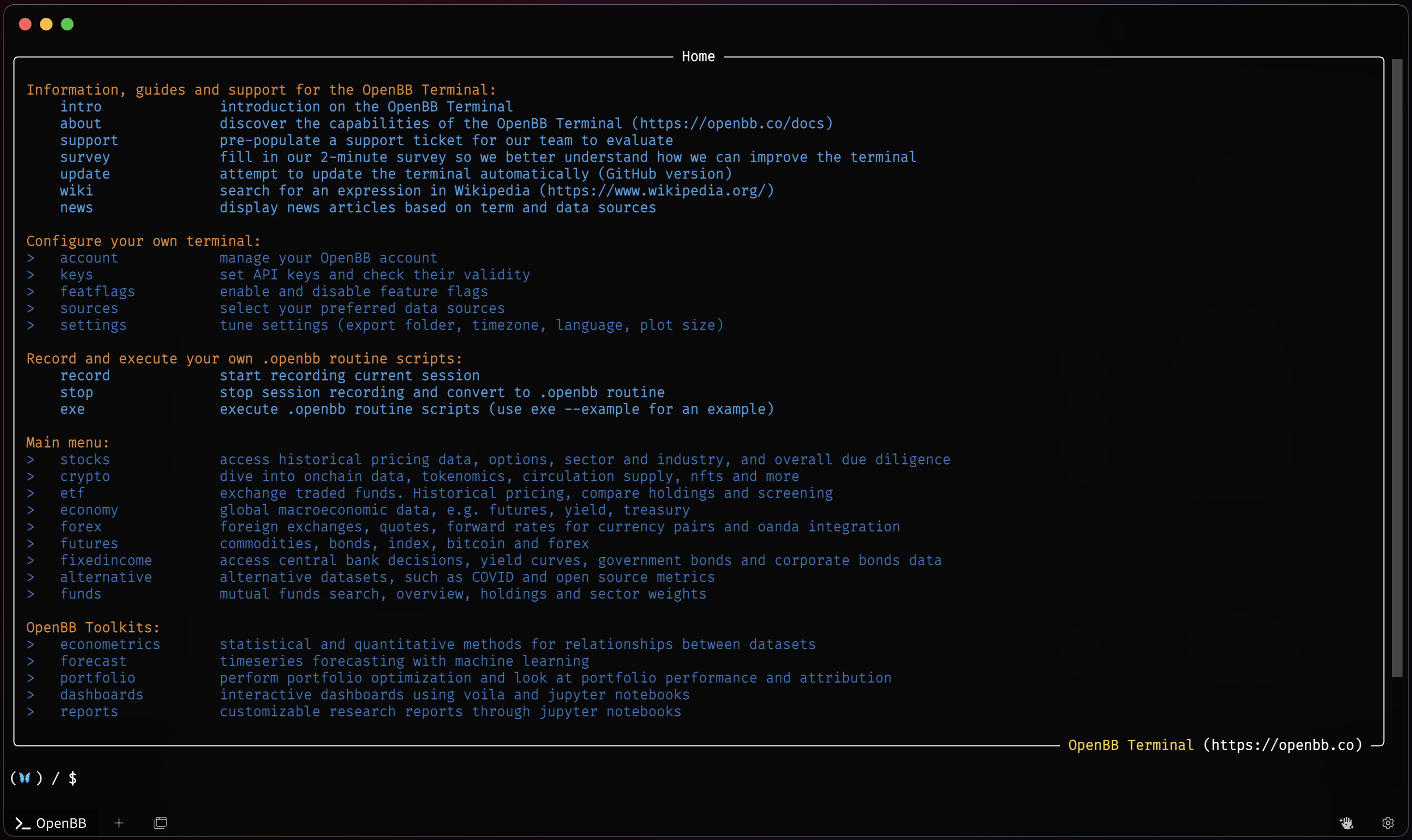
The OpenBB Terminal is a Command Line Interface (CLI) application. Functions (commands) are called through the keyboard with results returned as charts, tables, or text. Charts and tables (if enabled) are displayed in a new window, and are fully interactive, while text prints directly to the Terminal screen.
|
|
|
|
|
|
|
|
A menu is a collection of commands (and sub-menus). A menu can be distinguished from a command because the former has a `>` on the left. The color of a command and a menu also differ, but these can be changed in OpenBB Hub's theme style.
|
|
|
|
## Navigation
|
|
|
|
Navigating through the Terminal menus is similar to traversing folders from any operating system's command line prompt. The `/home` screen is the main directory where everything begins, and the menus are paths branched from the main. Instead of `C:\Users\OpenBB\Documents`, you'll have something like `/stocks/options`. Instead of `cd ..`, you can do `..` to return the menu right above. To go back to the root menu you can do `/`.
|
|
|
|
Absolute paths are also valid to-and-from any point. From the [`/stocks/options`](/terminal/menus/stocks/options) menu, you can go directly to [`crypto`](/terminal/menus/crypto) menu with: `/crypto`. Note the forward slash at the start to denote the "absolute" path.
|
|
|
|
|
|
<TutorialVideo
|
|
youtubeLink="https://www.youtube.com/embed/xy8LElyYmaI?si=psfs7nD9xjb-N1N8"
|
|
videoLegend="Short introduction to navigation"
|
|
/>
|